Desert Online General Trading LLC
Dubai, United Arab Emirates
Desert Online General Trading LLC
Dubai, United Arab Emirates


⚡ Power your productivity, secure your success.
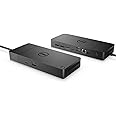
The Dell Thunderbolt Dock WD19TBS delivers 130W power delivery and supports up to three high-resolution displays (one 5K and two 4K), ensuring ultimate compatibility with Dell and other Thunderbolt-enabled laptops. Designed for a clean, efficient workspace, it offers flexible mounting options and advanced remote management and security features, making it the perfect docking solution for professionals demanding seamless connectivity and control.
| Brand | Dell |
| Series | WD19TBS Docking Station |
| Item model number | WD19TBS |
| Hardware Platform | Docking Station |
| Item Weight | 3.11 pounds |
| Product Dimensions | 2.5 x 11.4 x 12 inches |
| Item Dimensions LxWxH | 2.5 x 11.4 x 12 inches |
| Color | black |
| Manufacturer | Dell Technologies |
| ASIN | B0916F5DTM |
| Date First Available | March 26, 2021 |
T**.
Works for a 2021 Macbook Pro M1 Max (with some caveats)
Right now it can be pretty hard to find a good thunderbolt dock for the new M1 Macbook Pros due to some docks not being compatible with Apple Silicon and etc. I'm happy to say this does work with my M1 Max MBP, but there is one quirk.The good:It charges! The ports work! Getting great transfer speeds! It's built well and hasn't had any problems so far. I'm running 2 displays off of it, one 2k 60hz via DP, and one portable 1080p ProArt via the thunderbolt in the back of the WD19TBS. I'm also running a USB hub, and a 4TB SSD directly from it via the USB C Gen 3.2 in the front. No disconnection issues that i've seen.The bad:I can't run 3 monitors off of the dock. It should be possible, the included instructions show how you can do even possibly up to 4 displays off the dock with compatible computers, but something isn't compatible via Apple. Thankfully, there's an HDMI out on the Macbook Pro so I can get my 4k screen via that, with the other 2 monitors off of the dock.Only one of the two DPs and one HDMI port in the back will work for me at a time. If I use 2 of those, it looks like it splits the signal and mirrors it on both screens. You can get around that by using a USB C to DP cable and plug the second monitor in via the thunderbolt port.It was between this or the Razer TB4 dock, since the new Caldigit docks are impossible to find right now. I've heard there has been some bugs with the Razer, so I'm glad I went with this. It may not be a perfect fit, but the Dell products I have owned over the years are all still working flawlessly, so I have more trust in them than Razer.
S**3
Except for some update requirements for XPS 15 9550, buy this with eyes closed!
I have a Dell XPS 15 9550 with Windows 10 Pro that works rock solid for 5 years. There was always need for a good dock at home and after having immense troubles with TB16 and other manufacturers like Accell and Startech docks, finally paid premium price for this one from Dell WD19TBS.First power delivery of 130W requirement for 9550. Initially I had TB16 and was never even close to charging fully. Had terrible issues with it Dell support amid compatibility issues, this one delivers 130W perfectly over Thunderbolt 3 port. Other docks as mention above do not even come close to charging the laptop!Secondly as you have seen in above photograph, XPS 9550 along with WD19TBS drives 3 4k displays, 2 of them at 60hz while third one at 30hz (but then it is monitor limitation) along with native UHD resolution of 9550 itself. This is like paradise to me working from home as my job demands it!However, I have to say that its not all bed of roses with straight plug-ins and up you go! Had to go over firmware updates on 9550 including the software update for TI chip over power delivery and Intel chip drivers, microsoft hid drivers that do not show up in regular SW update check. Mind it that these drivers or FW updates do not even show up straight in Dell Drivers either! It took me 4 days to get the system up and running.So far the system has been running for a solid week and it has neither crashed nor blinked while working! I am a happy camper with this one finally and don't think of changing laptops for long time...
A**L
Does Not Work With Data Transfers thru It
On the plus side, it worked fine with the Dell 27" monitor though the DVI port. The less powerful one would not and would only work with HDMI. That said, none of the USB ports will allow data through put, only power for connetced devices. Dell support seems to be lame with little assistance. I just want to know if the desriptor is misleading ("Ultimate Connectivity: Thunderbolt connectivity makes it easier than ever to deliver power, data, audio, and video as well as connect to system peripherals, no matter what system you use. Plus, with support for up to three displays, including a single 5K and dual 4K monitors, you can connect to everything you need"), I have a broken docking port, or there is something better that I need instead of this one. Help?!
S**S
Does what I was hoping my cheaper USB hub would do
I've had one of the ~$50 USB-C hubs for a while now that connected my laptop through a single plug to dual monitors and a printer. It worked ok, but it could only show resolutions up to 1080p on my dual monitors, I got "low charger current" warnings on my laptop when it was plugged in, and while my personal laptop displayed on both monitors, I could never get my work laptop to display on more than one.So I was apprehensive about shelling out $250 for something that filled the same function as what I had, but I'm glad I did. This Dell one works seamlessly. It outputs to both my dual monitors at their max 1440p resolution, charges my laptop at full strength, and does so with both my personal and work laptops. I'm not fidgeting with the connection and checking drivers every so often - it just works. There's a quick fan noise right when you plug it in, but it runs super cool and I've never heard the fan kick on otherwise. The one thing I wish it had was a SD card slot, but that's easy enough to get a cheap little dongle for. Recommended.
S**L
Power Delivery disabled on Dell Laptop
It was a bit shocking to see that even though it's suppose to support 130W power delivery via the type C connection, and that the Dell G7 15 that I have supports power delivery over type C, it did not work with this docking station. In fact, in order to use my laptop and this dock, I have to have 2 power supplies.I know/understand that my laptop to be fully supported needs 210W and that this only would have delivered 130W at most. But because I'm not running the laptop at full blast all the time, I would have expected it to use 130W while consuming the battery for the remaining amount and while the laptop is idle slowly charge it up and such.Instead, what happens os that the dock provides 0W of power to the laptop and of course the dock doesn't work without a power supply of its own so I ended up having to have 2 big power bricks in order to use the dock with my laptop and have to (un)plug in 2 things instead of 1.Taking off the 1 start due to the unclear and confusing verbiage that implied that I could make some use of the power delivery system even if at lower power when really it delivers 0 power instead.
Trustpilot
1 month ago
2 months ago