
DOWNLOAD THE APP


Customer Services
Copyright © 2025 Desertcart Holdings Limited
DOWNLOAD THE APP

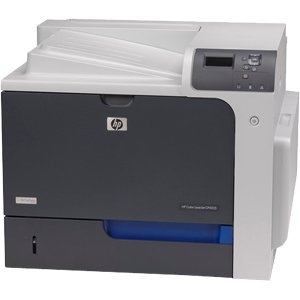

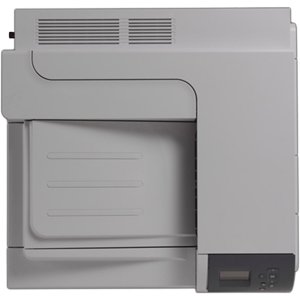


🚀 Print Like a Pro: Elevate Your Office Game!
The HP Color Laserjet Enterprise CP4525DN is a high-performance printer designed for busy work environments, featuring a robust 500-sheet output bin, automatic duplex printing, and an impressive total input capacity of 2,100 sheets across multiple trays. With 1 GB of memory and an 800 MHz processor, it efficiently handles complex print jobs, making it an ideal choice for professionals seeking reliability and speed.
W**Y
Few glitches
Support is difficult to get from HP. Always seem to have issues getting the integrated network card to recognize properly. Sometimes toner goes fast. Other times slow. Printer said to replace blue toner cartridge yet cartridge still works 3000 pages later.
M**R
Workhorse
We have had it as a workhorse for my small business for over a year. Amazing printer. Only downside is that the colors are a bit inconsistent (we use recycled cartridges, which is definitely part of the issue). I've owned (albeit much cheaper) color laser printers from Samsung and Brother. This one was a big step up. Solid 5 stars.
S**M
Dose not work!!!!
The printer has not work at all, came with 50.2 fuser error at start up. The cartridges were installed when it arrived. Did not seem to be a new printer, may have been a return. Amazon is helping out to get a refund from the seller, who claims they test all printers befroe shipping. I have been purchasing all types of printers for over 30 years, this is the first time I have ever received a "tested" printer. Waiting for the refund, will purchase from another source.
D**I
Horrible quality - Lasted 6 weeks! [SEE UPDATE]
Not what you'd expect from HP's flagship model aimed at the enterprise, but it lasted exactly 6 weeks. After that, the LCD display went totally blank and it stopped responding to any network communications. HP sent a replacement circuit board -- the first one arrived snapped in half; the second arrived intact, although it is packaged so poorly that some of the prongs of the contacts on the board were actually stuck in the cover of the cardboard box. It certainly does not look like HP cares about quality at this point, so I am going to look for another brand.Update 3/2013: We decided to hang on to the printer to see how it performed. We had to unbend the pins in order to fit the replacement board into the printer. However, since then, the printer has been a workhorse. No problems at all, high quality prints. I am revising my review from 1 star to 3 stars.
A**M
Great printer!
Prints quickly and high resolution, toner cartridges last a long time! Overall I've been very impressed with the printer and it has greatly sped up the printing process for my small business.
A**R
Five Stars
Better than expectations.. Highly recmend this company!!!!!!! .
V**R
Prints fast and crisp once it spools...pricey
Prints very fast and excellent quality but it seems to spool slowly on XP, 7, Vista, and Snow Leopard OS,
M**R
A workhorse - now you can concentrate on content!
I am using the HP4525DN for about 4 years in my publishing house. I use it to print out the mails to my customers, personalised by word serial letters. The HP 4525DN is a workhorse!Stuck paper is extremely rare (quite common with consumer printers).Some points needed to be observed, in order to get good results:- Never ever try non-original toner cassettes. If you do (as I did!), the printer will not handle them, you will get a lot of issues and spend a lot of time until you find out it is because of the so-called "compatible" toner. If you cannot afford to buy original toner cartridges better leave this printer and look out for something else.- When printing a good number of the same page, with the back side printed too, try to get a little moisture from the fresh air to give the paper some minutes or even some hours to calm down, to get cold before you print the other side. I found it best to keep the printed papers outside for an hour or two. This makes the paper e v e n again, this helps the printing, in order the 4525 can take the paper.When the paper in the paper box is not 100% even you may see the notice: "Fill up box no 2", although it is full. Then you bend the whole package a little bit, sliding it over the table, make it even/flat, Then the printer will take it all. Once running, everything is o.k.- Try to feed it with some nice paper - this gives a perfect impression at all your customers. For my mails I use a 90g/m2 paper with good surface, so the colour pictures come perfect. For genuine business letters - yes, I still use paper! - I take paper with a little chamois impression.- The printer may claim one of the cartridges are empty - as already mentioned here, you can still continue to print with it, with a minimum of some hundreds prints to come out, maybe even more. Once really at the end, the colour will just fade away - so, at the end do not print out too large number of copies in order not to waste your paper.So - enjoy your printing! Best wishes from St. Goar/ Gemany!
P**K
Its processor board went after about 35, 000 pages ...
Its processor board went after about 35,000 pages. Cost to replace the board wasn't worth the cost to replace the printer. I would avoid this printer due to this.
Trustpilot
3 days ago
2 weeks ago