
DOWNLOAD THE APP


Customer Services
Copyright © 2025 Desertcart Holdings Limited
DOWNLOAD THE APP

⚡ Power your build with pro-grade performance and style — don’t just build, dominate!
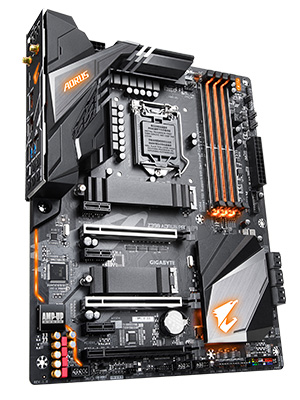
The GIGABYTE Z390 AORUS PRO WIFI motherboard supports 8th and 9th Gen Intel Core processors with a robust 12+1 phase digital VRM and DrMOS for stable power delivery. It features dual-channel DDR4 memory support across 4 DIMMs, dual M.2 PCIe Gen3 x4 slots with thermal guards, onboard Intel CNVi 802.11AC 2x2 Wi-Fi, Intel Gigabit LAN with cFosSpeed, and advanced thermal design with multi-cut heatsinks and heat pipe. The board also offers premium audio with ALC1220 VB and WIMA capacitors, customizable RGB Fusion lighting, and Smart Fan 5 technology for intelligent cooling. Ideal for experienced PC builders seeking high performance and connectivity in a stylish ATX form factor.





| ASIN | B07HRZKPXM |
| Best Sellers Rank | #299 in Computer Motherboards |
| Brand | GIGABYTE |
| Built-In Media | motherboard, users manual |
| CPU Model | Core i9 |
| CPU Socket | LGA 1151 |
| Chipset Type | Intel Z390 |
| Compatible Devices | Gaming Console |
| Compatible Processors | 8th Generation Intel Core |
| Customer Reviews | 4.4 out of 5 stars 2,181 Reviews |
| Global Trade Identification Number | 00889523014882 |
| Graphics Card Interface | PCI Express |
| Item Dimensions L x W x H | 10.62"L x 3.14"W x 13.18"H |
| Item Type Name | GIGABYTE Z390 AORUS PRO WIFI (Intel LGA1151/Z390/ATX/2xM.2 Thermal Guard/Onboard AC WiFi/RGB Fusion/Motherboard) |
| Item Weight | 1400 Grams |
| Main Power Connector Type | 24-Pin |
| Manufacturer | Gigabyte |
| Memory Clock Speed | 4400 MHz |
| Memory Slots Available | 4.0 |
| Memory Storage Capacity | 1000 TB |
| Model Name | Z390 AORUS PRO |
| Model Number | Z390 AORUS PRO WIFI |
| Number of Ethernet Ports | 1 |
| Number of Ports | 1 |
| Platform | Windows 10, Windows 7, Windows 8 Pro, Windows 8.1 |
| Processor Socket | LGA 1151 |
| RAM Memory Technology | DDR4 |
| Ram Memory Maximum Size | 2048 GB |
| S/PDIF Connector Type | Optical |
| System Bus Standard Supported | SATA 3 |
| Total Number of HDMI Ports | 1 |
| Total PCIe Ports | 4 |
| Total SATA Ports | 1 |
| Total Usb Ports | 1 |
| UPC | 889523014882 |
| USB 2.0 | 1 |
| Warranty Description | 3 |
E**!
Not the most user-friendly, but best performance for the price hands down
It was just under $200 when I purchased it. It's a great motherboard, but it is NOT for beginners. I have been using this motherboard since October 2020 and it has been smooth sailing. A few notes I had to learn the hard way since it isn't well documented... - The board IS Windows 11 compatible. You have to go into the BIOS settings, activate TPM, and then Windows 11 can be installed without issue - It is ARGB compatible, but the instructions are... confusing to say the least, in the instruction manual. - Gigabyte is not known for having robust or stable firmware, but it can still be a worthwhile experience if you know how to manage it As I mentioned, this is not a board for beginners. There are certain caveats to consider when purchasing a performance-oriented, but budget-friendly board, that can be easily overlooked if you don't know what you are doing. Even so, for the features and performance alone, it is definitely a 5-board for PC builders with a bit of experience.
K**S
Awesome Motherbaord
After researching the top 3 brands of motherboards (Asus, MSI, Gigabyte), I decided to go with the Gigabyte Z390 Aorus Pro WiFi board for my Intel i7-8700K. I was looking for certain features including a board with WiFi and the latest M.2 NVMe Technology, and not too much bling with lights So far, I am very pleased and happy with this board because I wanted to use Samsung's 970 EVO 500 Gb M.2 NVMe SSD. And so far, the stick is working smoothly with Windows 10 installed. The board instantly recognized the stick without doing any setting in the BIOS. Just make sure you only have this SSD installed when first installing Windows 10 if you want the OS on this SSD (or else you may have issues) I currently have 4 sticks of 3200 RAM CORSAIR Vengeance RGB 8GB DDR4 3200MHz C16 installed on the board along with a GPU EVGA 1070Ti FTW2 - the board booted up the first time it was turned on going straight to the BIOS screen and instantly recognized my Corsair fans, AIO Cooler, M.2 Samsung Drive and EVGA GPU card without any tweaking in the BIOS. A lot of people say the BIOS interface is not the best; but, being a first time PC building, the BIOS has an EASY Mode for a newbie like to me navigate through. However, the board defaults at the 2133 Mhz for any RAM over 2133; you'll have to go back into the BIOS...easy mode...enable XMP...then reboot to get it to change automatically You also can get a 3 year warranty with Gigabyte if you register your motherboard
T**Y
Nice Mobo
Built another system for myself-my ASUS mobo arrived DOA, and after months of fighting I gave up on them. Found this board-was a little apprehensive, as this was the first time I used something other than ASUS in over a decade. I'm pleasantly surprised. This board has delivered well in every area. Designed well, plenty of extra connectors, all the USB support I like, even wifi support built in as an added plus. The bios isn't as intuitive as the ASUS boards, but I had no trouble with it as I'm used to tweaking settings-a novice user might have some difficulty. The only thing that I would consider to be a negative is the placement and direction of the SATA connectors, but many board makers seem to favor this approach. The connectors are bundled together and face towards the drive stacks. The bigger problem is if you have a large video card (I had an ASUS DUAL-RTX2080-A8G I had to cram in there). Mine completely obstructed the SATA ports which made plugging in anything to the SATA ports impossible. I had to take out the video card just to plug something into the SATA ports. This was a minor issue though, and compared to the rest of the perks of the board, really inconsequential. Just install your SATA cables first. ;)
K**C
Great board, super thermals, designed to handle the 9 Series from the ground up with power phases.
I've got nothing bad to say about this one. I'm not a Gigabyte fan in general, but they got this one right. I put a lot of effort into building it as a gamer for a specific client, and it did everything well when I tested it and shipped it out. Just recently had contact with the buyer, he absolutely loves it still, won't even consider "upgrading" to the Intel 10 series because he doesn't want to switch boards. This has all the bells and whistles (ARGB headers being his favorite), but it's still as rock solid performance-wise as they come. The lighting is cool, even I admit it. The software to control it is even better in my experience than most, and I was able to tweak the settings I'd normally not want to saddle a buyer with right out of the box. Great board, fair price.
D**S
Excellent companion for a 9900k + XFX 5700XT THICC 3 ULTRA.
Update: After almost a year, I can say the board is pretty solid. I would advise not depending on the bloatware that gigabyte provides as optimizing center. You are better off taking your time and experimenting with the Bios settings. Speaking of Bios as of now version 12k is the most stable version for this board. If you are experiencing issues such as your PC randomly restarting, make your way to their main website and download the version from there. Gigabytes control center will often issue updates for bios but its best to check through the main site rather than using the control center. Besides that the board has been working pretty great. I just recently decided to upgrade my PC starting with a new SSD (my first) all the way to a (relatively) new powerful CPU (i9-9900k). A new MOBO wasn't part of the plan. I was plenty satisfied with my motherboard (a refurbished Asus Prime z390 A) which was also a last minute replacement to an ROG MAXIMUS VII a good 6 years back. In fact, the whole plan was to deck out the Prime with the latest and greatest hardware it could handle and hopefully coast through the next few gens of high prices and terrible refreshes. So the Irony of me having to write this review is still pretty strong... Irony aside, after countless weeks of error shooting and running tests to figure out why my PC would keep rebooting no matter what I was and wasn't doing on it, I was almost ready to RMA my GPU. My gut kept telling me it something else and for some reason I decided to replace the only part in my PC that isn't brand new at this point. Not knowing much and never really venturing past the Asus brand I wasn't comfortable but there weren't too many options and the reviews for this board/Brand seemed to be glowing! I decided to take the plunge and stall the RMA for an extra day (it came next day) and it worked!! From the first first time I pressed the power button I had a positive feeling that the issue was fixed and now its been a week. No crashes no random reboots. I don't know if it was a corrupted bios or something broken in the Prime but the thing I was trying to place upgrades around was ultimately the one that got replaced to make everything work. Besides taking care of the crashes it also had a few additional things that I really liked about the brand: - Built in IO shield - Just the overall sturdiness of the board. - The Bios is not terrible as the F9/10 - Has better performance out the box on basic settings with xmp disabled. - Installation of GPU was actually quite smooth compared to previous mobo. - An adapter to keep all teh LED cables plugged all in at once. - The Wifi is a nice touch but the Bluetooth receiver comes handy keeping the USB slot free from adapters. - Having the bios come with the latest update making it less of an hassle to get the PC running - REALLY CLEAR SOUND QUALITY!! Few Cons: -XMP II profile is missing in bios. Selecting it shows a blank value display and the RAM reverts back to its default speed. XMP I however works just fine (3200mhz) -While Bios display has improved considerably its still not quite as easy to find your settings on advanced mode. -Apps feel pretty cheap and lacks some of features Armory Loot crate provided. This is a minor complaint. RGB wasn't really part of the plan. - Does not support 5v 3 pin fans. There is support for LED strips, not sure if that can be jerry rigged for the fans. Point is you can't control three pin fans via the mobo.
P**R
Supposed to be a new product but the box has been opened.
First of all this is not a full review, I just need to say this right away. The box it came in was not sealed. In fact it wasn't even taped shut and there is visible corrosion on the VRM modules. The gigabyte MB box was delivered by Amazon along with some other boxes inside a larger box. The Gigabyte product box not only was opened and not taped or sealed in any way, it appeared to have been opened and closed several times as you can see by the wear and tear on the cardboard in my included picture. All the parts and documentation plus my Aorus sticker plate are accounted for and have protective bags and plastic wrap although that said protective plastic all looks suspiciously generic and not factory. Maybe that's just Gigabyte's way of keeping costs down I don't know. The antistatic MB bag was taped with scotch tape and once I took out the board I noticed right away the crooked VRM modules which are clear to see in the picture. I'm not too hung up on that, as long as it's solid solder and works well I won't see it anyway but I mean hey this is supposed to be a flashy LED lit up board WTH? The VRM's also have discoloration on them which I'm guessing is from sitting in an unsealed box (not a single silica gel pack anywhere) in an air conditioned warehouse. I inspected the CPU socket pins and they appear to be flawless so at least there's that. I've owned 2 Gigabyte MB that have both lasted for over 8 years and been moved multiple times from Guadalajara Mexico (3 years) to NH and NY for a year, Houston Texas for 3 years and now in California for 2 years now and only just started to have issues with the Z77 board. My Gigabyte Z68XP-UD4 is still going strong with heavy OC'ing and many different hardware changes so I'm expecting BIG THINGS from this latest Z390 board. So far I'm NOT impressed and undecided if I made the right choice. Since it is sold and delivered by Amazon (Prime) I'm not sure who is at fault if it does not work correctly. ***UPDATE 7/17/19*** So I installed the board. The first problem I had is the extra height the I/O shield has, the back of my case has a fan and radiator and the board was very difficult to get in place, it just barely fit so be mindful of that. Fan Headers!! Wow! And the advanced fan control seems to work wonderfully, goodbye my old friend SpeedFan! Oh and they are all four pin PWN/Volt and can each be assigned to function indivifually as either PWN or voltage speed control. The lights are cool but I haven't messed with that yet. The sound comes with a Gigabyte audio control panel that gives you basic sound field stuff like an EQ and choice of environmental effects. But it's pretty basic and my speakers don't sound nearly as good as with my SoundBlaster Z card, I'll miss that. Seems to run much cooler than my Z68 board, my office is significantly cooler. Haven't tried any overclocking yet, waiting to get used to it first. The settings in the advanced part of the BIOS are very detailed and rather cryptic, Gigabyte style. ASUS has a much nicer and friendlier BIOS but this Gigabyte Aorus Pro Wi-fi is rated in general to better handle the power required for a i9-9900k and has a few more features for way less money. TLDR: Pros: Cheap, great power handling, decent looking, nice lighting, Many fan headers all individually controllable, Many temperature sensors all addressable, 2 m.2 ports each with nice heatsink, reinforced PCIe x16 and x8 ports Cons: BIOS is confusing and unclear, packaging was unprofessional, documentation is lousy, not a lot of SATA ports, sound is not as great as they claim
M**I
Great Value, Excellent Board.
I got this for $189, which I think was a great deal. The board is fast, has lots of good bells and whistles, and even a little bling with LED lights that can be controlled via software through Windows. The built-in WiFi is a huge plus, and it has a jillion USB ports. One thing that's often overlooked is the layout of the board. I have a big Noctua CPU air cooler, and the RAM doesn't get in the way on this board. The 16x PCI slot is also far enough away from the CPU that the graphics card doesn't cram up against the CPU cooler either, which is an improvement over other mobos I've had in the past. I don't do any crazy overclocking or extreme builds or whatever, so I can't comment on that. But for some gaming and a little A/V work, I can't complain at all about the board. Put a fast processor and enough RAM into it and I think you'll be happy.
J**A
Starting At 5 Stars
I will start this review at 5 stars simply for the fact that I plugged everything in and booted up. It booted up no problem and windows adjusted to the new motherboard (been waiting for that for like 15-20 years and was promised before now and it never worked). Then I reset it and set my XMP profile to on and it has run my RAM at speeds without any issue at all. I am actually kind of amazed. So I've never had an easier install. First boot up the CPU was at 28c with a Deepmax 400 HSF. Last I saw it was 30-32c, which is still acceptable, and it's brand new so needs time to adjust to the paste. So far I am loving it. Need to ensure all my drivers are up to date and that I have all that Gigabyte has to offer software wise so I can see if any of it is useful, which they install CPUZ, Cfos, and Smart fan, which are all items I always have or don't mind having when a motherboard reminds me they exist (cfos). Layout is nice, and the added heatsinks for your m.2 drives is bad a$$. I was sad I had to rip off my 970 + 960 sticker so I could make sure the heat film touches the chips and not the sticker, but I placed them on the outside of the heatsink so it works out. I was able to screw in all screws without too much hassle. My last mobo in the same case was more difficult due to the placement of stuff. This one, not so much. Overall I am amazed and absolutely love this mobo, but time will tell if this changes. As I own this thing I will come back if any stars need to be removed If you have specific questions add a comment and I can try to answer.
Trustpilot
4 days ago
3 weeks ago