
🚀 Upgrade your WiFi game—fast, stable, and hassle-free connectivity!
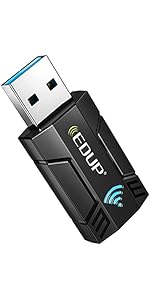
The EDUP AC600Mbps USB WiFi Dongle is a compact, dual-band wireless adapter featuring 802.11ac technology that delivers up to 600Mbps speeds. Equipped with a detachable 2dBi high-gain antenna, it enhances signal coverage and stability. Compatible with a wide range of Windows and Mac operating systems, this USB 2.0 device offers easy installation and reliable performance for gaming, streaming, and everyday connectivity.


| ASIN | B01CCMUN8C |
| Are Batteries Included | No |
| Best Sellers Rank | 59,544 in Computers & Accessories ( See Top 100 in Computers & Accessories ) 487 in USB Computer Network Adapters |
| Brand | EDUP |
| Colour | 600Mbps usb wifi adapter |
| Computer Memory Type | DDR2 SDRAM |
| Connectivity Type | Wi-Fi |
| Customer Reviews | 4.0 4.0 out of 5 stars (12,562) |
| Date First Available | 30 Mar. 2016 |
| Form Factor | adapter |
| Guaranteed software updates until | unknown |
| Hardware Platform | Mac PC |
| Item Weight | 22.7 g |
| Item model number | FBA_EDUP-EP-1607 |
| Manufacturer | EDUP |
| Operating System | 8 . 1,Mac,Vista |
| Power Source | AC |
| Processor Type | Core i7-4810HQ |
| Product Dimensions | 8.64 x 6.86 x 1.27 cm; 22.7 g |
| Series | FBA_EDUP-EP-1607 |
| Wireless Type | 2.4 GHz Radio Frequency, 5 GHz Radio Frequency, 801.11ac |
S**K
Works well.
Easy to install and works well on Windows 10. Better signal reception than internal card because of 2dB aerial. Contains RealTek 8811au chipset. Ubuntu drivers can be found on GitHub. A good unit for the price
P**E
Great item
From ordering to installation the process was great and works like a dream no more dropouts on my internet connection, thoroughly recommended.
M**2
product with some hassle
Reading about before purchase I still ordered it. Installing wasnt fun (as read before). I made a rooky mistake and actully followed the instruction on the leaflet. You better be a bit fit in installing something. But first I downloaded on another PC the drivers from the given website to a stick. This website is a bit confusing, I do not know why there is an installer. Next step is to uninstall the old driver of the old malfunctioning/broke adapter. Then install the downloaded driver and put the new device in a USB slot and ... didnt work. Could not find out why. The device is not found by windows 7. Removed the device and uninstall software. Thankfully I have a CD drive. Needed a touch light to position this mini CD accurate in the drive slide so the CD drive could read it. Installed driver as per paper instruction. Nothing worked. There we go with my rooky mistake: The paper does not mention to install the driver first without the device in the USB port, and then after installing software put the device in. Thats missed in the instruction, so correct way is: Uninstall old driver, remove old device. Put CD in, install software, insert device for completion. Windows should be online. But: Mine didnt. actually the blue light is not on. The same happens when starting the PC, the light is not always on, the device sometimes not seen, and hence no internet. I need to pull it out, and put back in, then it comes. I had the same sometimes with the old device, so that may be a windows or driver issue and not a device fault. But since other people have similar issues, it may be a bad driver. This is the last point, this driver installs a helper which takes ram/recources and hence not wanted. Its all a hassle. The software is from Realtec, means not from the manufacturer of the item. Testing the speed: Its slower than my old Netgear WPS 300, which had no extended antenna. When the antenna stands vertical up I get 58, when I put it horizontal it rises to 72 (the router should do 145). My game runs with that, tired of more fiddling, which should not happen at all. For the price it is its allright, must be fair that lowest price items can never be best option, but the connection mishap when starting the PC is annoying (one day that USB connection is worn off I affraid).
M**7
Amazing
Bought this to replace aTp-link dongle that came with my used Dell desktop computer. Kept getting drop-outs - especially when first booting up, but what a difference! No drop-outs at all so far and links straight to Wifi when turned on. My only regret was that I hadn't bought this sooner.
M**.
Doesn't connect to networks
Looked at great little product, came nicely packaged, the construction of the device looks solid and well made, after plugging it in Windows 10 automatically recognises it and installs the drivers very quickly, all great it seems. However, it will not connect to any wireless network, I can see the list of available wireless networks fine and can click any of them and enter the password but every time on every different network I have tried, just states it can't connect to that network. There is nothing wrong with my network, the password is correct and no MAC filtering going on, to rule out my router I set up my older version and still can't connect to the network, strange that every other single wireless device in the house can connect except this device. Complete waste of money.
E**C
Not for gaming
I bought it but it’s very inconsistent while gaming I have to unplug it and plug it again to get low ping have to restart pc so if u gonna game don’t get this
D**N
dramatically improved the speeds on my pc
i went from using a small cheap USB adapter to this and the results where great, went from roughly 2mbs to 40-50mbs (what i pay for). The drivers where also really easy to install.
W**H
Works straight out of box on Windows 10
Didn't need to install drivers device detected by Windows 10 without fuss. Good price and well packaged, comes with driver disc.
D**.
Da ich nicht immer das Firmennotebook hin und her schleppen wollte und außerdem lieber an einem richtigen PC arbeite, habe ich mir für zu Hause einen kleinen PC gerichtet. Dieser hatte aber kein WLAN. An meinem Homeoffice Arbeitsplatz ist kein Netzwerkanschluß verfügbar. Also musste eine USB-WLAN-Lösung her. Windows 10 hat das Gerätchen ohne mein zutun installiert. Meine anfängliche Skepsis war schnell verflogen. Selbst Videokonferenzen mit "Teams" oder Skype sind problemos möglich! -> Empfehlung!
A**B
J’ai acheté cet adaptateur wifi USB que j’associe avec une antenne Yagi 16 éléments. Je testerai le gain global lors d’un séjour dans un environnement montagneux à proximité d’un spot Wifi peu musclé. Je dois me coller dessus pour me connecter. J’aurai à couvrir 100 mètres en vue directe. Je croise les doigts.
H**S
Fantastic device. Excellent reception and can run at maximum speed of the router. Super easy to install.
A**Y
I bought it to use with rapsberry pi zero 2. Works fine, but have to find and compile drivers myself.
D**S
This product working good. You can purchase.
Trustpilot
1 month ago
1 month ago



