
DOWNLOAD THE APP


Customer Services
Copyright © 2025 Desertcart Holdings Limited
DOWNLOAD THE APP
![Tablo Dual LITE [TDNS2B-02-CN] Over-The-Air [OTA] Digital Video Recorder [DVR] - with WiFi, Live TV Streaming, Black](https://m.media-amazon.com/images/I/717osiPngPL.jpg)


📺 Cut the cord, not your options — Tablo Dual LITE keeps your TV life limitless!
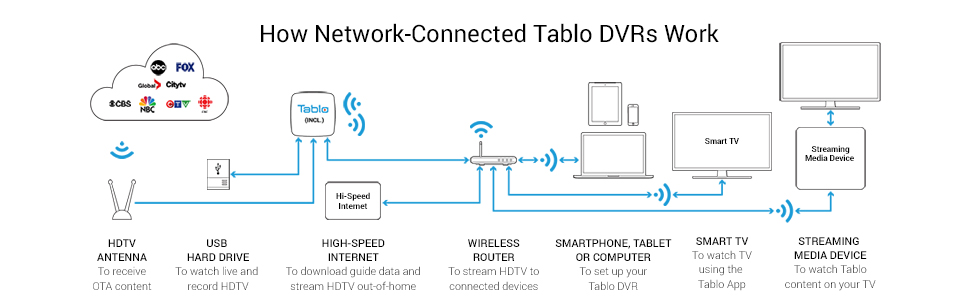
The Tablo Dual LITE is a compact, network-connected OTA DVR that records and streams live HDTV from your antenna to multiple devices simultaneously. Featuring two tuners, dual-band WiFi and Ethernet connectivity, and USB hard drive support, it offers flexible, subscription-free basic DVR functionality with broad device compatibility. Perfect for professionals seeking a sleek, modern alternative to cable with whole-home streaming convenience.






| ASIN | B078YKTWV6 |
| Best Sellers Rank | #198,895 in Electronics ( See Top 100 in Electronics ) #806 in Streaming Media Players |
| Brand Name | Tablo |
| Color Name | Black |
| Customer Reviews | 3.7 3.7 out of 5 stars (2,122) |
| Date First Available | March 31, 2018 |
| Is Discontinued By Manufacturer | No |
| Item Weight | 5.9 ounces |
| Item model number | TDNS2B-02-CN |
| Number of Component Outputs | usb, ethernet, wifi |
| Product Dimensions | 4.93 x 4.84 x 1.46 inches |
R**R
Exceeded my expectations in almost every way. I love this little box. I have two now. :)
The Tablo is a little box with 2 or 4 TV tuners that pulls TV signals from a TV antenna and presents them to you for either (1) live viewing or (2) recording for later viewing. This particular unit, the Table Dual Lite, has two (2) tuners for recording and live viewing, and will allow for six (6) concurrent streams from recorded content. I think it is FANTASTIC. Yes, there some currently some mild issues with the iPhone and Android clients you can use to view Tablo content (a delay is require at startup to sync schedule data), but the Roku app doesn't require that, and if you use the app on a regular basis the delay is only a little bit annoying. One the app is ready to go, it's brilliant. It shows a fairly standard rectangular TV guide (24-hour guid is free, 14-day guide is $4.99/month), and the guide contains information about the show, the indivual episode, and when it first aired. Recording is fairly straightforward, and you can record individual episodes or entire series (all episodes or only new episodes), you can limit it to specific channels if you have dupes with different signal strengths or episode runs, and you can choose how many to save. You can add a hard drive (an external drive to this unit via a USB port) to save your recordings locally (I use a $60 2TB drive on each of my Table Dual Lite units), or you can choose to use Tablo's Cloud storage ($4.99/month for 64GB of space). One caveat ... the specific antenna you choose, and how you position it, can greatly influence your level of satisfaction with these boxes. Low or no signal means unhappiness. :( I live in an east-facing house in the western Atlanta suburbs, and most of the towers are between 15-20 miles away from me and between 90 degrees and 110 degrees according to tvfool.com. I've tried three different antennas myself, and each produced different results. The first was a flat antenna that I hung in an east-facing upstairs window, and it picked up 22 channels, but a couple of the key network channels I wanted were not coming in very clearly and would pixelate. The second antenna was another smaller but somehow better antenna that pulled in 43 channels, and it was mostly ok, but it make me realize that the specific antenna in use made a fairly large different even in the same location. So I picked up a third antenna ... a GE model 33692 attic antenna. After spending around 25 minutes to assemble that weird little bugger, I put it in the window. 73 channels. At least 50 of those are consistently solid. Whoa. My first Tablo Lite was very happy, but with only two tuners and lots of shows I wanted to record, I found that there were times when I couldn't watch TV because both tuners were busy recording Stuff I Really Needed, so I just picked up a second one from Table (refurb) just so I could guarantee a free tuner whenever I wanted. I used a splitter and a pair of 3-ft cables to connect both to the same GE antenna, and they seem to both pick up around 70 stations with very little loss compared to just one Tablo. So I'm very very happy. Note: I mainly watch TV these days using a projector and an Andriod box or Roku, so I am not really able to see a lot of artifacts in the signals due to an inherently crappy picture on my 100" screen, but I'm more interested in an immersive 480p screen than a smaller screen with 4K. :) Because of this, I can't really comment on quality except to say that I generally don't notice anything annoying in terms of image quality except few 480p stations (1080p and 720p stations apparently downscale quite smoothly on my projector). I have a new larger conventional TV arriving soon, so I can make some more meaningful comments at that point, but so far I'm very happy, especially with the main local network channels which are quite clear. Even when it's raining outside.
M**B
Slow, Buggy, Waste Of Time
Bought this in my latest annual attempt at cord cutting. My old DLP Mitsubishi just refuses to die, and as much as I would like to have a new LED, replacing this reliable, old, perfectly functioning unit is tough. Anyway, the old TV's factory tuner doesn't have a any sort of guide for OTA channels (I have never used it for anything other than a giant monitor in my home theater system) and after being spoiled by Dish Network's digital guide and DVR for years, we weren't willing to give that up. When hooked up, the Tablo scanned and found all the channels in the area. Picture quality was excellent. And that's about all the good I can say about it. A big issue was with the guide loading super slow. Then, after it finally loads when you select a channel, the screen goes blank and you are treated to a spinning circle for 5-10 seconds while it is trying to figure out what to do. I felt like I was transported back to 1992. 'Pretty disappointing interface. Oh, did I mention you need to buy a subscription if you want to access your recordings remotely or want to have a guide more than 1 day out, or want to use cloud storage for your recordings, or to have it simply record your favorite shows? You know, I could live with that if it worked OK. But........ After dinking around for hours with this thing, the final straw was when it came up with an audio incompatibility issue with my current model Roku Premier+. It would refuse to play any channel unless I turned off the surround sound and played only in stereo. After a frustrating round of resets and re-installs, I gave up and couldn't get it back in the box and sent back fast enough. Many thanks to Amazon for making returns of inferior products so easy. And the cord cutting thing? Well, I guess breaking up is hard to do.......Dish made me a deal I could not refuse, so the inevitable has been put off for yet another year.
T**R
I got both the HDHomeRun and the Tablo, here is my comparison review
I purchased both the Tablo Dual, and the SiliconDust HDHomeRun Flex Duo. I like them both for different reasons and will use both. The Tablo is a bit more expensive, but the setup was easy, it can be used with wifi. On Windows you can access it see the Channel Guide and watch/record shows via a web browser. The layout is great, and easy to use. You have more options using the Tablo. The app for Roku works well, and also has a great layout and many options. While it can be used for free you will probably want to pay the $50 a year for the advanced Guide and recording. You will need a local USB drive plugged into the device to record. The HDHomeRun is cheaper, the setup is even easier than the Tablo, so would be great for non-tech users. However, on Windows you must go to the Microsoft store and install an app. The layout for the Channel Guide is more modern but not as easy to see what is on. The Roku app works but is also clunky. The device does not have Wi-Fi, so it must be plugged in directly to your router/switch, which may not be the location where your antenna connection is. You will probably want to pay the $35 a year for the advanced guide and DVR recording. *Here is the kicker for HDHomeRun. If you have a Plex server, you can easily connect it to the HDHomeRun device. Then you get a great channel guide, DVR recording, and the ability to watch your shows inside of Plex without needing to pay the $35. Also in Plex, you will have everything organized by season and episode number. I didn’t check phone or Firestick apps, as I don’t use them very often for watching shows. Conclusion, if you want simple and cheap get HDHomeRun, it works well if you want to just watch local TV. If you want to be more complex but have a great setup using Plex also get HDHomeRun. If you want easy to setup, great interface in both Windows and Roku, add in your own USB drive for recording, then get the Tablo. Quite frankly they both work well.
A**R
Points forts : Fonctionne très bien, installation facile, bonne compatibilité avec les produits Apple TV, iPad, etc. Enregistrement facile. Suggestion de programme selon les postes détectées par antenne. Prend peu de place, consomme peu. Utilisation de la télécommande Apple facile. Point faibles : L'interface est seulement en anglais. Plusieurs sous menus avant d'arriver au bouton écoute.
B**T
I got the package but the unit I cannot get to work on my TV. It will not connect to my the Wi-Fi. I have worked on for over a month and a half, and I still can’t get it to work. I even called the company and they could not even help me figure it out. I just hung up on me.
R**Y
Got this to compliment "Netflix". It took maybe 20 minutes to hook it all up. Turned it on verified everything was good to go, went and had dinner. Came back and everything had updated. It works well with my original LG remote. It was/is simple and intuitive to operate. I purchased a Seagate Expansion 2TB USB External HDD to go with it for the DVR Functions. My spouse loves this thing because she can watch her local content at her convenience. Two things I had noticed that are not so good but not a deal breaker. 1. This unit gets "warm", I took and turned it on its side and tucked it back behind the TV so it could better ventilate. No harm no foul. Can't see it where we had/have it. 2. It works better with a network cable then WiFi. Not surprising but I had to note it. In closing, I have decided to purchase a subscription. i would recommend this product to a friend and plan on purchasing another.
A**N
Had a bit of hard time installing the external WD Element 4TB hard drive to format the drive but aside this setup was easy and everyone in the family was amazed at the functionality, menus, etc. The only reason I didn’t give it 5 stars is because there is a little delay when switching between channels. Otherwise, this is an amazing product. I highly recommend.
A**.
It's difficult (and bug-ridden) to install, the requirements on supporting hardware are expensive (and bug-ridden), the software is slow, awkward, and counter-intuitive (and bug-ridden), and the price does not reflect the budget-grade cost you would expect from such a product. So why did I give it 3 stars? Because you can't really do better right now and at least I got it to work well enough (unlike my last 2 attempts at DVRs). I dunno, it seems there isn't much of a market for OTA DVRs right now so there's not a lot of R&D money to make one that works well, is easy to use and affordable. If you have the patience and technical know-how to install and use such a device, this DVR might be worth your while and you will get something acceptably usable and as well as have a decent viewing experience. If not, you should probably forget about getting a DVR for now.
Trustpilot
2 weeks ago
1 month ago