
DOWNLOAD THE APP


Customer Services
Copyright © 2025 Desertcart Holdings Limited
DOWNLOAD THE APP

🌐 Elevate Your Outdoor Wi-Fi Game — Stay Connected, Rain or Shine!
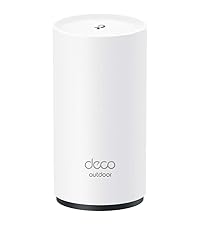
The TP-Link Deco X20-OUTDOOR is a robust AX1800 Dual-Band Wi-Fi 6 mesh extender designed for seamless whole-home coverage up to 2,200 sq.ft. It supports over 150 devices with ultra-fast speeds up to 1.8 Gbps, featuring AI-driven seamless roaming between indoor and outdoor units. Its IP65 weatherproof rating guarantees reliable performance in harsh conditions, while dual Gigabit PoE+ ports enable wired backhaul for maximum throughput. With versatile mounting options and advanced security via TP-Link HomeShield, it’s the ultimate solution for professionals demanding stable, secure, and high-speed outdoor connectivity.










| ASIN | B0DZF35CVM |
| Antenna Location | Home |
| Antenna Type | Internal |
| Best Sellers Rank | #1,599 in Electronics ( See Top 100 in Electronics ) #12 in Whole Home & Mesh Wi-Fi Systems |
| Brand | TP-Link |
| Built-In Media | 1 × AC Power Cord, 1 × Deco X20-Outdoor unit, 1 × RJ45 Ethernet cable, Installation Guide, Wall/Pole Mounting Kit(Pole Mounting Strap, Plastic Wall Anchors, Self-tapping Screws) |
| Color | White |
| Compatible Devices | Personal Computer, Security Camera, Smart Television, Smartphone, Tablet |
| Connectivity Technology | Ethernet, Wi-Fi |
| Control Method | App, Remote, Voice |
| Controller Type | App Control, Voice Control |
| Coverage | 2200 Square Feet |
| Customer Reviews | 4.5 out of 5 stars 15,135 Reviews |
| Data Transfer Rate | 1800 Megabits Per Second |
| Frequency | 5 GHz |
| Frequency Band Class | Dual-Band |
| Has Internet Connectivity | Yes |
| Has Security Updates | Yes |
| Is Modem Compatible | No |
| Item Dimensions L x W x H | 4.8"L x 4.3"W x 8.5"H |
| Item Height | 8.5 inches |
| Item Weight | 1.98 Pounds |
| LAN Port Bandwidth | 1000/100/10 Mbps |
| Manufacturer | TP-Link |
| Maximum Upstream Data Transfer Rate | 1200 Megabits Per Second |
| Model Name | AX1800 Outdoor/Indoor Mesh Wi-Fi 6 Unit |
| Model Number | Deco X20-Outdoor(1-Pack) |
| Number of Antennas | 2 |
| Number of Ports | 2 |
| Operating System | Linux |
| Other Special Features of the Product | Access Point Mode, Alexa Compatible, Guest Mode, Parental Control, QoS |
| Router Network Type | wireless_router_mesh |
| Security Protocol | WPA-Enterprise, WPA2, WPA3 |
| Special Feature | Access Point Mode, Alexa Compatible, Guest Mode , Parental Control, QoS |
| UPC | 810142823036 |
| Warranty Description | 2 Year Manufacturer |
| Wireless Communication Standard | 802.11ac, 802.11ax, 802.11b, 802.11g, 802.11n |
| Wireless Compability | 802.11ac, 802.11ax, 802.11b, 802.11g, 802.11n |
I**N
Decos x20
So far I’ve been using them for 2 years. Pros: they are very easy to set up, great quality, they do not drop connection, very stable internet as long as you set them up right, the app allows you to label them, they work fine for connection up to 1Gb. Make sure you connect your main to your modern near an open space centralized and with an Ethernet cable cat 5 or higher. Each has a duel Internet port in case you want to hardwire into a device instead of wife. Cons: the app sometimes prevents them from working properly so sometimes you simply have to open up the app so it can reboot itself, after a reboot sometimes they don’t automatically start working (so you must unplug the power of those showing red, will quickly reboot and show green), my biggest issue, the app displays usually the wrong speed, sometimes showing mbps or kbps, speed fluctuates a lot, even when you perform a 3rd party speed test, not exactly sure why. Location is a must, you must make sure they are set as close to each other as possible while getting a strong signal ( must play round to find the sweet spot). Over all they are great if you set them up properly, they provide great internet, very easy to use and set up, requires no maintenance but updates, so far I’ve had no issues for the last 2 years. I would recommend the Decos.
S**E
I couldn't be happier with my choice! Setup easy, app really good, Ethernet backbone is killer
I'm an IT geek / software developer for a living. I know all about how this stuff works and I wanted fast, but I didn't need crazy expensive for my home and some of these mesh systems are way overpriced IMHO. Reality is you can have all the latest crazy standards but once you get 20ft from the access point all bets are off and you'll never see the speeds you see quoted so you need to mix practical with price. There seem to be sooo many mesh system options these days, that I was overwhelmed, but after some consideration I thought I would just go for this one which seemed reasonably priced, but still offered most of the latest standards (and thus speed limits) and also had free returns! In this case this config with 2 slave units was great for my ~4500 sq ft house, my previous single access point left some dead spots (like my Ring outside the house) just outside the range. But with this setup I can blanket the house and get pretty good speeds (>100-200Mb throughput) just about everywhere, and faster (400+ when you are reasonably close / line of sight to the access point) It's important to remember when thinking about laying these out in your house what and where you need the speed. If you need speed inside your house (say you are always streaming movies from a pc to another device) or if you need speed from a device to the internet. The slave access points can only provide as much throughput back to the main access point (which is probably directly plugged into your router/internet) as good as their own wireless connection is to EACH OTHER. eg: if you put the slave access points 50ft away they might "only" be able to get like 20Mb back to the internet, as your devices is going from device -> slave access point ->* main access point (next to your router/internet) and the * connection is the weak link. What was the killer feature for me on these is you can actually use ethernet as a backbone for the slave access points. My house is pre-wired with ethernet so I was able to put the slave access points pretty far but every slave is hardwired back to the main access point and thus has 100% of the throughput back to the internet so no matter which access point you connect to in the house each access point is as fast as the main one so the access point to access point speed drop is a non-issue if you can set it up like this. DO THIS IF AT ALL POSSIBLE! It's like having 3 "full speed" access points strategically dropped through your house. It wasn't obvious I could do this from the (very basic) docs for setup that came with it, but a quick search through the online docs showed you could this and it's brain dead, just plug your home network into the port on the back. Extra bonus feature, you can use the 2nd port on the back as a local hardwired port so if you have a single PC or "device" (like an xbox or something) next to the access point you can still plug it in directly and get full hard-wired speed without needing to buy an extra switch in the middle. Note: If you don't use the 1st port for the backbone, then you get 2 ports for local devices that will get at least Access Point -> Access Point speeds without one more wifi hop needed. I was pretty impressed with the iPhone app that you use to manage the setup, gone are the days of a webbrowser hitting a super slow admin page, the app is snappy and you can tweak all kinds of stuff. (favorite feature: One of the access points ended up in a kids room and they complained about the LED at night, guess what, turns out there's a "night mode" where it turns off the LED's during a timewindow in the settings pages!) The "mesh" part works really good too, from the app you can see your device move from access point to access point and what devices are on which and stuff. Super handy for initial setup troubleshooting and geeking out over how it's all working. I will admit, I was a little nervous since TP-Link is sort of a more bargain brand in my head, but I've had it going for about 8 weeks now in my house and it's been basically flawless. I'm sold, I'd TOTALLY buy this again or recommend it to a friend (or anyone reading this)!
J**G
Tp-Link Deco X20
This Tp-Link X20 mesh Wi-Fi device is a must-have if you suffer from dead spots or a lot of buffering Wi-Fi. It literally increased my signal strength and boosted up my mpbs almost threefold and that is no joke. The price here on Amazon is amazing and let's put it this way this device on the box claims it will do a 5-6 bedroom house and it definitely will. I only have a three-bedroom house and this device can definitely work for a house almost twice my size. I have included pictures The first one that shows an HDTV is from the TP link app running speed on average which is definitely good enough for streaming 4K movies and the other is from my cell so you make the call but you would definitely not be disappointed with this. Long story short, my Wi-Fi router was only reaching about 300 ft and I believe that these devices can reach anywhere from 900 to a thousand feet per node and each one of these can work in series so you can expand your Wi-Fi coverage even further. Example some systems can expand your coverage but have to be connected directly to the router either utilizing it ethernet cable or Wi-Fi connected so it can expand your coverage but not this device you use one of the nodes for the new Wi-Fi router and it doesn't matter which one you use, use the included ethernet cable unplug your modem plug in your ethernet cable to either port on the back of the TP-Link node and the other on the back of the LAN port from your modem and then plug your TP link node into the wall receptacle along with your modem/modum router combo and then power them both up at the same time. Once done you have to download the app and there is a QR code and a website that you go to for either iOS or Play store and the app has instructions to follow step by step and once you're up and running you're good to go with that one and your new node connected acts as your new Wi-Fi router with faster and better coverage. All the other existing nodes that you have all you have to do is put it in a location where your signal is weak hopefully somewhere between the Wi-Fi router and that dead zone so you still have a little bit of Wi-Fi and it will shock you because the new TP-Link node actually reaches out a lot further than your Wi-Fi router so depending on what Wi-Fi device you're connected and how close you are you may actually have Wi-Fi coverage covering the area that used to be dead. But hooking up another node would definitely expand it at least through your whole house literally. I can't say enough about these I had one time or a show I think buffered for about 2 seconds and that was it did not buffer again and I believe that was at the very beginning before the show loaded on my TV but most of the time it is really responsive and does not cut out or buffer and reaches so far that it is unreal. The speed that you get with this remember it's also limited onto how much speed you're actually paying for through your internet provider so keep that in mind. It shipped really quickly and I definitely got it on time and Amazon has literally saved me from having to spend hundreds of dollars on a new mesh Wi-Fi router to do my whole home with this new mesh Wi-Fi router combo it makes it so simple to hook up and honestly I have never hooked up a Wi-Fi router and set it up in my life. The internet provider when they installed it they hooked it up and set it up and I've never had to mess with it until now. Something to think about but definitely definitely I cannot say that enough this is worth a try as you would not be disappointed. And as for people who do gaming I don't but my stepson does and when he comes over and brings his PS5 there is no lag the picture is so crystal clear he was actually shocked that this works a lot better than my original Wi-Fi router so something to think about and he's a young adult.
L**R
Excellent Mesh Network that meets my requirments
UPDATE 29-Sep-2024: I'm totally satisfied. ZERO issues, works beautifully. I had this at 4-Stars to start as installation and set-up went smoothly however I wanted time for it to "bake-in" with use., now I'm at 5-Stars. There is a TP WiFi 7 model available that does cost less than other vendors, still expensive though. The WiFi 6E was $188 for the pair, WiFi 7 is $449 for a pair. That's a big jump, and yes, from what I've read you'll get higher performance. The question that needs to be asked: Do you need it for the extra price? If you can easily afford it, no reason not to. I've worked for 30 years as a network design/architect/consultant in the carrier industry. As described below, for my requirements the TP WiFi 6E is perfect. In 5 years, I may need to look into upgrading to a higher grade mesh. By then, prices will come down for a WiFi 7 and maybe when WiFi 8 is out that'll be a consideration. For now, WiFi 6E works. I give routers a 5-year life span as tech improves rapidly, but do you need annual upgrades? Not in my world, yet. I'm still waiting for 5G cellular service in my rural setting yet I do get 80Mbps down/19Mbs up (Verizon), and in some places in Colorado Springs I've clocked 1.3Gbps on my iPhone which is insanely fast. My iPhone does provide good hotspot backup if needed. If you have a "Brady Bunch" size family, maybe the WiFi 7 would better, and you may need more than 2 routers in the mesh depending on your house, basement, patio, number of devices and floors. The nice thing about the TP mesh is adding more as needed is easy, as it should be today. GENERAL: 16-Sep-2024 I needed a new WiFi mesh solution. I'll explain why in a bit. For 99% of the users at home, basic settings should be fine. For those with bespoke setting requirements, they know what needs to be done. This isn’t a commercial grade device like from Cisco or Meraki although for small offices, I think the XE75 would be excellent. DETAILS TO CONSIDER: I’m using the TP Deca XE75 – be SURE to know this, not Deco AXE5400 as this is not a choice when registering via the app. I use just a pair in a 3,800’ slab-on-grade ranch. Each XE75 works at 2.4/5/6Ghz. There are 3 “Networks”: Router, Guest and IOT to isolate connections. Pricing was excellent at $219 for the pair + a $30 discount coupon! This is not a Base plus Extender, these are both full-function WiFi routers with the first one setup being the Main. They each have 3 UTP Gbit ports. I only needed UTP on the Main. Password, frequencies, ect settings are all transparent across the mesh network. You can click on each Wifi router in the mesh to see what is connected to each. Each SSID will have its own password. Be sure to use Upper/lower/a few numbers/a few special characters, and MAKE SURE TO JOT THEM DOWN! SSID Router and Router_6Ghz + Password you create - iPhone, laptop, printer, SAN/NAS SSID Guest + Password you create: if I have visitors SSID IOT + Password you create: all other connections like Hunter-Douglas PowerView (motorized Roman shades), TVs, 22KW Generac generator, DTV, DVD, etc that have vendor access for updates and such. SETUP: SUGGESTION: Unplug your ISP equipment before you start setting up the app. My iPhone just downloaded via my Verizon cell connection nicely. This gives your ISP equipment the 5 or more minutes to quiesce (shutdown, clear). When I connected to my ISP equipment and powered-up, I called my ISP, they saw the new device, authorized and in a few seconds I was back on-line. Download the TP App, and follow the instructions step-by-step. When setting up, each XE75 has a barcode on the bottom that needs to be scanned as you set them up – easier than typing in the code. It’s a tad fuzzy to scan, just don’t give up. I used an iPhone 13 Pro to scan and was surprised how difficult it was. Just follow the instructions at setting up the router EXACTLY (keyword=EXACTLY) as they say. The app will ask you to name it, I used Office from the choices, and I think you could do a custom name. With my ISP, I have to call and tell them a new router is being connected so they can authorize it for security. My ISP is a local company in Colorado, Kellin, that services remote areas hence microwave (plans in the next 12-18 months include going up-to 500Mbps - way more than I need), and support is seriously fantastic after more than 10 years. The UTP ports (3 on each route) support 1Gbps. The TP should work for all ISP, probably even StarLink although check first to be sure. The App set-up worked great as I followed the instructions EXACTLY as they specified. Next, I created PASSWORDS for Office, Guest and IOT networks. Next, I added the other XE75 to the mesh using the barcode reader, and boom, up it came, connected to the mesh and I named it Bedroom. On the App you’ll see: ISP icon---Office/MAIN icon----Bedroom icon (these are my locations) plus you’ll see how many devices are connected to each with a footnote number for each. Nice. Next, I started discovery for Router – my laptop runs at 6Ghz. BTW, UTP connections go to Router only that I can tell, not Guest or IoT Next, I started discovery for IOT No Guests yet, however, they should connect as easily Under “More Settings” at the lower right corner of the app, click and you’ll see Wi-Fi Setting (Main Network), then Guest Network and IoT Network. Pretty straight forward; naming Wi-Fi Setting the same as the Main Network would make better sense at least to me. In Wi-Fi and Guest Networks you have 2.4/5Ghz and 6Ghz network options. In IoT you only have 2.4/5Ghz. I turned off 6Ghz for Guest as 2.4/5Ghz will be fine plus you’ll get better distance and plenty of bandwidth performance. If I need to connect my laptop to Guest or IoT, my laptop selects the highest frequency. My iPhone 13 doesn’t do 6Ghz. When I upgrade my iPhone in a year or 2, it’ll probably have 6Ghz. PERFORMANCE: My microwave ISP is 120Mbps Up/Down, plenty for me. I don’t game or have kids. I work from home as a consultant, do WebEx/Zoom/MS Teams video calls that are excellent quality, I’ll watch an Amazon Prime movie now and then, I use DirecTV not a streaming or cable service. So far, performance has been flawless. Generac has “issues” with mesh networks – this is on them to fix as it is 2024 and it is not a $50 device, but that is for another review. (Generac works great, it’s the 2.4Ghz WiFi set-up that is archaic.) If you do have a Generac, the best way is if the remote mesh router is near the Generac, turn it off and force the Generac to connect to the Base. Then, bring the remote router(s) back on-line. This seems to fix the stupid problem. And yes, it is stupid for a $17,000 device as it should have a great WiFi solution, it doesn’t. This is a problem for Generac with all mesh networks, not just TP. I did a lot of research and found a good work-around solution Reddit. For the price and performance, I think you’ll like this device. I only have the main and 1 remote. More remotes, no idea. My video calls, streaming with Amazon Prime (Netflix should be OK, I don’t have it) and gaming should be fine (I don’t game). Another thing that will affect performance over the Internet will be your ISP’s quality. They say like 1-Gig service however, that is the max you’ll probably get. During busy times performance may degrade based on how many people they support – it gets complicated with over-subscription to bandwidth during peak hours. Clearly, more users will be on between like 6PM and Midnight than at 1PM or 3AM in a residential area: streaming movies and gaming uses a LOT of bandwidth. That 1 Gig you subscribe to is not 100% all the time. This has nothing to do with TP or a home set-up. AND NOW FOR SOMETHING COMPLETELY DIFFERENT – Why TP? 2.4/5/6Ghz: What’s the difference? The higher the frequency, the more data that can be transmitted. Problem is, as the frequency goes up the ability to penetrate walls drops. 2.4Ghz carries less data however it penetrates walls better than 5Ghz and 6Ghz. I won’t get all wonky. Extenders are the reason they are needed in large houses/multiple floors to penetrate hence we have mesh networks today as single WiFi devices have distance problems at higher frequencies as more data is needed like for gaming, video, streaming, phone calls, ect all at the same time. I had to replace my Netgear Orbi 850 w/1 satellite. The Base unit UTP ports stopped working which means I lost ISP access and UTP devices. My hardware warranty ended 7 weeks prior. I paid over $600 in July 2023. I contacted sales to see if I could buy a refurb'ed 850 base at a decent discount. Nope. They just said your hardware warranty has ended - I was up-front and told them that. I connected my laptop to my ISP and it came right up. They wanted to troubleshoot. Waste of time. Duh. I’ve used Netgear for over 20 years, routers, WiFi and LAN switches. I upgrade when needed. This Orbi 850 issue and how they handled it was poor. This wasn’t a $50 device. And, now I have an Orbi 850 satellite I need to sell on eBay, the base will get recycled. Will I ever buy Netgear again? Extremely unlikely. I like the LAN switches, solid, reliable, lifetime warranty on the ProSafe products however I have all the Gigabit LAN switches I need as WiFi speeds get better. I tried the eero Pro 6E mesh Wi-Fi router, $184.00 + 20% rebate + $100 credit sending my Orbi back. Great deal. My ISP recommended eero. The set-up was a tad awkward (I wrote a review) and I got through it. Connected my devices and all. I noticed my laptop had really poor performance and disconnects. I decided to buy the eero Extender & wall mount total $95, neat set-up. Got it, however, my laptop kept going to the base router, never the Extender. The problem was the Extender only handles 2.4/5Ghz, not 6Ghz. I have no way to disable 6Ghz on my laptop, this is a deficiency and Lenovo support was no help. I called for eero support to see if a 2.4/5/6Ghz extender was available or if I could disable 6Ghz on the Base Router. No to each question. At least TP allows you to disable 6Ghz. The recommendation: buy a 2nd eero Pro 6E mesh Wi-Fi router, and now the price ~7 days later was $249. Not having an Extender at 2.4/5/6Ghz when the base equipment does is silly given we are now seeing WiFi 7 being released (EXPENSIVE though). I sent the eero stuff back for a refund. Had the eero Extender provided 6Ghz, I would have kept it as it did work really well, 2.4/5Ghz is fine for my house, and a new laptop would have cost a LOT more. If your device doesn’t do 6Ghz, eero would be fine. However, as with all technology we’ll see upgrades with new devices in the coming years. If you have a device that can’t disable 6Ghz, you'll have a problem. If you are still awake, I hope this helped.
T**N
Really Good Mesh Solution
I was looking for a good more budget friendly mesh system for my house and property. The performance is really good, I get really fast speeds off of all of the mesh devices. The ease of installation is really easy and the app walks you through setting up everything. They look very clean and aren't an eyesore compared to a traditional home router would be. I have had no connection issues or issues with streaming both movies, TV shows and video games. Great product, would recommend.
M**P
Good, Affordable Mesh Wifi
For years I've lived with pretty good WiFi from my network provider's Internet modem, with the exception that there were some dead zones in my house. In addition to that, it has dual-band 2.4GHz and 5.0GHz networks. When I encounter a Wifi dead zone with my phone, I would then have to manually try the 2.4GHz (slower) network, or switch the phone into 5G cellular mode. Frustrating - and not optimal. I looked into WiFi repeaters and extenders, but all the research to find a better working, and integrated, WiFi experience was leading me to build a Mesh Wifi network for my home. After watching lots of product reviews on-line, I finally decided on the Tp-link Deco X20 system. I purchased a 3-node solution. Node 1 is in my office and connected to my Internet modem. Node 2 in the living room with my home theater, and node 3 upstairs in my bedroom. Now I have decent and reliable Wifi signal throughout the house, with speeds ranging from 500mbps, to about 150mbps in the most distant areas. Set up was very easy. I chose to set up the X20 as a WiFi access point (AP mode), and not use the X20's router functions. This means that my Internet modem is still in charge of DHCP and assigning IP addresses to all devices downstream, and that all devices on my network can talk to each other, because they are all on the same subnet. In addition, the AP mode allows me to leave the original WiFi networks turned-on, and migrate these devices to the new mesh WiFi, as needed. Two important things to note about the Deco X20 system. First, the 2.4GHz and 5.0GHz signals are combined into one SSID. If switching is required, the Mesh Wifi does this seamlessly in the background - so you don't have manually switch WiFi networks on your device. Second, the nodes have two wired network ports. In my office, one of these ports is used to connect the node to my Internet modem. However, it is possible to use the other network port, and the two ports on the other two nodes, for devices that are sitting close to the node. For example, upstairs I have the Deco X20 node sitting next to a Roku Ultra video streaming device, which has a network port on the back of the unit. Rather than telling the Roku to use Wifi to connect to the mesh Wifi network, I can just connect a short network cable from my Roku to the Deco X20 node, and the Roku now thinks it has a wired LAN connection. Wiring a device directly to the node, where it is convenient to do so, should provide a faster connection, because there is one less network hop for the data to jump through, to get onto the network. In short, the Tp-link Deco X20 this is a very good product, easy to set up, and I recommend it as an affordable way to get started building a mesh WiFi.
D**L
Works well, easy set up
I like these. I have this setup at one home and an Asus at another. This TP link is more stable and the app is much easier to use. I liked it so much I bought a set up for my son for Christmas. It would be nice if there were more Ethernet ports for back hauling and for my home theater and my office where I prefer to connect everything directly to the mesh boxes.
B**K
Borderline bait and switch and definitely manipulative. stay away
I've been dealing with tp-link support since I bought this kit. I was straight up raw dog screwed over in this transaction and provided with an original hardware revision set of radios that never once had an update and tp-link even had to send me a custom firmware trying to fix one of the myriad of issues. It's absurd that these are still being sold without stating clearly whether or not you're going to get the garbage hardware revision 1.0 that doesn't get updates is unsecure cannot run WPA 3 and 160 MHz spectrum just simply doesn't work reliably enough to enable. Super irritating and even though tp-link said the brand new radio set was already obsolete they still suck just enough to not even consider offering to exchange it with the current hardware revision that still gets security updates. And actually works.. just yet another disappointing evening dealing with these garbage units and found myself chatting with GPT and Claude who all have settled on trying to convince me to go and put all this on relevant social media accounts to try to shame them for the tone deaf response to what I went through on this. I wasn't even planning on writing this up here but considering when I was trying to pull the info up for drafting what I intend to write up soon and then I see that it's still being sold, it's still manipulative as hell in the way that it loudly presents itself as Wi-Fi 6 without specifically saying it's not 6G Wi-Fi but it's a collective 5G and 2.4 g spectrum that theoretically could some magical wishful unicorn day operate at the low end of a 6G signal. Y'all need to do better.. Borderline bait and switch and definitely manipulative. Stay away. Bad luck versus horrible luck lottery with your purchase if you buy this. You may get the later hardware revisions which are still updated and supposedly are more or less functional or you may get the original 1.0 revision. I received that one and that was already discontinued as firmware supported before I even purchased it. So the exact same purchase you might get something that hasn't had security updates in years and functionality is broken, or you may get something that half works. Either way it's absolute BS that one guy might get broken equipment and the next gets something and the majority of them they can at least work with. To top that off I spent months in support emails with tp-link which I would reply immediately and then I would wait 10 days sometimes 2 weeks plus for response and by the time we got past basic diagnostic info return window was closed and these guys never even offered to swap it out with the current hardware revision which is what should have been shipped to begin with. Every single step I was just listening of the way trying to interface with this company has been an absolute nightmare and every single person I've spoke to is completely tone deaf to the situation. Likely contractors running support for 15 companies at the same time so I guess I wouldn't blame them. Which is a good principal to have. Even if you get a complete moron or somebody just rude at a help desk. Their life is already something to pity. Don't project irritation at them but instead projected at there overlords..
Trustpilot
3 weeks ago
5 days ago