
⌨️ Elevate your workspace, protect your wrists, and stay connected like a pro.
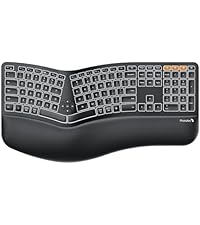
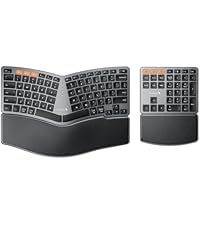
The ProtoArc EK01 Plus is a full-size wireless ergonomic keyboard featuring a unique curved split design and cushioned wrist rest to reduce strain. It offers dual Bluetooth and 2.4G USB connectivity for seamless switching between three devices, a rechargeable 2000mAh battery with up to 100 days of life (backlight off), and adjustable white LED backlighting. Compatible across Windows, Mac, and Android platforms, it’s designed for professionals seeking comfort, productivity, and versatile connectivity in one sleek package.




| ASIN | B0DJ6TC9D8 |
| Best Sellers Rank | #23 in Computer Keyboards |
| Customer Reviews | 4.4 4.4 out of 5 stars (1,016) |
| Date First Available | October 21, 2024 |
| Item Weight | 3.74 pounds |
| Item model number | EK01 Plus |
| Manufacturer | ProtoArc |
| Package Dimensions | 20.5 x 10.9 x 1.5 inches |
B**Y
Great keyboard; feels good on my RSI wrists
After almost 20 years, my Microsoft Natural Keyboard 4000 started to break down on me. I've had to learn to touch type because the letters have worn off over the years. I have been in development/IT/cybersecurity for many years and have carpel tunnel/RSI/whatever-its-called-these-days and a natural keyboard with a split key design is a necessity. But I'm quite picky with my keyboard and wanted to find something that would suit me. This unit fits the bill perfectly. I don't like really loud mechanical keyboards. Some people do but I do not. This keyboard has a good tactile feel to the keystrokes so that I can tell if my presses registered without me having to look at the screen, but it's not so loud that people on my zoom calls ask me to mute my microphone because of the noisy keys. Another feature I like about this one is that it is similar (not identical) to my old unit regarding the wrist rest. It is some type of faux leather with some texture to it, but is also slightly padded. Not so much that it makes it awkward, but just enough to keep it from being too firm. Very comfortable. The keys are spaced appropriately and I had no trouble adjusting to this new keyboard even though the keys are significantly different from my last one. Some of the nice features about this keyboard are that it has volume up/down controls in the center of the keyboard, along with play/back/forward keys too. There are some handy keys available for use with this unit as well, but I'm a pretty simple user. While my last keyboard was usb, this one is wireless, but I had a requirement of not wanting a bluetooth keyboard. I have a KVM switch on my desk for my home laptop and my work laptop, as well as other "mad scientist" computer experiments, and this keyboard allows me to plug in an RF USB receiver into the KVM instead of being forced to use bluetooth. It does have bluetooth and an easy to use switching system for multiple computers (separate buttons included above the numeric keypad), but because I'm sometimes installing operating systems, etc., it is a must for the keyboard to appear as a native USB HID on the target computer. This ProtoArc device works perfectly in that regard and I've had no problems with any computer I've worked on so far, and I've tried at least 7 various units. It works great with my KVM, or plugged directly into the computers. Another feature I didn't think I would care about but has been very handy on quick trips into the office when I do not turn on the overhead light is the backlighting of the keys. I thought this would be very over-rated but has turned out to be the "surprise" utility function for me. overall the feel is great, functionality is superb. I hope to be posting about a new model in about 20 years when the keys are so worn off that I can't tell what key is what anymore. I'll definitely see what ProtoArc has to offer for human input devices at that time as well...
A**M
Nice feeling keys, not too heavy, shortcuts work good enough.
So, my microsoft sculpt ergonomic spacebar broke and I needed a replacement. I actually went through 2 other keyboards before landing on this one. So I'm going to compare the sculpt, Meetion, Nulea 7 color, and ProtoArc. All of them were Wifi + 2x bluetooth. I use with both. I've had the MS Sculpt for years, I like it. In that time I've needed to replace a couple key caps, but it's been good. I really like the feel of the keys and I'm used to the shortcuts. Every one of these new keyboards seems to have a different idea on what alternate shortcuts the function keys do, I wish that were standard. The biggest issue with the MS Sculpt was it was bluetooth only, so I had to pull out and old wired keyboard every time I needed to go into bios, that was a bit of a pain. But I liked the use, feel, lightness of it enough. It took 2 AA batteries that I replaced maybe 2 times a year. All the new ones recharge via USB-C, but that needs to be done maybe every 1-2 weeks? So not bad since I can plug it in to the pc that it's next to for that. All the new keyboards also have a wifi dongle so I can use them in bios. First I tried the Nulea. The feel of the keys is the same as the ProtoArc, it actually has a lot of similarities. I really like the key feel. But what absolutely destroyed and made me hate the Nulea was the missing right CTRL key, OMG that drove me insane, 100% garbage without it. They have this stupid "light" button instead, it's so worthless without the right ctrl key. On top of that, I use a lot of complicated keyboard shortcuts, and depending on the wiring of the keys, some might not work. In my case Ctrl+Shift+Win+Page Down did not work, which was problematic for me as well. So I ended up returning that. Next I tried was the Meetion. It was lighter than the others, good and thin too. It doesn't have the flat keys, but keycaps. I like good key caps, but those they were not. It felt super cheap, but the biggest deal breaker was often repeated stuck keys, at least once a day. After a few days of that I returned it. I've been using the ProtoArc for a few weeks now, and it's great. It does have that light key on the right, it adjusts brightness and honestly I don't really care about that feature and wish I could remap it. But all that matters there is that it actually has the right ctrl key. My keyboard shortcuts work, I can use it in BIOS. It's probably about an oz heavier than my original microsoft sculpt. The only part that isn't great are the volume keys, well, all the keys in that little circle of keys in the center between the halves. That's why I deducted the star, but they work, and the keyboard looks great otherwise. So I'm happy with it and hopefully will have it another 5 years at least. Edit: So, after about 6 weeks of using it, the up arrow just fell off, it looks like the part that holds half of it down was malformed during manufacturing, I suppose that can happen. But it caused me to come here and reevaluate my review, and I've actually added back that star, so it's 5/5. Reason being is, first, after using it more, the volume keys didn't bother me as much, just got used to them, and mainly, when I contacted customer service about the key issue, they were very prompt to respond and sent me a replacement right away, they said it would take 4-5 days, but somehow it arrived the next day, and it works great, so very happy with that. One thing I also forgot to mention in the original review, is that it has one of those silicon keyboard spill covers, which is a really nice feature! Specifically because you can usually only find those made on laptops. So if you want your keyboard to always be easily cleanable you can use it all the time. I did use it for a couple weeks, but it slowed down my typing a little like any other cover I tried, but I do like having it.
M**E
Les van mis comentario, uso bastante el teclado, vengo de un Logitech mx keys muy bueno por cierto pero nada ergonómico, este teclado me ha ayudado bastante con el tema del dolor de muñecas, es bastante buena la iluminación y el famoso retraso de reconexión no me lo ha hecho, las teclas son suaves al tacto y no necesitas hacer mucha presión para escribir, la batería me dura una semana mas o menos, sí le doy bastante uso, el cambio entre mac y windows no me ha afectado ya que el teclado cuenta con la iconografía de ambas plataformas, el único pero que le pongo es el lenguaje que solo es en inglés, bueno eso vi cuando lo compre, como escribo sin ver las teclas no me afecta pero las persona que buscan los signos ortográficos si tendrán problema por que no son los que deberían ser hay que buscarlos picando uno por uno hasta que salga el que deseas, !tómenlo en cuenta!, el teclado cuenta con un cubre polvo transparente de latex, eso me gusta pero sinceramente no lo uso me dificulta escribir rápido, se lo pongo cuando no lo uso.
A**Z
O único mal é não ter a tecla "< >"
A**A
This keyboard is absolutely great for ergonomics. Its got some really fantastic features. I'm going to nitpick a bit but overall its a really great keyboard from a functional standpoint. Its got the usual ergonomic layout, which is great for your wrists. The buttons are responsive and have subtle wells in them which really increases comfort. I find that some similar ergonomic keyboards I've tried will make the tips of some of my finger hurt after a long time typing, but this one feels a lot gentler on my fingertips. The split spacebar also makes sure that its easy to press with either thumb and it will actually work, even if you only pushed it at one end. Its got 3 levels of brightness which are easy to switch between. Just white though, no RGB lighting. Speaking of which, I've also not had any problems gaming on this keyboard, it works great, and I find some of the keys that usually give me trouble because of my small hands, like the shift and cntrl are actually a lot more comfortable. Its also got some really nice function keys, like one that instantly brings up the settings window or takes you to the login screen which is great for security. The wrist rest is comfortable, soft enough. I don't love the material, its that synthetic faux leather and I find for some reason it tends to make my hands sweat, I actually prefer the usual untextured synthetic rubbery stuff. Its mostly fine though, its got a very soft surface feel. One of the best features of this keyboard are the legs. Its got the usual 2 at the back, but its also got 2 more at the front, which is fantastic if you just want to add a tad of height without introducing any tilt. Its got several wireless modes for connection, ironically it doesn't work wired though. You can plug a USB C wire into it and plug it into your computer and it will charge, but it wont work. I'm not a huge fan of wireless stuff for my stationary desktop, since all it means is an extra charging headache. I ended up just keeping it wired to my computer for charging and using the wireless dongle at the same time, its a bit annoying though that it ends up using up 2 USB slots though when they could just have made it work wired. Overall its a great keyboard with a ton of features that really add up to the comfort of the entire thing. Its just really great to reduce wrist pain if you spend a lot of time at the computer.
L**S
Muy ergonómico pero recomiendo no conectarlo vía Bluetooth ya que tarda en responder
N**J
Wow. I really wasn’t expecting this keyboard to be so fantastic. It is so well designed, so comfortable to use, and has so many incredible features that it’s going to take me time to explore them all. I’m delighted with this purchase and I would highly recommend it. To me it’s head and shoulders above other keyboards I’ve used. Very reasonably priced for such a high quality product. Even the packaging has clear, well written and very helpful instructions, everything down to a sticker to apply on the back with a phone number for inquiries. I especially love the thin silicone sheet that keeps the keyboard clean. Wow!
Trustpilot
2 weeks ago
2 weeks ago



