
DOWNLOAD THE APP


Customer Services
Copyright © 2025 Desertcart Holdings Limited
DOWNLOAD THE APP


🚀 Elevate Your Desk Game with 13 Ports of Power & Precision
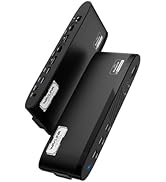
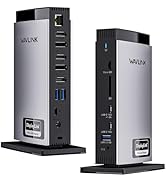
The WAVLINK Universal Laptop Docking Station is a cutting-edge 13-in-1 hub designed for professionals who demand high-resolution dual monitor setups (up to 5K/dual 4K@60Hz), broad device compatibility, and streamlined connectivity. Featuring 2 HDMI, 2 DisplayPorts, multiple USB-A and USB-C ports, gigabit Ethernet, and audio I/O, it supports Windows and Mac laptops including the latest Apple Silicon models. Its built-in GPU technology optimizes video performance while reducing CPU load, making it ideal for multitasking, remote work, and presentations. Included cables and power adapter ensure a plug-and-play experience with a sleek, clutter-free workspace.





| ASIN | B0DD7JG9C3 |
| Best Sellers Rank | #104,593 in Electronics ( See Top 100 in Electronics ) #1,120 in Laptop Docking Stations |
| Customer Reviews | 4.0 4.0 out of 5 stars (135) |
| Date First Available | September 24, 2024 |
| Item Weight | 1.03 pounds |
| Manufacturer | WAVLINK |
| Product Dimensions | 11 x 6.55 x 3.5 inches |
V**G
Great device. Useful.
Works perfectly. It is hard to get satisfaction from purchases these days. Too many products promise but don’t deliver. But this product is the real deal. I have a Samsung dual display in one enclosure that is connected to my laptop. I’ve tried two other adapters and could not get all 3 screen working simultaneously without sync or bandwidth issues. This adapter is amazing. In addition I can go hardliner Ethernet without having dongles putting stress on my laptop ports. I love this docking station.
S**F
Works well for dual monitors, Ethernet, Keyboard/mouse, add-on hub but not speakers in HDMI monitor.
This device provides multiple ports (HDMI, USB) include a USB-C power port. My laptop is powered from this device so there is only one wire going to the laptop: USB-C power port provided all the connections necessary for 2 HDMI monitors (1 2k, 1 4k), Ethernet, wired trackball and mouse, a Yubikey and a 16 port USB-3 hub. It loses one star because one of the monitors has a speakers that do not work with this hub, but do work if the monitor is plugged directly into the computer.
L**A
It works nicely.
When I initially plugged in my 2 monitors (HDMI) to my 2-yr old Dell laptop, they didn’t connect. But like 3 minutes later, voila! I guess it needed to warm up. It’s been working ever since. Had a power outage one day where I had to unplug/replug to reset it. Otherwise, no issues. It’s a good buy.
N**R
Well worth the money
I finally found a dock with enough USB-C adapters. In this day and age, I don’t know why they are making box with so many USB adapters. Most products now come with the USB-C adapters. The front and back placement of the adapters is absolutely perfect. I love this product. I hope it works for a long time!
Z**2
Stop, Consider the WL-UG7602HC Model That Actually Works as Stated.
this think is so over priced, it does the same as the cheaper smaller version except it has more USB port which none of them work... so again i ask what's the point just sell/buy the WV-UG7602HC version for half the price and that doesn't require external power source, nor does it have the 5 additional USB ports that DO NOT WORK, or the Ethernet Cable Port that serves ZERO purpose. Getting same functionality and a far more attractive looking device that's honestly much heavier than this giant power draining WL-UG69K version. Oh and cant return it without the box and label....
T**Z
Review of Wavlink Docking Station, known as the WL-UG69PD5. Good product.
I noticed that the USB-A ports were upside down for the vertical configuration that it is. I thought that this was a quality issue. I have never gotten any hardware where this was missed. The ports work fine, but it is just not a AAA standard quality. The support for 4K is good at 60Hz. Not, great but good. I have tested others and this is the best one that I have found. I also want to make something clear. The lag that some are reporting happens when you use monitors that don't support 60Hz with one that does. The system will use the lowest common frequency available. For instance, if a monitor has 4K @ 60Hz but a second monitor only supports 30Hz, then the display will only support 30Hz across the monitors. This will show up with major lag in the displays. I bumped the score to a 4 since it does what it says, and others are much worse. P.S. : I did not need the Displaylink drivers with this second attempt since I am using a brand new HP laptop right out of the box. P.S.S. : If one that is made and supported in the USA comes around, I will gladly switch. This is made in China.
J**E
Works as Expected
This product pretty much worked right out of the box on my windows 11 HP laptop. I plugged in the two HDMI monitors and with only a small bit of adjusting resolution I was up and running in 30 minutes or less. It was a bit pricey, but I will pay extra for working right out of the box every time.
C**S
Works
Works as advertised, sometimes my MacBook does lose pairing and I need to redownload the driver which is annoying.
M**R
Works perfectly
B**D
I love this USB A and C multi-port video dock! In typical Wavlink fashion build quality is very good, featuring a sleek, futuristic-looking plastic shell and an upright design that gives easy access to all ports. The included PVC USB A and C host cables have moulded strain relief on both ends and feel somewhat inexpensive but certainly rated well enough to support high speed USB 3.0 data and video. The included power supply feels like decent quality, too. I love the bright blue LED that indicates power right near the front/top of the unit so you'll always know if you are plugged in or not. Performance wise, this dock installed effortlessly in Windows 11 via plug-and-play and provided simultaneous output to all ports exactly as described. What's more, video lag on all ports was negligible - so this would be perfect for gaming as you see fit. I even tested it on an ROG Ally and it worked flawlessly. All other ports worked perfectly, including the 1/8 inch audio jack for headphones. Audio was crystal clear and the built in amp was tested with full sized headphones and earbuds (it's very loud at full volume). The gigabit Ethernet port performs at full bandwidth using this dock on Windows. As a minor nitpick, the clear black plastic on the main body LOOKS great but like all smooth finishes is an absolute fingerprint magnet. On another note the instructions that came with this dock requested a driver download from their website. I followed the instructions and was able to easily install the requested DisplayLink drivers, however - it worked perfectly even before the driver was installed. Windows 11 just automatically installed the required drivers and no unconfigured devices showed up in Device Manager. Highly recommended for Windows 11!
D**E
This item has caused me problems twice in the last couple of weeks. First I lost the use of my Wireless sound which was plugged in to this , Then when trying to switch to a larger Monitor I had trouble doing that. Save your money unless you enjoy tinkering with stuff to get things working.
A**M
This is a pretty decent dock with a good selection of ports. This is one of the few I've tried that detects my external 16:10 monitor perfectly without any stretching or scaling. It also has Displayport, which I poorly chose as my monitor connections back when I bought them. I thought DisplayPort was the future as HDMI is inferior in a number of ways, however as usually the more widespread yet inferior standard caught on everywhere. So I'll give it points for including those, as that is rare. I wouldn't have to use an HDMI to DVI adapter anymore at least. I do struggle to find a bit of usefulness here though. My Dell XPS ultra thin laptop only has 2 USB-C ports, so one usually always needs to be taken by the power adapter (Thanks Dell). This helps alleviate that by only using one port and including power delivery of 65W, which is great. The other USB-C is taken by a USB-C to HDMI adapter, which then runs to an HDMI to DVI connector on my monitor. All to avoid Displayport since the cables are very specific and adapters are a bit scarce. This can save me from that abomination (though it does work). I also do gain other ports which is nice, but I don't find myself using this all that much given that I have a temporary workspace on the kitchen table and don't have to plug in a lot of peripherals - mouse and keyboard are bluetooth, and just the one monitor takes that one plug; instead of plugging in the dock, plugging the monitor to that, then plugging the dock to the laptop... it's just not saving me any time or effort. Maybe if I had a permanent setup and needed to plug in external drives, etc... it would maybe make more sense. For now it doesn't, and for some this just won't be worthwhile. Your milage may vary. The biggest shortcoming of this dock is the price. I feel like $200 is pushing it pretty hard for a dock these days when you can get ones for almost 10x cheaper that do nearly as much. They're also usually really small now. This is a big dock with a HUGE power brick adapter (not entirely impressed with that) - far bigger than any of my laptop power adapters which are positively tiny now. Overall the value here is a bit of a hard sell for me. When it's not saving a lot of time or effort I can't use it that much, however if you're taking your laptop between workspaces this can be handy. Basically one cable to plug into all of your peripherals and monitors. I won't knock it too much as much of this is my personal setup and situation. Again, your milage will vary.
D**N
This Docking Station is unique as it can be used on computers and laptops that do not have the USB-C DP/Thunderbolt ports but can also be used on computers and laptops that do have these newer ports. This docking station comes with both cables to allow you to connect to either. The dock also comes with its own 40-watt power supply. On the front of the dock, you have a Blue LED power indicator light, 2 USB-C 5Gbps ports, an audio 3.5mm port, and 1 USB-A 3.0 5Gbps port. At the back of the dock, you have 2 USB-A 3.0 5 Gbps ports, a 1 Gigabit ethernet port, and a combination of a Display port and HDMI for each of the 2 Display outputs. You can choose to use either a DP or HDMI from each one. This dock will support two additional monitors in 4K. You also have the USB-C Host port, and the power input port for the included power supply. On the right side of the dock there is a security lock. The dock is attractive and stands vertically on base that has a rubber bottom to keep it secure on the desktop. The housing is all plastic with ventilation on both sides. I plugged in two external displays using the HDMI ports and plugged the USB-C to USB-C cable from the dock to one of the Thunderbolt ports on my Dell 5320 laptop. The dock was recognized within seconds, and I had two additional displays in extended mode. I didn’t need to install any drivers. Both monitors are Full HD, but this Dock is capable of dual 4K display modes so it great to have for future monitor upgrades. I tried the USB ports, and everything works as it should. For my experience, this Docking Station is just plug and play. I love the fact that you can use it on older USB PC’s that do not have the capability to output display through a USB-C port. I have other WavLink products and find that they all work well as designed. This Docking Station is no exception. I like the design, the attractive look, and especially the versatility. There is a generous number of ports for expansion. It’s a great Docking Station. At the time of this review, there is an 11% discount and an available 20-dollar coupon for an even better bargain.
Trustpilot
2 weeks ago
3 weeks ago