
DOWNLOAD THE APP


Customer Services
Copyright © 2025 Desertcart Holdings Limited
DOWNLOAD THE APP
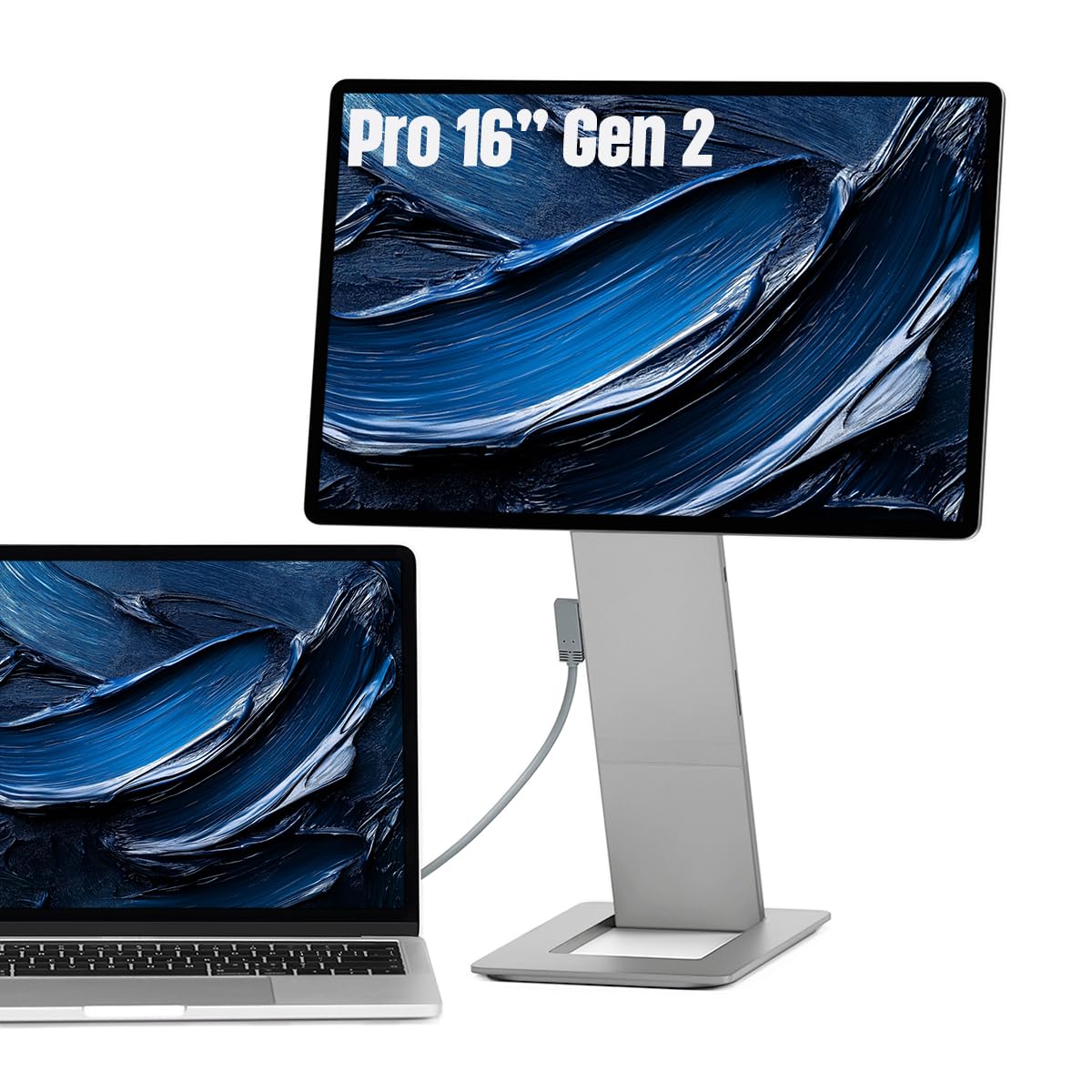
🚀 Elevate your mobile workspace with pro-grade clarity and sleek metal craftsmanship!
The SOTSU FlipAction Pro 16" Gen2 is a premium portable monitor featuring a stunning 2560x1600 resolution with 100% DCI-P3 color accuracy, 120Hz refresh rate, and 400 nits brightness. Its full metal CNC-machined chassis ensures durability and a sleek aesthetic, while the innovative magnetic fold-flat stand and height-adjustable pivot design offer unmatched portability and ergonomic versatility. Designed for both Mac and Windows users, it supports MST daisy chaining and pass-through charging, making it the ultimate on-the-go display solution for creative professionals and multitaskers.


| ASIN | B0CLJ3JNFD |
| Adaptive Sync | FreeSync |
| Additional Features | Glossy Screen, Height Adjustment, Portable, Tilt Adjustment |
| Aspect Ratio | 16:10 |
| Best Sellers Rank | #12,434 in Electronics ( See Top 100 in Electronics ) #393 in Computer Monitors |
| Brand | SOTSU |
| Brightness | 400 Candela |
| Color | Metallic Gray |
| Connectivity Technology | USB Type C, mini HDMI |
| Contrast Ratio | 1500:1 |
| Customer Reviews | 4.3 out of 5 stars 120 Reviews |
| Display Resolution Maximum | 2560 x 1600 Pixels |
| Display Technology | LCD |
| Display Type | LCD |
| Hardware Connectivity | USB Type C, mini HDMI |
| Has Color Screen | Yes |
| Image Contrast Ratio | 1500:1 |
| Item Dimensions D x W x H | 0.5"D x 14.4"W x 9.3"H |
| Item Weight | 1.36 Kilograms |
| Manufacturer | Suzhou Pinyu Precision Mechanical Co., Ltd |
| Model Name | FlipAction Pro 16" Gen 2 |
| Model Number | SFA16PMGG |
| Native Resolution | 2560x1600 |
| Number of Component Outputs | 1 |
| Picture Quality Enhancement Technology | 100% DCI P3 color gamut, FreeSync |
| Pixel Pitch | 8.15 |
| Power Consumption | 11 Watts |
| Refresh Rate | 120 Hz |
| Resolution | 2560×1600 |
| Response Time | 9 Milliseconds |
| Screen Finish | Glossy |
| Screen Size | 16 Inches |
| Screen Surface Description | Glossy |
| Specific Uses For Product | Personal |
| Total Number of HDMI Ports | 1 |
| Total USB 3.0 Ports | 3 |
| Total Usb Ports | 3 |
| UPC | 850057055030 |
| Viewing Angle | 180 Degrees |
| Voltage | 5 Volts (DC) |
| Warranty Description | 2 |
| Warranty Type | Limited Warranty |
J**L
The BEST 16" monitor money can buy (2025), The King
I have 6 different portable monitors. This is the BEST in all categories: Quality: this is solid metal, solid glass, magnets Picture Quality: glass clear picture (2.4k 120hz 400nits) Ports: ports are easy to access, clever that they are in stand Design: the flip action is best in class, amazing! the built in stand amazing, the base for stand is magnet onto back Height: the stand and base can make this so tall that it will be vertical over my macbook pro Cost: the most expensive on the market, and you get the best quality of any competitor, trust me I know This is slim, light, gorgeous display to look at with the bezel being equal on all sides. When it comes to design, function, and quality this is the king of portal monitors. I know this is expensive but I'm in love and I might purchase another so I can cuddle it in bed at night.
D**K
Good high quality product
Bought it for $600, one of the most expensive portable monitors. In terms of quality-price ratio it's not great, I think $450-500 would make more sense. Pros: - 120hz, 2560x1600. 4K would be an overkill for 16" for me - Metal feels great and sturdy - Magnets are strong and reliable - High adjustability for height and tilt angle thanks to the stand and 180° rotation - The ports are located in the stand, really nice that this way no cables are sticking out from the side - Fits in my backpack with the MBP 14" - Can detouch it from the stand in a second and use it on a bed - The monitor weights 930g/2.05lbs + stand 435g/0,96lbs Cons: - Poor black colors because of IPS, that's the main issue I have. I would have paid $200 more if there was an OLED option. Btw there is no information in the specs that it's IPS. - Anti-reflective coating is a bit better on the MPB than on this monitor. - The stand is not THAT stable, it would still wobble for a few sec after touching it or if your table is not sturdy enough. I think a tripod stand would be better in such cases. - No speakers. It's not a problem for me since I use it with a laptop only, but can be an issue for those who buy it for pc/console. - The protective case is not high quality, I would expect better, but good enough to use as a mousepad. Recommendations: - If you use it with mac, you MUST download BetterDisplay app and use the HiDPI feature (available in free version) to fix the resolution issue. Otherwise by default the picture would be too big/small/blurry.
N**1
Apple like quality, good picture, and flexible stand
Bought this and was extremely happy with the quality. At first the price seems pretty high, as you can get decent computers for this price. But it makes up for that with a high quality display, docking features, flexible stand, and the apple like product feel. I did return it as right now i don't really need a portable display. But in the future i will definitely go back and purchase this when a true need arises.
S**.
Apple quality
The monitor is like an Apple product and definitely feels premium. I really like the functionality and how convenient it is to adjust to your liking. I like how the stand can be magnetically stored on the back of the monitor to keep everything altogether for transporting.
B**P
Fantastic Monitor, but missing some things
For a premium price tag, it almost holds its value. Three things: 1: HDR is garbage. It just barely works, and the colors are not great. 2: for this price point, I’d expect more than 60Hz. Maybe have the mode unlocked when it has the alt power plugged in, so that you aren’t draining your device. 3. How is this not a touch panel at this price? If I’m going to sacrifice refresh rate, I should gain a feature from the panel. Verdict: 4/5 stars, IF you find it on sale. 3/5 at full price.
B**N
At this price point, the bar is very high.
So it's good! It meets my needs very well, but it is expensive. I do have some nit-picks, because you can get a functional portable monitor at an 8th of the price. I'm a remote worker with a mac and windows laptop, and I wanted something that would allow me to play my steam deck and nintendo switch in my room. Overall, I'm a sucker for premium-feeling tech, but at this price, I'm not 100% sure I'm going to keep it. Pros: -Sleek. Metal construction, rounded edges, looks premium. It would fit in as part of a permanent setup but packs up quite small. Flat glossy black bezel like a Mac monitor. Symmetry is good. Logo isn't obnoxiously placed. -Display is beautiful. It just looks good, beyond just having a high resolution. Which is good, because I want to watch movies on it in my room as there's no good place for a TV in here. -Cable is good. Just works. ALL devices I've plugged it into, it just works. Windows, mac, steam deck, and switch. No configuration is a plus. -Magnetic stand is neat. -90deg rotation is a cool feature that I personally haven't used yet. -Passthrough power works well. -The number of orientation options is tremendous. You can have it next to or above your device, tall or short, upright or sideways, with the bottom part of the stand in front of or behind the monitor (good for if on edge of table/against wall vs against back of laptop). If you want to buy two (very expensive!) there are even more orientation options... Cons: -When rotated 180deg to get tall enough to be above your laptop, in some orientations, the screen can wobble from typing vibrations. -Auto-rotation doesn't seem to work 90deg, just for fully upside down rotating 180deg. Have to manually change display settings to go 90deg. -Rotation CAN smack the table and scrape the back of the monitor against the stand. -The case. It's a cheap neoprene sleeve. Basic stitching around the edges, no hemming. No microfiber interior. Cheap cheap cheap. And it's sooo tight that it's a real squeeze to insert the monitor. It feels inevitable that (a) a bit of debris is going to scratch the monitor from forcing the sleeve on and (b) that the sleeve is just going to fall apart. If I do keep this, I may have to buy another (unfortunately probably bulkier) laptop sleeve for a 16" laptop. At this price point ($600), that's pretty bad. -The manual, with regards to portability, says "Cover the surface of the screen with soft cloth to prevent damage to the monitor." Soooo, where's my cloth? For $600? Come on... -The bezel. To me, at this price point in 2025, I would hope for a smaller bezel. Not a big con, but the whole thing could have significantly less area/volume with a smaller bezel. -16:10 aspect ratio is a little bit nonstandard. -Cable portability. What do I do with the cable when traveling I guess the fold-up stand only takes up 2/3 of the back of the monitor, so there's space to sorta shove it in there, but that feels like a miss on the monitor/sleeve. -Right angle cable is nice, but the right angle does get in the way of rotating monitor and of passthrough port, so it almost has to be on the device side, when it sometimes covers up stuff on the device. -Audio options - there are none! No speaker, no audio ports, nothing. On the one hand, this may simplify connections. On the other, I'd really like to see a speaker setup for this. There's a third left on the back of the monitor when stowed. A wired or bluetooth speaker that can be stored there would be great. On many monitors, the speaker is garbage anyways, so none is almost better than some speaker, but I'd like to see a good option! -Why is there a usb-c port INSIDE the connection to the stand? The manual describes this port as "currently not applicable". So there's that. -SD card slot. I guess it's nice for someone that it's there, but I don't need it. Would rather have an audio port. Why a con? Because it's cost I don't need. I could take it or leave it. My experience device-by-device: - Mac -- feels like it was made for a mac. Matches the color and aesthetic with metallic gray. But if you're buying just for a mac, you coulddd get an iPad and just extend screen. Works well with or without passthrough power. Mac display settings are... weird and unintuitive. The "default" resolution Mac uses for this monitor is 1280x800. Putting it to 1600x1000 makes it MUCH worse, with text significantly fuzzy. Putting it at the native resolution for the monitor makes text impossibly small to read. But it's still higher resolution than 1280x800 at 1280x800, so there's some scaling from higher resolution going on... - Windows -- also works excellently. Matches the color and aesthetic of my surface pro 2-in-1, and with the side-by-side and over/under options and a detachable keyboard on my surface, I can make a cool and compact portable setup! Works well with or without passthrough power. - Steam deck -- This is where it shines. It ALMOST works without passthrough power, but the deck doesn't put out quite enough power. The Steam Deck though does an excellent job here by (1) still working as a controller while the screen casts out to the monitor and (2) still outputting audio in your hands while playing, covering for the lack of audio options on the monitor and decreasing devices needed. - Nintendo switch -- this one's a bit more of a pain to be honest, but workable! First, I tried using the Switch dock in every orientation imaginable (except an HDMI to mini-hdmi cable, as I don't have one and don't really want to buy ANOTHER cable to test). With power to the dock and power to the monitor, using multiple different USB hubs and HDMI to USB-c converters, I simply couldn't get the Switch to display on screen. However, what DID work was passthrough power to the monitor and using the included USB-c cable to plug in directly to the Switch. It's conveniently fewer items (fewer converters, no dock, no separate power to dock). You kinda just have to let the Switch lying on its back someplace since you can't really prop it up while it has a plug in the bottom. Passthrough power is sufficient for making the Switch think it's docked. Bluetooth audio from the Switch still works when plugged into the monitor (so I imagine a direct audio input to the switch will work too), but no speakers. -iPhone 16 -- plugging it in, it mirrors (so long as auto-rotation is turned on on the SOTSU. Just didn't work when auto-rotate was off. I don't know why.) It's in portrait on a landscape screen. iPhone has no setting to flip it on the monitor, and the monitor doesn't seem to have any option to flip the screen 90deg, so it's ugly. When the iPhone is in landscape mode, the screen is in landscape mode and works better. Requires passthrough power. Disappointing overall since the screen itself can rotate 90deg! Since both steam deck and switch need passthrough power to work for this guy, I'm tempted to get a big power bank to plug in to make it that extra bit of portable (if I keep the monitor). Overall, excellent item with the biggest gripes being the lackluster sleeve and the price. At $300, it'd be amazing. At $600, it's an irrational luxury item for people that would pay whatever for that extra bit of luxury. Because you're ALSO going to want to get a better case for it.
J**.
Terrible Image quality
I like premium stuff. So when this popped up, I was excited as the all-in-one stand and monitor design was very appealing. With that being said, the build quality is amazing. It feels more like my $799 Espresso display which is what I was hoping for. However, after getting set up and admiring the finish that matched my MacBook perfectly, I turned it on. At first the colors were a bit off, but no biggie I can calibrate that a bit. However, as soon as I opened a DAW and started working I noticed that the resolution was wrong. Upon entering Settings on my Mac, there was no resolution native for the MacBook to play nicely with that didn't distort the images or text in a weird way. The overall screen quality is similar to my $60 HKK portable monitors sadly, and the stand isn't worth paying the premium price for. It's a shame, as they advertise it having an LG screen, but bo matter which machine I tried it on the result was the same. Save your money a bit more and get an Espresso if you want the Mac feel, or just get a cheap one with better native resolution if you only want the extra real estate.
D**P
Worth the investment! BUY THIS MONITOR
This monitor is worth the investment. The display is high quality and the 120hz makes this monitor feel very smooth and easy on the eyes. This is by far the best portable monitor out there. The screen is very bright and the different rotation angles is great. If your work requires you to travel, this product is a must have!
Trustpilot
1 month ago
2 days ago