
DOWNLOAD THE APP


Customer Services
Copyright © 2025 Desertcart Holdings Limited
DOWNLOAD THE APP



🖋️ Elevate your Chromebook game with precision and power—because your ideas deserve the best.
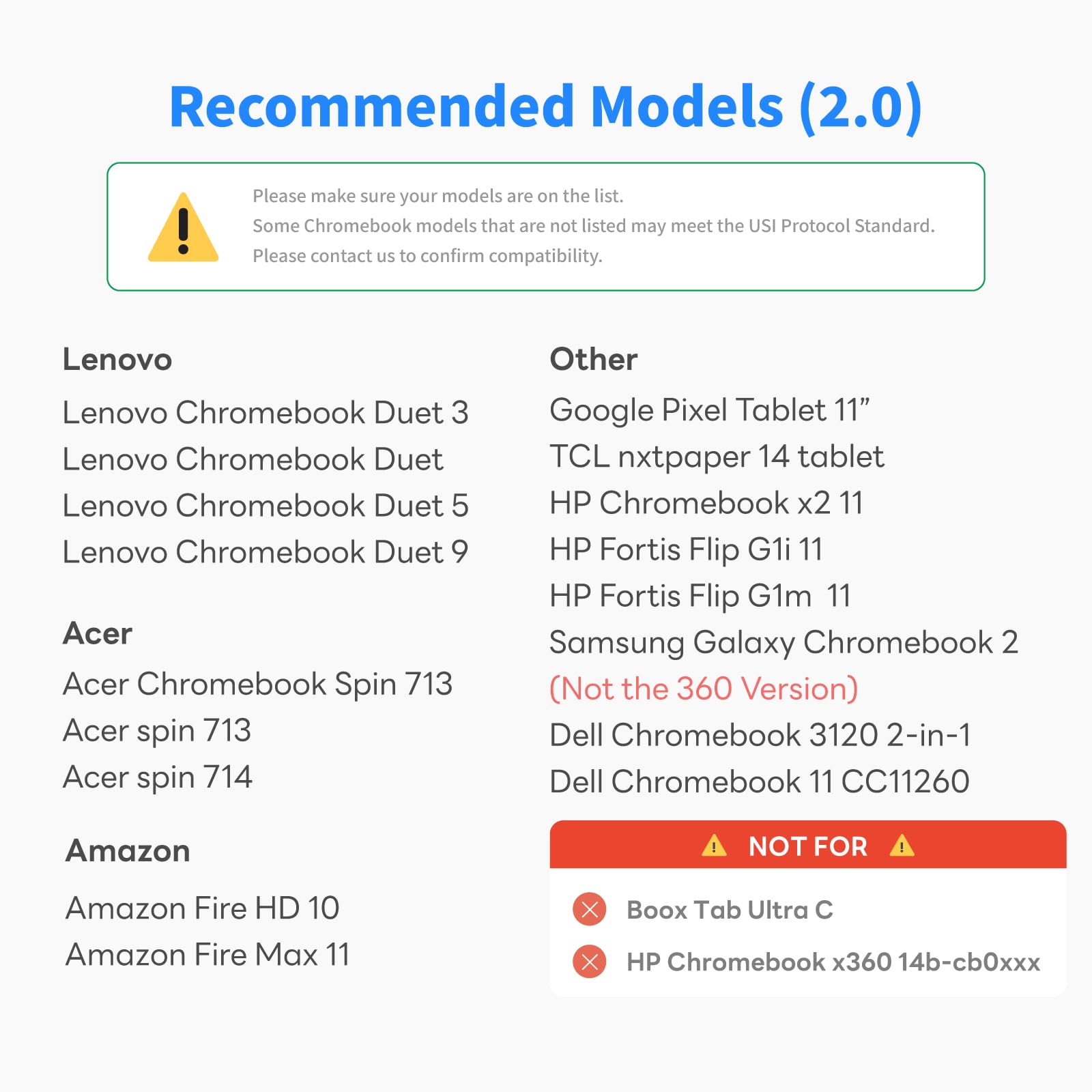
The Penoval USI2.0 Stylus Pen is a premium, USI-certified digital pen designed for select Chromebook models. Featuring 4096 pressure sensitivity levels, palm rejection, and magnetic absorption, it offers a natural writing and drawing experience. Its durable aluminum alloy body houses a fast Type-C rechargeable battery delivering up to 90 hours of use after a quick 50-minute charge. No Bluetooth pairing required, making it an effortless, professional-grade tool for creatives and professionals alike.











| ASIN | B0CMX315NG |
| Are Batteries Included | Yes |
| Average Battery Standby Life (in hours) | 90 Hours |
| Batteries | 1 C batteries required. (included) |
| Battery Charge Time (in hours) | 50 minutes |
| Battery description | Lithium-Ion |
| Best Sellers Rank | 2,541 in Stylus Pens |
| Brand | Penoval |
| Colour | usi-2.0 |
| Customer Reviews | 4.4 4.4 out of 5 stars (351) |
| Date First Available | 15 Nov. 2023 |
| Delivery information | We cannot deliver certain products outside mainland UK ( Details ). We will only be able to confirm if this product can be delivered to your chosen address when you enter your delivery address at checkout. |
| Guaranteed software updates until | unknown |
| Item Weight | 15 g |
| Item model number | USI2.0 US |
| Lithium Battery Energy Content | 0.26 Watt Hours |
| Lithium Battery Packaging | Batteries contained in equipment |
| Manufacturer | Penoval |
| Number Of Lithium Ion Cells | 1 |
| Product Dimensions | 19 x 6.2 x 1.1 cm; 15 g |
M**K
Poor quality
I’ve been using this pen for JUST a week, but the tip is already showing wear.:(
P**P
I’ve been using the Penoval USI2.0 Stylus for over a year now, and it’s still going strong. The battery still holds a charge, and it charges up fast, especially if you use a decent charger. I like the metallic feel. It feels sturdy and actually kind of premium in your hand. The silver finish looks good too. The wight is nice and not too heavy, it's a great value, the magnet is solid and decently strong, it's easy to hold. I mainly use it with my FireMax 11 tablet for drawing and editing, and it’s made things a lot easier. Palm rejection works really well, so I don’t have to worry about messing up my sketches just by resting my hand. It also has pressure sensitivity, which is decent, I haven’t gotten deep into painting with pressure effects, but it works fine for sketching and coloring. I’ve done photo touch-ups and even some basic graphic design with it, and it’s worked without any problems. It’s also handy just for general tablet navigation, like typing in passwords if you have bigger fingers. I actually bought a second one for my grandmother because she needed something easier for her tablet, and she’s been happy with it too. I haven’t had to change the nib yet (probably because I don’t draw constantly), but I’ve got a spare set just in case. After all this time, pressure sensitivity still works and nothing’s broken. Overall, if you have a USI-compatible tablet and you want a reliable, comfortable stylus that won’t break the bank, this one is a solid choice. I’d definitely recommend it for artists or just anyone who wants more precision and palm rejection on their tablet.
I**D
Dateline: A Lenovo Duet 5 Screen, Under the Cold Glow of a Thousand Pixels. The world of the stylus has long been a wretched hive of scum and villainy. A chaotic landscape of proprietary connectors, fussy Bluetooth pairings, and princely sums demanded for a simple stick that lets you draw on a screen. You were either locked into a specific company's gilded cage, paying their exorbitant fees, or you were lost in the wilderness. But a new standard has emerged from the ether, a universal language called USI 2.0. And the Penoval stylus is its finest missionary. This is not a tool you have to coax or persuade. There is no pairing ritual. There is no descent into the labyrinth of settings menus. You simply unbox the Penoval, hold its fine, metallic point near the screen of your Chromebook, and the two become one. It is an instantaneous, almost telepathic connection. A digital handshake that says, "Alright. Let's get to work." The sheer, unadulterated simplicity of it is a revelation. And the work… good heavens, the work. This is not some blunt, fat-fingered instrument for clumsy tapping. This is a digital scalpel. The tip is fine, the tracking precise. Where you put the point is exactly where the line appears. There is no lag, no parallax, no frustrating gap between your intention and the digital result. With 4096 levels of pressure sensitivity, it becomes a seismograph for your imagination. A gentle press yields a faint whisper of a line; a firm hand unleashes a bold, confident stroke. It feels intuitive. It feels right. The pen itself rests in the hand with a cool, comfortable weight. It’s a well-balanced instrument, designed for long, frantic sessions of note-taking, sketching, or simply navigating the digital world with a grace and precision your clumsy fingers could never hope to achieve. But the real masterstroke, the final, glorious rebellion against the old guard, is the battery life. This thing sips power with the discipline of a desert hermit. It lasts and lasts, a stark and welcome contrast to my memories of the first-gen Apple Pencil, a device that seemed to need a constant, life-sustaining tether to a power source. For the price, the entire proposition is ludicrous. You are getting a high-performance, professional-grade stylus that works seamlessly, feels great, and boasts an epic battery life, all for a fraction of what the big-name players demand. The Penoval USI 2.0 isn't just a great value; it's a statement. It’s proof that you don’t need to empty your wallet to get a tool that performs flawlessly. It is, without question, the smartest, sharpest, and most sensible stylus a Chromebook user could ever hope for. A five-star champion in a field of overpriced contenders.
L**S
I'm glad I was able to find it! I've been using it for some days now and it works great. It's very easy to use!
M**B
I like this stylus. It works well and I've not had any issues with it. I used it multiple times each week. For reference, I am using it on a Pixel Tablet. My only complaint, and this is minor, it has no pocket clip. Without a clip I find it difficult to store in my bag without it falling out of the pocket. I will probably make a pocket that will clip to my bag and hold the pen snugly, maybe even using a magnet. Not everyone will have this problem, and it isn't enough for me to look for a different solution. This seems to be common to most styli (sp?). Let me hit on some of the key points: - The pen is solid and well constructed. - I like that it is rechargeable, I didn't like searching for AAAA batteries for my old one. - I have had not connectivity issues, it just stays connected. - The pen (or maybe it is the tablet) is very responsive, I don't detect any lag. - I have used the pen directly on the tablet and using the mat screen protector also sold by Penovol. There is enough traction of the screen to make the pen glide over the surface with a good feel. Using the matte screen protector (sold by Penovol) you get a more pen-on-paper feel. I like both, but I like the paper feel a little better.
E**D
Excellent stylus works great on my Tablet. Very nice precision and sensitivity on the tip. Easy to use and keep connected. Easy to charge and the charge lasts for a pretty decent amount of time. The automatic turning on when you move the pen and lack of need to pair it with the device is wonderful. Now for the "bad" the tips wear down to a mechanical pencil lead thick rod of metal. If this isn't noticed, there is a serious risk of scratching the screen. The worn down tips all do not wear evenly unless they are intentionally worn that way, not just used without thought. I have also found that if i touch and move the tip around too much the pen stops working properly with depth of touch getting messed up; it registers as a tap when the tip is still just above the screen, initiating a long press if not careful. Though this is simple enough to reset just by putting the pen down for a short while so it turns off, then picking it back up to turn on; alternatively plugging it into a charger seems to reset it. If you don't fidget with the stylus you likely wont run into this issue, so its not a big deal.
Trustpilot
3 weeks ago
2 weeks ago