


🚀 Clone, transfer, and cool—power your storage like a pro!
The Sokiwi 10Gbps NVMe Docking Station is a dual-bay M.2 NVMe SSD enclosure designed for professionals seeking ultra-fast data transfer and seamless offline cloning. Supporting SSD sizes from 2230 to 2280 and capacities up to 8TB, it delivers up to 10Gbps speeds via USB 3.1 Gen 2, features a tool-free design for quick installation, and includes an intelligent cooling fan to prevent overheating. Compatible with Windows, Mac, and Linux, it’s the ultimate solution for efficient storage expansion and backup without the need for a computer.

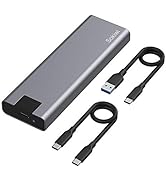

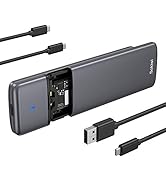


| ASIN | B0B7R8V96K |
| Best Sellers Rank | 302,806 in Computers & Accessories ( See Top 100 in Computers & Accessories ) 283 in Hard Drive Docking Stations |
| Compatible devices | Laptop |
| Data transfer rate | 10 Gigabits Per Second |
| Guaranteed software updates until | unknown |
| Hard disk form factor | 2.5 Inches |
| Item model number | SKUD1001 |
| Item weight | 0.39 Kilograms |
| Manufacturer | Sokiwi |
| Max number of supported devices | 2 |
| Memory storage capacity | 8 TB |
| Package Dimensions | 15.09 x 13.49 x 5.59 cm; 390 g |
C**O
Used this to upgrade my PC build from a 250GB drive to a 2TB. I first cloned my original 250GB OS drive to a 2TB Samsung 980 Pro with heatsink using this enclosure, and it worked flawlessly. Couldn’t use the included cooling fans due to the size of the heatsink, but it didn’t cause any issues. Fast, reliable, and made the whole upgrade process smooth. Great tool and solid value.
G**D
I needed to duplicate two 512 GB PCIe Gen 3x4 2280 SSDs as backups for two of my critical PCs. I tried a couple other duplicators, but they didn't work with this particular flavor of SSD, even though they said they would. This one, on the other hand, works exactly as advertised. It made perfect duplicates of my Windows 11 OS, apps and data. I took one star away because of the silly little rubber pegs one has to use to secure the drive in the holder. There has to be a better way. Aside from this minor distraction, this docking station is well designed, functions nicely, and is easy to use.
P**1
As others have wrote, this unit works exactly as needed. I'm another one of the 40 year IT guys here and can vouch this clone device works exactly as described and does it FAST. Cloned a 256GB NVMe to new 1TB NVME, took less than 5 minutes. I was amazed. Afterwards use one of the many free 'partition wizard' programs to rearrange (or delete) partitions so you can make the newly found disk space contiguous with existing space. Ie: The existing C drive partition must be adjacent to the new unallocated free space in order to Extend the drive's useable space. I deleted the two Dell/Windows recovery partitions using EaseUS Partition Assistant Free Edition. The two recovery partitions allow for a system restore from the manufacturer's Windows files. For me, if the drive is fouled so badly that I need to reinstall or repair Windows I'll simply reinstall Windows 10/11 from a USB image created using free Windows 10/11 Installation Media utility. If you're an amateur the above steps may be overwhelming or frustrating, seek out YouTube for assistance. Only caveat of the clone device might be the cheap feel and durability. It feels like cheapy $15 USB speaker thing. This is one of the few devices in my toolkit that I'm willing to overlook the build quality for functionality and time savings achieved.
J**N
Wish it worked more than once. I bought this just before Christmas so I could upgrade my mom's computer SSD from 256 to 1tb because she started to save a ton of pictures. It worked that one time cloning and all was well. Windows allowed me to stretch the drive and she can keep being picture happy. Now here I am trying to clone a 256 to 1tb (same drives) and no joy. I power it on again using the included wall wart. Turn it on - two blue lights. I press and hold the button and I hear the beep and it seems OK but there is zero progress. Looking further into it the fan no longer works. It seems this is a one and done appliance.
-**-
(Review of SOKIWI NVMe M.2 Duplicator Dual-Bay Offline Clone Tool-Free, 10Gbps NVMe Docking Station with Cooling Fan,NVMe M.2 SSD Enclosure for NVMe PCIe Size 2230/2242/2260/2280(up to 8TB)) I purchased this to clone the original 250GB SDD in my Dell laptop - full to the brim mostly with Win11 bloatware - to a new 1TB drive. The process, start-to-finish took about 90 minutes, including using it as an external enclosure for the new drive while I used Gparted on a Linux box to rearrange partitions so I could make full use of the new space as a contiguous drive. The offline cloning took perhaps 10 minutes. If I have to scratch for nits, the labelling of indicators, switches, etc. could be more readable, and the rubber NVME retainers are a bit fiddly to insert. While the included documentation is best described as "spartan," it was sufficient to my needs: While the procedure it describes for using Windows to extend a cloned partition to make all space on a larger target drive available didn't work for me under Win10 -- I didn't waste a lot of time on it, just used Linux. I would love to say that I'd buy it again, but I've already bought it and don't expect to need an extra. (If I lost this one, yes I'd buy another!)
Trustpilot
3 days ago
2 months ago



