We remain fully operational. Our teams are working around the clock to ensure your deliveries continue safely.

DOWNLOAD THE APP


Customer Services
Copyright © 2025 Desertcart Holdings Limited
DOWNLOAD THE APP


⚙️ Elevate your Ender 3 game—print sharper, quieter, and faster!
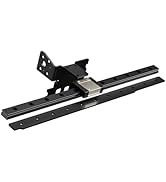
The Official Creality Ender 3 Dual Z-axis Upgrade Kit transforms your Ender 3/Pro/V2 with precision-engineered lead screws and stepper motors, delivering 0.01mm repeat positioning accuracy and synchronized dual Z-axis movement. Its dustproof, low-noise design enhances stability and print quality by minimizing vibration and layer ripple. This upgrade simplifies bed leveling and includes a metal power supply holder, backed by responsive after-sales support for a seamless installation experience.



































| ASIN | B07VJG4ZCG |
| Batteries Included? | No |
| Batteries Required? | No |
| Best Sellers Rank | #19,528 in Industrial & Scientific ( See Top 100 in Industrial & Scientific ) #361 in 3D Printer Accessories |
| Color | Black |
| Customer Reviews | 4.6 4.6 out of 5 stars (446) |
| Date First Available | September 18, 2022 |
| Included Components | Lead Screw and LED Light |
| Item Weight | 1.83 pounds |
| Item model number | Lead Screw Kit for Ender 3/3 Pro/3 V2 |
| Manufacturer | Creality 3D |
| Material | Metal, Steel |
| Package Dimensions | 15.63 x 3.98 x 2.64 inches |
| Part Number | CA1-PJB |
| Style | Lead Screw Kit for Ender 3/3 Pro/3 V2 |
L**N
Works great with the couple small quirks I mention below.
This kit works great and definitely will tighten up the z axis of your Ender 3. The installation was quite easy once I was able to figure out how it all goes together. There are however a couple things that I have seen about this kit in many You Tube videos, etc that are just dead wrong, and may cause you a lot of frustration if you follow poor advice. The main issue is that machine frames are never perfect, and it is okay- and normal for your z axis to be unlevel by a mm or two in one direction or another. When the installation is finished, Do NOT try to align the z axis to the top bar by wedging some object in there. This is terrible advice. it will create unequal stresses on the steppers and they ultimately will work itself back to balanced forces, causing poor print quality. What you actually want to do to align it is to turn both z screws in opposite directions by hand and you will feel it begin to bind as the forces become uneven. Set it in the middle of the range on both side so that the forces are balanced across both leadscrews/stepper motors. It will stay right there and not move alignment. Forcing it to a different alignment, will only cause it to miss steps at some point and fall back into balanced position during the middle of your print. Once the forces are balanced and you have run the axis up and down a few times, it will stay there. Now tram your bed to this alignment and you will not have to touch it again. I have printed at least a dozen prints since installation using this method and cr-touch bed leveling repeatedly shows .01-.03 max variance without ever adjusting the z axis. Installation Notes: The first thing you should do is remove the original leadscrew and check and adjust the eccentric nuts on both sides of the z axis. The whole axis should roll up and down with no resistance, but be snug enough to stay straight and not wobble. Put something on your printer bed to keep the nozzle from hitting the bed while you are doing this. During the installation process, be certain to loosen the two small hex bolts that hold the brass follower nut to the arm. the nut can move aa few mm in any direction and will alleviate any alignment stress on the leadscrew. Leave all the attachment screws slightly loose, and only tighten the leadscrew into the stepper coupler. Move the z axis to the top to align the stepper/leadscrew to the frame and then snug up the stepper attachments. Bring z back down and make sure it moves smoothly and then snug the brass follower nuts. The top bearings actually slide back and forth to accommodate any forward or backward tilt of the stepper, so your main concern here is right/left alignment.
D**Z
Excelente producto
Excelente producto buen vendedor
T**E
Easy install, worthy upgrade
This made the printer much more rigid. I could flex the x-axis around a lot before, and there's no way that was good for print quality. It's tight and precise now, and the install was kinda fun. It seems more complicated than it is.
S**H
Good Kit But.. Yup, There the But. The z axis lead screw upper bearing holders are wrong. UPDATE
The kit is great. I installed everything until I goto the Z axis stabilizer bearing holder and noticed that the mounting holes are way off. Not sure what type of slotted extrusion they are ment for but they are definitely not ment for the 20x40 standard v-slot extrusion that makes up most all 3d printers of this type. You get 2 per kit and I bought 2 kits so that means I have 4 unusable Z stabilizer bearing holders. Will give a better review when I hear back about what they are going to do to make these kits right. If you dont need them then dont worry, Go ahead and buy the kit. You cant go wrong. I could always print out a set but just think of the time they spent in fabricating the molds for these items. Someone may get a slap on the wrist :)... Now time to wait and see if I will get any feedback from the supplier. UPDATE: Was contacted by the seller and they were all for making this right. I said no replacement is needed and just wanted them to know the issue with the z axix bearing block. I was advised that their QA department will look into the issue. Fast response from them. I will buy again if ever needed
M**N
Needs upgraded mainboard to control it properly...
This is a good product, but what they dont tell you, is that it wont work right without further modifications to the printer. The kit comes with a splitter cable that splits the z axis signal between both motors. There's no way to level the z axes with each other, since both motors run on the same signal. So you can level it manually, but there's no guarantee it will stay level, because the motors have no way to compensate for being out of level. You really need an upgraded mainboard that has independent drivers for the left and right z axis motors. I had issues with this kit, it caused my Master z axis (left side) to bind up, and i ended up removing the second leadscrew and the splitter cable, going back to the original single-side drive. I do still have the kit installed, minus the leadscrew and splitter cable, but the machine is currently only running on the Master side z axis. I kept the dual z-axis roller bracket installed because it helps tighten up the slave side of the x axis rail, which helps keep the x axis level. I would recommend buying this kit even if you dont use the second z axis, simply because of the extra z axis bracket, which in my opinion is worth the $25 all by itself. The stock ender3 x axis rail only has a front bracket on the slave side, so the z axis rollers only mount on a single mount point, and can be difficult to keep tight, mine was a bit loose and hard to keep level, which prompted me to purchase this kit. The included bracket mounts to the opposite side of the roller axles and creates a solid mounting between the two brackets, allowing a much tighter fit which is easier to keep level, and honestly, alleviated my need for a second leadscrew altogether. My x axis stays very level now, even without the second driven z-axis. I do still intend to upgrade my mainboard at some point in the future in order to properly make use of this upgrade, but for now, the problem i was having that caused me to purchase this kit, has been solved. If you are having trouble keeping your x axis level, i recommend buying this kit and ONLY installing the bracket that holds the leadscrew journal, at first. I suggest taking apart your master side and straighten and tighten up your brackets and rollers on BOTH sides of the x axis rail and install the second z rollers bracket, level it up manually, and then try a print before attempting to install the rest of the kit. If that solves your issues, i would wait to install the rest of the kit until you can upgrade your mainboard to have the ability to driven the z leadscrews independently and use the z axis leveling gcode to level them properly.
K**R
Necessary upgrade
An absolute must for any ender3 moving forward. I have two and would not be without this upgrade
K**E
First upgrade towards direct drive
This product was easy to install on my Ender 3 and made a very noticeable difference in the layer lines of my prints. Everything you need is included and instructions are easy to follow. Good product
G**O
muy bueno
A**E
Passt gut für den Ender 3V2 (2021). Einbau etwas knifflig. Ich wurde empfehlen zur Synchronisation beider Achsen etwas zum stabilisieren Drucken damit man die Spiralstangen richtig einstellen kann.
S**E
perfetto , facile l'intallazione.
N**A
Perfecto, montado y funcionando. No requiere grandes conocimientos para su montaje, mejora notablemente la impresión y hace que el nivelador de la cama sea más preciso y no requiera demasiada atención.
I**A
Compatible con la Ender 3 Pro, incluye todo lo necesario para montarlo. Una de mis recomendaciones es imprimir dos varillas de almenos 120mm ya que tendras que alinear ambos motores de manera manual ya que este kit no tiene un cinturon de sincronizacion.
M**N
Super kit
Trustpilot
1 week ago
1 week ago