
🚀 Power Your Productivity with One Hub to Rule Them All!
The LIONWEI 13-in-1 USB-C Docking Station transforms a single USB-C port into a powerhouse workstation hub, supporting dual and triple 4K@60Hz displays, 13 versatile ports including high-speed USB-C/A, Gigabit Ethernet, and audio, plus 100W power delivery. Designed for professionals seeking seamless multitasking and reliable connectivity across major laptop brands, it offers plug-and-play convenience and robust performance backed by an 18-month warranty.


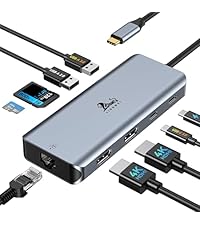


| ASIN | B0BNTHWWMY |
| Best Sellers Rank | #8 in Laptop Docking Stations #15 in USB Hubs |
| Customer Reviews | 4.2 4.2 out of 5 stars (12,354) |
| Date First Available | August 22, 2022 |
| Item Weight | 4.9 ounces |
| Item model number | 1 |
| Manufacturer | LIONWEI |
| Product Dimensions | 13 x 0.5 x 5 inches |
B**R
Powerful hub that turns one port into a productivity powerhouse
This 13-in-1 USB-C docking station has completely simplified my setup. With support for dual and even triple displays, I can easily connect multiple monitors without juggling adapters, and the video quality stays sharp and stable. The assortment of USB-A and USB-C ports means I can keep all my peripherals plugged in at once — keyboard, mouse, external drives, and more — without swapping cables every time. The built-in Ethernet port is a nice bonus, delivering a reliable wired connection when Wi-Fi gets flaky. Setup was plug-and-play, and it hasn’t skipped a beat since I started using it for work and media. If you’re looking to expand your laptop’s connectivity and drive multiple displays with one hub, this docking station is a fantastic value and handles everything I throw at it with ease.
B**E
Performs better than expected!!
I was leery at first, because I had used powered docking stations for decades. I connected 10 USB external drives (added a USB extender), dual monitors, and a cooling pad. I expected the startup to fail, and I was very surprised when all the devices fired up, the monitors came on, and the cooling pad was cooling. What an amazing device! I purchased it for my new MSI Katana A15 laptop. I recommend this docking station!! Works great!
R**Y
The card reader stopped working. Customer Service was excellent. See several updates below.
See Updates below. At first, this solved my problem of not having enough USB ports on my laptop. I have two external hard drives, a printer, mouse, and keyboard, plus I plug in chargers and other devices part of the time. I have a Go Pro camera, and always take the SD card out and plug it in to the computer to download video. It is many times faster than plugging the camera in. This is where the Hub failed me..... It has an SD card reader, and a micro SD card reader, which I really liked..... Until they both quit working. The USB ports still work, but if I plug a card in the card reader, the little light in the Hub comes on, but it does not show up on the computer. I am hoping I can get this issue resolved with the seller. Updates later. Update: I just noticed that on the product page description in now says "Please note: this USB Hub does not support Video output. I don't think that was on there when I bought it, but I could be mistaken. Funny thing is, it DID work to transfer video from the card to the computer files when I first got it. Then it stopped doing it after about 4 months of use. I just tried a card with non-video files, and it still does not work. I am trying to get in touch with the seller to see if this can be resolved. Update 5-23-22: The company responded via email. They said it should work with video files. After several back-and-forth emails asking me to try re-formatting my SD card, etc, they finally agreed to send me a replacement. It arrived in a few days. The replacement fails to show an SD card in either slot, just like the old one after it failed. This one did not work right out of the box. Obviously this is an issue with this USB Hub. I am changing my rating to one star. Update May 31st, 2022: After getting frustrated with the replacement not responding, I left this thing alone for a while. Marstech Customer Service did not give up, and contacted me later, still offering to help. I tried it again, and the SD slot started working. The Micro SD slot still was not working, but then started working after a few more tries. Kinda funky, but at this point, the replacement is working okay. I am changing my rating to 4 due to the good customer service, and the fact that it is now working. I hope it does not have a relapse! Update June 7, 2022: Relapse! The card reader portion stopped working. I tried their suggestion of uninstalling and re-installing the device in Device Manager, but could not get it to come back. However, after informing Marstech, they refunded the purchase price without being asked. I feel the company responded promptly and well each time, and did everything they could to make it right with me. 5 stars for Customer Service!
R**Z
Perfect all-in-one USB-C hub—stable triple display, fast ports, and rock-solid performance!
This USB-C hub is a powerhouse! The 13-in-1 design gives me every connection I need—dual HDMI plus DP for multiple monitors, plenty of USB-A and USB-C ports, fast Ethernet, and even an audio jack. Setup was seamless with my MacBook, and the video output is crystal clear on all displays. Data transfer is quick, and I love that it keeps everything organized with just one cable to my laptop. Sturdy build, no overheating, and reliable performance—perfect for work and home office setups. Highly recommended if you want a true all-in-one docking solution!
B**M
amazing hub, great value, everything I wanted.
I try not to give 5 stars in my reviews because I know sometimes it seems too good to be true, but some products deserve it. If I can't come up with something wrong to deduct a start, then I have to give it its due. This is definitely a 5star product, and I will outline my reasons for it. 1. When I was looking for a hub most of the time you end up in one of two brackets either it's on the cheaper side but you cannot charge your laptop with it, and it doesn't have a whole lot of ports, or it falls on the expensive side like more than $100. On top of that almost all the other hubs have a bunch of things that I don't need, like an SCID port. This one is surprisingly affordable, especially for what it offers. 2. For this hub, it's almost like the manufacturer had contacted me and asked me what I wanted in the hub. Then after I told them, they manufactured exactly that. Because it has two HDMI (which is surprisingly not common) and then on top of that, a DP port. I actually have the capacity to connect three monitors if I wanted just by using converters. Currently my extra monitors are HDMI because that's the tech that I have (in addition to my MS Surface). One of the HDMIs could also use a DP cable anyways. But if I added an extra monitor, I could have 3. With my laptop, I would practically look like “the Source” in the Matrix movie with all those monitors connected. So my point just being that if you need versatility, this offers that. You can hook up 3 total monitors and be great to go. 3. On top of that it has tons of USB-A ports. I have a lot of products that use that, including my headphones, my external hard drive, and my camera. But that is not all: it has those two USB C ports in the back. Therefore, this hub is going to work for me for a long time because there's just so much I can do with it. 4. When I first got it, I could not get it to charge. I'm putting this in here because I saw some reviews where they mentioned that they were having an issue getting it to charge. I will say that it's very important that you have the correct cable. That was what I learned when I got this product. So if you're having that issue, the way to troubleshoot it is to plug your laptop in with your USB C cord with your brick into the wall and make sure that your machine charges without the hub at all. That will help you determine what the problem is, and that's what helped me determine what the problem was. It wasn't that i had a cheap USB-C cord, but I was using that USB-C cord for a piece of tech that apparently wouldn't charge my laptop. It would power my backup battery when I needed to charge that. Make sure the cord you are using truly is 100 Watt PD charging. Or of course, I'm sure you can use a 240 Watt if that's what you happen to have. I went the extra step of getting a confirmed USB-IF Certified cable. It's not that much more to do it, and a good cable is worth it. Ever since then I've been golden. I will say, naturally, if I have my machine powering my drive + other stuff, the 100W may increase the charge of my device, but it maintains it. Like 28% might stay there. I think that’s common sense, but just in case someone is having that issue. If I’m just using the monitors though, it charges my laptop to 100%. 5. The other feature that I absolutely adore is there is a button on top where I can switch displays instead of having to go through the menu. I definitely use this more frequently than the average user because sometimes all I need are a couple of screens up, or maybe just one, and I don’t like to have monitors running for no reason. It can just lead to screen burn, etc. I may not necessarily need to have all of my screens running. So i can push on that button (I put a picture of what pops up), and it gives me the display options just on that first one touch. I'm still learning but there is a difference between a brief touch and holding it in, and there is a difference to be had. So what I'm talking about is the brief touch you have your menu options and then you can choose from there. It's so convenient and a wonderful time saver for somebody like me who sometimes I only want my big secondary screen, and sometimes I want to light it up with all the monitors I have because I need them for the project you're working on. Good reviews help us all make good purchasing decisions, so I hope this helps anyone else in knowing what they are getting.
T**M
TL;DR Great USB C hub for Macbook Pro 16. It has all the necessary adaptors and it has a good low profile shape which can be integrated smoothly with the MBP 16. (See uploaded video) I will highly recommend this hub. Pros: 1. I purchased this usb c hub to convert the my MBP16 usb c to USB-A and sd card reader. And it works great, every usb converting function is working as expected. In the meantime, the hub won't get extremely hot (my previous adaptor does). It will keep in a warm temperature which is acceptable. 2. I occasionally use its HDMI adaptor to connect my MBP to a 1080P monitor, and the monitor can work smoothly in 60HZ. 3. I really like its low profile design and it can be connected/integrated with my MBP smoothly. The hub is tightly connected with my mac and they are almost in the same level, I can put my mac on the desk and do not need to worry if the hub has bump or create uneven point. Cons: 1. The hub's power light won't turn off, even I shutoff my laptop. It maybe because I have my mac's power cable always connected, but I think it makes more sensor to shutdown the hub if the laptop is in sleep mode or shutdown. 2. It lacks DP adaptor. I think this "Con" belongs to Apple. I cannot find a usb c to hdmi adaptor that support 4k 60Hz output. So to use mac with 4K 60Hz monitor, it needs to be "usbc to usbc" or "usbc to dp". In general, I think a DP adaptor is more preferable than a HDMI for a Mac.
V**E
So far this product has been really good for all the uses I needed out of it. The build quality is really great, all the ports work really well and are sturdy. There is no part of the product that is creaking or a loose piece of plastic. It fits really well if there is no protective case on your Macbook, which I didn't mind removing but some people might. The best feature about this product is the Hdmi port. The resolution on that port which the monitor receives is really good in quality. This is definitely a good buy. The only thing that is left to be spoken for is the life of this product. So far it has been really good.
S**N
This is great for intended purpose
H**5
Awesome cord. Very durable, affordable and serves it's purpose. My Asus Zen Book sadly was built with a mini HDMI. Those things are just too damn sensitive. I moderately tripped over the cord and it only shows picture now if I hold the cord on a certain angle. A full sized HDMI would barely be bent at all... I was trying one last time to position it good but it seems like it doesn't show picture at all anymore (Guess I tried to bend it back in place too much). I'll fix it eventually, money is better spend reinvested in my online business. Too my amaze, my type C port has a "D" beside it so it allows display out. I'm glad I got an premium ultra book... Picture is expected at good quality, if I play a 4k video on YouTube with a 1080p TV it looks the same as it would on a 4k screen (2160p). What I'm saying is it's not worth it to get anything more than 1080p unless you have a tv over 80'...(I think your money could be better spent at that point). That is if your tv is 10+ feet away from you which it should be because 10+ feet away makes it so your REM sleep isn't negatively affected from watching TV before bed... Just a little tip to save you some cash and tiredness in the morning.
M**.
It is a very nice cable, at first all I wanted was to screen mirror my game to my tv using my new galaxy s9, i tried using my charger it did not work so i bought this plugged it in. The screen mirror feature worked but what I didn't know is that it allowed my phone to serve as a desktop pc, looked just like a linux OS, it was very cool to use because it seemed as if it were a pc. I would really like to use the feature more, at first I saw that this product had no downsides but since i wanted to use the pc feature my bed is far from my tv and the length was short, i would be very interested in a wireless version. All in all I'd say this product is worth the money I spent and then some
Trustpilot
1 week ago
2 days ago



