We remain fully operational. Our teams are working around the clock to ensure your deliveries continue safely.

DOWNLOAD THE APP


Customer Services
Copyright © 2025 Desertcart Holdings Limited
DOWNLOAD THE APP
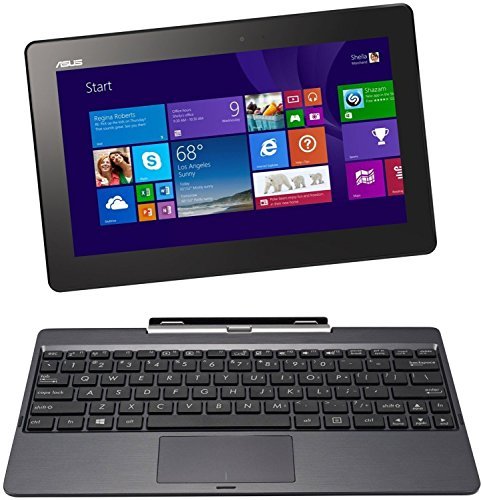
🚀 Elevate your mobile workspace with ASUS Transformer Book – where flexibility meets performance!
The ASUS T100TAF-BING-DK024B is a sleek 11.6-inch HD convertible laptop featuring an Intel Atom Z3735 quad-core processor, 2GB RAM, and 32GB eMMC storage. Designed for professionals on the move, it offers up to 5 hours of battery life, dual-band Wi-Fi, Bluetooth 4.0, and a crisp IPS display. Its detachable keyboard and lightweight build make it ideal for seamless transitions between work and leisure, delivering solid performance for everyday tasks and media consumption.


| ASIN | B00PSFY3AU |
| Are Batteries Included | Yes |
| Average Battery Life (in hours) | 5 Hours |
| Batteries | 1 Lithium Ion batteries required. (included) |
| Brand | ASUS |
| Colour | Gray |
| Computer Memory Type | DDR3 SDRAM |
| Connectivity Type | Bluetooth, Wi-Fi |
| Customer Reviews | 3.7 3.7 out of 5 stars (397) |
| Date First Available | 6 Nov. 2014 |
| Form Factor | Convertible |
| Graphics Card Description | Intel HD |
| Graphics Chipset Brand | Intel |
| Graphics Coprocessor | HD GPU |
| Graphics RAM Type | Unknown |
| Guaranteed software updates until | unknown |
| Hard Disk Description | SSD |
| Hard Drive Size | 32 GB |
| Item Weight | 570 g |
| Item model number | T100TAF-BING-DK024B |
| Lithium Battery Energy Content | 31 Watt Hours |
| Lithium Battery Packaging | Batteries contained in equipment |
| Lithium Battery Weight | 300 Grams |
| Manufacturer | ASUS |
| Maximum Memory Supported | 2 GB |
| Number of USB 2.0 Ports | 1 |
| Operating System | Windows 8.1 |
| Power Source | AC ADAPTOR |
| Processor Brand | Intel |
| Processor Count | 4 |
| Processor Speed | 1.33 GHz |
| Processor Type | Atom Z3735 |
| Product Dimensions | 26.3 x 17.1 x 2.05 cm; 570 g |
| RAM Size | 2 GB |
| Resolution | 1366x768 |
| Screen Resolution | 1366 x 768 pixels |
| Series | Transformer Book |
| Standing screen display size | 10.1 Inches |
| Voltage | 5 Volts |
| Wireless Type | 802.11b, 802.11g, 802.11n |
Y**R
Excellent hybrid and good value for money
I have had a rather aged Nook HD for a few years now and have loved using it due to its excellent quality screen but as it has become so slow I have been looking for a replacement. My requirements are for a tablet with a HD screen on which I can watch Netflix. My wife also wants a laptop which she can use mainly for MS Office but also for some light photo editing and also to watch various videos on Youtube. We both want a light compact machine which does not cost a lot as I have a speedy full tower PC that can handle intensive tasks such as video encoding and photo editing with aplomb. As this device would be shared I decided to look at a hybrid machine and this Asus received glowing reviews including from Tech Radar so I decided to take the plunge and buy a refurbished machine from Amazon Marketplace seller lcdtv (the 64Gb version). It was listed as Grade A stock and when it arrived it looked brand new so I was very pleased. It was well packaged, came with the pen and spare battery, battery charger and there was no mark on the main tablet or the keyboard. Booting into Windows 8.1 revealed no dead pixels and everything was working as expected so I was happy. One of the first things I did was to upgrade the machine to Windows 10 and the whole process was very straight forward. Searching on Google for Windows 10 Upgrade I downloaded the small software from the Microsoft web site and it automatically downloaded all the files required and upgraded my machine without a hitch. I have installed Bit Defender which has received good reviews for its antivirus and antimalware capabilities along with Office 2016.Thanks to the SSD everything loads up quickly and I have no complaints about the performance of the machine. Here are my initial thoughts on the machine which I hope will assist with your purchasing decision: 1. The keyboard works well with the tablet but note that it has a separate charging port – therefore you need to charge the tablet and the keyboard separately. They keyboard obviously has longer battery life than the tablet but I haven’t yet been able to check how long. It goes to sleep automatically and wakes up when you press a key. There is a delay before the tablet starts receiving its input as the Bluetooth link is re-established 2. The magnetic clamps are strong and hold the tablet firmly in place – the build quality is good and I have no concerns that over time there may be issues with the connectors 3. The tablet cannot tell when it is disengaged from the keyboard meaning I have to manually change the tablet to “Tablet mode”. I don’t know whether that is me or an issue inherently with the hardware but it would have been great if it was automatic 4. There are no full sized USB ports on this machine meaning you will need a micro USB to USB cable which are quite cheap on Amazon – as I find using a mouse when in Desktop mode essential this is an important accessory for me 5. There is no full sized HDMI port either so you will need a mini HDMI to HDMI cable or use something like a Chromecast to view on TVs 6. When connected to the keyboard the tablet cannot be positioned in tent mode – it can only open in one direction and doesn’t go flat like regular laptops 7. Speakers are not the most powerful – they will do in a pinch but I recommend connecting it to proper speakers or even a decent portable speaker 8. Being used to Android Windows is generally slower for some Apps – for example I read on my Kindle App and this is noticeably slower to load than Android. However once loaded you can easily switch between apps and keep it loaded in memory 9. Windows 10 in tablet mode doesn’t feel as usable compared to Android. For example the taskbar in Windows is essential as the tablet has no physical home or back key but it could do with being more customisable. However I think with time I will get used to Windows tablet mode as this is my first time using it This machine is light and compact, with decent performance and a good screen and bought as A grade stock excellent value for money. Windows 10 as a tablet OS will take time to get used to for people coming from iOS or Android but the Desktop mode is like any normal laptop. Upgrading to Windows 10 was a breeze and there was not too much bloatware to get rid off. Overall I am very happy with my purchase and the flexibility the device gives me.
M**H
Strange H/W config. Lots of bloatware. And Its a T100, not a T200! Maybe OK.
My trusty 7 year old WinXP MSI 10" netbook finally fell apart. So, I saw this ASUS Transformer in an amazon warehouse '20% off' sale as a directly comparable replacement for it. There are several different variants, I bought the one with the 64GB SSD and the 10.1" screen. After the sale discount was applied, it cost me about £120 in used 'very good' condition. Arrived on time, well packed and apparently undamaged - other than the cosmetic damage listed on the warehouse description, of course. It appears quite sturdy, and is heavier than you'd expect just from looking at it. I bought it to use as a netbook, but its actually a tablet with a detachable keyboard. Both the tablet (the screen part) and the dock (the keyboard/trackpad part) have charging ports and 'on/off' buttons and presumably separate batteries. Not quite sure how that works, as the windows onscreen battery indicator only shows the tablet battery charge (?), but if your keyboard/trackpad doesn't appear to be working be aware the dock needs to be charged and switched 'on'. Anyway, switched it on and it opens into the usual windows set up screen. The product description said it was loaded with Win 8.1, but the start up ended with a multi gigabyte Win10 update notice. Now I thought the 'free win10' update period was over, so I'm not sure if that update was 'built into' the ASUS when it was manufactured, or whether that particular PC I'd bought was already on Win10 and detecting the latest 'creators update' as part of set up. End result is - after a 2 hour long set up - its on the latest version of Windows 10. ....... and its not detecting its dock/keyboard/touchpad any more. Not sure why, maybe its set itself into tablet mode or maybe the dock battery needs to be charged after the 2 hours of setup activity, or maybe windows 10 doesn't understand the dock? After playing around with it for a couple of hours it seem to have a mind of its own how reliably it detects the dock. There may be a switch, a key, a setting or a duff driver that I need to find, but I haven't found it yet. Looking at the software installed alongside Win10, it has all the ASUS bloatware there. Which is good, because there may be some necessary drivers or utilities for the unusual hardware, like the dock, but bad because bloatware generally is. More surprisingly there's stuff like Dropbox, Evernote, WPS Office, Mcafee, DriverNotifier which may be part of the ASUS build, but its stuff I normally see dumped on refurbished PCs. That extra non-ASUS(?) bloatware takes over 1GB, which is a lot of wasted space on a small SSD PC! So I uninstalled all that. McAfee, as expected, didn't want to go. DriverNotifier tried to tell me i'd 'underestimated it' which was strangely creepy. I may have to do a clean Win10 install after hearing that. PC is now recharging. 5 hours to full charge it tells me, which is not an impressive recharge rate. Last, but not least, its listed as a T200TA on Amazon, but the box it arrived in tells me its a T100CHI. It looks like the pictured product, and has the correct spec ...... and I don't know if there is any difference between the T200TA and T100CHI, but be aware it appears there are all sorts of variants under the generic product title. So, if it runs OK after the recharge and I find out how to make the dock detection more reliable, it looks like a suitable replacement for my old MSI.
Trustpilot
2 weeks ago
2 months ago