
DOWNLOAD THE APP


Customer Services
Copyright © 2025 Desertcart Holdings Limited
DOWNLOAD THE APP

✈️ Elevate your cockpit game—fly like a pro, feel the thrill!
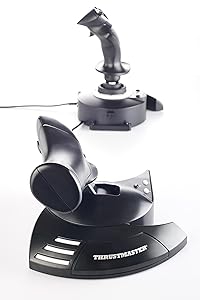
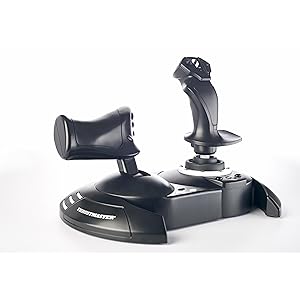
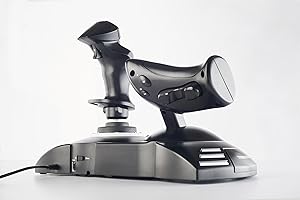
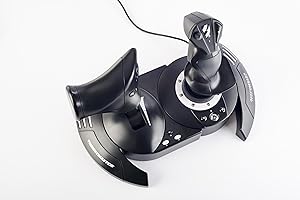
The Thrustmaster T-Flight Hotas One is a precision-engineered flight stick and detachable throttle combo designed for immersive flight simulation on PC and Xbox Series X|S. Featuring adjustable joystick resistance, multiple programmable buttons, and plug-and-play USB connectivity, it delivers realistic, ergonomic control for all aircraft types. Ideal for beginners and seasoned sim pilots alike, it supports popular flight sim titles and expands with Thrustmaster rudder pedals for enhanced realism.

| ASIN | B07643TW2V |
| Best Sellers Rank | #734 in Video Games ( See Top 100 in Video Games ) #3 in PC Game Flight Controls #14 in Xbox Series X & S Controllers |
| Customer Reviews | 4.4 4.4 out of 5 stars (6,325) |
| Date First Available | November 5, 2016 |
| Is Discontinued By Manufacturer | No |
| Item Weight | 3.62 pounds |
| Item model number | 4460168 |
| Language | English, French |
| Manufacturer | Thrustmaster |
| Product Dimensions | 20.47 x 11.42 x 22.24 inches; 3.62 Pounds |
| Rated | Everyone |
| Release date | November 1, 2017 |
| Type of item | Video Game |
B**Z
Great Entry-Level HOTAS – Smooth Controls and Perfect for Flight Sim Beginners
The Thrustmaster T-Flight Hotas One is an awesome starter setup if you’re getting into Microsoft Flight Simulator or any flying games on Xbox or PC. The controls feel solid and responsive, and the throttle + joystick combo gives a much more realistic flight experience compared to a standard controller. Setup was extremely easy — literally plug in and go. The joystick has a nice weight to it, the buttons are well placed, and the adjustable resistance is a nice touch. The throttle moves smoothly and gives you good control during takeoff, cruising, and landing. I also like that you can separate the throttle from the stick if you want more realistic spacing. For the price, the performance is excellent. You’re not getting the super high-end metal feel of a premium HOTAS, but everything works reliably and feels good in the hand. Perfect for new pilots, casual sim players, or anyone who wants a big upgrade from using a controller. If you’re looking for an affordable and dependable HOTAS setup for Xbox or PC, this one is absolutely worth it…..
M**O
Thrustmaster TFlight Hotas One works great!
Great flight stick for the price and easy controls. As other reviewers stated- no need to install the Thrustmaster driver as others reported issues. Just use the basic driver windows 11 installed by default. Press the xbox button to turn it on. For the following steam games: Elite Dangerous detects this joystick by default. For Mech Warrior 5 Mercenaries - right click game in steam and select properties and select controller and click set up and follow on screen instructions and afterwards play in gamepad mode in game and everything works including throttle and twisting to turn! Enjoy! Strike Suit Zero sees it as a Xbox 360 game pad, just set the throttle as the throttle in game and enjoy.
K**N
Amazing for Ace Combat / Star Wars Squadrons. Xbox One / Series X/S Works on PC too!!
Ordered two, one for myself and one for my best friend who loves flight simulator games as a birthday gift and took a little bit to make sure it was all set up and configured correctly at first and is still taking some getting used to as I haven't had a joystick in the better part of almost 20 years all the way back since my wingman days on PC, but thrustmaster has always made great joysticks or HOTAS setups. The throttle control in Ace Combat is amazing and all of the axis controls, targeting options, etc. are really perfect for games like that and the level of customization is unlike anything I've ever seen on previous joysticks that I've owned. I haven't had the opportunity to use it on PC yet and I don't own Microsoft flight simulator as I prefer like actual aerial combat dog fighting games however I have heard that it can be configured for several games involving space combat. Definitely makes a huge difference over using a regular controller... I really don't get what is up with all of the negative reviews that people have made about this flight stick but as far as I've seen it's great. It even comes with its own miniature Allen hex wrench to be able to securely screw the throttle base to the joystick base so you can have it as one giant unit like I do for either setting on a table or your lap while playing or you can also detach them depending on your preference although the wire connecting them is not detachable so it's wise to be mindful of that but overall it is an amazing flight stick and for people who've had issues using it with their XBox you have to make absolutely sure that you've turned off your controller and have the joystick itself plugged in via the USB port before you actually start the game even once you've got it loaded to make sure that the joystick is being recognized as your player one controller.
J**Y
It's aiight.
Throttle is REALLY, irritatingly loose. I'm going to have to open it up to try and tighten it. Other than that, pretty damned good.
C**R
It disappears. What every good controller should do. (Xbox One User)
You get so into using the device that it ceases to exist. You aren't thinking about it being there. It just melts away because the actions you perform with it become so natural, that belief is suspended. You get these easy muscle memories for actions. "Oh, there's a star. Hard bank right, throttle up, turn out, wait until you hit 1c, then throttle back and tap the system map to pick dock." You think that. Then your hands just do it and you aren't thinking about it. Because it's such a good controller. It feels cooooooooooool using it. I can't put it any other way. It's not good for shooters. I tried to use it to drive tanks in War Thunder, but that's a twitch shooter's world. Not a stick world. Not unless you are flying the planes. Perfect for that. But it will take a lot of TIME to get the stick to play nice with War Thunder. Their default settings aren't just bad, they are dangerous. No rudder control to speak of. You have to remap it off the stick because it's way too high, even if you set it to 0 in settings. Remap it to the toggle button on the back of the throttle. But Elite Dangerous? It's like they sat down with the folks behind the game and made SURE it would just be perfect out of the box. Because it was. I haven't changed a single button, setting, or mapping. I adore the default setup for this stick with Elite Dangerous on Xbox One. This alone, for me, is enough of a reason to buy this thing. It's one of the most rewarding gaming experiences I've ever had. "Throttle up to engage light engines." Sure thing. And you slam that throttle forward and start hurtling through fields of stars.
T**S
Easy to use, qreat quality and just what he wanted
R**I
Excellent. Everyone should take it. It makes adventure to play Games .
F**R
Es una buena adición para el simulador, además de que incluye los botones de xbox por si lo juegas en el xbox series. yo lo conecte a la pc y ha funcionado muy bien con MSFS 2020, 2024 y X-Plane 12. tiene varios botones para poder configurar a tu gusto
J**C
Un joystick davvero eccellente e intelligente ... pienamente soddisfa la mia modalità di gestire gli strumenti di vari aerei per volare in MSFS 2020. Grazie
T**N
Cant find any HOTAS combo for under 100 SGD, i would say this is a good product for anyone trying to get into flight sim as it is very affordable and customisable.
Trustpilot
1 month ago
1 month ago