Some deliveries may take a little longer than usual due to regional shipping conditions.

DOWNLOAD THE APP


Customer Services
Copyright © 2025 Desertcart Holdings Limited
DOWNLOAD THE APP


🖱️ Elevate your click game—precision, power, and comfort in one sleek package!
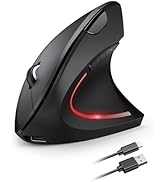
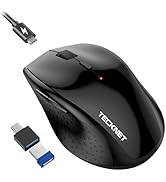
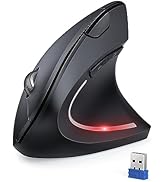
The TECKNET Wireless Mouse combines high-precision 4800 DPI optical tracking with a robust 2.4GHz wireless connection offering up to 15 meters of lag-free use. Designed ergonomically for right-handed users, it features six adjustable DPI levels and silent clicking for a distraction-free environment. Powered by 2 AA batteries, it boasts an impressive 30-month battery life, making it ideal for professionals seeking reliable, long-lasting performance across multiple operating systems.

















| ASIN | B001DHECXA |
| Are Batteries Included | No |
| Average Battery Life (in hours) | 18 months |
| Batteries | 2 AA batteries required. |
| Best Sellers Rank | 31 in Computers & Accessories ( See Top 100 in Computers & Accessories ) 2 in Mice |
| Brand | TECKNET |
| Colour | gray-black |
| Customer Reviews | 4.4 4.4 out of 5 stars (28,894) |
| Date First Available | 8 Jun. 2007 |
| Guaranteed software updates until | unknown |
| Hardware Platform | PC |
| Item Weight | 75 g |
| Item model number | EWM01002 |
| Manufacturer | TECKNET |
| Operating System | Linux, Windows 10, Windows 11, Windows XP |
| Power Source | Battery Powered |
| Product Dimensions | 6.5 x 4.15 x 10.5 cm; 75 g |
| Series | EWM01002 |
C**S
A classic mouse re-born. A bit like Danger Mouse.
I don’t know the history of what’s going on here, but TeckNet Classic M002 nano mouse is basically the exact same mouse as the Logitech VX Revolution that I bought back in 2007 and amazingly still use to this day. I bought that when I received my first company laptop, and I’ve used it for 9 hours a day, every working day for 10 years ever since. The VX wasn’t the only Logitech mouse in our household. My partner uses a Logitech MX Performance mouse with her desktop computer, while up until recently I used a Logitech MX Anywhere with my personal laptop. I’d only had that mouse for two years before it started to develop an issue where it would very briefly drop connection with the laptop, literally a fraction of a second, but long enough to make some Photoshop actions and drag and drop functions an utter nightmare. I’d had enough of it, despite it being a very nice mouse to use otherwise, so went looking for a replacement. A quick look on Amazon and I noticed this TeckNet mouse which at first glance looked incredibly similar to my trusty VX. I was intrigued to see if it really was the same, and for the money it was a no-brainer, so I waited for it to arrive. On arrival, I immediately compared it side by side with the VX, which as you can see from my photo is nearly identical. The feel of the mouse is absolutely the same. It’s a smaller mouse than many, but is so comfortable in my hand. It sits nicely, the buttons are all in the right place and function well. There are a few small changes to the VX though to note. Firstly, the USB dongle is much smaller and of the sort that can be left permanently in the computer, unlike the inch-long protrusion that came with the VX. The new mouse also has a power saving function where it drops to a stand-by mode after a period of inactivity, something which is cancelled by a click of a button. The underside of the mouse looks very different, but you’ll not really notice that in use. Finally, the zoom button in the top left of the VX has gone, which I can count on the fingers of one hand how many times I used over the last decade so no big loss. Given I spent nearly £50 on the VX mouse I’ve got to say that for less than £10 this TeckNet mouse is an absolute bargain. It’s comfortable and functional, and only time will tell if it’s as reliable as the VX. If it lasts a quarter as long I’ll still be up on the deal.
K**S
brilliant value mouse
This is a brilliant mouse. I have used them for years. Batteries last exceptional long time, it is resposive , plug in and go.
H**2
Cheap mouse - Does the job OK
Replaces Logitech MS720 (Bluetooth and WiFi) that started having problems with mouse buttons etc (common problem). This mouse works OK, is a similar (larger) size to the Logitech and cheap. But no Bluetooth so I waste a USB socket on my laptop for the USB transmitter/adapter. PROS - Cheap and works - Large size that is comfortable for larger hands CONS - Mouse keys do not feel as positive as the Logitech (light, short travel, little feedback) - Needs USB adapter so you lose a USB socket - Mouse cursor can look less controlled on screen are Logitech, even after adjustments
Z**F
Excellent Wireless Mouse – Smooth, Comfortable, and Great Battery Life
I’ve been using the TECKNET Wireless Mouse with my laptop for a while now and I’m really impressed. It’s very comfortable to use, fits nicely in the hand, and the buttons feel solid and responsive. The adjustable DPI levels are a great feature – switching between speeds is easy, and it works well for everything from everyday browsing to more precise tasks. The tracking is smooth and accurate on different surfaces, and the connection has been completely reliable with no lag or dropouts. One of the best things is the battery life. It really does last a long time without needing changes, which makes it perfect for work, travel, or home use. Setup was simple – just plug in the USB receiver and it’s ready to go. Overall, this is a great value wireless mouse: comfortable, accurate, and dependable. I’d happily recommend it to anyone looking for a quality mouse for their laptop or PC
S**W
Quiet, comfy and reliable mouse
This wireless mouse is great, smooth tracking, quiet clicks, and the battery really does last ages. Comfortable to use for work and everyday browsing.
J**S
Extremely comfortable
This mouse is incredibly comfortable and very quiet with clicks. It was very easy to connect once I found the bluetooth reciever in the bottom of the mouse. It is just the right size for my hand and it's very high quality in my opinion.
R**N
Sneaky version update - still okay value
Tecknet have made a sneaky version update on this mouse recently. The newer version can be identified by: the 'Tecknet' logo placed towards the edge of the mouse rather than the centre, the LED indicator colour red rather than green, and the sensor now uses visible red LED rather than infrared. I went to order a 2nd mouse after having a good experience with the first one I had purchased a couple of years ago for work. To my disappointment, although the URL / Amazon listing has remained the same, a number of negative changes have been made to this mouse (most likely as a cost saving measure). The changes are subtle enough not to be noticed in the product pictures before ordering (and not all product pictures have been updated as of Jan '22). The side grips are now solid plastic, rather than the slightly rubbery-feeling textured finish to the previous version. The once infrared LED for the tracking sensor is now visible bright red (feels quite 2008), so when you switch the mouse on, you instantly get blinded. The scrollwheel appears to be set a little too deep (could just be a defect with my unit), so you often catch your finger on the plastic edges of the left/right buttons when scrolling up. The switches appear to be a fair bit louder and have more resistance. The mouse is still okay value for a wireless mouse, battery life amazing, ergonomics great aside from the scrollwheel - just a little disappointing when the previous version was the same price and, in my opinion nicer to use. I am not sure why this is labelled as 'for gaming', if this is the intention, you may find the wireless latency and lower polling rate (most 'gaming' mice use 1000hz / 1ms) to be fairly high, especially for FPS games.
E**C
This is definitely a great mouse. The feel is good and big enough for my hand. For the price that I'm paying, it is really reliable. I bought 3 of these and so far none has given me any problem.
M**M
Extremely easy to start using, just pull out the dongle from inside the battery compartment, put into USB port on your computer, install batteries in mouse and you're set. The DPI setting is a little confusing because as far as I can tell, there is no indicator of which setting you're on, so I'd click the button and move my mouse. If it was still moving too quickly, I hit the button again. I'm on the lowest DPI setting and I slowed the mouse in Windows setting so I could actually move the mouse and hit where I wanted to on the screen. I really like that it shuts itself off after x amt of time to save the battery life. Just remember if you're using your mouse to wake up your machine, you need to push a mouse button first to wake it up.
M**A
Teşekkürler..
P**X
This a tue best mouse i have ever used. I buyed this for gaming and also for my vissual effects and 3d animation work. It has extra 2 button which makes my work more easier and faster.... and yes its bery very durable i droped it once and it was allright. I used this mouse almost 8 month and its still working great and i hv not changed batteries till now battery life is just amazing i use daily 4 to 8 hrs . Thank u amazon
J**T
Hey everyone! I bought this wireless mouse a couple of days back. This is made by tecknet ,which is a UK based brand. Till now I have used many products from tecknet and I happy with all of them. I also own few other wireless mouse which I have reviewed on amazon earlier. #Review Anyway ,coming to the product ,It comes with a simple cardboard like packaging. When you first hold it in hand it feels extremely lightweight .Actually I thought that its a cheap product. But its not ,The left, right, and middle click buttons are all the normal mouse-style buttons: Small rectangular buttons with a good click, and you don't need to press them hard.At the sides there are two buttons for back and forward. Also there is a button on top which can be used to adjust the DPI. The design of this mouse is really ergonomic with that curved left side for your thump. It feels really comfortable in your palm. SETUP AND FUNCTIONING -------------------------------- The mouse is very easy to setup.You just have to insert the AA battery at the bottom to power up the mouse ,then plug in the nano receiver to your PC's USB port.And now you can use it within a radius of 10m max or anywhere around your room.It uses 2.4G wireless connection for transferring the inputs from the mouse. Also I didn't install any driver on my PC to install the nano receiver, it worked fine ,just like a plug and play device. Overall the mouse offers good amount of feedback and works great.I use it with my lenovo laptop with windows 10 installed.This is as responsive as the wired ones.The automatic power saving technology ensures that the mouse automatically turns off when not in use.And it turns on when you press any button.Also this mouse works with most of the surfaces ,you don't need a mouse pad always. #Battery life ----------------- As seen in the description it offers 18 months of battery life ,which is just amazing. #CONCLUSION: --------------------- Overall, if you're looking for a mouse that is good for casual use, then this is definitely the mouse for you. The mouse might not be the best for playing games and the like, but if you are anything like one who use your laptop for homework and browsing the web, then this mouse is more than enough. The light weight ergonomic design ,18 months battery life and 2 yrs of warranty is something worth appreciating. Thanks for reading ,I hope my review helps .You can comment down below for any further help. Regards Abraham
Trustpilot
3 weeks ago
2 weeks ago