


🖥️ Elevate your Mac setup with the MX Master 3S — where precision meets quiet power.
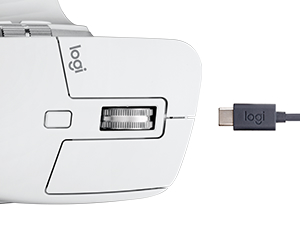
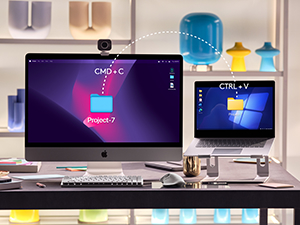
The Logitech MX Master 3S for Mac is a premium wireless mouse optimized for macOS and iPadOS, featuring an ultra-precise 8K DPI optical sensor that tracks on glass, MagSpeed electromagnetic scrolling for speed and accuracy, and 90% quieter clicks for a distraction-free experience. It supports multi-device Bluetooth pairing with seamless file transfer, offers extensive app-specific customization through Logi Options+, and boasts an ergonomic design for all-day comfort. Powered by a rechargeable USB-C battery lasting up to 70 days, it also incorporates recycled plastics, making it a sustainable choice for creative professionals and power users.







| ASIN | B09HMV6K1W |
| Additional Features | Lightweight, Portable, Rechargeable, Wireless |
| Antenna Location | Office |
| Are Batteries Included | Yes |
| Are Batteries Required | Yes |
| Battery Average Life | 1 months |
| Best Sellers Rank | #134 in Computer Mice |
| Brand | Logitech |
| Built-In Media | Free Adobe Creative Cloud Subscription |
| Button Quantity | 7 |
| Color | Space Grey |
| Compatible Devices | Personal Computer |
| Connectivity Technology | Bluetooth, Radio Frequency , USB |
| Customer Reviews | 4.5 out of 5 stars 6,508 Reviews |
| Enclosure Material | Plastic |
| Hand Orientation | Right |
| Hardware Platform | Mac, PC |
| Item Dimensions L x W | 6.83"L x 5.45"W |
| Item Height | 2.4 inches |
| Item Weight | 200 Grams |
| Manufacturer | Logitech |
| Model Name | MX Master 3S |
| Model Number | 910-006569 |
| Mouse Maximum Sensitivity | 8000 Dots per Inch |
| Movement Detection | Optical |
| Movement Detection Technology | Optical |
| Number of Batteries | 1 Lithium Polymer batteries required. (included) |
| Number of Buttons | 7 |
| Operating System | Windows, macOS |
| Power Source | Battery Powered |
| Range | 30.0 feet |
| Special Feature | Lightweight, Portable, Rechargeable, Wireless |
| Style Name | MX Master 3S Mac (NEW) |
| UPC | 097855174826 |
| Unit Count | 1.0 Count |
| Warranty Description | Manufacturer’s warranty can be requested from customer service. |
J**Y
Logitech MX Master 3S: A Video Editor's Dream Mouse
As a video editor who's constantly toggling between my 16" M1 MacBook Pro, iPad Pro, and occasionally other devices, I've found a trusty sidekick in the Logitech MX Master 3S for Mac. This mouse isn't just a tool; it's my editing and productivity wand. The ease of switching between devices is akin to magic. Just like its cousin, the MX Keys keyboard, the transition is seamless. I can be trimming a clip on my MacBook and then switch to my iPad for some quick graphic work with just a click. It's like having multiple assistants at my beck and call. Now, let's talk about the programmability - a video editor's dream. The Logi app transforms this mouse into a Swiss Army knife of shortcuts and functions. Every button, scroll wheel, and gesture can be customized to my workflow. It's like having a bespoke suit; everything is tailored exactly to my needs, making editing a breeze and saving me precious time. Need to make custom program-specific hotkeys? Consider it done! The ergonomics are top-notch, too. After hours of editing, my wrist and hand still feel as fresh as a daisy. The mouse fits my hand like it was custom-made for it, and the strategically placed thumb controls are a godsend. And the battery life? I get a solid 2-3 weeks of all-day use on a single charge. It's like the Energizer Bunny of mice - it just keeps going and going. Plus, with USB-C charging, I'm back in action quickly when it does need a boost. Some people have mentioned connectivity hiccups, but I've never experienced one. In short, the Logitech MX Master 3S for Mac is a powerhouse mouse that's transformed my editing workflow. It's comfortable, customizable, and keeps up with my demanding schedule. If you're a video editor or a multi-device power user, this mouse is a no-brainer.
D**N
Better than the Magic Mouse
A few years ago, I had to (VERY regrettably) switch from a MacBook to a PC for work. At the time I absolutely LOVED the Apple Bluetooth keyboard except that at the time it did not have a num pad. I also had a wired version that did have the numpad, but obviously now that MB doesn't have USB anymore that's not practical anymore. So back then I looked for a PC keyboard to replace my Apple one, and I settled on the MX Keys and the Master mouse since that came the closest I could find to the Apple keyboard. I also really liked the Magic Mouse, except for a few things. It always felt a little sluggish (like it would not slide lightly over my desk, and I've tried a number of different things like mousepads and blotters), I was always accidentally touching it and triggering gestures, and the biggest was that I could not get used to the whole thing being a button, you had to push down the whole mouse to click. As I've used the MX mouse over the years, I have become very attached to it, it fits in my hand like a glove and it is such a pleasure using it. Fast forward to 2024 and I have to say that I love this MX Keys/Mouse a lot better than my Magic key/mouse. So much so even that when the opportunity came to switch back to MacBook, I was very happy to find out that Logi has Mac versions. Took me about 2 seconds to order them for my new Mac. Luckily the Apple BT connectivity is super stable (unlike Windows, BT is so crap that you have to use the universal wireless dongle) so there are no wires or dongles necessary. It's pricey for sure, but I spend my whole day typing and using the mouse that it's totally worth it to me. I haven't really played with the gestures but so far all the buttons work the same as I've become used to on the PC version. When I first started working on a Mac back in 2013, I really liked having the Magic mouse and loved how intuitive it was and how the touch surface had the gestures. The MX just fits so much better, there is zero tension in my hand, and the Logi software lets you customize the buttons down to the app level. Maybe it doesn't look as cool as the Magic Mouse, but it runs circles around it in every day use. For me this is the perfect mouse.
A**K
You'll get used to it fitting perfectly in your palm
This is a great mouse with great response time. The color is as accurate as it was shown and it is not too large and not awkward for the palm. I bought a refurbished mouse, I initially had some doubts when I heard something wobbling inside but found out that's common if it dropped at any point. It is still great though, absolutely worth it.
S**A
One of the Best mouse for MacBook!
I have been using Logitech mouse since forever and my previous mouse lasted for 8 years. It’s hard to migrate between the mouse and get used to the new one but this was super easy! The mouse controls are very well defined and shortcuts can be used to define the common activities you want to configure them with. Both scrolling buttons work perfectly and they have feedback option that can be enabled and disabled for scrolling. Side scroll works great too for vertical scrolling. To sum up - 1) its lightweight 2) easy to connect - does not need Bluetooth hardware plugged into the USB. It directly connects to Mac. 3) it fits well in the hand and is very ergonomic. 4) it’s a good mid range mouse, although you can get them for a lot cheaper but this is the minimum you should spend if you are into regular use or into any kind of editing etc.
W**D
I really like it.
Ok, this is a great mouse. I'm old, mid 40's. I've been using a Magic Mouse for almost 2 decades now. It's been great, but this mouse is a lot better. There is a slight learning curve. You'll have to remember what you decided it should do in each app. It's extremely customizable. Keyboard shortcuts are really fun. That's a new one for me, setting a mouse button to do keyboard inputs. It does all the normal stuff extremely well, and you don't have to customize the buttons. I recommend starting slow with the most common functions. Once that becomes routine, you can add more. Each button can do 5 different things with "gestures." Hold the button and move the mouse in one of four cardinal directions. It's really cool. You should definitely buy it.
J**O
The best mouse I've ever used, except it discolors over time
The MX mouse is by far my favorite mouse for every day use and gaming. It feels great in your hand and doesn't take much grip to hold it, which is nice. The mouse clicks are super satisfying, gentle but tactile. Scroll wheel feels great, very tactile and smooth. The two side buttons are easy to press and great for gaming. The side wheel and left side button on the bottom are nice additions as well. My only complaint is that the white mouse discolors over time with extended use. Tried cleaning it, but it's permanent. Doesn't bother me too much, but will definitely bother some folks.
R**F
If you're not using the MX Master 3 as a working professional you are losing the race.
Logitech make the finest peripherals in the game, hands down. This is no different. Any heavy excel users, audio technicians, video editors and multitaskers - Logitech's flagship productivity mouse is the only choice as far as I am concerned. This mouse would be a below average choice for gaming so if that's your use case I'd go elsewhere. Not that you won't be able to play games (on the windows version with the I closed 2.4GHz unifying reciever that is, Bluetooth is a huge no go) but it'll put you at a disadvantage in games. I bought the Mac version because it's being used for my work from home office setup and all of my gear is mac. On the off chance that there was some slight compatibility optimisation with this version I didn't want to pick up the original just for added dongle support if the Bluetooth performance could be compromised at all - I have read stories of people with choppy Bluetooth issues on the original when paired with mac which I have not experienced at all, but could also have been fixed with firmware updates since then to be fair. My employer also has a zero RF policy for security reasons so I wouldn't be able to use the unifying reciever even if I wanted to, Bluetooth is my only choice. Do I wish it had a 1000Hz polling rate? Yes - but this would probably significantly diminish battery life. The polling rate is fine for what I am doing, it's more a quality of life feature that I have become used to on my windows desktop and the difference is noticable to me. It's so far outweighed by all of this mouse's pros that I'm not bothered by it at all. The left and right click are extremely satisfying and crisp, the mouse wheel click is one of the most premium feeling and sounding I've ever felt. Build quality is exceptional. I like that the space grey finish matches all my other maccessories ( ;D ) but the colour isn't a selling point for me really. Weight and ergos are great for me and the gesture button lets me perform magic mouse type functions without having to use a magic mouse which is as ergonomic as a toaster. Whichever version you're looking to get, just buy it and get it over with. Think about how much you use your mouse every day, the return on investment is overwhelming considering the hours vs dollars and you'll be more productive and motivated to do more with proper quality tools.
U**R
The best mouse I have ever used. MUST BUY.
Mice are one of the products I can only use wireless. With the wire and the way I sit at my desk, it makes for a difficulty and cumbersome experience so I always look for quality wireless peripherals. In my experience wireless products are always annoying to use with the low latency dongles and the short battery life and the lower quality materials companies use. This mouse, however, addresses all of these issues - the wireless capabilities alone are nice, but it goes further than most by being bluetooth rather than using a dongle. This change improves latency issues while allowing it ease of access to multiple setups. The weight and feel of the mouse as well as ergonomic design make it feel like the greatest mouse I've ever had in my hand. And the battery life in unbelievable. I use it exclusively for well over 8 hours per day and never turn it off, only turning off my computer each night. Despite this after weeks of usage I find its only at 20% at the lowest and after a quick 50 min charge while still using it nonstop, its at full power once more. The mouse also comes with a program that allows complete and entire re programmability to each and every button, while adding shortcuts to each button, and allowing different uses for multiple buttons to switch on the fly. This mouse is incredible and for its low cost it is a MUST BUY for any user who prefers wireless peripherals.
Trustpilot
2 days ago
3 weeks ago



