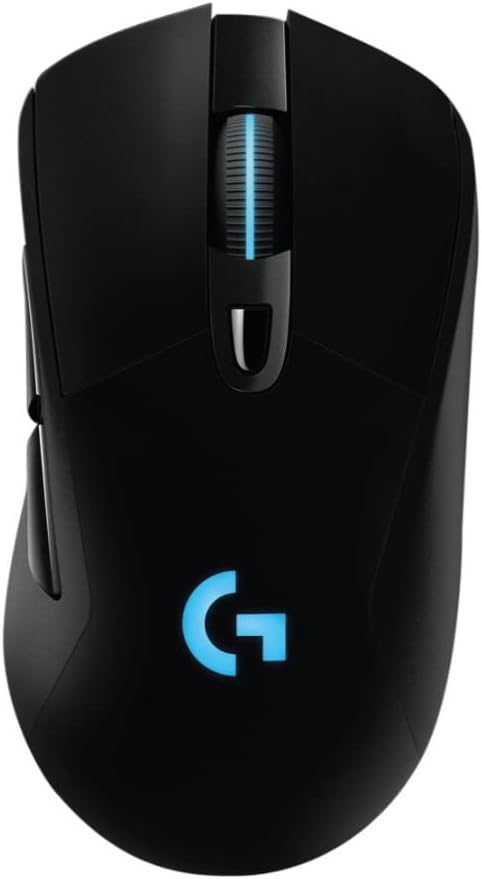
🎮 Own the game with wireless precision and endless power!
The Logitech G703 Lightspeed Gaming Mouse combines professional-grade PMW3366 optical sensor accuracy with ultra-low latency LIGHTSPEED wireless technology. Its ergonomic, lightweight design ensures comfort during extended use, while POWERPLAY compatibility offers revolutionary wireless charging to keep you powered without interruption. Featuring six programmable buttons and customizable RGB lighting, the G703 is engineered for gamers who demand performance, style, and freedom from cables.
| ASIN | B071S8M8TB |
| Additional Features | Alcohol-Free |
| Antenna Location | Gaming |
| Are Batteries Included | Yes |
| Are Batteries Required | Yes |
| Best Sellers Rank | #6,971 in Video Games ( See Top 100 in Video Games ) #99 in Mac Gaming Mice #317 in PC Gaming Mice |
| Brand | Logitech G |
| Built-In Media | mouse, user guide |
| Button Quantity | 6 |
| Color | White |
| Connectivity Technology | LIGHTSPEED Wireless |
| Customer Reviews | 4.2 out of 5 stars 1,726 Reviews |
| Enclosure Material | Metal,Rubber |
| Global Trade Identification Number | 00097855130983 |
| Hand Orientation | Ambidextrous, Right |
| Hardware Platform | PC |
| Item Dimensions L x W | 4.88"L x 2.68"W |
| Item Height | 4.88 inches |
| Item Type Name | Logitech 910-005091 G703 LIGHTSPEED Gaming Mouse with POWERPLAY Wireless Charging Compatibility |
| Item Weight | 3.8 Ounces |
| Manufacturer | Logitech |
| Model Name | G703 LightSpeed Wireless Gaming Mouse |
| Model Number | 910-005091 |
| Mouse Maximum Sensitivity | 12000 Dots per Inch |
| Movement Detection | Optical |
| Movement Detection Technology | Optical |
| Number of Batteries | 1 Lithium Polymer batteries required. (included) |
| Number of Buttons | 6 |
| Operating System | Windows 7 |
| Power Source | Battery Powered |
| Range | 5.0 meters |
| Special Feature | Alcohol-Free |
| Style Name | G703 |
| UPC | 097855130983 |
| Unit Count | 38.4 Ounce |
| Warranty Description | 2 - year limited warranty |
K**R
Great mouse for fans of the G402
I've been using a G402 since 2014, but this year I decided to finally upgrade to wireless after dealing with cable drag for far too long. Note that this mouse is identical to the G403 save for the wireless connectivity. I'm very impressed with the build quality and ergonomics of this mouse, thought it is a bit shorter (front to back) than I would like. The shape is very similar to that of the G402, with a slightly higher ridge in the palm arch area and concave buttons instead of concave ones. if the G402 is comfortable to you, you'll likely find this mouse comfortable as well. The weight distribution is a bit different on the G703, with most of the weight focused at the back of the mouse near the optional added weight. One major difference between the G402 and the G703 is two fewer side buttons. Personally this is sort of a let-down, as 4 buttons and a dpi-shift button was a good balance for me. However, the two side buttons (down from 5) and one extra top button (dpi-shift) are much higher quality than the extra buttons on the G402, without the G402's sharp edges. Also notable is the lack of glossy black anywhere on the G703, when it was very prevalent in the G402's angular design. This is a pro for me, as that material collected fingerprints like mad, and the frequent divets in the G402 collected dog hair as well. The G703 is far smoother than the G402 but has some missing buttons that may be important to certain users. Let's talk about wireless. Wireless mice are tricky for gaming, and Logitech has the best wireless implementation that I've ever used. That being said, the input lag *is* noticeable, but definitely not unbearable. I don't play a lot of competitive games, so I may not have the finest-tuned eye for this sort of thing, but I got used to the feel of this mouse after about an hour of gaming with it, and I can really only detect the slight input lag (think 6ms instead of 1ms) when I'm actively looking for it. The battery life is good, but not exceptional. With the high polling rates, sensor quality, and absolutely necessary RGB lighting found on gaming mice, it's natural that the battery life would be lower than other Logitech wireless mice such as the Performance MX or MX Master. The battery lasts around 25 hours as claimed with the lighting on and in heavy use. Most people could probably go a week or so easily without charging, but I would plug it in to charge overnight at least every few days just to be on the safe side. One nice addition on the software side would be a tray indicator for the mouse's battery life, but I guess "the technology isn't there yet." (This whole paragraph is somewhat moot if you have a Powerplay, which I don't). I can't speak to the durability as I haven't had the mouse this long, but I've had a great experience with Logitech's customer service in the past with the 2-year warranty included with their product. I would recommend this mouse to anyone outside of the most hardcore latency-snobs with its comfortable design, pleasing aesthetics, and excellent wireless.
D**S
Great mouse
I got this mouse on sale to replace my G502 that was a little small for my hands, I also wanted a wireless mouse. It is very comfortable in hand. You can't tell that this is a wireless mouse there is no lag. Battery life is probably the weak point but if you remember to turn it off when you aren't using it, it lasts long enough. The RGB is bright, but I turn it off to save battery life. You can use any Micro USB cable to charge it. It comes with 2 10g weights, not sure why you would use them. The drag on this mouse at first was a little more than on my G502 was, but it seems to be getting smoother as I use it more. The sensor in this mouse is the 12K PMW3366 sensor, at least on the mouse I received, it is NOT the 16K Hero sensor, not that I ever set the DPI even close to that, I top out at like 1,200DPI even on my 4K TV, and I play games on 800DPI but mostly on my 1440p monitor. The sides have a nice rubberized coating so that you can grip the mouse. The side buttons are nice and big, so they are easy to press when you need to. My only real complaint is that G Hub is kind of confusing to use, but if you just don't set up any profiles you can just use it to change the DPI and RGB then change your keybindings in-game.
M**R
Scroll wheel failing after 7 months of use... FIVE STARS
I purchased this mouse in late November of 2017. I'm writing this review in early July of 2018 to report that my mouse wheel is failing. Despite this fact, I still feel this product has earned five stars. I feel this way because I truly do love this mouse. It's next to non-existent response time couple with the general feel of the mouse just work for me. I love have a wireless mouse that quickcharges to full battery in under an hour. The mouse is simply a mouse that works exceptionally well, at least most of the time. I've run into an issue where the scroll wheel would intermittently scroll the opposite way of whatever way I actually wanted to scroll. At first it was next to nothing so I ignored it, but it got worse. So eventually I reached out to Logitech support. I registered my product just a few days ago, not right after purchase like I probably should have, but just in late June of 2018. Despite this fact, Logitech first sent me some general troubleshooting tips to try. I had already done most of them, but went ahead and did them again just to be safe, then went ahead and tried the others they listed as well. No luck. After I told them as much they approved me for a warranty replacement. Just like that! I've already got another mouse on the way courtesy of Logitech support. There was no arguing back and forth, no playing tag through email, no need for me to explain my problem multiple times. This has been one of the smoothest interactions I've had with a support department of a company. It was really this, in addition to a great overall product that even led me to write this review. I don't normally take the time to, but I felt I should as a shout out to Logitech's customer support. Thank you so much Logitech and I hope everyone else has as good of luck with not only their products, but also their people should the need arise.
S**T
Big waste of money
This WAS a good mouse. The G703 with the old Logitech gaming software was awesome, despite the key logger (logi referred to it as hot spots). Some years ago that software retired and the newer version came out. The issue with the new software was it affected ALL of the functionalities of ALL the firmware for your devices. Key bindings are no longer possible. - Can't assign the extra buttons to do anything beyond left/right click. - macros are non existent and ignored -scroll wheel is sub par - logitech turned $200+ worth of customizable hardware... Into basic , and i mean BASIC boring non configurable hardware . The only way to gain some functionality back is downloading the software which requests administrator privileges and runs at the kernel level (thus effectively has higher permissions than the owner themselves) The worst part is sometimes Microsoft feels the need to force some sketchy driver software which doesn't even fix ANY of the issues above or provide any additional controls. So basically it's a USB device that can force install buggy unwanted software, firmware gets changed... By the time u get new hardware, you'll find out that it got worse for W11 and therefore should get new devices compatible with the OS. Which of course will still be impossible to tell whether it's even compatible with Windows 7, let alone 8 or 10/11
A**X
This thing is amazing!
I had a Microsoft Sidewinder x8 for at least the last 10 years. It worked quite well but I had the common issues regarding wired charging failing after a few months. This wasn't an issue and was easily resolved by just getting a AA battery wall charger that I could just swap out when the got low. What I didn't realize was how the wireless connectivity was getting every so gradually worse as time went on. It was honestly unusable but I attributed it to just the ever increasing presence of wireless devices but boy was I wrong. Frustrated no more am I with this mouse! It's precise, light, snappy and the button clicks are clickly and satisifying. Battery life is superb. It's been over a week sin ceI last plugged it in to charge. I like the shape as well. I use fingertip grip and have very large hands. I bought the Sidewinder x8 because it was a large mouse for larger hands and I thing th G703 does a good job. Overall very satisifed and I've had it for about a month. Here's to hoping it lasts me another 10 years!
A**N
Good Mouse
I have the previous generation of this mouse (G403). It has been a great mouse but the left click started to double click after 3 years, but I use this mouse for gaming. So hard to say whether it is normal wear or not. I like the weight (with weight installed) and size of G703 exactly like the G403 not sure what the improvements are, but I believe it is transceiver speed a few other improvements. The DPI switch and thumb switches is great for games especially for FPS. I have since installed new switches on my G403 so it serves as a backup to G703 should I encounter another double click issue or other. I have not tried the wireless charging as I just use USB. Stays charged for quite a while your mileage may very depending on usage.
A**.
Phenomenal mouse for average sized hand. Incredible upgrade from traditional wireless mouse.
This mouse was a replacement for the mouse that came with the Logitech MK710 wireless keyboard/mouse combo (Marathon M705). I was hesitant to spend $80-$90 on a mouse, but it went on sale for $64.99 around the holidays. Pulled the trigger and I do NOT regret this purchase in the slightest. The difference in accuracy and smoothness between this mouse and my previous mouse were night and day. Additionally, this mouse really fit my hand much better than the MK705 mouse did. The MK705 is about half the length, so I had to use that mouse in more of a claw grip. I can now rest my entire hand on the mouse, so I don't get pain/cramping I used to get. I also upgraded to a nicer mouse pad that extends under my keyboard. This really helped with the smoothness of moving the mouse without the pad moving or my hand sticking to the desk. Now for the pros/cons list: PROS: - Highly configurable. I have various profiles for different games / activities. Syncs nicely with other Logitech devices via software. - Incredibly smooth movement, both on screen and on the desk. - Great battery life and very easy to switch to the cable with minimal interruption. Also alerts you at 30% remaining. - Software will "learn" the surface of your mouse pad to optimize the accuracy of this mouse. - I've noticed absolutely no lag or wireless blips since using this mouse. - Buttons have a nice click / tactile feedback to it. It's very apparently when you click anything and I have not had any mis-clicks (please see exception below under CONS). - Includes a 10g removable weight. Started out by using it, but found I like the mouse better without the weight. This is all personal preference though. CONS: - The DPI button doesn't have the greatest tactile feedback. When I have my headphones on and I click this button, I'm not always positive if I pressed it down all the way. I can't hear the click, nor can I feel it. I have to verify if I clicked this button by moving my mouse around to and seeing how quickly the cursor moves on screen. For me, this is not a big deal because I have found I actually don't want my DPI changing. I'm happy with one consistent DPI/sensitivity combo for the games I play. Also, I've never accidentally clicked this button either. I don't ever feel like it is in the way. You have to make a distinct effort to click this button fully. For me, this is not a true "CON", just wanted to make people aware of this. NOTES: I haven't tried this with the PowerPlay wireless charging system. It's honestly not really necessary. The battery life is decent and easy to switch to wired connection. The only time I'd really consider purchasing the PowerPlay system is when the battery life ultimately begins to degrade. That way I can continuously use the mouse without having to plug it in to charge. But I don't even know if I would do it then because the charging cable that comes with the mouse doesn't kink on me nor does it get caught on anything. TL;DR - I regret waiting as long as I did to buy this mouse. Has improved my accuracy way more than I expected and fits my palm much nicer than my previous mouse. Worth every penny (even at the non-discounted price).
J**M
Impressive Wireless, Lackluster Longevity
I was blown away when I first got this mouse and started gaming on it wirelessly. Unfortunately, after gaming on it for over a year now, I can't recommend it after the long-term problems that I've experienced with it. That isn't to say it isn't without its merits, but let me provide a good ol' pros and cons list: Pros: - Wireless is incredibly smooth, as advertised! - Battery life feels excellent. I don't remember what it is advertised for, but I feel like I can use my computer for a solid 12 hours before having to plug it in - The Logitech Gaming Software is pretty good. To the point above, it will send you a desktop notification when the mouse is low on battery. It has solid customization options for onboard memory, a click metrics functionality, battery life monitor, and some various other features that are nice to have for the mouse. There is a game detection mouse profile mode that I haven't messed with, but that looks promising as well. - One small QOL thing, when your mouse wakes, the middle mouse button LED will color green/yellow/red based on the battery life. Neat! Cons: - There is a very common problem with this mouse that scrolling in one direction will cause it to scroll in another direction. There is a firmware fix for this, but I just recently started experiencing this again after several months of having the fix installed. There is also a DIY hardware fix (if you search the G703 scrolling problem fix on YouTube, you should be able to find it pretty easily), but I haven't tried that myself yet. It may not sound that bad, but it makes a mundane task like browsing the web extremely frustrating. - Somewhere between 6 and 9 months, my mouse started registering multiple clicks per left click. After became particularly frustrating and impactful in my gaming, I used the Logitech Gaming Software to track my clicks and found that in about 1/5 of my clicks my LMB would click more than once. This can be mitigated by changing your system double click options so that it only detects very fast double clicks. It also occurs negligibly if you have very forceful clicks, but I value my wrist so most of the time I left click pretty softly. Before it developed the above problems that I've read online are pretty common, this was an excellent mouse, but its long-term durability leaves a lot to be desired and I am honestly pretty disappointed. I had a Logitech MX518 that I had longer than my time in high school and it had no problems at all for half a decade. I wish their new mice would last that long and my next mouse probably won't be a Logitech. In all fairness, I haven't made a serious attempt to get a replacement, but I don't want to go through the hassle just to have another identical mouse develop the same problems in under a year.
Trustpilot
1 month ago
1 week ago