


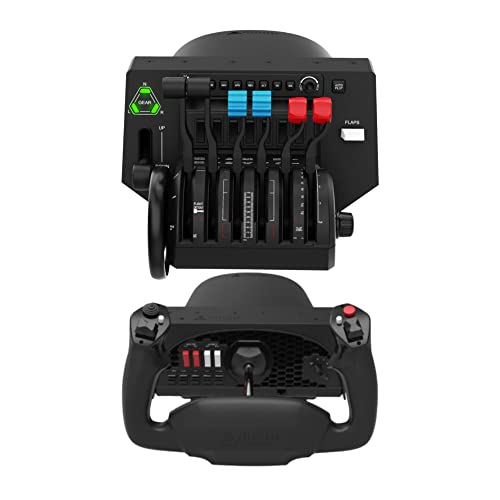


✈️ Elevate your home cockpit to pro pilot status — don’t just simulate, dominate!
The Honeycomb Alpha Flight Controls Yoke paired with the Bravo Throttle Quadrant bundle delivers a premium, versatile flight simulation experience. Featuring 6 commercial and 6 general aviation levers, LED landing gear indicators, a backlit autopilot panel, and 14 programmable warning lights, this heavy-duty setup replicates real cockpit controls with precision. Ideal for serious flight sim enthusiasts and professional training alike, it offers customizable controls and robust build quality to bring the skies to your desktop.
| ASIN | B09NFNSY38 |
| Best Sellers Rank | #30,424 in Video Games ( See Top 100 in Video Games ) #90 in PC Game Flight Controls |
| Customer Reviews | 4.4 4.4 out of 5 stars (228) |
| Date First Available | December 11, 2021 |
| Item Weight | 26.7 pounds |
| Item model number | Alpha Flight Controls |
| Manufacturer | Honeycomb |
| Product Dimensions | 23.8 x 17.8 x 19 inches; 26.75 Pounds |
| Type of item | Video Game |
J**L
Feels like i'm flying
I bought this to practice training while I'm at home. The yoke feels great, and seems like good quality. You'll want to clamp it down on something stationary or a heavy table or a designed stand, as pushing and pulling on the yoke takes a bit of effort. My initial messing with it, required 20 pounds of weights on a snack tray to keep the tray stationary on a carpet floor. MSFS picks it up right away. It'll require some configuration to dial it in though like the button layout. Also, I'm not sure if there is a setting for it, but when you make a turn with the yoke and then ease up on the yoke back to neutral, the plane doesn't exactly return to neutral as well. Meaning it requires sometimes turning the yoke in the opposite direction to become straight again. I haven't used the throttle quadrant yet, as I'm using a Cessna for training, and found Cessna like Throttle controls, and have been using those instead. The throttle quadrant seems of good quality, and has different handles for different aircraft layouts or configurations.
D**.
Nice quality
Nice quality materials
E**A
Great combo
Love this setup and the ability to.change levers to suit the type of plane Im flying.
B**O
Very nice!!!!
I’m really enjoying the Alpha and Bravo equipment. The quality is really good and the technical support is very helpful. These did take some work to get set up in MSFS 24 but they are working great now! One thing to add is if your desk is too thick for the clamps than tough luck. My original desk I just used the sticky pad but the yoke would pop out of the sticky pad usually when I was coming in to land haha so it was a pain. New desk and using the mount and clamps provided is very sturdy. So make sure your desk is only a couple inches thick max
M**N
Lights are a little tricky, but awesome with MSFS 2020
Using this with MSFS 2020 and it's day and night. I already had a TM T 1600 and TM Warthog setups, with the pedals and interested in using a yoke with throttle controls. Just awesome. The issue is getting the lights working with different airframes, both Asobo and third parties. Would need to have some technical skills to get it all working the way you want.
A**N
Need to be a software developer to set it up
Took many hours to rig the Alpha and Bravo on a PC, running X-Plane. Had to pore over forums and developer notes to find some janky workaround to use it with a Boeing 767 setup in XP12. Have spent all day trying to now get it to run on a brand new M3 Max MacBook Pro, only to have the speed brake act as a reversed throttle 1 and the yoke’s pitch and roll modes reversed. Neither of these can be reconfigured. $579 for a very pretty, very useless controller set. The thrust levers don’t even match up. Don’t venture here unless you’re a software developer looking for a passion project with lots of spare time. Not if you’re actually trying to use a sim to build and maintain skills.
A**R
For serious simulator use.
Just right for serious flight simulator use. Better to error on th ground than during a flight.
A**R
Well built system
Impressed with design and construction. Had another common system before but this is much better built. Yoke travel is smooth. Pretty red dash lights are unnecessary but they don’t hurt anything. Switches on the Beta throttle unit don’t automatically work with MS FS but there is a fix on the internet.
J**K
High quality and easy to install. Just download the drivers for the yoke and thrusters. My son (14) uses it and he is an actual pilot. He likes it because it sharpens his skills during the winter months when the weather is bad. You need to buy the rudders to make it feel more realistic. Unfortunately Amazon doesn't sell the rudders from Honeycomb.
A**R
Merci!!!!!!!!!
P**N
The Quadrant works quite good and works well,but the yoke has a few issues which I don’t like to much.First the tension on the yoke is quite high and there is no adjustment,especially when flying the airbuses.Also the hat switch Is not smooth like my thrustmaster.Also the button in front of the hat switch is a bit too high making it hard to get at the hat switch.All in all it does work very well and feels good on your hands.
Trustpilot
2 weeks ago
2 months ago



