We remain fully operational. Our teams are working around the clock to ensure your deliveries continue safely.

DOWNLOAD THE APP


Customer Services
Copyright © 2025 Desertcart Holdings Limited
DOWNLOAD THE APP


⏰ Wake smarter, charge faster, live better.
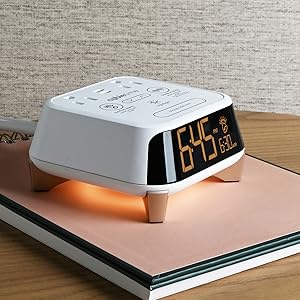
The Brandstand CubieWink is a compact, durable alarm clock designed for seamless usability with a large dual time and alarm display, intuitive knob control, and reliable AAA battery backup. It features two USB charging ports to power your devices overnight, making it a perfect bedside companion for busy professionals who value simplicity and efficiency.









| ASIN | B0754J2865 |
| Batteries | 2 AAA batteries required. (included) |
| Batteries required | No |
| Best Sellers Rank | #196,782 in Home ( See Top 100 in Home ) #1,445 in Alarm Clocks |
| Customer Reviews | 4.5 4.5 out of 5 stars (446) |
| Date First Available | 6 September 2017 |
| Is assembly required | No |
| Item Weight | 363 g |
| Item model number | BPECW |
| Number of pieces | 1 |
| Product Dimensions | 10.16 x 3.81 x 4.45 cm; 362.87 g |
D**H
I'm giving it five stars because I LOVE the usability and simplicity of the design, which is EXACTLY what I wanted. Someone put in some really serious thought into making this usable. Have you ever woken your partner because you thought you'd turned the alarm clock off, but you'd accidentally hit snooze instead--and the alarm went off again while you were downstairs making coffee? Have you ever overshot the time setting holding down the + button, because you weren't ready when it switched from snail speed to warp speed--and then overshot the other way going back? Have you ever missed an alarm because you carefully set the ALARM for 5 am, but didn't notice that you had the wrong am/pm setting on the TIME? Does it drive you crazy that you need to fuss with daylight savings time on your alarm clock when every other clock in your life adjusts automatically? Do you have trouble finding the button that shuts off the alarm, in among the eight buttons that control the tinny radio you never use? If none of those things ever happens to you, then you will not understand why I love this clock. Here is what is so good about it: --it shows both the time, in big numbers, AND the ALARM setting, in smaller numbers. You can always see both at a glance. You can always see how it's set and what it is going to do. --If the alarm is off, it displays the word "OFF." No surprises when you thought it was off but it was only snoozing. --Both the time and alarm settings show the AM or PM setting by showing the illuminated letters "AM" or "PM." No twelve-hour-off mistakes! No wondering if a little red dot means "AM, as in radio" or "AM, as in time." --In the morning, I usually want to shut the alarm off, and that's what the big raised button on top does. I don't have to remember which button is the "alarm off" or feel around for it. --the big button on top is also the knob for setting the alarm (and, if needed, time and date) and works very nicely. No "warp-speed overshoot" problem. Turning a knob is infinitely better than "+/-" buttons. It has a battery backup, which, bless them, uses two AAA batteries (not a hard-to-find button cell, and not an expensive 9V battery). It arrived with alkaline batteries installed. The product is apparently designed for hotels so it ought to be durable. That's hard to judge, but I noticed immediately the retaining screw for the battery cover screws into a threaded metal bushing, not plastic. Nitpick #1: the product I received came with no instructions at all. That's wrong. It didn't even give a URL for downloading them. Instructions for the similar CubieTime can be downloaded from the Brandstand website, under "Alarm clocks; CubieTime; Specs." Basic instructions are given on the bottom of the clock, and they're well written, but they aren't enough. Nitpick #2: to automatically adjust for daylight saving, you need to tell it the date. the instructions on the bottom on how to do it are clear enough. But the way the display shows "month" is puzzling, and I actually thought for an instant that the display had some dead segments. The display for the day looks like a "d," but the display for the month looks like "ni." It does don't look like an "m."" When I found and downloaded the manual I realized it's supposed to be that way and stopped worrying. It's not a big thing once you know. Nitpick #3: three little switches are hidden inside the battery compartment. Two are obvious: daylight savings on/off (preset "on") and 12- or 24-hour display (preset "12"). The third is a little weird and you probably need to know it's there because you'll probably want to change it. The third is called "single-day alarm" and is preset to "on." "On" means that the alarm time automatically resets to 6 a.m. after every activation of the alarm; "off" means it stays at the last setting. I haven't lived with it long enough to see it adjust for daylight time. I don't know yet how well it keeps time while it is on battery backup. I don't know how long the batteries last. the instruction manual doesn't say anything about any "low battery" warning and I don't know if there is one. I don't plan to use the two USB charging ports and can't tell you anything about them. the manual for the CubieTime model says that that model provides "5V/2400mA shared" Observation: Unlike the CubieTime, the CubieWink does not have AC outlets, and it has a regular plug which thus uses up one wall socket.
J**G
This device is small but easy to set up, easy to change brightness, and reasonably priced. The capacity to charge your phone overnight is an added bonus.
G**.
Me encanta este reloj. Es tan facil de usar
I**.
Expensive for an alarm- but its value is its simplicity and ease of use. It is a good alarm if you need one!
P**E
Very good quality
Trustpilot
1 week ago
2 weeks ago