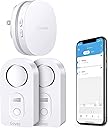
💧 Stay dry, stay ahead — never miss a drip with Govee’s smart water guardian!
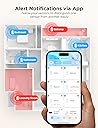
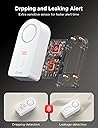
The Govee WiFi Water Sensor 2 Pack offers professional-grade water leak detection with a powerful 100dB alarm and real-time app/email alerts. Supporting up to 10 sensors on a 2.4G WiFi gateway, it provides comprehensive home and basement protection. Its adjustable volume, multi-probe design, and easy smartphone integration make it an essential smart safety upgrade for proactive homeowners.


| Battery Description | Alkaline |
| Brand | Govee |
| Color | White |
| Compatible Devices | Smartphone |
| Power Source | Battery Powered |
| Product Dimensions | 3.66"L x 2.2"W x 5.12"H |
D**H
easy to use and setup
nice product. very economical and it works great. easy to setup
K**O
Grateful! They work!
Feel the need to write a review. Bought these two months ago just because. This morning I got notification that I had water in my basement. Turns out my hot water heater broke. Very grateful I was able to run downstairs quickly and turn off the water. Didn’t hear the water in my basement so I would have left for work and been in a worse predicament. Can confirm they work!!!!!
R**N
They work well, but pairing was pretty confusing.
They seem to work well. However, WIFI pairing was pretty confusing. I recommend them, but they need to clean up or update their pairing instructions.
V**R
Great local and online water leak alarm
Great price. Simple to set up. Gives both a local alarm and an online notification via the app. Clever use of the plug-in hub using wall outlet to avoid battery issues.
E**.
Please read my recommendation
I received the item and a box of five more sensors about an hour ago. I am professional at home construction, including the plumbing trade. Here's what I found. After setting up the first sensor to the internet, I proceeded to place that one under my kitchen sink. I looked under the sink with a flashlight and didn't notice anything on the bottom of the sink cabinet, so I slid the sensor to the back of the cabinet. On doing so, I felt a dampness on the palm of my hand as I placed the sensor. There was a film of water on the bottom of the cabinet. I waited to see if the sensor would go off, as it did when I tested it by wetting a finger and putting it across two of the terminals on the bottom of the sensor. Well, that film of water did not trip the sensor. Wondering why, I placed the sensor on a flat piece of plastic on my work bench and I could see there is a 1/16 inch or so of space between the sensor probes and the flat plastic sheet I put it on. That's the problem right there. A film of water on the bottom of a cabinet will not set the sensor off. The probes will not contact the water surface. Here's what I did. I removed the little rubber plugs from each of the four feet of the sensor. Use a sharp object. I placed the sensor on a piece of sand paper on a very flat surface. Rubbing down on the sand paper I sanded the plastic feet down to the same level of the metal probes under the sensor. Now the probes will touch the surface the sensor is resting on. I tried the sensor under the sink again and it immediately tripped the water alarm. A slow drip will not make a puddle of water in a cabinet. It will most likely coat the bottom of the cabinet as it's being absorbed into the wood or leaking out at the seems of the cabinet. Something about kitchen cabinets: The bottom of kitchen and bath cabinets is usually made of cheap particle board or some material equally water absorbent. A small drip will not form a puddle of water as you might think. The bottom of the cabinet will absorb a small water leak, like a very slow drip, for MONTHS. Probably until the bottom of the cabinet is ruined. You will be able to tell by the bottom of the cabinet sagging down. But here's what I do with my sink cabinets. I put a heavy bead of caulk around the edge of the inside of the cabinet where the bottom of the cabinet meets the sides. Then I apply two or three coats of varnish to the bottom of the cabinet (we're talking INSIDE the cabinet here). What this does is make the bottom of the cabinet somewhat water proof, enough that the cabinet material will not absorb a small leak. And a larger leak will run out the FRONT of the cabinet, rather than down the seams between the bottom and sides of the cabinet. And you will notice it before damage is done. Now, the Govee setup. I did find the setup a little confusing I'll admit. Especially when setting up to the internet. The app wanted me to connect my phone to the wifi of the gateway unit that comes with the sensor. I'm thinking, do I want to do that? And lose my home wifi on the phone? I ended up backing out of the setup. But going back into the app again, I found it was working. I pushed the buttons as directed and setup the 6 sensors I had without issue. As you do each one, and are looking for it in the app screen, pull down the screen to refresh it and you'll see the device you connected. I gave four stars because: The directions could be a little more precise with the wifi setup of the gateway. The sensor probes should be lowered to pick up any amount of water. Note: The first sensor I installed saved me a big headache had the dripping fitting decided to break sometime down the road. This one find paid for the sensors I put in today. An overall excellent product. Just sand down the feet. UPDATE: 6/29/21 - I had a sensor alarm in my bathroom vanity sink cabinet. I removed the stuff stored under the sink and didn’t see anything around the sensor. I moved the sensor and carefully felt the area with my fingers. With no visible water, the area felt slightly damp to the touch. I took a closer look at all the plumbing with a flashlight, and sure enough, one sink supply connection was the slightest bit wet. Maybe one drop per hour. My description above on how I modified the sensor probes to touch the surface (floor, etc.) had allowed the unit to alarm well before any water started to puddle and soak into the wood and ruin the cabinet. I highly recommend these water sensors and that you modify them as I suggested above.
C**S
SECURITY RISK. CAN'T RECOMMEND AT THIS TIME.
Update 10/7 Govee got back to me. If this Support Engineer's description and troubleshooting steps are right, no one should buy this kit at this time. First off, if you use an Eero, as I said before, it won't work out of the box and it requires a support call to them to disable 5GHz (shame on you Eero for not making that a user toggle, BTW). But here's the issue -- look at #6(A). The password recommendation is 8 characters, numbers and letters only. From what I can tell so far, that isn't a temporary thing. If you want Govee to stay on your network, you have to basically give your WiFi the security of a piece of Swiss cheese. No WiFi password in this day and age should be 8 characters. With access to a botnet or AWS instance farm, a WarDriver or your neighborhood script kiddie will have it cracked in minutes, or in the best case for them, a couple of days. This is unacceptable and I don't know how this could have scored an 'Amazon's Choice' banner with that level of insecurity. I've responded asking if there is a way to reload the firmware on the device and if they have anything in a Beta stage that could be tested to resolve these issues. If not, this is getting returned. Here are Govee's troubleshooting steps and notes: If the gateway is unable to connect to WiFi, please follow this troubleshooting: (1) If the mobile phone WLAN/Wi-Fi switch is not turned on during setup, there is no WiFi list selection, please go to the phone settings page to re-open the mobile phone WLAN/Wi-Fi until the prompt disappears. (2) In the WiFi setting interface of the APP, please fill in the your home WiFi account and password correctly. If you need to switch WiFi, please do not choose the WiFi named "Govee_gateway_XXXX"; (3) Please check if the network standard is 5G network, please switch to 2.4G network standard and restart the router. (No supports 5G) If the router supports dual-frecuency, please turn off 5GHz before connecting:) (4) Please check if the WiFi network is normal. Please use the mobile phone to connect to the WiFi network to confirm that the network communication is normal. (5) Please check if the WiFi network account and password are correct or not, and enter the correct account and password to reconnect. (6) If the WiFi account number and password are not compatible, please mo-dify them to a simple (number and letter combination) account and password before connecting. A. The password length is recommended to be 8 digits. There can't be any special symbols (eg: '=&<>"" {}) in the WIFI name and password. B. If the router has the anti-mite network function enabled, please disable it. C.Please chan-ge the encryption method in the router settings to TKIP&AES; D. Due to the difference of routers, if the above methods can not solve the problem, please restart the router or chan-ge a router to have a try; (7) When APP prompts you to connect a WiFi starting with Govee_gateway_XXXX, and you can't find it in the WLAN setting, please check if the light on the gateway is flashing slowly blue or not. If not, press long the WiFi pairing key for 3 seconds until the blue indicator light flashes slowly. (8) If the router is not compatible with the device, please use the mobile phone hotspot to connect. (9) Please turn on GPS/location and Bluetooth. (10) Please log in to the router and enter its security settings interface to disable Mac address filtering. (11) As for IOS, please note that there will be an extra blank, please de-lete it when you enter WIFI password, thank you! (12) One example from our customer: complete setup if I disabled mobile data connection on my phone. Gateway to WIFI: https://youtu.be/m_A_4Fg0Jd0 Update 10/4 I spent over an hour on the phone with Eero Support working through this and they turned off the 5GHz band completely, and the gateway still wouldn't connect, and they never saw it try to connect during the setup process. Still haven't heard back from Govee despite two requests within the app and multiple emails directly to Support. About to return this. I had high hopes for this little kit, and it looked like it was precisely what I needed. I read the reviews and ignored the negatives thinking 'surely, in a network as well built and modern as mine, there won't be issues, after all, I've not had any problems with other 2.4GHz only devices'. Don't make that mistake. It seems that this system works if you have a 1994 WiFi setup with horrible security, no band steering and don't use a mesh of any sort. If your WiFi setup is in any wise modern, don't bother. I don't generally say flat-out to not buy a product, but I have yet to get something even close to working or get a response from the company. I run an Eero Pro configuration and have terrific WiFi throughout the house. The system supports both 2.4GHz and 5GHz bands simultaneously, with band steering technology in place. The WiFi 5040 gateway Govee has built simply will NOT connect to it, no matter what I do. I have other 2.4GHz only devices, some of them pretty old, that work flawlessly with Eero. I don't think it's an AP/Mesh problem, it looks to be a client problem entirely. I thought it was the password being too complex, based on some reviews that said simplifying their password helped. Turned on Guest access with a horrific password, and it didn't make any difference. Thought maybe the beta band steering I have enabled was causing an issue, so I turned that off and started again. Nope, no dice. I happen to have a mobile hotspot that operates in a fixed 2.4GHz band for WiFi, still wouldn't connect to that, though I'm still suspecting that connection issue is related to the complex password I have on that device, but it's too troublesome to change that for me to keep troubleshooting. Support? They don't reply if I log a problem via the app or an email, so I can't really say they have good or bad support, because from my perspective they have NO support. What's so painful to me is I'd be willing to help them figure out what's going on if they'd only respond. I work in the tech space, and troubleshooting these sorts of things is something I do all the time. As it is I'm going to have to explore other solutions.
B**S
A Lifesaver for Every Home - Govee WiFi Water Sensor 3 Pack Review
I recently purchased the Govee WiFi Water Sensor 3 Pack, and I can confidently say that it's one of the best investments I've made for my home. These little devices are absolute lifesavers when it comes to protecting your property from water damage. Installation was a breeze - just a matter of connecting them to my 2.4GHz WiFi network (note: they don't support 5G WiFi). Once set up, they worked seamlessly with the Govee Home app, allowing me to monitor the status of each sensor from my phone. The 100dB adjustable alarm is loud enough to get your attention, even in a large house. It's a reassuring feature knowing that you'll be alerted immediately if there's even a hint of water where it shouldn't be. The fact that you can customize the sensitivity level ensures that false alarms are kept to a minimum. But what truly sets the Govee WiFi Water Sensor apart is its ability to send email alerts. This means you're not reliant solely on the app - you'll receive a notification even if you're away from your phone. This level of responsiveness is crucial for avoiding major water damage incidents. The sensors themselves are well-built and feel durable. They're compact enough to be discreet, yet sturdy enough to handle any potential moisture. I placed one in my basement, another in the laundry room, and the third under the kitchen sink - all high-risk areas for leaks and water damage. Since installing these sensors, I've had a couple of instances where they detected water where it shouldn't have been. In both cases, I was able to address the issue before any serious damage occurred. It's incredible how much peace of mind these sensors provide. The battery life is impressive. I've had them for several months now, and they're still going strong. The low battery alerts are another thoughtful feature, ensuring that you're never caught off guard. In terms of value for money, this pack of three sensors is reasonably priced considering the level of protection they offer. When you compare it to the potential cost of water damage repairs, it's a small price to pay for such a valuable safeguard. In conclusion, the Govee WiFi Water Sensor 3 Pack is a must-have for any homeowner. It's reliable, easy to install, and provides an extra layer of security against water damage. Don't wait until it's too late - invest in these sensors and save yourself from potential headaches and costly repairs down the line. I highly recommend them to anyone looking to protect their home and belongings.
R**S
So Close to Being Great
Had I written this review when I first purchased the product (last October), I would have rated it 5 stars. It installed quickly and easily, when I tested it by placing it in water, the sensor alarmed loudly and I promptly got an alert on my phone via the wifi bridge. I loved it. Like other Govee products, I felt it was well engineered, well built, and just worked. With the benefit of having used this for almost a year now, it's not everything I thought it was, because of one big issue. A couple of weeks ago, I came home to a small puddle of water on the floor by the basement freezer. One of the kids had come downstairs to get out ice cream or something and didn't snugly shut the door. Most everything in there was ruined and melted and the water leak detector was sitting in a puddle of water. The device wasn't alarming - I thought maybe it had been chirping all day and the battery had run out. Maybe the wifi somehow disconnected and I missed an alert or something? I went to the app, to see if it had alarmed and I had somehow missed it or what happened. The app showed the last alarm was months ago and the device had 1 bar of battery left. As I explored further though... while the app shows the current status of the wifi bridge, it doesn't show anything about the devices. I mean, the device is there reporting 1 bar of battery but... since when? I changed the batteries and it worked again so it wasn't a problem with the device. The problem was - as best I can figure - that the batteries died, the app didn't report it, and there's nothing in the app that shows the actual "status" of the lead detectors. It doesn't say they're online or connected or that the battery status is current as of XYZ date, nothing. The leak detectors only report the last leak. When I reached out to tech support to inquire, they informed me that had the batteries died that the app would show battery dead - but it didn't. It still showed 1 bar of battery remaining. When I inquired how I could test to ensure that the other leak detectors were working, they told me to put them in water to force them to alarm. As I continued digging around in the app, I saw that all 3 leak detectors were showing up but I only remembered having used 2 of them. After finding the box, the 3rd leak detector was still in the box with the little tab inserted that prevents the battery connection. I had NEVER used it. But it shows up in the app with full battery life. I assume they pre-connected it to the wifi bridge prior to my purchase? Which on one hand is great but the fact that I've never used it and it's still showing up with full battery is just... wrong. Govee - please, please, please add something to the app that shows status? If I can see that the devices aren't connected or haven't connected recently, I can be more aware there's an issue. This current situation has led to some serious issues and frankly, I just don't feel like I can trust the devices right now. I'm looking for a similar replacement that will just allow me to confirm that the leak detectors are online and working. Something your leak detectors should already be doing for me.
Trustpilot
2 months ago
2 weeks ago