We remain fully operational. Our teams are working around the clock to ensure your deliveries continue safely.

DOWNLOAD THE APP


Customer Services
Copyright © 2025 Desertcart Holdings Limited
DOWNLOAD THE APP


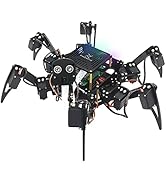
🤖 Own the future of robotics—build, code, and control your hexapod masterpiece!
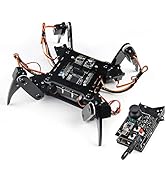
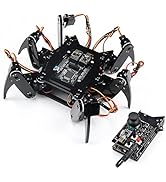
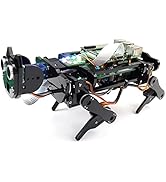
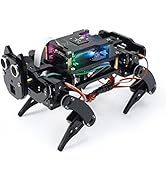
The Freenove Big Hexapod Robot Kit is a sophisticated, programmable six-legged robot platform designed for Raspberry Pi models (not included). Featuring 18 servo motors for dynamic walking and self-balancing, a rotatable camera with ultrasonic ranging for face recognition and obstacle avoidance, and wireless app control across multiple devices, it offers an immersive STEM experience. With detailed Python tutorials and broad compatibility, it’s perfect for tech-savvy professionals eager to elevate their robotics skills.












| ASIN | B08M5DXS2P |
| Assembly Required | Yes |
| Batteries Included? | No |
| Batteries Required? | No |
| Best Sellers Rank | #97,762 in Toys ( See Top 100 in Toys ) #74 in Remote- & App-Controlled Robots |
| Color | Black and Gray |
| Customer Reviews | 4.3 4.3 out of 5 stars (358) |
| Date First Available | 21 March 2021 |
| Educational Objective(s) | STEM, Robotics, Programming, Problem-Solving Skills |
| Item model number | FNK0052 |
| Manufacturer recommended age | 0 - 10 years |
| Material Type(s) | Paper |
| Number of Game Players | 1 |
| Number of Puzzle Pieces | 1 |
| Package Dimensions | 27.7 x 25.7 x 9 cm; 2.66 kg |
| tech_spec_battery_description_toys | Rechargeable (Not Included) |
M**R
This was the first time I had ever purchased a kit like this and I wasn’t disappointed! What I liked: The instructions for building were clear and very well written. If they are followed to the letter the kit will work first time. When completed it’s a terrific kit. I do confess though for me I did manage to kill the servo control board after getting it to work. The only explanation I have is that it was probably an electrostatic discharge. In some ways I’m glad I did because it led me to get in contact with Freenove support. In the documentation they advise that they are there to help and indeed they do. The support and eventual diagnosis of my problem was second to none, they are awesome! Over a few days corresponding with their helpful and courteous staff, trying different options we sorted out my issue. I was able to purchase a replacement board for a very reasonable price. As yet I haven’t had time to swap the board but I have no doubt it will be fine. Just have to avoid the carpet.
D**N
Everything worked perfect following the instructions, I am on Ubuntu 20.04 and bought the Raspberry Pi 4B. The support team of Freenove is simply amazing, very helpful and quick replies!
C**N
El producto llegó un día antes, al parecer todo, en buen estado, no lo he terminado de armar ni de probar, no sé si todo funciona, pero tiene muy buena calidad, en primera observación, hay que lo de armar y probar, es muy pronto para dar una opinión realista de este producto, pues lleva tiempo armarlo y realizar las configuraciónes de la raspberry pi, y subir los diferentes programas, y probar ya todo en su conjunto, pero al parecer tiene buena apariencia y espero que todo salga bien, Saludos
A**L
I waited some time before writing a review, in order to thoroughly explore the capabilities of this robotic hexapod. I thoroughly enjoyed this project and it's certainly a 'talking piece'. Construction: The written instructions (a .pdf file) are considerably above average, especially in the software sections. Pay attention to the software. Once the machine is ready to start waving its arms, you will need to connect to a PC or laptop using remote desktop - this is well documented and works. For the physical construction there are invaluable youtube videos linked in the document, but you can also find user reviews which compliment the official videos. Overall, although daunting, I had no problems putting the hexapod together, checking out the individual features and then calibrating the legs. I would suggest you need to be over 10 years old to put this robot together, but adult supervision (or other help) would probably give you the best shot at success. In terms of parts: In my kit there were no missing parts or screws. I ordered the 18650 batteries online (I recommend the Sony/Murata batteries rated at 3Ahr.) Make sure you buy the FLAT top batteries (not the variety that has the (positive) button top. The robot draws a considerable amount of current and I'd caution against buying cheap batteries with outrageous claims in respect of amp-hours. Be aware that this robot, with 20 servo motors, can easily pull 15A so make sure to get well-regarded batteries if you want to avoid overheat damage. Coding tutorials are included and I had no problem getting every feature to work 'as advertised'. This is a well thought-out kit, probably better than any I've constructed before (which includes wheeled vehicles, robotic dogs, drones, 3D printers and assorted electronic kits). I've added or substituted several sensors, including Lidar, RTK GNSS, MEMS gyro and actual radar! Worked fine. The ultrasonic was usable and gives the robot 'character' but not my favorite ranger finder. Nothing in life is perfect so here are the minor issues: First, the robot is seriously heavy. I feel they could've used high-tensile strength plastic bolts/nuts to reduce weight, but otherwise the complexity and sheer number of servo motors guarantees serious weight. My robot, assembled with batteries, and using a Raspberry Pi 4, came in at 4lbs 9.5oz. The motors are capable and they do a good job articulating the robot, but the cost is battery run-time. During energetic motion, the run-time is less than 20 minutes (at least in my experience). So for this reason I recommend you buy several sets of batteries! Note, as stated the robot does not have a built-in charger for the batteries so you'll need a D-4 or similar charger that can take (at least) 4 batteries at a time. Second: given the battery life is short, it would've been nice if the robot had an easy way to shut off power to the servo motors while doing program development. There are two press-buttons used to power-on the robot and I suspect one of these powers the raspberry pi while the other powers the servo management board. However, they are not labeled as such, and I do not know if it is safe to operate the robot with just one power button pressed - I feel this could've been better documented. Third: This is a minor point but this robot has only limited practical usage - I'd consider it a great introduction to Pi and IoT programming; it's certainly a lot of fun, but aside from amusement and educational value, it's not got much of a walking range before it runs out of battery. You aren't going to chase the cat around the house unless it's very elderly or very patient. Fourth: I wish the robot had come with rubber booties for grip, but these are easily fabricated so not a show-stopper. Summary: This is a well thought out kit, not suitable for young kids, unless unusually gifted, and would benefit from adult supervision during construction and initial commissioning. Thereafter, it's easy to work with, especially if you are programming in python. Value for money is excellent - other than batteries and a rapsberry pi, everything is included.
A**E
OK so I know it is clearly stated, but be aware, you need to supply batteries, charger and Raspberry Pi. I used a Raspberry Pi 3. This is my 3rd Freenove kit. I have been impressed by the quality of their kits and their outstanding customer support and the big hexapod is no exception. I believe problems can happen with any purchase; it is how they are dealt with that is the measure of a company. My kit had one mis-cut piece. I contacted Freenove support and they had a replacement in the post the next day, they also offered me an STL file to build my own if I had access to a 3d printer. I consider that to be 5 star support. The kit included 2 screw drivers and a spanner, which between them were suitable for all the nuts and bolts. Freenove do supply a few spares of each nut and bolt, but the servos do not include spares, so be careful with the screws for securing the servo arms! I found a very helpful set of build videos on you tube (search for 'Blade Dreams'). If you do follow the video, a couple of points to note: Blade Dreams had an issue with the orientation of the ultrasonic connection wire - the tutorial is now updated so just follow that. Blade Dreams also inserted rubber bushes in his servo mounts - I don't believe this is necessary. The Freenove tutorial is clear and easy to follow, except, perhaps, when connecting and orientating the servos. The golden ruler is never connect or disconnect anything when the Pi is powered up, always shut it down and power it off first. So first connect the servos, then turn on and run the server program. Everything else went smoothly and was a lot of fun. It sailed through the set up tests, I calibrated the leg positions using the supplied calibration sheet and now it's good to go. One aspect of Freenove products that I particularly like is the open source code. Having had fun creating new movements and actions with my Freenove dog kit, I am now looking forward to exploring and tinkering with the Hexapod code. I have found with previous kits that any questions I have about both the kit and the code are always promptly and helpfully answered by the support team. I think the coding side is a big plus, but, having built the kit, it is good to go with the supplied PC software or via a phone app so software tinkering is purely optional. Compared with my previous kits, the Hexapod is big! It also feels very sturdy. I am very pleased with my purchase and I'm looking forward to further exploring its potential. I would recommend the Freenove Robot User group on Facebook facebook.com/groups/333208747878884 which is a recently formed group for Freenove robot owners with the intention of sharing tips, mods and code. I shot the video immediately after calibration, I'm not very good at filming and controlling the robot (via android app) at the same time which is why things get a bit jerky particularly when I move the head!
Trustpilot
2 months ago
2 months ago