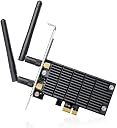
⚡ Upgrade your desktop Wi-Fi game — speed, range, and stability in one sleek card!
The TP-Link AC1300 PCIe WiFi Card (Archer T6E) delivers dual-band wireless speeds up to 1300Mbps with 2x external antennas for extended range. Featuring heat sink technology for enhanced stability and compatibility with Windows 10/8.1/8/7/XP, it’s designed for high-performance tasks like 4K streaming and online gaming. Its low-profile design and easy PCIe installation make it the ultimate desktop Wi-Fi upgrade.


| Data Link Protocol | IEEE 802.11a |
| Data Transfer Rate | 1300 Megabits Per Second |
| Compatible Devices | Desktop |
| Hardware Connectivity | Express Card, Radio Frequency |
| Item Weight | 9.6 ounces |
| Item Dimensions L x W x H | 4.76"L x 4.74"W x 0.85"H |
| Color | Black |
T**.
Great choice
Really worked as intended. My old pc did have a motherboard with WiFi and getting this was a great choice. It gave my pc internet connection which was pretty fast and my pc was pretty far from the router on top of that. It also didn’t feel flimsy and was built with some thought to it. There was also to recognizable sound to it and was most certainly quiet.
J**4
Overall quality exceeded my expectations!
I have a home office setup in my garage about 50ft from my WiFi Router that is inside my House. My PC is an HP ProDesk 600 with Windows 10 64bit. My ISP is Spectrum at 200Mbps Download Speed. I originally went with a TP-Link AV600 Powerline Adapter to get an internet signal to my garage. Always assumed a hardwire plugin would be the fastest and surest connection type for my needs. With that setup I had just under 40Mbps D/L. Not very fast but it seemed to work ok but unfortunately would continually lose connection a few times a day and the Powerline adapter would need to be unplugged then plugged back in to reset. I tried different outlets in my garage with similar results.I finally had enough and decided to try this TP-Link AC1300 PCI Express Adapter and all I can say is wow! Took me only 5 minutes to install. I then I installed Broadcom BCM4360 chip Drivers as I heard the drivers from TP-Link website can have issues on some systems. My first speed test showed my speeds increased to around 85Mbps. I was getting one to 2 bars of signal. Since my signal was not consistently great I ordered an Eightwood Dual WIFi Antenna. This has a magnetic base and extends the TP-Link Wifi antenna from my PC to 6.5ft. Once I plugged that in and raised the antenna off the ground as high as I can get. I now am getting 194Mbps! So if you are not in the same room as your router and are not receiving 3 bars. I would recommend to add this antenna extension to get the best signal possible. Made a huge difference for me. The TP-Link AC1300 is now working flawlessly and does not disconnect. Can't believe I am getting this kind of performance from a relatively inexpensive WiFi Card!
J**B
Perfect. First time out of the box, not a single problem.
So, I have a great little computer. Got it on Amazon also and it worked great for a couple of years. It had a solid state hard drive that died. After days into weeks of hard times without an operating system I made a windows 10 usb boot device and got all hooked up and guess what...no wifi. Screwed around with it for a couple more days and decided to buy this wifi card. Always expecting there to be more problems, so I kept my fingers crossed. It came today and literally five minutes later (ok, maybe 15) I have screaming wifi and I am back in business. Installation went the smoothest I have ever experienced. CD, low profile bracket, the little antennae, everything worked flawlessly. I couldn't be happier. Thanks, TP, you guys are great.
C**N
The Best Internal Wifi Card for a "Legacy" Windows XP System... but with some issues.
I own multiple computers, running multiple operating systems. Most of these have been comprised of components I've migrated past, over the years, rebuilt into "archival" systems to permit old stuff to be run natively... DOS/Win3x, BeOS 5.0 Pro, Redhat 7.2, Win98SE, WinXP (x32 & x64), Ubuntu, Fedora Core, Haiku, Win7x64, and Win10, all have homes in my collection.I decided that I wanted to move the XP machine to another location in the house, but didn't want to have to run ethernet cable to that location, so I started looking for a Wifi card cable of interfacing properly with modern Wifi networks (Wireless AC mode) which would run under WinXP.This card came to the top of my list pretty quickly. And yes, it does seem to be the best option if you're running an older OS (XP in particular) and want Wifi access. I realize, this is a fairly rare requirement, but if you do have this as a requirement... this is your best bet.That said... it has an issue. This is a DRIVER issue, not a hardware one, mind you, but an issue nevertheless.I've discovered that I need to "reset my wifi" almost every time I cold-boot the system. Because, initially, the drive and OS don't communicate, and I have no wifi connection. I have to let the system fully boot up, and then, "repair" the network connection. Once this is done, the networking works beautifully... full AC1300 speeds, no errors, etc, etc. But that initial negotiation seems to be "problematic." This is a problem, and I really wish that there was some chance of this being fixed... but it's an old product, supporting an old OS, and thus this is just something I have to live with.It's not a HUGE problem... an annoyance, more than anything else. But you'll see this mentioned in quite a few reviews of this card. It's easily dealt with, but it shouldn't be an issue at all. If you pick this card up, you need to bear this in mind. I had an option... settling for the much slower "Wireless N" (there are a lot of "N" cards out there with XP support) or getting the higher throughputs but having to deal with the "bug." I chose the latter. You may prefer a less painful experience and be willing to accept slower speeds.I have had good experience with TPLink devices in the past... repeaters, switches, etc... and this is the first one I've ever had ANY issues with. I attribute the issue to them having insufficient resources to develop support for this "obsolete" operating system... and give them a lot of credit for providing Wireless AC support for XP in the first place! Almost no one else even bothered.If you have XP (for any reason... and yes, there are legitimate reasons to run older OSes, regardless of what anyone might try to tell you)... and want fast wireless data transfers... this is your best... maybe ONLY... real option.
Trustpilot
1 month ago
2 weeks ago