


🚀 Elevate your productivity with the Lenovo Flex 5 — where power meets portability!
The Lenovo Chromebook Flex 5 is a sleek 13.3-inch 2-in-1 laptop featuring a vibrant Full HD capacitive touchscreen, powered by a 10th Gen Intel Core i3 processor with speeds up to 4.1 GHz. It offers up to 10 hours of battery life, Wi-Fi 6 and Bluetooth 5.0 connectivity, and a lightweight design with narrow bezels and anti-glare display. Perfectly optimized for Chrome OS, it integrates seamlessly with Google services, making it an ideal choice for professionals and students seeking a versatile, fast, and portable device.

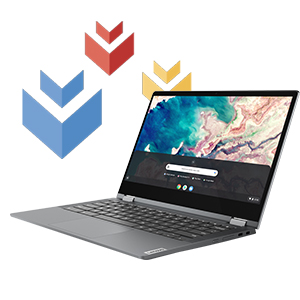
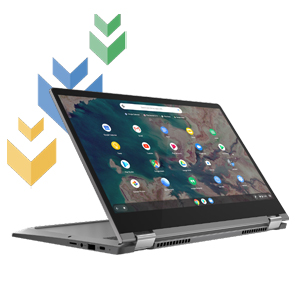
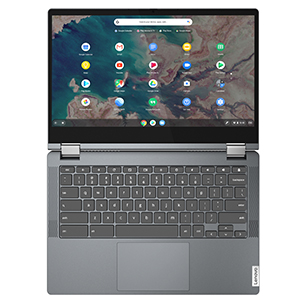
| ASIN | B086383HC7 |
| Audio Output Type | Speakers |
| Audio Recording | Yes |
| Audio features | Integrated Sound card |
| Automatic Backup Software Included | Webcam |
| Battery Average Life Standby | 10 Hours |
| Battery Cell Type | Lithium Polymer |
| Battery Life | 10 Hours |
| Best Sellers Rank | #9,504 in Computers & Accessories ( See Top 100 in Computers & Accessories ) #90 in 2 in 1 Laptop Computers |
| Bluetooth Version | 5 |
| Bluetooth support? | Yes |
| Brand | Lenovo |
| Built-In Media | Lenovo Chromebook Flex 5 13.3 | 4 Cell 51Whr internal battery | 45W AC adapter | Quick start guide |
| CPU Model | Core i3-10110U |
| CPU Model Number | Core i3-10110U |
| CPU Model Speed Maximum | 4.1 GHz |
| Cache Memory Installed Size | 4 |
| Camera Description | Front |
| Color | Graphite Grey |
| Connectivity Technology | wired, wireless |
| Control Method | Touch |
| Customer Reviews | 4.1 out of 5 stars 4,827 Reviews |
| Display Resolution Maximum | 1920x1080 Pixels |
| Display Technology | LED |
| Display Type | LED |
| Form Factor | Chromebook |
| Graphics Coprocessor | Intel Integrated Graphics |
| Graphics Description | Integrated |
| Graphics Ram Type | Shared |
| Hard Disk Description | SSD |
| Hard Disk Interface | USB |
| Hard Disk Size | 64 GB |
| Hard-Drive Size | 64 GB |
| Hardware Interface | Bluetooth 5, USB |
| Human-Interface Input | Keyboard, Touch Pad, Touchscreen |
| Item Dimensions L x W x Thickness | 12.2"L x 8.43"W x 0.67"Th |
| Item Height | 0.67 inches |
| Item Type Name | 2 in 1 Chromebook |
| Item Weight | 3 Pounds |
| Keyboard Description | Qwerty |
| Keyboard Layout | QWERTY |
| Lithium-Battery Energy Content | 42 Milliamp Hours (mAh) |
| Manufacturer | Lenovo |
| Memory Clock Speed | 2400 MHz |
| Memory Speed | 2666 MHz |
| Microphone Form Factor | Built-In |
| Model Name | ChromeBook Flex 5 |
| Model Number | 82B80006UX |
| Model Year | 2020 |
| Native Resolution | 1920 x 1080 pixels |
| Notebook Pointing Device Description | Touchpad |
| Number of Ports | 2 |
| Operating System | Chrome OS |
| Other Special Features of the Product | Anti Glare Coating |
| Power Device | 45-watt AC Adapter |
| Processor Brand | Intel |
| Processor Count | 1 |
| Processor Series | Core i3-10110U |
| Processor Speed | 2.1 GHz |
| RAM Memory Technology | DDR4 |
| RAM Type | DDR4 SDRAM |
| Ram Memory Maximum Size | 4 GB |
| Resolution | 1080p |
| Screen Size | 13.3 Inches |
| Speaker Description | Integrated Stereo Speakers |
| Specific Uses For Product | Personal |
| Total Usb Ports | 3 |
| Touch Screen Type | Capacitive |
| Touchpad Feature | Touchpad |
| UPC | 194778313780 |
| Video Processor | Intel |
| Virtual Reality Ready | No |
| Voltage | 5 Volts |
| Warranty Description | 1 Year Limited Manufacturer |
| Webcam Capability | Yes |
| Wireless Compability | 802.11ax |
| Wireless Technology | Bluetooth, Wi-Fi |
L**6
One of the best Chromebooks available
Pros: - This thing SLAPS with the i3 processor. No lags, no slowing this puppy down. One of the few Chromebooks with the added oomph of something that's not an Atom. - Touchscreen is responsive and works great. - The matte finish is a welcome change, as it actually feels great under your wrists and doesn't get oily. Makes it feel more expensive than it actually is. - Being able to utilize this for three different jobs, all with different logins is great. - Battery life is better than a regular laptop, but maybe a bit worse than a small Chromebook. It's a happy medium. - Linking to my Google Pixel is a breeze, and will automatically utilize your phone data when you're on the go. Can also pull up messages, etc. Cons: - The audio is, quite frankly, terrible. It's tinny, located on the top of the laptop, and maybe the lone drawback. If you can get past not utilizing the laptop speakers and utilizing Bluetooth instead, it's a non-issue. - Occasionally gets the quirks of being a Chromebook (stuck in tablet mode, etc.). This is more of a Google issue than anything else, and can happen to any Chromebook. This thing SLAPS. Go ahead and buy it for the price. You won't regret it.
M**L
Great purchase!!!
I, along with my special friend, spent nearly two weeks reading many dozens of online user reviews as well as articles & ratings from "the experts." I found myself suddenly needing a new computer ASAP 2 weeks into the semester, but I was lucky enough to be able to borrow one to use while I took my time & found the absolute best option for my price range. The prevailing opinion among those in the know is that this is the best Chromebook out there for under $500. After 6 weeks of use, I'd have to agree. Battery life is great, it's fairly lightweight, fast, easy to use, and I'm enjoying the backlit keyboard and foldable design more than I expected to. Also has a power jack on easy side - which is a small detail that has proved to be very nice to have. The only thing I'm not absolutely thrilled with is the audio volume (quality is fine!) but I have a nice Bluetooth speaker/headphones so that's a very easy fix. This isn't even an issue at all so far for my online classes, only on occasion when watching certain movies or shows. There ARE cheaper computers/Chromebooks out there but if you can afford this one, I absolutely, enthusiastically recommend! I've never loved any electronic device so much, and it arrived very quickly and well packaged and in pristine condition.
M**H
UPDATE
I purchased this in June 2021 and it will no longer charge with the power supply. If I connect a regular type-c charger ( like for a phone) it will charge very slowly, you can't be using it or it will drain faster than it charges. I don't understand why it will not recognize the power supply, and yes, I bought a new one, but it recognizes a regular type-c charger. Of course their help page is of no help (Try unplugging it then plugging it back in! ) And it's out of warranty, so maybe it's time to look for something better. Overall, this has been a good laptop alternative. I had a Dell XPS before this and of course you can't really compare the two, however this is a third of the price of the Dell. I didn't start out looking for a Chromebook but as I was researching for a new laptop (the Dell's battery went dead after a little more than 3 years) I realized I really didn't need Windows 99% of the time. This had good reviews from quite a few websites and well known you tube channels. After almost two years I'd have to say it was a good, and inexpensive, investment. My only negatives would be that it has slowed down a bit over time but not so much that it's really a problem, at least not for me. The other negative, however can be a problem-the speakers. I know you can't expect a lot but it's a shame that a device that has a really great screen has such mediocre sound. Watching a movie or even some videos becomes less of an experience than it could be simply because the audio is weak. Headphones aren't always practical and if you have any background noise at all it can be difficult to hear. I will still stick with a Chromebook but I'll make sure my next one has better speakers.
G**S
Fast, sharp and beats a tablet
I bought this machine for its portability and the touchscreen and the keyboard. My IPad is not as useful to me as this Chromebook is. I often need a keyboard to type on and the touchscreen keyboards are just too slow and unwieldy for me. The Lenovo keyboard is much better than the add-on bluetooth keyboard I bought for my IPad. This machine is also faster and when I am on the go I don't want to be held up by my devices. I can hot spot from my IPhone when no wifi is available and can access any data from my Windows laptop if I choose to put it in my drop box or other cloud "drive". It also has intelligent input/output porting and very good onboard speakers. Battery life is awesome! I have had no trouble connecting to printers at home or on friendly networks at the in-laws or at my children's homes. Micro SD port is a big plus as well because I like the option of storing data on board if I choose and cards are cheap. At this point I am very happy with my Lenovo Chromebook.
J**R
Excellent features for the price. Great for university.
I purchased this to be a "commuter" device for university. My Windows laptop is a bit too expensive and fragile for me to want to stuff it in a backpack and carry it around all day. When I purchased this, I was looking for something that could be used for video conference lectures, that I could do schoolwork on, and that I could use for light internet browsing during study breaks. I used it during the fall 2020 semester, and this met those expectations and more. Here's the "Good, Okay, Bad" breakdown. Good: The convertible screen ended up being incredibly valuable, once I finally got my hands on a USI stylus. I used it to take notes directly on PDFs of my lecture materials using Squid, and it really upped my study game. If you're already deep in the Google ecosystem, this is a really handy device to have. My Pixel paired easily and now I can see my text messages on my computer. That's really cool. Startup takes no time at all. The battery life is impressive. I can consistently get at least 8 hours of heavy use, even with my brightness turned all the way up. It charges really fast, too. The screen is clear, bright, and vibrant. I'm used to a much larger screen on my Windows laptop, and the transition to this smaller screen was easy, because the quality is so nice. It's a durable little sucker. I'm kind of hard on my electronics. Four months of daily use, and it still looks the same as it did the day I unboxed it. The keyboard is excellent and I love that it's backlit. I wish it had a 10-key numpad, but it definitely wouldn't fit one. The touchpad is also excellent and I love that it supports multi-touch. I'm just a big fan of Chrome OS. It's simple and easy to use. There's almost no learning curve. It has a lot of fun little tricks that make it really simple and efficient to use. Okay: The RAM is sufficient for my needs. It gets a little laggy when I have a lot of tabs open and apps running simultaneously. By "a lot," I mean like 20+. I currently have 12 tabs, one of which is a youtube video, and Google Hangouts open and it's running fine. It sometimes struggles to handle having multiple youtube videos open, or having a youtube video paused in the background while I do a video call. It has crashed on me a few times, almost always when I have multiple youtube tabs or streaming services running simultaneously. But as long as I'm careful about how much I have open at one time, it's fine. The touchscreen is just okay, even with the USI stylus. It's not bad exactly, but sometimes it takes a while to recognize my USI stylus. I'm not sure if that's a problem with the stylus or the Chromebook. Palm rejection, latency, and smoothness vary a lot depending on the app you're using. (I tried every handwriting app in the play store.) I've never used it to draw. I wouldn't use this as a tablet replacement. It's a little bit too big and the layout is a little bit too unwieldy. The app selection is okay. You can run most Android apps on a Chromebook. Usually they work fine. Sometimes they're a little clunky. The webcam is alright. It's nothing fancy, but it's fine for video calls. I like the privacy cover. Bad: The speakers aren't great. They're loud enough, but they're tinny with no bass. The speakers on my Pixel 3a are objectively better. I almost always use headphones, so this isn't a huge problem for me - I didn't even notice until I'd already owned this Chromebook for a few months. But if listening to music without headphones or an external speaker is important to you, this might not be the device for you. Overall, I'm very happy with the Flex 5. I would recommend it if... You already have a more powerful Windows or Mac device and want something lightweight, cheap, and sturdy to carry around. You're caught between buying a tablet and a laptop, because you want a bigger screen/better keyboard/more traditional computer-like interface than you can get with a tablet, but you don't want to spend a ton of money on a laptop or sacrifice features and durability for a low-tier laptop. (This is the perfect compromise for that, especially if you're already a Google/Android user.) You're a light computer user who basically just wants an internet machine, but you want a nice internet machine. I would highly recommend this for an older adult or a kid who doesn't need any fancy software. You already own Android or Google devices and want something that will complement them.
S**N
Right hinge broke! Beware!!
Revised - 3/9/21 As others have complained, the right hinge for the monitor is defective. I can't open/close the laptop unless I do it very slow using two hands so the monitor would not break. From what all are saying I guess I am SOL. I will contact Lenovo none the less to see if the will fix this. Revised - 9/30/20 I must apologize to Lenovo. The issues I was facing was from my own doing. I forgot that I had set the OS to dev mode sometime ago and that was causing the device to act up. After setting the OS back to standard mode, it is running smoothly not freezing once. All our headache went away. Back to 5 stars! Revised - 9/24/20 Stay AWAY!! Now the sound is going away during my daughter's virtual class. We need to restart the device in order to get the sound back. I would stay away from this device if you need something for school. Our first Chromebook so not sure if this is normal for Chromebook. Very dissapointed to say the least. Revised - 9/23/20 Our device is starting to freeze daily and needing restart. This is extremely frustrating for my 4th grade daughter when learning virtually. It is not like she has too many files or apps open so I'm down grading this to three stars. With our kids needing more time on computer for their schoolwork during the COVID19, we finally decided to purchase a chromebook. What I wanted was a unit with 14" monitor, FHD, at least 4GB Ram, at least 64GB storage, a decent processor, and touchscreen. That got my attention on Asus Flip 434 and HP X360 but perhaps due to the dwindling inventories, I was not finding any attractive deals for these or any of the mid range chromebooks in the weeks studying the market. And then I came across the soon to be released Lenovo Chromebook Flex 5 with all but one of the spec I was looking for; it has a 13.3" monitor. But at $409, I could deal with the slightly less monitor size so I preordered a unit. The product came 1 day early and we had it for close to a week now. The build quality is solid with quality feel throughout. One exception is the edge along the trackpad at the very side of the unit. When flipping the laptop to a tablet, I noticed the edge plastic along the trackpad move slightly since it is thin. We'll see if it can withstand the usage by our kids. But that is the only concern I have. The display is very crisp with wide viewing angle. I like the keystrokes on the keyboard. It zips through any of the activities we do granted we are using mostly for web browsing and video conferencing. The only game my kids tried was Roblox since their 3 year old tablet is having hard time playing it. The Flex 5 plays it very smoothly. For me, this is my first Chromebook experience so I'm still getting used to the little differences from the PC/Windows but it's not that difficult. It's no different then when a new version Windows is released. I am very pleased with the purchase and hope one unit will be enough for the four of us:)
T**Y
Excellent build quality, keyboard and screen. (Review after two months of steady use.)
This is my first Chromebook. I decided to dip my toe into the world of Chrome OS because I’m embarking on a long-term writing project using Google Docs, and I wanted a small, portable device with long battery life and a good keyboard. After some research, including reviews both on Amazon and on other sites, I decided on the Lenovo Flex 5. New to Chromebooks, I admit I was very hesitant. A 3D animator and motion graphics artist by trade, I own several Windows 10 workstations and laptops, all of which have powerful CPUs, high end graphics cards, lots of ram and ample storage. I was therefore reluctant to purchase a computer that only had an i3 processor and 4GB ram. But after using the notebook for two months, I couldn't be more pleased. Pros: Battery life: 8-10 hours with daily moderate use. 1. Keyboard: For such a small device, the keyboard is surprisingly comfortable and quiet. Extra points for the nice backlit keys. 2. Display: Sharp 1080 screen that is evenly lit. The touchscreen is very responsive. 3. Size: Small footprint without feeling like you are sacrificing anything in the display or keyboard. 4. Cost: At this price point, the Flex is hard to beat. 5. Responsiveness: In my use (writing and surfing the web), the Chromebook has been very snappy, with no lag. 6. Build quality: This Chromebook has an exceptionally solid feel. Cons: 1. The screen has a gloss finish that might bother some users due to glare or reflections. So far that has been a non-issue for me, but it is a fingerprint magnet. 2. Swivel screen. I hardly swivel the screen to turn the Flex into a tablet since I use mine for writing and therefore want the keyboard. I’m reporting this as a con only because there have been reports of the screen attachment breaking after repeated flips. Such reports have made me a bit paranoid about switching to the tablet configuration. 3. Webcam quality is not very good. I tried it once and probably won’t use it again. 4. Bluetooth mouse. This is a criticism of Chrome OS in general, not the Flex in particular. I purchased a Logitech bluetooth mouse for my Flex. I had no trouble pairing it, and the forward/backward navigation works fine. But scrolling with the wheel while surfing the web is VERY frustrating. Pages scroll smoothly and then suddenly jump much further down, causing you to have to scroll back up to find your place. This aggressive scrolling is not unique to the Flex or to the Logitech mouse. It has been well documented as an issue with Chrome OS and bluetooth mice. It is truly my only major grievance in owning this Chromebook. Google apparently has better things to do and has ignored customer complaints about this for years. Fortunately, the Flex has a touch screen, so you can always forgo the mouse and simply scroll using the display. In conclusion, I am extremely happy with my Lenovo Flex 5: nice keyboard, crisp display, terrific battery life, excellent build quality, and very attractive price point. But keep in mind that I’m using my Flex only for surfing the web and for writing in the cloud. I can’t comment on how well it handles other tasks, such as playing games. If you’re expecting tablet-like weight, you will be disappointed because it is considerably heavier than a tablet. Personally, I would rather have a well constructed Chromebook like this one than a flimsy, light one.
J**K
A Versatile Gem: Lenovo Chromebook Flex 5 13" Laptop Shines in Performance and Portability!
The Lenovo Chromebook Flex 5 13" Laptop has truly exceeded my expectations, delivering a top-notch performance with its array of impressive features. From its crisp screen to lightning-fast startup and exceptional battery life, this Chromebook has become my go-to companion for work and play. While it offers an incredible experience indoors, the only minor drawback is its screen brightness, which could be improved for outdoor use. First and foremost, the display of the Lenovo Chromebook Flex 5 is simply stunning. The screen's crispness and clarity enhance every visual element, from text to images and videos. Whether I'm browsing the web, streaming content, or working on documents, the vibrant colors and sharp details make everything visually appealing. The high-quality display ensures an immersive and enjoyable viewing experience, elevating my productivity and entertainment to new heights. One of the standout features of this Chromebook is its lightning-fast startup. Within seconds of pressing the power button, the device is up and running, ready for action. This impressive speed allows me to jump right into my tasks without any frustrating delays. Whether I need to quickly respond to an email, join an online meeting, or access my favorite apps, the Lenovo Chromebook Flex 5 saves me valuable time and ensures a seamless workflow. Battery life is another area where this Chromebook truly shines. With its exceptional power management capabilities, it offers an impressively long-lasting battery that keeps me productive throughout the day. I'm getting about 10 hours of watching video! Whether I'm working remotely or enjoying multimedia entertainment, I can rely on the Lenovo Chromebook Flex 5 to keep up with my demands without needing frequent recharging. The peace of mind that comes with a reliable battery life is truly invaluable, especially during long trips or extended work sessions. While the Lenovo Chromebook Flex 5 excels indoors, it does have a minor downside when it comes to outdoor use. The screen brightness, while generally adequate, could be improved for optimal visibility in bright sunlight. While this hasn't been a major issue for me, I can see how it might affect users who frequently work or enjoy entertainment in outdoor settings. Nonetheless, this minor drawback does not significantly diminish the overall exceptional performance and versatility of this Chromebook. In conclusion, I wholeheartedly recommend the Lenovo Chromebook Flex 5 13" Laptop to anyone seeking a reliable, efficient, and portable computing solution. Its crisp screen, lightning-fast startup, and remarkable battery life ensure a delightful user experience. While it could benefit from improved screen brightness for outdoor use, this Chromebook excels in every other aspect, offering a seamless blend of performance, versatility, and value.
Trustpilot
1 week ago
3 days ago



