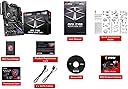
🔥 Power your pro-level build with speed, style, and smarts! ⚙️
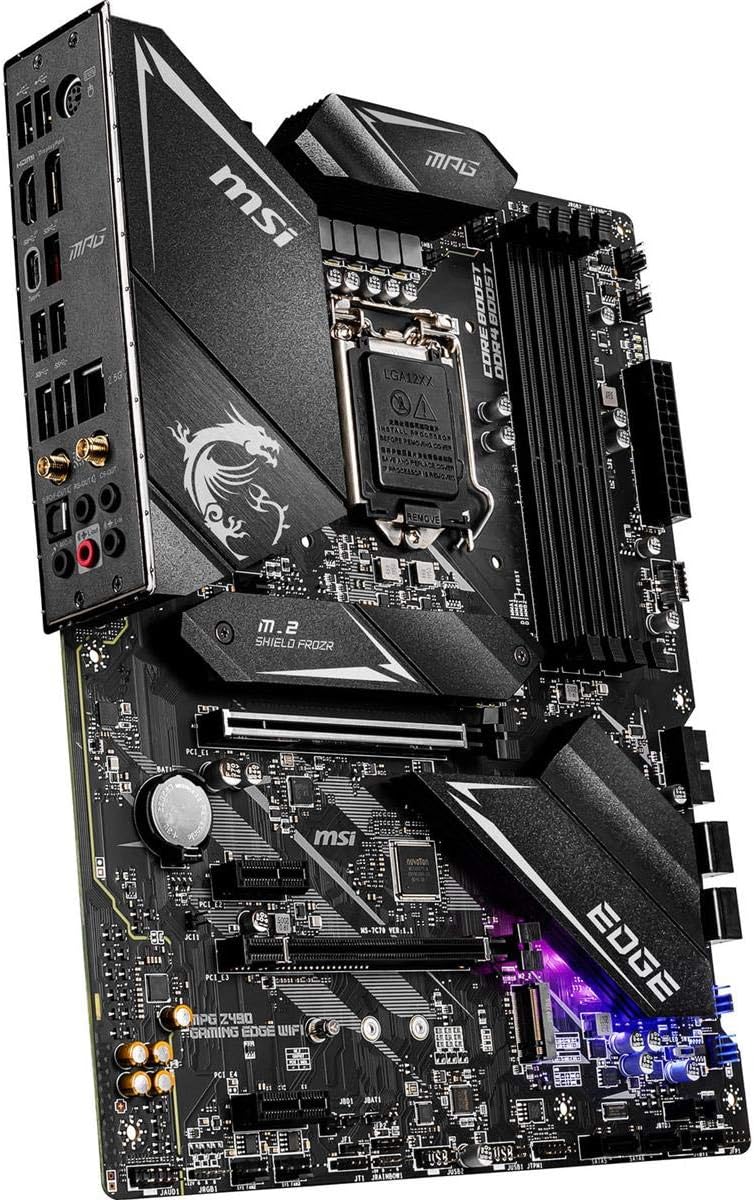
The MSI MPG Z490 Gaming Edge WiFi motherboard is engineered for 10th Gen Intel Core processors, featuring lightning-fast USB 3.2 Gen 2x2 Type-C, dual M.2 slots with Shield Frozr for SSDs, and cutting-edge Wi-Fi 6 plus 2.5G LAN. With support for up to 128GB DDR4 RAM at 4800MHz, customizable Mystic Light RGB, and a user-friendly BIOS, it delivers a premium, future-ready platform for gamers and professionals seeking high performance and sleek aesthetics.


| ASIN | B0876J8436 |
| Best Sellers Rank | #987 in Computer Motherboards |
| Brand | msi |
| CPU Model | Pentium |
| Chipset Type | Intel |
| Compatible Devices | Personal Computer |
| Compatible Processors | Intel Celeron, Intel Pentium Gold |
| Customer Reviews | 4.6 out of 5 stars 2,522 Reviews |
| Graphics Card Interface | PCI Express |
| Item Dimensions L x W x H | 9.6"L x 2"W x 12"H |
| Item Height | 2 inches |
| Item Weight | 2 Kilograms |
| Main Power Connector Type | ATX |
| Manufacturer | MSI |
| Memory Clock Speed | 4800 MHz |
| Memory Slots Available | 4 |
| Memory Storage Capacity | 128 GB |
| Model Name | MPG Z490 GAMING EDGE WIFI |
| Model Number | MSI MPG Z490 GAMING EDGE WIFI |
| Number of Ethernet Ports | 2 |
| Number of Ports | 18 |
| Platform | Windows 10 |
| Processor Socket | LGA 1200 |
| RAM Memory Technology | DDR4 |
| Ram Memory Maximum Size | 128 GB |
| S/PDIF Connector Type | Optical |
| System Bus Standard Supported | SATA 3 |
| Total Number of HDMI Ports | 1 |
| Total PCIe Ports | 4 |
| Total SATA Ports | 6 |
| Total Usb Ports | 10 |
| UPC | 824142212493 |
| USB 2.0 | 2 |
| Warranty Description | 3 Years |
C**Y
I love this board
This is the best gaming motherboard I’ve owned . So many settings and connections and features that make gaming so much better . And for the price of pc case . The argb lights also look really amazing . Support for most ddr4 , including the ability to overclock the ddr 4 well above rated speeds . Includes a usb drive with drivers which is a huge benefit. The Msi bios is so easy to use even in Advanced mode .it has automatic fan software to control and adjust fans with just a mouse click , or set the curves manually like me. Most computers have 4 pages of bios with 10 settings total , Msi has Hundreds of settings in this Bios . But honestly you don’t need to touch any of them as they all have an Automatic feature which means it loads the best values without you needing to know anything. For those who want to dial it in with their own settings , voltages and speeds can . The heat sinks are really made heavy and strong , and look really good doing it .the board itself is quite heavy for a motherboard due to reinforcements and heat sinks and I love it . You really feel that your getting your weight in motherboard and not some cheap plastic flimsy generic board . Quad ram slots and 4.0 Pcie support for Gpu and Ssd . Can you tell I love this board ?
H**R
This motherboard is a great value. I love it
I decided on this motherboard that I paired with an I7 10700k. This Z490 motherboard is super awesome. It is a good quality build and has lot's of extras such as built in RGB lighting. The built in wi-fi made it real easy to connect and it has separate headphone and microphone ports. What I really love the most is the two M2 memory slots. I do some video and photography editing and the NvMe SSD makes a big difference in retrieving large files quickly. I originally intended to use only one of those M2 slots but after seeing just how fast they are I decided on getting both slots filled. I am not too savvy with technology so I have not messed too much with overclocking in the BIOS. However, I did get this motherboard because it does allow you to easily overclock both the CPU and memory with a single click in the BIOS. I also have a lot of internal HDD drives from years of photography and this motherboard has 4 drives that you can connect internally. There are a total of 6 that you can connect internally but you lose connections if you use the M2 memory slots. This is fine as there are still lots of USB connections in the back to attach external drives. It also has an USB type C connection which is a must for me. The EZ Debug LED were very helpful during the build. These LEDs are indicator lights that tell you the status of your components such as CPU, RAM memory, and graphics card as your system is booting. With the price just under $200 it's a great value
A**N
DRAGON CENTER SOFTWARE IS GARBAGE.
Edit: I was able to figure out the RGB Issue. The problem was between a separate RGB Controller and Mystic Light. For some reason all the commands got queued up in the RGB Controller (No Idea, Your guess is as good as mine), and was affecting Mystic Light, after I disconnected the RGB Controller, and plugged everything directly into the Mobo I was re-welcomed with all the lights functioning again. Further testing lead me to find a bug in the hardware controller, where if too many commands were sent back-to-back (Like if you constantly were switching between different lighting modes) it would brick and everything would get stuck until the RGB connectors were uplugged. So I would like to clarify that the RGB issue was NOT caused by Mystic Light like I though. Mother board is a solid 10/10 if it wasn't for the garbage Dragon Center Software. If RGB functionality is important to you, one of two things: DON'T use the Dragon Center Software, which mean say goodbye to your motherboard RGBs. It is known for bricking your total-RGB functionality. OR, set up the motherboard RGBs first before installing/setting-up other RGB software, i.e. Corsair iCue, Cooler Master Node. IF you go with the latter, immediately after you RGBs are set-up the way you like them, remove the Dragon Center software, AND THEN, configure the rest of your RGB software. If you do not do it this way, eventually your Dragon Center will cease to function and then no longer be able to address them, e.g. on/off, mode change. You will NOT be able to fix this without an RMA through Amazon or MSI.
J**H
Amazing, but definitely not for beginners.
It was my first time building a PC, and the motherboard was super easy to install. However, upon booting up I was put in MSI’s BIOS menu. There was no problem, until I couldn’t leave the BIOS. Every time I exited the BIOS, the computer would shut off, and when I booted back up, I was put back in the menu again. I was booting up from a flash drive with windows installed on it so I was very confused as to why it wasn’t working. Luckily, I have a friend who is very experienced with PC’s so he managed to get it working after putting the flash drive in his own rig and messing with it. After we got it working though, it turned out better than I could have ever imagined. It looks, and performs absolutely amazing! TL;DR This motherboard’s BIOS menu is very confusing, and needs someone with experience to handle. But it’s a great motherboard.
C**L
This board is a dream.. MSI software is a nightmare.
This is my favorite board to build on, hands down. I built in a Corsair 4000X case and it’s like they were meant to be. Cable management turned out super clean (see photos) and the fit and finish on everything is top-notch. I built this system with an MSI 3080 ti, an i7 10700K, and 32gb of Corsair Vengeance. Everything runs perfect, the ram profiled in auto, and all the sensors work awesome with Aida64. Performance and stability have been great. My one gripe is the MSI software, especially Mystic Light. As soon as I installed it I started having issues with iCUE (specifically with the aforementioned fam) and I can’t figure out how to get rid of them besides a fresh Windows install. MSI software tends to include tons of background services that don’t uninstall when you remove the software. This has cause me many headaches over the last few days. The “solution”, for now, is to boot my machine and let all 100 MSI processes get running in the background, and then manually boot iCUE. TL;DR the board is perfect and the experience would have been, if it weren’t for two days of software woes just to change the colors of some LEDs.
J**Z
Feature-Packed Micro-ATX Motherboard – Great for Gaming and Future-Proofing
I’ve been using the MSI MPG Z490M GAMING EDGE WIFI motherboard for my Intel 10th Gen build, and it’s been an excellent performer with a lot of useful features. It offers a great balance of performance, connectivity, and future-proofing in a compact Micro-ATX form factor. The board has a premium feel with solid heatsinks and a sleek black-and-silver design. The reinforced PCIe slots add durability, which is great for heavy GPUs. The RGB accents add a nice touch without being over the top. Paired with my Intel Core i5-10400F, the board handles gaming and multitasking effortlessly. It supports dual-channel DDR4 memory up to 128GB and 4800+ MHz (OC), giving it plenty of headroom for high-speed RAM. M.2 Slots: Dual M.2 slots (PCIe Gen3) for fast NVMe SSDs offer excellent storage performance. USB 3.2 Gen 2 Ports: The board comes with USB 3.2 Gen 2 ports, ensuring high-speed data transfers for external drives. Wi-Fi 6 & Gigabit LAN: The built-in Wi-Fi 6 provides fast and stable wireless connectivity, while the Gigabit LAN ensures reliable wired performance for gaming. The MSI BIOS is easy to navigate with a clean UI. It offers solid overclocking options and XMP support, making memory tuning simple and effective. The Micro-ATX form factor is perfect for smaller builds while still providing plenty of connectivity options. It fits nicely into most cases without sacrificing features. Issues I've had: Since it’s a Z490 board, it only supports PCIe 3.0 unless you upgrade to an 11th Gen CPU. This isn’t a huge deal for most current-gen GPUs, but it limits future expansion potential. The board has fewer fan headers than some larger ATX boards. If you’re using multiple case fans or AIO coolers, you might need a fan hub or splitter. One of the M.2 slots is placed close to the GPU, which can cause thermal issues for SSDs during heavy gaming or long sessions. Consider adding a heatsink for the M.2 drive. While it supports SLI and CFX, most users won’t take advantage of it, as multi-GPU setups are becoming less common in modern gaming builds. Overall: The MSI MPG Z490M GAMING EDGE WIFI is a fantastic Micro-ATX motherboard for Intel 10th and 11th Gen CPUs. It offers great performance, strong connectivity, and future-proofing with Wi-Fi 6 and USB 3.2 Gen 2. The dual M.2 slots and easy BIOS navigation make it perfect for gamers and enthusiasts building compact but powerful systems. Highly recommended for mid-range gaming builds or anyone looking for a feature-packed Micro-ATX motherboard with excellent performance, connectivity, and price.
D**E
Do your Homework
upgrading from a 300 dollar evga ftw+ motherboard and couldn't be happier. the tools that come with msi motherboard are fantastic and compared to my last mother board i feel that i overpayed on my last one. this mother board has the latest wifi out right now and i paired it with a intel 10850k cpu and didn't even have to mess with my bios for it to work. was smooth and easy. the only thing i have to over as far as advice is that i'm using a 2070 nvdea graphics card so its pretty big and when you build your pc you should plug in your sata cabels before plugging in your GPU because other wise the graphics card if your using a rather larger one like me will cover a few of the sockets for sata. so just be sure to plug the cables first. however if your not using 4 different drives the board does have two more sata sockets below the other 4 that are more roomy and very easy to access even with gpu installed. recomended ram slots are 2 and 4 oth this board so dont use 1 and 3 if your using only 2 ram cards. just thought i'd save you the time in finding that out. Make sure your regular boot works before you use msi boot. i say this because many people who do custom rigs if using a usb to instal windows on a drive often have problems booting after removing usb. do your homework. once your regular boot works then you can turn on msi fast boot. because msi fast boot will disable usb plugs to prioritize boot speed and you wont be able to access bios if you run into a problem. you'd have to reset the board by removing battery. if your an experianced builder your not going to run into problems. Great Board!!!
R**N
Amazing Mobo, just make sure to disable OC before doing BIOS update
This motherboard is amazing! Only issue my brother and friend had with this motherboard, is that if you update the BIOS while you have CPU/XMP OC profiles activated, you will 99/100 brick the mobo where the CPU Debug LED will be lit and the computer will not turn on. The BIOS tells you not to update the BIOS when you have OC enabled when you enable the OC, but it never says anything about this when you actually try to update the BIOS using M-FLASH, which is crazy stupid. I had been scared to update the BIOS on mine after my bro and friends mobo's were bricked from it, but I decided to do it today, and so I disabled the OC's, and then updated, and it updated perfectly with no issues. Sad on MSI's part that they don't warn you of this when you update the BIOS, but other than that, this motherboard is top-notch amazing and the performance is great.
Trustpilot
2 days ago
1 month ago