
DOWNLOAD THE APP


Customer Services
Copyright © 2025 Desertcart Holdings Limited
DOWNLOAD THE APP


🚀 Elevate your office game with speed, security, and seamless wireless printing!
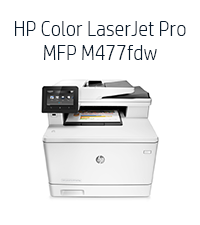
The HP LaserJet Pro M477fdw is a versatile all-in-one color laser printer designed for small businesses and workgroups. It offers fast printing speeds up to 28 ppm, automatic duplex printing, wireless connectivity including NFC touch-to-print, and a 50-sheet auto document feeder. Equipped with HP JetIntelligence toner cartridges, it ensures high yield and efficient printing. Robust security features safeguard your data, while smart toner replenishment keeps your workflow uninterrupted. Ideal for professional environments demanding reliability and multifunction performance.




| ASIN | B014CSKE7E |
| Additional Printer functions | All In One |
| Best Sellers Rank | #119,773 in Office Products ( See Top 100 in Office Products ) #144 in Laser Computer Printers |
| Compatible Cartridge | Arthur Imaging compatible HP Color LaserJet Pro M477fdw Toner Cartridges |
| Compatible Devices | Laptops, PC |
| Control Method | App |
| Controller Type | Vera |
| Customer Reviews | 3.7 3.7 out of 5 stars (1,001) |
| Date First Available | October 1, 2015 |
| Dual-sided printing | Yes |
| Duplex | Automatic |
| Global Trade Identification Number | 00888793383582, 00888793833582 |
| Hardware Interface | Ethernet, USB |
| Included Components | Printer |
| Ink Color | black, cyan, magenta, yellow |
| Is Discontinued By Manufacturer | No |
| Item Weight | 51.2 pounds |
| Item model number | M477fdw |
| Manufacturer | HP |
| Max Copy Speed (Black & White) | 28 ppm |
| Max Input Sheet Capacity | 250 |
| Max copy resolution black-white | 600 dpi |
| Max copy resolution color | 38,400 x 600 dpi |
| Maximum Black and White Print Resolution | 600 x 600 dpi |
| Maximum Color Print Resolution | 38,400 x 600 dpi |
| Maximum Media Size | 8.5 x 14 inch |
| Memory Storage Capacity | 512 MB |
| Model Series | M477 |
| Number of Trays | 1 |
| Number of USB 2 Ports | 1 |
| Output sheet capacity | 250 |
| Print media | Envelopes, Fabric, Glossy photo paper, Labels, Paper (plain) |
| Printer Ink Type | Toner |
| Processor Count | 1 |
| Product Dimensions | 18.6"D x 16.4"W x 15.7"H |
| Scanner Type | Sheetfed |
| Series Number | 477 |
| Sheet Size | 8.5 X 14 |
| Specific Uses For Product | Office |
| Supported Media Sizes | Legal (8.5 x 14 inches) |
| Total USB Ports | 1 |
| UPC | 888793383582 779177501336 888793833582 |
| Warranty Type | Limited warranty |
| Wattage | 570 watts |
K**R
HP - Major Fail corrected - Excellent all in one!
(Review update 2 7/12/2016) - Updated star rating from 3 stars to 5 stars. Replacement printer received in January 2016 has worked great for the last 6 months. (As I had originally planned after reading the printer specs prior to purchasing the unit in 2015). I can easily recommend this printer for uses in a SoHo environment. Has worked well connected into a network supporting multiple Mac's and wireless devices, plus fax. Very pleased since correcting the initial problem. (Review update 1//11/2016) - Updated star rating to 3 stars from 1. The printer when it works is excellent. Service is playing catch up. Since initial review had 2 visits from HP On-site support. Very pleasant service technician. Although I was told by HP Tech Support that there is a 2 day onsite service warranty on this product, the service tech did not arrive until January 5...14 days after the original service schedule date. Tech was very apologetic. Said where it was a new product that there were not enough people familiar with it to service it in my area (plausible comment). The first onsite visit did not fix the product. The next day, the tech returned. Upon examination of the printers controller board, the tech asked me if I had purchased a new or refurb product... as it looked like a refurbished controller. (I had purchased a new printer from Amazon... more on that later). The tech got the product mostly working... but some features would not work. The tech suggested a call to tech support as she thought it might be software related. The tech also suggested a conversation with Amazon about the "new" status of my printer. I spoke with Amazon customer service directly. They confirmed that I had ordered a new printer. The Amazon customer service rep immediately ordered a replacement printer for me with expedited shipment. I have since installed the printer and it appears to be totally working (like the original printer when I first received it.) I was definitely taken aback by the HP Tech's comment on the original unit being a refurb, but Amazon instantly corrected that problem (to their credit). I updated my review to 3 stars from 1 star. The last printer functioned for 45 days... so we have a way to go before I can say we are without further problem. This printer when working is excellent. The form, fit, and function are very good. Assuming this is just an early adoption problem (the printer was just released in September 2015), and no further problems develop, I would be able to recommend this printer. (Original review) Installed printer November 7. Ethernet connection died 45 days later on December 21. Tried to get Wifi working but product would reset every time it went to sleep, erasing all of the program parameters. Contacted HP support. Tech could not trouble shoot over phone. Was told would have onsite warranty service within 2 days. Service call scheduled for December 23. Service was no call - no show. Escalated problem... Now told that because the product is new that it will be December 31 before any parts are shipped and some time in January before onsite service will repair. Totally unacceptable for a new product that is not supposed to be disposable and costs so much. Will create major headaches for my business during the holiday season. On the flip side... when the product was working it was great.... however if this is the level of support it gets, I am very concerned about its use in the future. Big HP Fail
J**W
HP Pro MFP M477fdw Printer - Excellent but not perfect
Overall, I love my HP Color Laser Jet Pro MFP M477fdw multifunction printer. It prints, scans, faxes, copies, and can do it all in duplex* (front/back). It prints charts/graphs/spreadsheets/word processing/powerpoint etc. beautifully. I haven't used it to print photos so I can't comment on that. I can say that it's a nearly perfect office machine though (see good/bad below). It uses HP print cartridges CF412A (yellow), CF413A (magenta), CF411A (cyan) and CF410A (black). Here are the good and bad as I experienced it: Good 1. It does everything I need and does it well - prints, scans, faxes, copies, with duplex functionality* (front/back). 2. Does it all - both WIRELESSLY and directly connected to your computer.* 3. Somewhat quiet. On a 1-10 scale, with 10 being VERY loud, I'd say it is a 4. 4. Very good AFTERMARKET print cartridges are available and are around $80 each (one color) - a little expensive but not as expensive as genuine HP. I used only genuine HP and was very satisfied with them. 5. HP Smart software is available from HP to allow printing of photos and scanning from the desktop/laptop. For printing of documents, you would do so through your specific app (Word, Excel, Powerpoint, etc.). Bad 1. Genuine HP print cartridges are somewhat expensive - a 4-pack (all colors) is running around $409 at the time of this review. The original HP ink lasted nearly a couple of years for me. Of course, your mileage may differ depending upon how much printing you actually do. I have been using my HP Pro MFP M477fdw at home going on 4 years now. 2. Scanning in Duplex. The M477fdw won't scan to a computer/network folder IN DUPLEX FROM THE PRINTER CONSOLE but it WILL scan in duplex to a computer/network folder through the HP Smart desktop app! It will scan in duplex from the PRINTER CONSOLE to an email address though - what's up with that HP? Not being able to scan in duplex from the console will be either a minuscule problem or a significant problem depending upon whether the MFP is in the same room with you as your desktop or it isn’t, respectively. If the MFP is not in the same room as your desktop, you may be doing a lot running back and forth between them. NOTE: the M477fdw WILL scan a one-sided page from either the HP Smart app (or some other 3rd party scanning app, maybe) or the printer console to a computer/network folder or to email - wirelessly or directly connected. The problem occurs only with DUPLEX scanning to a computer/network folder and only from the printer console. 3. The Automatic Document Feeder (ADF) on top of the MFP cannot be fully trusted to scan multiple pages (in a stack) without supervision. Sometimes it will pull in just one page at a time but, for me, it pulls in 2 or more simultaneously more often than not when I have more than 5 or so pages. Often, I would just stand there and feed it one page at a time to be sure it got all the pages. Fortunately, the HP Smart program allows you to see screenshots of each page scanned and you can see the number of pages that printed and compare that to the number of pages in the stack. Once you become familiar with HP Smart, you would be able to scan any missing pages at the end of the process and drag it to the proper location amongst all the other pages shown on the screen within the app - but that’s a bit tedious. Having stated all this, most ADF feeders from most MFP brands also can’t be completely trusted to pull in just one page at a time. The HP Smart app is definitely the way to go for scanning with this MFP though and I’d say it scans about as well as most. 4. Windows found and installed automatically most everything I needed to print from Excel, Word, Powerpoint, etc. but I found that HP Smart was the best app to use for scanning. Some HP drivers available for downloading are either finicky about downloading/installing or both. HP Smart downloaded and installed well for me but the HP Universal Fax driver wouldn't even download. Eventually, I decided to use RingCentral (a 3rd party fax agent) for faxing from the M477fdw and it did just fine. 5. If you’re not connecting the MFP directly to your computer and/or you plan to scan from the MFP to a folder on your hard drive/network and you’re not familiar with networking, you’ll likely need a networking/computer guru to set that up for you. That likely would be true for most, if not all, wireless MFP’s though so maybe this comment shouldn’t be in the “Bad” section. All in all, I'm very happy with my M477fdw after I got it and the apps set up the way I wanted. I hope this review was helpful to you. If so, please give me a thumbs up! *see “Bad” item 2 above.
H**D
Third set of toner and no issues. Great quality print and a surprising amount of pages per cartridge.
D**E
Excelente producto, funciona muy bien. Es económico en cuanto a la cantidad de toner que utiliza. Tiene múltiples formas de conectividad para mandar a imprimir
A**R
Great printer - fast efficient, well made, great for a small business
C**S
Excellent Product, Super fast delivery :)
L**A
Sigue funcionando después de 3 años de compra
Trustpilot
1 month ago
2 weeks ago