
DOWNLOAD THE APP


Customer Services
Copyright © 2025 Desertcart Holdings Limited
DOWNLOAD THE APP


⚡ Unleash Pure Power & Precision — Join the Dark Side of Performance!
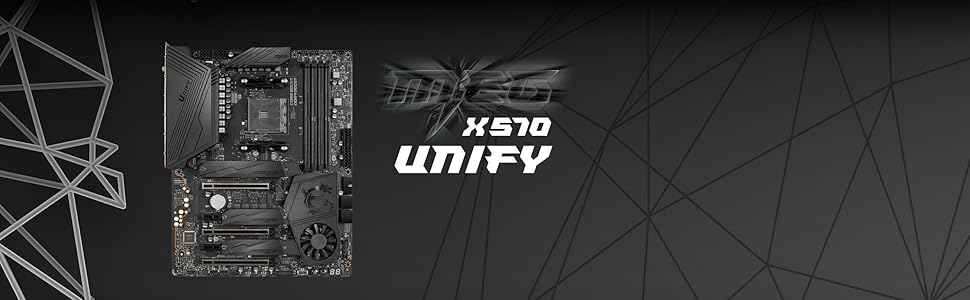
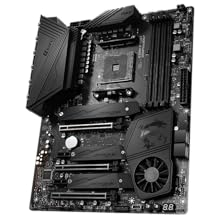
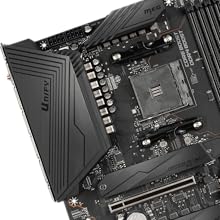
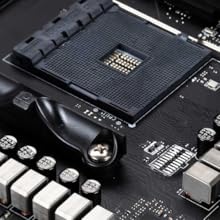
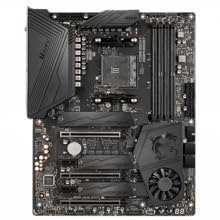
The MSI MEG X570 UNIFY is a high-performance ATX motherboard designed for 2nd and 3rd Gen AMD Ryzen processors, supporting DDR4 memory up to 5000+ MHz (OC). It features PCIe 4.0 triple M.2 slots with Shield Frozr for ultra-fast storage, an advanced cooling system with an all-metal extended heatsink and patented fan design, and premium connectivity including 2.5G LAN and Wi-Fi 6 with MU-MIMO. Tailored for gamers and prosumers, it offers robust power delivery, easy DIY installation, and a sleek, RGB-free design symbolizing stealth and quality.










| ASIN | B07YWF1G9S |
| Are Batteries Included | No |
| Best Sellers Rank | 273,471 in Computers & Accessories ( See Top 100 in Computers & Accessories ) 3,109 in Motherboards |
| Brand | MSI |
| Computer Memory Type | DDR4 SDRAM |
| Connectivity Type | Wi-Fi |
| Customer Reviews | 4.5 4.5 out of 5 stars (1,619) |
| Date First Available | 14 Oct. 2019 |
| Form Factor | ATX |
| Graphics Card Interface | PCI Express |
| Guaranteed software updates until | unknown |
| Item Weight | 1.8 kg |
| Item model number | 7C35-010R |
| Manufacturer | MSI COMPUTER |
| Maximum Memory Supported | 128 GB |
| Memory Clock Speed | 5000 MHz |
| Memory Technology | DDR4 |
| Number of Ethernet Ports | 1 |
| Number of HDMI Ports | 1 |
| Number of USB 2.0 Ports | 2 |
| Processor Socket | Socket AM4 |
| Product Dimensions | 26 x 26 x 5 cm; 1.8 kg |
| Series | MEG X570 UNIFY |
| Wattage | 3600 |
| Wireless Type | 802.11a |
N**R
A good basic workstation motherboard for applications.
I bought this after my ASUS B350 was ‘bricked’ while attempting a BIOS update using EZ BIOS. I am not a gamer so I was looking for a stable workstation motherboard and chose this X470 as it has a better cooled and robust Voltage Regulator Module VRM than the B450 and more sockets including a S/PDIF out. From the reviews, it is a good MB for the price and it will overclock so I assume it is good for gaming. However, for a workstation using applications, it was the conclusion by thefpsreview.com. “The X470 is a great board, but it’s largely standard fare for the segment. The only area where it stands out is reliability. The thing just worked.” That was the deciding factor. I just put it in the case connected everything up it booted into the BIOS I selected the default settings and away it went. What I immediately noticed was the silence as the fan only runs at a speed that is needed to keep the CPU cool. The other thing I noticed as the improvement in sound quality even from cheap 5w speakers. Warning! If you want to register the product then you will need the CHK number and it's on the side of the main power plug. If you do not have a small inspection mirror you may have to take it out again to read it. What also annoyed me was the setup CD is useless as it opens in a dialog box too small to be able to load the drivers and utilities. However, these are all available from the MSI website and you need the Dragon Center download. It has many options for gaming that are also useful for memory-hungry photo imaging software. The BIOS updated easily using Live Update within the Dragon Center control panel. As I run the MB cool and slow for stability the only BIOS change I have made was in advanced mode, settings, advanced, wake up event setup, resume by USB so I could wake it up with my mouse or keyboard. Basics like this are not in the manual which concentrates on overclocking. Update: I have used this for most of the day for well over a year, it is incredibly stable and never had a BSOD Blue Screen of Death. As I usually send it to sleep instead of switching off for a faster boot up I need to close and restart Firefox otherwise even with 32GB it soaks up all available memory and grinds to a halt
P**Y
Good value for money, and easy for first time builders like me
I was going to go for the b450 board but I ended up buying this for my build instead, and I didn't encounter any issues at all apart from having to remove the cpu cooler brackets, which was easy. It seems fairly well made and I was able to read the manual and figure out where all the cables go easily. I put a new ryzen 5 3600 and 2x8gb sticks of ddr4 ram in, plugged in my old psu, hdd and rx580 and it booted first time. Windows installed all the new drivers automatically and I was up and running. The bios is simple to navigate and didn't need updating for me. Just ordered an rgb light strip to try out with the rgb software it has, and it supports 2 m.2 ssds too which I'll try when I can afford one. Just a random noteif you do buy it, apparently it's normal to have a constant red light above each stick of ram with this motherboard, i thought there was an issue but they are apparently just to indicate the slots are occupied.
K**R
Sub £300 super charged motherboard.
Fantastic value motherboard from MSI. Has everything I need plus more. 3 x full 16 lane PCIe slots, three Lightning M.2 slots with heat sink covers thrown in. it even comes built in type C and type A USB 3 sockets and error code display. And yes WiFi is built and with great antennas. It is a fantastic foundation for my first AMD based computers system build since 2007. I just want to get my hand on the latest AMD GPU and cpu. I have tested it with ryzen 3 3100 , 5700xt GPU and crucial 3200 2 x 16 GB memory sticks and the performance is impressive. Totally satisfied already while I wait for the new GPUs availability. Although not an over clocking fan boy, this motherboard seem built for some serious over locking. It’s like it’s big £700 brother but without the led fan fair. Great value purchase.
D**N
Solid, Stable and Feature Rich Motherboard
***The first one of these I bought I had to return as it was completely dead - no EZ Debug light came on or anything even with just CPU and RAM, so i had to return it. The second unit i was shipped works completely fine. For this reason alone i have knocked off a star but i think this is a solid motherboard with most features you would want as per the review below.*** It has a tonne of features for the relatively cheap price point, including reinforced steel PCI-E slots (not gen4 but it wouldn't be this inexpensive if it did have these), 2x M.2 slots, multiple USB 3.2 Gen 2 ports and a lot of RAM compatibility (up to 4133mhz overclocked). I managed to OC my 3000mhz corsair RAM to 3200mhz and it has ran stably for the past year or so. Paired with my Ryzen 5 3600x this motherboard is overall very stable and runs very well, i do not suffer with BSODs or crashed very often. My board did come with a very old BIOS version (from 2019, one of the very new Ryzen 5 compatible ones) so i would recommend flashing the BIOS if like me your version was super old. The old BIOS had a bug wherein if Chrome or simple other programs were open, the CPU fan would ramp up - this was very loud with the stock cooler and very annoying. However, flashing a new 2021 BIOS has since fixed this issue. The BIOS itself has a tonne of overclocking settings for CPU and RAM. It also has a handy smart fan mode which attempts to keep your case fans running as quiet as possible (i did change the fan curve slightly) which has proven useful and will prove useful for new PC builders. Temps on this board are also solid, the chipset doesn't get stupidly hot and the CPU fan curves handle my 3600x just fine, keeping it around 50-55 degrees when gaming. I have had one issue recently, where the PC turned off in windows, attempted to restart and then failed to. The PC then launched with a screen that said something along the lies of "XMP profile failure, PC will boot into stock settings". I never fully figured out what the issue was, however taking the RAM out and reverting back to the advertised speed on the memory worked for me. Another drawback from a future-proofing perspective is that it does not have a USB-C header on it, meaning now in my fractal meshify 2c i have a front USB-C header that doesn't work. Overall though, this is a solid and budget-conscious product from MSI with most features you would want from a motherboard.
O**R
Sobre toute en noir. Bien agencée pour accueillir 3 SSD NVME 2280. Bios complet. Ventilo du chipset s'active à l'allumage puis après se coupe sauf si ça surchauffe ce qui n'arrive pas dans un boitier bien ventilé. super produit !
A**R
Ich selber nutze das MSI X470 Gaming Pro, für meinen Gaming Rechner. Nun hatte ich mal lust meinen Rechner aufzuwerten, mit neuen Teilen, und aus den alten einen zweit PC zu bauen. Das X470 Gaming Plus Max ist es nun geworden, für das ich mich entschieden habe. Und wieso? Naja das Board bzw das Bios unterstützt ohne Flash/ Update schon alle Ryzen 2000er sowie 3000er, außerdem habe ich mich über die Jahre sehr mit dem MSI Bios angefreundet, alles ist einfach zu finden, wenn man es eben versteht und sich damit auskennt. Betreiben tuhe ich einen Ryzen 5 2600 auf 3,4ghz mit dem Board, problemlos. Eingebaut, direkt erkannt und die Kiste rennt, was will man mehr. Zukünftig ist auch noch Luft nach oben was Overclocking angeht. Lieber die paar Euro mehr investieren in ein zumindest, Zukünftig gesehen, Wertvolles Board wie ein X370, X470 sowie X570 anstatt ein paar Euro an der Stelle zu sparen und auf ein B350/B450 oder so zu greifen, zumindest meiner Meinung nach. Später passt immer noch ein 3000er Ryzen drauf und auch mit Flash ein 5000er. Qualitativ ist das Board absolut Hochwertig und es ist alles dabei um direkt starten zu können. Also für unter 100 Euro wirklich absolut zu empfehlen!
P**7
Prima di tutto segnalo per la prima volta dopo quasi 10 anni di utilizzo di Amazon, la non curanza dell'imballaggio. Arriva la MoBo in una busta del corriere, senza nessuno scatolo di protezione, infatti la mobo arriva danneggiata, tanto che le viti dell'X-Clamp del Socket avevano scavato nello scatolo.. Faccio il reso ed arriva un'altra mobo, ma sempre nella busta e senza scatolo.. fortunatamente la mobo questa volta era ok. Per la prima volta 1/5 ad Amazon. Per quanto riguarda la mobo dopo aver seguito il lancio di Zen 2 da Luglio 2019, ho analizzato praticamente tutte le mobo, i vari aggiornamenti dei bios dei vari brand, ed i potenziali problemi. Le MoBo MSi al di sotto della MEG ACE sono completamente inutili, temperature altissime (circa 110C il PCB della MoBo) e VRM non all'altezza per dare abbastanza power delivery per CPU da 3700X in poi (con 3600 e 3600X sei "OK" ma le temperature sono altissime). MSi grazie al feedback dei recensori e degli utenti introduce questo modello la UNIFY che ha un heatsink nuovo sulla sezione dei VRM ottenendo temperature migliori della MEG ACE ed ha VRM identici alla MEG ACE ed alla sorella maggiore Prestige Creation, offrendo prestazioni di altissimo livello praticamente di fascia alta. La qualità costruttiva è ottima, ed il BIOS è stabile e funziona tutto come previso, boosta tranquillamente la mia cpu, un 3900X, stesse identiche prestazioni di una Prestige Creation. Beh perchè costa molto meno della Creation? Pecca molto sull'I/O soprattutto quello interno SATA, dispone solo di 4 porte SATA (6 era il minimo IMHO), ed anche nel retro della MoBo è un po' scarna, e non ha la 10 Gigabit Aquantia che ha la Creation, ma "solo" una 2.5Gigabit. Siccome non necessito di una 10 Gigabit, il problema dell I/O è risolvibile riorganizzando lo storage, e per le usb semplicemente utilizzare degli hub se necessario, risparmiando molto per delle feature in più che non utilizzerei. Credo che questa sia la scheda perfetta per qualità/prezzo/prestazioni/temperature/bios per una cpu da 3700X in poi (anche perchè con 3700X/3800X non vengono nemmeno utilizzate tutte le fasi dei VRM, ha tantissimo power delivery). L'architettura Zen2 è molto sensibile al power delivery ed alle temperature, migliori sono i VRM e le temperature, maggiori sono le prestazioni, è necessario non comprare MoBo meno care per risparmiare, la CPU non performa a dovere e si degrada subito per le altissime temperature. Segnalo altre mobo adatte a queste cpu: ASUS TUF X570 PLUS (3600X- Max un 3700X), VRM buoni, Temperature nella norma, budget basso. Gigabyte X570 Aorus Ultra (3600X-Max un 3700X) VRM buoni, Temperature nella norma, budget medio. Gigabyte X570 Aorus Master (3700X in poi) VRM eccellenti, temperature eccellenti, budget alto. MSi X570 Prestige Creation (3900X in poi) VRM eccellenti, temperature eccellenti, budget alto.
K**Y
Une bonne carte mère , la dernière mai BIOS date de 2025, pas eu de problème de reconnaissance de ssd ou de RAM pour le moment elle est top.
M**L
Das MSI MEG X570 UNIFY ist ein leistungsstarkes Mainboard für Enthusiasten mit einem Fokus auf hohe Performance, gute Kühlung und eine cleane Optik – allerdings gibt es auch ein paar Einschränkungen. Leistung & Ausstattung: Dank PCIe 4.0 und M.2 Lightning Gen4 bietet das Board extrem schnelle Datenübertragungen, was vor allem für SSD-Nutzer ein echter Vorteil ist. Mit 128 GB RAM-Unterstützung und einer maximalen Taktung von 5000 MHz ist es ideal für High-End-Systeme. WLAN 6 sorgt für eine stabile und schnelle drahtlose Verbindung, was für Gamer oder Streaming-Setups nützlich ist. Kühlung & Design: Die Frozr-Kühlkörper mit patentiertem Lüfter und Doppelkugellager halten Temperaturen im Zaum – wichtig für übertaktete Systeme oder anspruchsvolle Builds. Das schwarze, minimalistische Design ohne RGB ist perfekt für Nutzer, die ein cleanes, unauffälliges Setup bevorzugen. Kritikpunkte: Hoher Preis: Verglichen mit anderen X570-Boards ist das UNIFY nicht günstig, besonders wenn man auf RGB verzichten kann. Lüfter auf dem Chipsatz: Wie bei vielen X570-Boards kann der Lüfter hörbar werden, wenn das System stärker belastet wird. Begrenzte USB-Anschlüsse: Trotz des hohen Preises sind nur 2x USB 2.0-Ports verfügbar, was für einige Nutzer möglicherweise nicht ausreicht. Fazit: Ein starkes, leistungsfähiges Mainboard, das vor allem für Overclocker, Gamer und Enthusiasten ideal ist. Wer Wert auf Top-Kühlung, PCIe 4.0 und WLAN 6 legt, wird hier fündig – allerdings gibt es günstigere Alternativen mit ähnlichen Features. ⭐ 4,5 von 5 Sternen – Leistungsstark und gut gekühlt, aber nicht billig!
Trustpilot
2 weeks ago
1 month ago