Some deliveries may take a little longer than usual due to regional shipping conditions.

DOWNLOAD THE APP


Customer Services
Copyright © 2025 Desertcart Holdings Limited
DOWNLOAD THE APP
![Weebill S [Official] 3-Axis Gimbal Stabilizer for Mirrorless and DSLR Cameras](https://m.media-amazon.com/images/I/61gfyx2UFfL.jpg)
🎬 Own every frame with the Zhiyun Weebill S — your pocket-sized cinematic powerhouse!
The Zhiyun Weebill S is a compact, professional 3-axis gimbal stabilizer designed for mirrorless and DSLR cameras up to 6.6 lbs. Featuring an ergonomic sling mode, 14-hour battery life, and a cutting-edge TransMount wireless image transmission system, it delivers smooth, jitter-free 4K video. Its smart app enables real-time remote control, timelapse with motion trajectories, and AI-powered subject tracking, making it an essential tool for millennial pros seeking cinematic quality and creative freedom on the go.


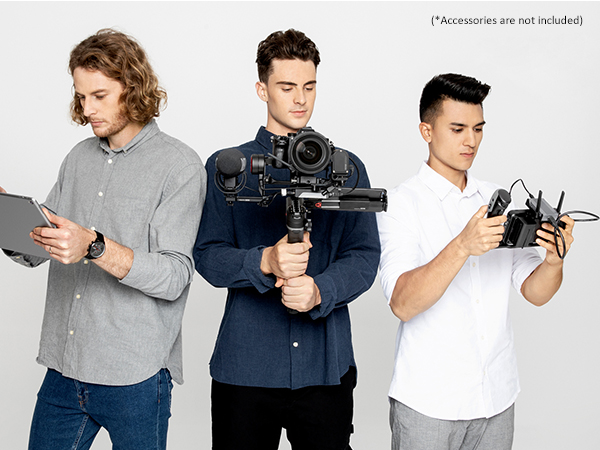

| ASIN | B07Y47P31Y |
| Audio Recording | No |
| Battery Average Life | 14 Hours |
| Best Sellers Rank | #163 in Professional Video Stabilizers |
| Brand | ZHIYUN |
| Built-In Media | Weebill 3S, Zhiyun Weebill S |
| Color | Black |
| Compatible Devices | Camera |
| Customer Reviews | 4.4 out of 5 stars 1,610 Reviews |
| Exposure Control Type | Manual (M) |
| File Format | MP4, MOV, AVI |
| Folded Size | 11.73 x 5.51 x 7.48 |
| Image stabilization | True |
| Item Dimensions D x W x H | 7.48"D x 5.51"W x 11.73"H |
| Item Weight | 926 Grams |
| Manufacturer | Zhiyun |
| Maximum Weight Recommendation | 6.61 Pounds |
| Media Type | Video |
| Model Name | Weebill S |
| Product Dimensions | 7.48"D x 5.51"W x 11.73"H |
| Video Capture Format | MP4, MOV, AVI |
| Video Capture Resolution | 4K (3840 x 2160) |
| Viewfinder Type | LCD screen |
| Warranty Description | 1 Year |
| Water Resistance Level | Not Water Resistant |
R**T
I love it. So many features in a small package!
The only other gimbal I’ve used is my Movi Mini Mi for my iPhone, which obviously is much much lighter, so I cannot say how “lightweight” this is compare to other gimbals. It’s not heavy but it’s not light either, you walk around for a while with it you know you’re carrying something. That being said: it’s comfortable to hold I prefer to keep the handle (aka tripod feet) on the top angled position and holding it that way, super easy to go from high to low angles. It’s really not a big deal to unscrew and put on bottom (as show in picture) to stand on tabletop, or to hold like you would other gimbals (such as a Ronin S)... so don’t be a sucker and buy those quick connector things for $20 each (you’d need 2 to even make it worth it) that are like quick release for the handle. I bought this gimbal over the other similar Zhiyun gimbal that was $50 less (Crane Lab maybe? the one that looks almost identical) for 2 reasons: this one advertises stronger motors, I shoot DSLR not mirrorless so this is important. And secondly, this has more clearance between the gimbal motors and the handle (when in underslung setup) and I didn’t want my fat hands getting in the way of the gimbal when in gimbals. And this is a big deal because even still occasionally I can feel it brushing my knuckles (and I simple adjust my hand, no issue). I simply bought this to smooth out my shaky video. However, it’s got so many awesome features when you connect the app. Sync mode! Follows the gyroscope of your phone, so you can literally stand several feet away from the gimble on a table and turn your phone left, up, down, whatever and it will follow in real time. There’s almost no delay. Trajectory and Timelapse modes: the gimbal will act as your intervelometer if you don’t have one (I don’t). So you can set the settings for a time lapse and it will trigger the camera accordingly. Perfect. Then add trajectory (setting up to 5 or 6 points) it will memorize them and you set the duration and it will add motion to your timelapse. Trajectory doesn’t have to be a photo timelapse. You can tell it to be in video mode and simply add movement over time (perfect for those who like Canon’s built in video timelapse). If you buy the separate wireless video transmitter ($125 ish) you can see video in the app which offers more features that could be super useful: like subject tracking. You could set the gimbal on a table and in the app draw a box around yourself in the image and it will follow you as you move around. So there you go, robot camera man for your YouTube cooking show. *theres some PSYCHOTIC reviews of the ZY Play app on the IOS App Store, it does NOT collect your info, I’ve entered zero personal info into the app (Nor did the app ask for any). The app rules, and it’s a MILLION times better than the Movi app that I use with my phone gimbal. So ignore the bad reviews. Mounting a monitor comfortably can be rough. So my advice: get a 4 or 5” monitor, 7” are too in the way. Maybe if you purchase a large and expensive quality smart arm mount you can get around this... but I returned a 7” and went for a 5”, even though I prefer the largest screen possible. I also returned one of those dual ball-head tension mounts because it SUCKED. I got one of those rigid 5” mounts for $28 and it’s the only solution that worked for me (see photo). The reduce in shake in my videos is noticeable and I’m still new to using this thing. I was really nervous about dropping $400 instead of say $200 on a glidecam type steadicam, this thing earns its price tag. Learn to balance it (I still watch a video every time) properly until you get the hang of it. And if you’re using the same camera/lens every time you only need to adjust how forward or back the quick release plate sits balanced. The ONLY thing I don’t really like is that it didn’t come with even a padded nylon case. The box it comes in is kinda like a suitcase with a clamshell hard foam inside... so it’s useable, but I wish I could just put this in a small padded case and throw it in my backpack. But otherwise, fully love it.
A**Z
Impressive Gimbal with a Learning Curve
I was pleasantly surprised by how well this gimbal performs. It takes some fine tuning to get the balance just right, and you have to follow the setup steps in the correct order. Once that’s done, though, it works flawlessly and makes shooting smooth and stable footage so much easier. A bit of effort up front, but definitely worth it for the results.
T**N
Perfect gimbal for Mirrorless cameras
Hey Amazonians, it’s Tj with another review brought to you by my wallet and my love for amazing production gear. This time, the Weebill S. As always, for my quick readers here’s my view: love the product & customer service. App needs some work. See the pros and cons list below. As of October 2019, I bought the Weebill S, took it out for a spin (figuratively and literally) and y’all I’m impressed. As of this review it’s been a little over 1 month of use with several projects and videos completed with the Weebill S. Since I bought the Weebill S the week it came out, the software was fairly new. Zhiyun reached out to make sure my camera would be compatible and to make sure I had my shipping info from overseas. That’s great customer care. My setup is a Sony a6400 Mirrorless camera with a Sony zoom 18-105mm lens and a Sigma 30mm lens. In the photos is the Sigma 30mm lens. As I learn more I’ll update my review. PROS AND CONS LIST Pros: • Customer Service • Smooth Stabilization • Setup videos • Axis locks • Image Transmission • Wide Variety of gimbal modes (Vortex mode is my favorite) • Easy Adjust to Sling Mode • lightweight and sturdy design Cons: • Non-intuitive setup (that’s why they have videos) • awkward button setup • small LCD screen • Mobile App is inconsistent (they have been updating) FINAL COMMENTS Overall, I think Zhiyun put a lot of thought and work into designing the Weebill S. The lightweight design and Sling mode setup keep my arms from getting tired while filming. The gimbal modes “Go” and “Vortex” help keep the creativity in my video shots. I’d like to see if Zhiyun could do something about making the various gimbal modes more accessible. I would say something about the mobile app, but I’ve already seen two updates since I’ve stated a month ago. We all know it needs work. Hahaha. I think they’ll keep the updates coming. I’d also like to see a bigger LCD screen and an adjustment of button positions. It’s more of a personal preference though. The feedback from Zhiyun’s other models like the Crane series and Weebill Lab has definitely been applied to the Weebill S which turned out to be an amazing product. If you’re a Mirrorless camera owner, this one is for you. Yes, Yes it can hold some of the bigger body cameras too. I haven’t tested that yet. All in all, I recommend this product and it has TJ’s seal of approval. See y’all on the next review. ~TJ
R**N
Works fine on Sony ZV-1, but
Te gimbal does an excellent job of stabilizing the camera although it is heavy and awkward. My only complaint is that the locking knobs are very easy to bump to unlock requiring re-balancing the camera.
L**O
Todo bien
Excelente producto
S**I
Buen vendedor y con entrega puntual
Me funciona bien por eso una vez mas lo compre muy recomendable llego a tiempo
A**R
Don’t buy
I got this gimbal and openned the package then shelfed it for two years. Finally got the oppurtunity to use it so I took it out to use it, but the battery will not charge. Tried the correct charging methods with multiple different cables and outlets but nothing works. You can’t open it up to change the battery so it’s completely useless. Very disappointed that I never even got to use the product
E**C
So far so good
So far the gimbal is great. Very smooth and very easy to balance. My only issue is the hodge-podge nature of learning all the features. I've had to watch 7 different youtube videos just to get all the information I need. The little quick guide they send it with doesn't help much, and there's not a single source of information on all the "modes" with clear descriptions in one place. I had to start making my own notes on the available modes and how to get to them. Each mode is activated with its own secret combination of button clicks. I wish I could switch the modes one dial as easily as I switch it on my camera. I made a quick guide for anyone facing the learning curve like I did: WEEBIL QUICK GUIDE PF - Pan follow (default mode), will pan left right, but not up down F - Follow - Click or hold the trigger - camera will pan and tilt with you POV - Click the POV button - camera will pan, tilt, and now ROLL V - Vortex mode - double click POV button and control rotation with thumbstick. Triple click to start automatic rotation. L - Lock mode - Slide the button to “L” to lock all axis and the camera will remain pointed straight ahead Double click trigger to reset camera position.
Trustpilot
2 months ago
4 days ago