We remain fully operational. Our teams are working around the clock to ensure your deliveries continue safely.

DOWNLOAD THE APP


Customer Services
Copyright © 2025 Desertcart Holdings Limited
DOWNLOAD THE APP


💻 Illuminate your living room command center with effortless style and control!
The Logitech K830 is a premium illuminated wireless keyboard with a built-in touchpad, designed for seamless living room media control. Featuring adaptive backlighting, a 33-foot wireless range via Bluetooth or Unifying receiver, and dedicated media keys, it offers error-free typing and smooth navigation compatible with Windows, Android, and smart TVs. Its compact metal design complements modern home entertainment setups, making it the ultimate tool for couch-powered productivity and entertainment.


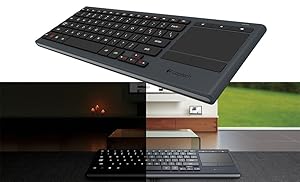
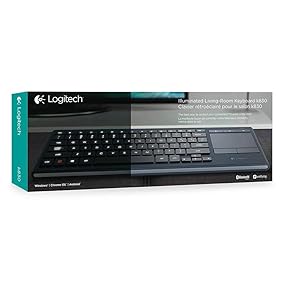


| ASIN | B00ZOPVSKW |
| Additional Features | Bluetooth, Lighting, Wireless |
| Antenna Location | Office |
| Best Sellers Rank | #2,870 in Computer Keyboards |
| Brand | Logitech |
| Built-In Media | USB range extender, USB recharge cable, Unifying receiver, User information |
| Button Quantity | 87 |
| Color | K830 |
| Compatible Devices | PC, Smart TV |
| Connectivity Technology | wireless |
| Customer Reviews | 4.4 out of 5 stars 4,186 Reviews |
| Enclosure Material | Metal |
| Global Trade Identification Number | 00097855113566, 10097855113563 |
| Hand Orientation | Ambidextrous |
| Is Electric | No |
| Item Dimensions L x W x H | 15.1"L x 5.59"W x 1.65"H |
| Item Weight | 17.46 Ounces |
| Keyboard Backlighting Color Support | Single Color |
| Keyboard Description | Illuminated |
| Keyboard Layout | QWERTY |
| Manufacturer | Logitech |
| Model Name | 920-007182 |
| Model Number | 920-007182 |
| Number of Keys | 80 |
| Number of Sections | 3 |
| Power Source | Battery Powered |
| Recommended Uses For Product | Office |
| Series Number | 920007182 |
| Special Feature | Bluetooth, Lighting, Wireless |
| Style Name | Keyboard |
| Switch Type | toggle |
| Theme | living room, home entertainment |
| UPC | 097855113566 |
J**K
Great error-free wireless typing, decent touch pad, excellent backlight
So far I have tried USB on Win10 PC and bluetooth on iOS14 iPhone. Both connections provide excellent debouncing for typing. No issues at all with CTRL-C or anything like that. I expect Logitech to be experts in this. I have tried many other wireless keyboards from various brands which all suffer from double types and missed keys. This unit has not skipped or double typed anything at all woohoooo success! I am not using it for gaming so take that into consideration. The touchpad single-finger mousing is a little tiny bit jumpy from time to time. But it's not a show stopper and I suspect it can be solved by antenna reorientation. Two-finger scrolling is very jumpy and it's a bit annoying. Other reviewers have reported the same. So in conclusion Logitech may not be the king of touchpads but for typing this unit is excellent. The scrolling issue could be resolved by adding a scroll wheel (or by fixing the touchpad problems). The backlight is the major reason for my purchase, that coupled with the touchpad and volume controls sold me. Mouse left and right buttons are a little hard to find because those are not backlit. I like the fact that the battery is not completely impossible to replace as this thing ages out. Only time will tell how long the battery lasts. But so far it's been fine for my purposes. The single touch mute and volume buttons is a huge selling feature for me. One last thing I like is that the F1-F12 keys are activated through the red FN key. I like that they put the media and shortcut keys as the foreground buttons and put the F1-F12 keys in the background. Overall this is a great compact style keyboard for browsing and light typing. Do not expect amazing ergonomics. Definitely expect lightweight compact error free typing. There is no need for a number pad because numbers are located in their standard positions above the QWERTY area. Up, down, left, right are a little small but with practice it will be fine. Like any other new keyboard you have to gain practice time. All of the above works perfectly without special drivers or software installs.
S**Y
Excellent, almost perfect full sized keyboard
The Logitech K830 is about as premium as a home theater keyboard can get. This keyboard is a perfect fit for those full keyboard typist like myself who prefer a standard keyboard like the one you would find on a laptop pc. Your ten fingers will find the home keys easily and stay put. To be completely upfront. It is slightly smaller than a standard keyboard layout. From the left shift key to the right shift key, the keyboard measures 10-1/4" inches. A standard keyboard measures 11" inches. The loss of 3/4" of an inch is bearly noticeable. It has a full-sized ENTER (RETURN) key and both the left and right shift keys are a standard 1-3/4" wide keys. Tabs are also standard sized. The spacebar, however, is slightly smaller than normal, 3-1/2" side. I added two full-sized keyboards for comparison. The Keytronics bluetooth keyboard and a wired Dell Mechanical keyboard. Despite being 3/4" of an inch less wide, it does have a generous touchpad for mouse navigation. The pad measures 3-1/8" wide by 2-1/8" tall. The pad is as good as those found in a good quality laptop touchpad. Furthermore, this keyboard is backlit making it easy to use in a darkened living room without the need to switch on a lamp. Perfect for the 5.1/7.1 surround home theater. One other thing. The keyboard is capable of entering input to two devices at once. Since the keyboard can pair with any Bluetooth device and pair with Logitech's own Unifying micro USB dongle, you could add the dongle to your smart tv, and Bluetooth connects the keyboard with your FireTV, Android TV (eg: Nvidia Shield TV), Apple TV box or even a PC computer and then switch the active device using a special keyboard combination on the keyboard itself. Nice eh?
G**T
Worth it for $60, maybe $70
It's an upgraded keyboard when comparing to the smaller cousin. Thile smaller cousin will last 10x more on battery life at least then this one. Only main difference is that this have bluetooth, rechargeable built in 1,100mah battery, and backlite. Mine work fine, I got it for $60, now it's almost double the price, which is a shame.. Not sure if it worth double the price. Battery life is about 12 days with no backlight and moderate use of 3 hrs a day. I use it for gaming on my bed lol (I know I shouldn't) but I use it 4 hours a day with backlight on and it last about 3 days. Connectivity sometime drops and act up when gaming. This is really more for multimedia/regular computer or tablet use. I bought a magnetic charging port so the micro usb wont break as some has stated. Mirco usb is not as robust as it should be. The weight is on the heavier side when compared to its little cousin because of the side aluminum panel, it is about 30% more weight about half a pound more. Is it worth it, yes at $60-$70. NO at $100+ You better give me wireless charging if you are going to charge $100+ lol. I needed it for my PC in my bedroom. I wish the battery was twice as long, 1100 mah is very weak, it should be 2,500 mah. 2x AA is around 3,000 mah. You would figure since this is an upgrade keyboard they would have better battery life. I will probably solder a new battery on it later on, doubling it. I guess you have to cut some corner for pricing.
J**S
Best HTPC keyboard I've ever used!
I am a tech guy and I know my tech products. I've used dozens of keyboards over the years for my Home Theater PC. I used IOGEAR's GKM571R mini lighted keyboard for years. It has a good trackball but it's keyboard is awful for typing. So I wanted a large keyboard for when I'm doing more then just selecting videos. It had to be lighted and it had to have good navigation. This is by far the best fuller sized keyboard I've used for HTPC use. The keys are well spaced and have great travel and feel. The touchpad is by far the best one I've used in 20 years of computing. I've had an integrated touchpad in my desktop keyboard since way back in 1997 and I've always liked them IF they perform well. This one is very sensitive and responds to gestures perfectly. You just have to lightly glide across it and gently tap. No frustrating intermittent responses from the keyboard. I wish it had 3 finger gestures for back and forward paging but it only has 2 finger scrolling and pinch zooming. I does have a back key on the left side top row to use with your thumb as well as the standard back key right next to the touchpad. I've been using it for over a month now and I've completely abandoned my IOGEAR mini. This keyboard rocks! The rechargeable battery lasts a couple weeks of fairly heavy use. I now just charge it overnight about once a week so I don't get stuck. It will warn you when it's getting low. There are 3 light settings off, low and high. The lighting is bright white and very easy to see in a dark room. My only cons to this keyboard are the function lock keys use a dark red type that is so difficult to see even in the daytime and I have excellent vision. Forget about seeing them in the dark, it's not happening. The good news is they are only the F keys. The default is your media controls which are lighted so it really hasn't been a problem. But why Logitech would make this excellent keyboard and then choose dark red instead of a neon high contrast color baffles me. The other thing is this keyboard is a fingerprint magnet. It will look like it was passed around at a pizza party in no time. I clean it every few days because it looks dirtier then it is. But they are small knocks. My search for the best HTPC keyboard has finally ended!
S**K
So far, great
I've bought a lot of Logitech equipment over the years and some have been great at the outset and slowly began to fail like some of the Wave Keyboard Mouse combos with sticky keys and erratic mice. However, I've bought this keyboard brand new and have to say it's just great. Couple of the Pros: 1) Trackpad is silky smooth and on point 2) Backlight has an off, low, and high setting 3) Keys feel excellent when typing 4) Size and weight are near perfect 5) Color choice is a dark gray almost bluish tiny so it will go nicely with almost any color entertainment setup 6) Rechargable Battery, Cons 1) Backlight only has two lighted settings for low and high 2) Backlight doesn't have an option to respond to when the keyboard is moved, only when the keys or trackpad are used So for the use part of the keyboard, I've been using it for a couple of days since it arrived and have had no issues as I sit about 15 - 20 ft away from my home theatre pc and the keyboard receiver. The backlight feature having an off setting is very nice as it can save on batteries and we have skylights in our living room so we only use the feature when its very dark at night. Keyboard is very short height-wise but, it doesn't lack any keys you might need for average home theatre use. It weighs more than I had expected but its a nice feature since its size was a bit surprising. Some have complained that its very thin and difficult to pickup which I did find it was thing but not difficult to pickup at all since both the top and bottom of the keyboard have an inset layer of silver/gray plastic that allow you to pick it up with one hand quite easily. I have no complaints about this device and hope it stands the test of time. I also feel $60 is a good price for this keyboard so if you can find it brand new and cheaper by all means buy it.
S**P
Great tactile feel, solidly built
This is a very solidly built keyboard - one of the best in the Logitech line. I buy keyboards like this to use instead of my laptop's keyboard - far easier to replace an external keyboard than the one inside your laptop! Also I'm not crazy about the keyboard that comes with my Dell XPS 13 - I feel the keys have kind of a squishy feel. I was searching for one to replace my Logitech K810 keyboard (which I loved because it was backlit, lightweight, portable and fit right over the laptop keyboard; several keys detached from the K810 after a few years and I needed a replacement.) Anyway, I was once again looking for a backlit, cordless, battery-powered, fairly compact keyboard and this was the closest I could find. I really like it, it works well and it's solidly built. My ONE complaint - and I hope Logitech is listening - is that I don't need a touchpad nor do I need a numeric keypad. I just want the smallest possible keyboard I can take with me in my computer case. There are very few keyboards that meet these requirements. The K810 did and I cannot, for the life of me, understand why they discontinued that model.
Z**Y
First one faulty. Second works just fine.
The first one I received in the mail had the absolute worst mouse on a trackpad I've ever used. It's jittery, randomly right-clicks, gets stuck on some invisible force field, randomly selected while scrolling. It was just worthless. I tried on multiple devices with the unifying receiver and Bluetooth. Just terrible on everything. I own MANY Logitech products and I couldn't be more let down by such a piece of trash. Where is QC? Requesting a replacement, The new one works well enough. Not nearly as responsive as the DiNovo Edge (greatest HTPC Keeb ever made, REALLY wish they'd bring it back), but it also isn't over $200. The Edge didn't go out without a fight, but my toddler thoroughly smashed it while I was getting his breakfast. So I needed a replacement, and it looks like their best model right now for the category is this. First off, this is NOT as good as the Edge, but we'll let it stand on its own merit, not just a long-winded side by side. Construction quality is so-so. It feels too plastic-slick. VERY light, which is great for carrying around, but terrible for it staying in place. Every time you hit a key or barely nudge it, the whole thing gets pushed around. The keys are less than optimal, not concaved and therefore really weird to touch type on, which is what you need to do when looking across a room at a TV or projection screen. Also, it's a bit spongy on the feel, but this reduces the sound, which is positive when using for media. I'm typing on it right now, and it isn't too bad for accuracy, but absolutely not preferred for usage due to the shape of the keys. I'm a proficient touch typist and there are still moments I doubt if I'm aligned properly. Sure, there's the homing bumps on F and J, but the rest of my fingers could be slightly off center, so I find myself second-guessing. I think they went for looks over functionality on a lot of the features. I'm not expecting Signature Plastics keycaps or mechanical switches, but just a bit more attention to the part of the keyboard you actually interact with--the keys--might be a good idea. The left-click mouse button on the top left corner is clever, but you'd think they'd have the right click close by...yet it is the primary function of the F5 key. Weird. I get that you still have the dedicated buttons next to the pad, but if you are standing or in some way--not resting the board on your lap--it makes it unwieldy. The battery life, insofar, is spectacular. They did a great job there. I have a feeling it will be weeks before needing charging. I haven't found any hardware indicators, but as long as you don't forget to charge it a couple times a month you'll be fine. Connectability works (being recognized when turned on). There really isn't a way to make "it does the job" sound like it's something amazing. Either it works or it has issues or just doesn't work at all. This is the first of the three. Range. VERY good. Even on Bluetooth, I was able to use it 60+ feet, with 2-3 basic walls in between, not a hickup. Could probably go further. If one was using this to teach a class with a projection system and the PC it was connected to was at the back of a medium theatre or college classroom, I think it'd still work just fine. The backlighting is pretty good, though I think they missed something with making the Functions pretty much invisible (just the alphas, modifiers and media keys light, not F1-F12, sleep/power and Bluetooth connect) as they are not backlit. Worse yet, they are a reddish brown, making them hard to see in even moderate lighting conditions. I touch type, but I don't have all the spacing memorized for the sleep button, blue tooth connecting and whatnot. Hitting the sleep button accidentally while watching a movie or with a presentation would kind of spoil the moment. Maybe have a button like that be off to the side or completely separate. Like the Edge...(again, so perfect). The mouse touchpad on the new model I received was acceptable. It lags a tiny bit and isn't exactly precise, but it serves its functions. With gesture controls, it's pretty easy. The dedicated mouse buttons serve their function, but otherwise, they are pretty much unused with the ability to just tap on the pad or tap with two fingers for right-click. Dedicated (and lit) volume controls are nice. I like that they are separate and would be very hard to accidentally hit. The media keys are kind of "meh." Take them or leave them. As long as I can assign them to whatever I want, it's a non-issue. Seen one, seen them all. Overall, this is an okay HTPC keyboard/mouse combo. Even with its shortcomings, I would find it average and worth what it costs. Not a great value, as I think it's pricing could be a little lower to make it punch up for its weight class, but it does the job. 3 solid stars. Would give it 3.5 if that was an option. 4 is reserved for something that goes a bit beyond the norm, while 5 is for best in class. I think some people think 5 should be for "if there's nothing wrong with it", but that means it's average, IMO. A solid C+ grade in this case. Like this.
J**0
Great Keyboard, dont pay more than $100
Great Keyboard, nice left click with left index finger feature, wireless, perfect for controlling my TV/media Laptop from the couch. I wasnt going to write a review, and then I noticed these are now listed for like $400 dont pay more than $100. $50 is more reasonable. this is not a $400 keyboard.
Trustpilot
2 weeks ago
2 months ago