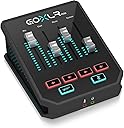
🎧 Elevate your stream with pro audio control that fits on your desk!
The TC Helicon GoXLR MINI is a compact, USB-based online broadcast mixer featuring a studio-quality MIDAS preamp with built-in EQ, compression, and gating. Designed specifically for Windows users, it offers flexible multi-device audio routing and a dedicated app for full control and profile management. Perfect for streamers and content creators seeking professional sound quality and intuitive operation in a sleek, space-saving design.


| ASIN | B07XH41DLN |
| Audio Input | XLR |
| Best Sellers Rank | #10,765 in Musical Instruments ( See Top 100 in Musical Instruments ) #25 in Unpowered Recording Mixers |
| Brand | TC Helicon |
| Brand Name | TC Helicon |
| Connectivity Technology | USB |
| Customer Reviews | 4.4 out of 5 stars 4,225 Reviews |
| Global Trade Identification Number | 00653341336538 |
| Item Dimensions D x W x H | 5.2"D x 6.61"W x 2.76"H |
| Item Height | 7 centimeters |
| Item Type Name | GoXLR MINI Online Broadcast Mixer with USB/Audio Interface and Midas Preamp |
| Item Weight | 730 Grams |
| Manufacturer | Music Tribe US |
| Number of Channels | 1 |
| Output Connector Type | USB Type B |
| Power Source | Battery Powered |
| Product Dimensions | 5.2"D x 6.61"W x 2.76"H |
| UPC | 653341336538 |
| Unit Count | 1.0 Count |
| Warranty Description | 3 year manufacturer. |
T**M
Mini takes 99% of the useful bits and halves the price
This is an utterly fantastic device. If you are a streamer, this will seriously up your stream quality when paired with a quality mic. Background: I'm a semi-regular Twitch streamer and also a software engineer and digital recording nerd. I have high standards for digital audio equipment. In the past, I've used Presonus, Alesis, and Focusrite USB and firewire audio interfaces, the dbx 286s processor that everybody uses, Behringer X AIR mixers, and even a full size X32 mixer for a few days until I realized what overkill that was for producing a stream :-P My GoXLR Mini is replacing about 3x its dollar value in high-quality preamps, outboard processors, and interfaces, and I couldn't be happier with it. The built-in preamp is high quality and has more then enough gain for my PR40 without needing a Cloudlifter. The included gate, compressor, and EQ help make your voice clear, clean, and consistent. And, although it looks like you only get 4 inputs due to the 4 faders, you actually get quite a bit more I/O than it appears - the GoXLR Mini adds 5 virtual output devices, plus the hardware mic in, line in, and optical in, and you can flexibly route all of these and re-map the faders in the GoXLR app however you like. I'm appreciative of the ability to configure the lights to act as meters, and the full audio engineer-level control over parameters like compression ratio and gate attack & release timing. They also thoughtfully beat me to a feature request by allowing you to map the headphone output level as a fader, even though it's an output and not an input. I have a few niggles / feature requests, many of which were acknowledged by TC on their Discord server and are planned soon: 1) StreamDeck integration - natural pairing for a device like this. ** UPDATE: This is available now. ** 2) Making the 'cough' button a toggle instead of a momentary switch. ** UPDATE: This is available now. ** 3) Visual cues when configuring the gate and compressor to see when they're kicking in. No ETA but acknowledged by TC. 4) The app is helpful and the ability to mix ALL of the inputs and outputs in one place is great. However, there's no minimal 'mixer only' view in the app, so if you want to keep the mixer handy, you have to also waste screen space showing the profile load/save and a picture of the device itself. At $500, the GoXLR was expensive and had features that were cool as a novelty but unnecessary. At $250, TC has hit this offering out of the park.
B**I
Good
Good item. Works well
B**K
Great combo for preamp, mixing, eq, compressor, noise gate
After a year of experience, I have edited my review to share my observations, and why I still would justify buying the GO XLR mini over the other options I tried (like Blue Yeti X with Logitech G-Hub or Voicemeeter or M-Audio or MOTU M2). -The preamp is loud and has a superior tone compared to other preamps I have used. I don’t have a great voice, and this makes me sound good on any mic, which says a lot. It’s full, warm, and balanced and retains a lot of coloration and character in my recordings. The noise is not loud at all. I've had quieter self noise on the MOTU M2, but it makes my voice sound a tad muffled. I find the GOXLR Midas preamps have the best balance and sound quality. -EQ, compressor, noise gate, and mix: The EQ, compressor, and noise gate is just minimum customization for pre-processing. It allows for just enough, but it felt limited. In a sense, it’s better that way because if I just customize minimally, I can avoid over-processing and sounding unnatural. It also means that it’s a little easy to over-process if settings are too high. -EQ works great. I found that my settings with different mics are fairly consistent with my surroundings and my voice. Was able to tame some of the annoying clicks, sibilance, room reverb, boom/rumble a tad while retaining the high/mids/lows I need. The GOXLR mini only has 6 frequencies to EQ, so it does feel a tad limited, but at least can do the minimum I require. The normal GOXLR has more options (but bigger and more expensive). -The compressor is so strong it’s too easy to screw it up. I had my attack too low and release too high with not enough make-up gain for the longest time that sometimes it produced a pumping noise. I found out that the attack and release has to be closer to the lower middle end, with a tad higher make-up gain for best results. For low compression, I found 2.5:1 works quite naturally. For higher compression, 4:1 works best overall. Just real sweet without distracting booms. -The noise gate settings are strong, but if slightly adjusted, works great without sounding distracting or taking away from my voice. It’s so strong in fact that I leave it in the minimum settings and it does a great job. Any higher will ruin the quality. -Mixing: Sometimes I have music streaming from my phone in the background. It’s cool to adjust once in awhile for effect. Usually keep it at 35%. -Live monitoring/Playback: The preamp hiss is so loud, I had to buy a 3.5mm filter to get more accurate live monitoring/playback. And it can get LOUD. If not careful, the live monitoring can get so loud it can create an echo or feedback on the mic, or worse yet, hurt my ears. Gotta keep it turned down. Gotta have the filter to cut down the hissing noise. Just to be clear, the hiss is not recorded. -Interface/Menu/Sliders: The software menu isn’t too confusing. It can be used to customize LED settings or save other mic profiles. Using the sliders is fairly straightforward. I find the soft buttons of the mute and bleep to be pleasing to the touch. The Go XLR menu interface is great because it’s not a resource hog, but rather a control center with minimum resource drain because the actual processing is done onboard the Go XLR mini itself, which also makes for smoother output. -Build: It feels sturdy but like all interfaces, it’s a bit clunky and can be awkward to place on a desk. The GOXLR mini is just slightly bigger than the other 2 audio interfaces I used. For $200, the GOXLR is a better deal than all other audio interface and processor combos. High quality audio and pre-processing all in one package. The ONLY issue some people may have with it that I can think of, is that there is only 1 mic XLR input. If you want to podcast with multiple people on one device, this would be a hard no. For my usage scenario: 10/10 - I do not need any other device.
J**S
GoXLR MIni: Mostly excellent, with a couple of issues
Overall: Sound quality is far beyond the Astro Mixamp I am trying to retire, except that there are intermittent dropouts and pops. I have a support case open and will update once I have a resolution. This is the only reason for the low score on sound quality. ETA: The dropouts and pops have been resolved by removing my second GPU, which I was only using for PhysX and RTX Voice processing anyway. It is strange to me that something like this would adversely affect a hybrid hardware/software DAC/mixer. My impression so far is that the GoXLR may make you want a better headset and mic, or could just help you get better quality out of what you already have. The good: Zero-latency monitoring with the mic you want to use. I'm constantly in meetings and this matters a lot. This will drive an A40 TR headset to much higher volume than the Mixamp, and clarity is better. With volume at max and no sound being output, there is absolutely no sound in the headset versus the Mixamp which has a very noticeable background hiss past half volume. Initial feedback from participants in meetings is that it sounds fine, but I'm taking this with a grain of salt given what 2020 has conditioned people to put up with when it comes to meeting audio. Lighting customization is good enough to let me do exactly what I want. I don't have everything completely off, but you could if you wanted. Noise gate, EQ, and compression for the mic input. Four custom-assignable physical faders with their own mute buttons. The not so good: The aforementioned dropouts and pops. This is an issue others have experienced, and solutions seem to have ranged from motherboard replacement to simple software fixes, and in between occasionally an add-in USB card does the trick. There's obviously a not-uncommon problem here that TC-Helicon are handling on a case by case basis. There is zero function without the app, a stark contrast to the Mixamp which is self-contained. Documentation and support is aimed at streamers and gamers. You're going to be funneled to Youtube and Discord, though there is still a web-based support portal. No EQ for sound sources. I can use Peace for this, but given the price and the fact the GoXLR app is running anyway, this should be included. People who don't add an EQ are stuck with whatever their headset gives them, which is a shame because they may be blaming the GoXLR for that lack of quality. Monitoring doesn't seem to accurately represent what's being output, mainly with regard to volume level. The top plate has a glossy finish. I don't care so much about the fingerprints, but you may find yourself fiddling with device placement to avoid glare from it. I guess the typical streamer is supposed to work in a dimly lite cave?
N**T
Simply the best in it’s category, for now.
Top quality materials, sound quality, and functionality. If you want the ability to adjust individual audio sources on the fly there is no substitute. “You can do that with many audio mixers”. You can, but the beauty is in the software. And the software is exclusive. It can be a little confusing at first but if you break it down and learn the basics you can do so much with it. Like iOS makes the iPhone what it is, this software is a great compliment to this high quality mixer. Complaints: - Bigger than I thought. The top side with the volume adjusters seems pretty standard. Could be condensed but not a big deal. The fact that it’s around 2.5” high makes it a little overly cumbersome. - power doesn’t shut off when you turn off your pc, you need to set a sleep mode and turn off all the lights. If your power resets for whatever reason it goes into a default state with lights shining bright. - the bottom left button could easily be customizable in the software as opposed to strictly an audio censorship sound. - why is the headphone jack on the front?? -$250 is steep. No better quality in the class but the price is definitely a slight drawback imo.
F**E
Can’t live without it
I don’t know how I’ve gone my entire content creator life without this. I was always getting overwhelmed. Y watching videos of people using it. Just kept. Rushing it off thinking I didn’t need it. When I got a second computer for streaming and recording purposes and I needed to connect both my gaming and streaming pc this GOxlr mini made everything easy. I couldn’t picture my life without this in it now. It makes controlling two pcs extremely easy. Even if you just use one PC it lets you control everything from music to gaming sounds and just about anything you customize it to control. Long gone are the days of tabbing out and opening mixer to control volumes separate when I can do it right from the GOxlr. There’s free mixers out there that anyone can use. But for me ever since I made the change to physical mixer vs a free digital one it’s made my experience with streaming and recording videos extremely enjoyable and easy. If I could give it 10 stars I would. It was a little complicated and overwhelming at first to learn how to route different sounds to different locations on the mixer and to the computer. But after watching a few YouTube videos and learning how routing worked it worked exactly like what I needed it to. Highly recommend it if you do any kind of content creation if it’s streaming or recording or just need easier way to control multiple computers!
B**H
Errors, Errors, Errors
Bought this item when they said they were REHIRING their team to work on another Goxlr then they re-fired them and now the mixer is slowly going out of date and constantly conflicts with Windows and errors out to the point of being a problem more than the solution it promised to be. Started out a 5/5 - Ended up being a 1/5. Waste of money, go with Rode.
S**R
Best device I've bought for my computer in a long time
This device is great even when not being a streamer, its amazing when you are though. I have the GoXLR mini and it has so many great little features if you use an XLR mic. As a XLR interface this has all the features you would want, it does processing internally so no processor usage from your PC, and the internals are good quality. There is a pretty good headphone amp so it can drive your high oom headphones and it sounds better then most on board audio from the motherboard of your pc. The fact that it adds individual audio lines to your computer is the main selling point to me, set your music up so the fader controls the volume. Put your voice channels on the chat fader so you can control how loud your party members in discord or xbox party chat are for you. Put your web browser on music for videos when not listening to music, the volume controls can be highly customizable and it helps a lot when just using your computer or gaming with friends not just for streaming. I would recommend this device to anyone who wants to up their voice chat to an XLR mic and wants a little more fine control on their audio. I would highly recommend to anyone wanting to stream and have a great audio set up.
Trustpilot
1 day ago
2 weeks ago