We remain fully operational. Our teams are working around the clock to ensure your deliveries continue safely.

DOWNLOAD THE APP


Customer Services
Copyright © 2025 Desertcart Holdings Limited
DOWNLOAD THE APP

📡 Double your screens, double your impact—mirror like a pro!
The avedio links HDMI Splitter 1 in 2 Out delivers pristine 4K@60Hz video mirroring with support for Dolby Vision and Atmos, HDCP 2.2, and 18.5Gbps bandwidth. Designed for seamless plug-and-play use, it duplicates one HDMI source to two displays simultaneously, with smart auto downscaling for mixed resolution setups. Ideal for home entertainment, presentations, and digital signage, it ensures crystal-clear mirrored content without lag or loss.


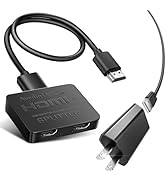


| ASIN | B07XCZC6SP |
| Best Sellers Rank | #307 in Electronics ( See Top 100 in Electronics ) #1 in Satellite TV Splitters |
| Customer Reviews | 4.1 4.1 out of 5 stars (36,703) |
| Date First Available | September 3, 2019 |
| Item Weight | 4.6 ounces |
| Item model number | 1x2 4K@60Hz |
| Manufacturer | avedio links |
| Product Dimensions | 7.8 x 7.5 x 0.98 inches |
B**G
Perfect Mirror - Great for HDMI Method Setup
The Avedio Links HDMI Splitter (1 in 2 Out) worked great for my setup. Quick, plug-and-play installation with no extra configuration needed. The included 4 ft HDMI cable was a nice bonus. The ports feel solid and well-built, and the signal stayed clear with no noticeable loss in resolution. Works well for anyone using the “HDMI method,” as it mirrors the output cleanly. Be aware that when disconnecting or reconnecting cables, both monitors will briefly flicker on and off.
N**N
Works as expected
Worked exactly how I was hoping. One TV was set to 1440p, and the other was only a 1080p TV. The computer it was connected to set the resolution to 1440p, and everything just worked.
T**L
Died after six hours, unplugged a while and worked again.
Worked great for about six hours. I admit was fantastic while it worked for two different size screens without problems. But, then i died and i had to go back to one screen! Now that it has been unplugged overnight, it works again. I checked the computer out, and it is 1080p at 60 hertz, and both my TVs are a 75-inch Toshiba Fire TV 4k and an Insignia 43-inch 4k Fire TV, which should both work fine with 1080p input, like from older DVDs and often the internet sites. I set all devices to 60 hertz prior, so that should not be an issue again. I am retesting (my second use of the device to see and will update this review if it decides to last longer without giving a blank screen to both TVs (no input). This time it did not die, so I am upping it to a four-star since it is handy. If it dies, unplug it and try again later. Also, disable the computer mode on your TV, which should not make a difference, but may have.
W**S
IT SPLITS!
I've got a fairly complicated entertainment set up. I've got a monitor and a TV, and I've got an HDMI switch with three game consoles connected to it: the Xbox 360, the PlayStation 3 and the Nintendo Switch. (I've also got an Xbox One X which I use as set top box, which will have to go to a new HDMI switch as my TV only has two HDMI inputs. Neither here nor there for this product :) ) Occasionally I may have the desire to play games on the smaller computer monitor so I can parse the interactive content more easily without it giving me a headache, me being autistic and everything :-) but then I may have the desire to watch Blu-rays and DVDs on my PS3 and Xbox 360 respectively, on my larger TV. You probably know that physically changing connections out too often can wear out the connectors; this is no different with HDMI! So I wish to preserve my connectors as much as possible, and this product that I am reviewing now by avedio links definitely helps out in that regard. Installation couldn't be simpler! I just plug the HDMI out of my HDMI switch into the input of this "one in, two out" splitter - then connect my computer monitor with a rare HDMI input into the first HDMI out of the splitter, and the TV into the second HDMI out of the splitter! (The default input of the monitor, that my computer generates, is a DVI-D, but that's neither here nor there for this device :-) ) So, the colors are strong, the audio is nice and loud - as though I were passing a straight HDMI signal through! And there's really no lag to speak of - but when both my outputs are on the same time, there is a TINY, less than 1/10 of a second lag between the devices, enough that I can hear it but not see it, and I can't tell which device is behind. But I don't see a scenario where I have both outputs on at the same time for a long time, anyway. Good show, avedio links! I'll be getting another to go with my secondary monitor when I get a new games console to hook up to it within the next couple weeks or so. I'll report back if, as has happened tragically to a few of my fellow reviewers, the device should fail in a few months. But I doubt it will - seems well-made. Just remember to provide power - get a USB AC Wall Adapter at the same time, so the splitter can pump the signal to both of your outputs as seamlessly as possible! PS(3)!!! :) When using this splitter and when playing Blu-rays on the PS3, I think the automatic frequency detection gets a little wonky - so my monitor by default displayed an Out of Range error when I got into the video content. So, I just went into Settings -> Video Settings -> 1080p 24Hz Output (HDMI) -> Change it from Automatic to Off. There should be no other ill effects from playing it either on the monitor or TV going forward. (I also changed the BD/DVD Video Output Format (HDMI) from Automatic to RGB, which I think is superfluous as the other option has to do with Component output which this splitter of course doesn't do :) )
S**N
Kind of useless
It *splits*, but I still have to only have one plugged in a a time or the other- even if off- will cause the one I WANT to use not to function at all. Kind of defeats the purpose. Using it for a TV to have both the DVD player and streaming dongle attached, so I wouldn't have to physically move the TV to switch them out constantly, but I STILL have to do that now. So now I just basically have a wee short extension cord for the exact same effect.
R**N
Splitter duplicates the single view from the original source. Read the review for lesson learned.
I purchased this unit to add an additional monitor to my computer. What I learned is in order to have dual monitors, there needs to have two video outputs coming from the computer. I had always thought the single HDMI should produce a split screen across two separate monitors. Apparently, that is not the case. After installing this unit between my computer and the monitors, this device did feed the screen to both screens. However, Windows or Mac did not detect this device in order to split the screen into two monitors. The view was identical for both screens for the Windows PC. And the device did not display anything on the MAC. I do not recommend this device if you are looking to split your computer screen image into dual monitors. This is an excellent device if you want to duplicate a single image on to two screens. Hope that helps.
S**A
BUEN PRODUCTO
U**E
Fungerade perfekt, tänk dock på att man bör starta om datorn igen efter man anslutit fick bild direkt men inget ljud men efter en omstart av datorn så fungerar allt perfekt nu och har aldrig varit problem sedan dess.
P**O
so i will be quick. It's a splitter and if you connect 2 monitors to it you will get 2 same images on both monitors. i sound stupid and it is but i thought i can have 2 independent monitors connected to the same hdmi port so : Make a research before buying instead of doing dumb things like me 🤣🤣
S**L
My wish was to connect my LG OLED CX 4K HDR 120Hz tv to my computer in mirrored mode. My PC monitor is 1080P HDR 100Hz. Windows can't mirrored screen with keeping the HDR. So this solution wasn't working for me cuz I really want to keep HDR. With this HDMI splitter I now can feed my TV with 1080P HDR at 100hz so I'm super happy. Works beautifully. It didn't works first I had to put it in copy with monitor in output 1 first.
R**Z
Buen producto, me soluciona mi problema: enviar la salida HDMI para una pantalla y un proyector. La imagen es buena, es fácil de instalar y de desinstalar: cumple totalmente con las espectativas. Aconsejable.
Trustpilot
3 weeks ago
4 days ago