
🎨 Elevate your art game with precision and freedom—never miss a stroke!
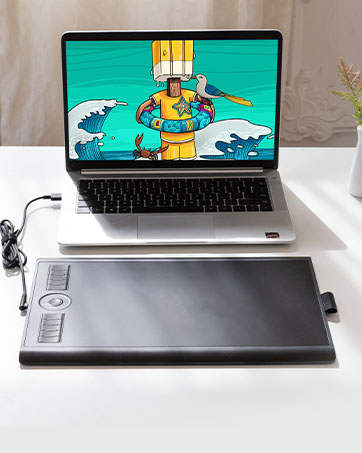
The GAOMON S620 OSU Signature Graphics Tablet features an 8192-level pressure-sensitive, battery-free pen with 4 customizable express keys, a 6.5x4 inch active area, and a 266 PPS report rate. Compatible with Windows, Mac, and Android, it supports most major drawing and design software, making it ideal for digital artists, students, and professionals seeking portable, precise, and eco-friendly creative tools.




| ASIN | B07R49KYCF |
| Best Sellers Rank | 870 in Computers & Accessories ( See Top 100 in Computers & Accessories ) 1 in Graphic Tablets |
| Guaranteed software updates until | unknown |
| Item model number | S620 |
| Manufacturer | GAOMON |
| Product Dimensions | 21.11 x 17.4 x 0.79 cm; 249 g |
A**A
Good starter stylus, worth the money.
Easy to connect and use via usb or Bluetooth on mac. Very smooth operation and good detail on brushes in Photoshop. Decent size and weight, with enough space to do details but also span the entire screen if necessary. Pressure sensitivity is excellent, feeling similar to real life pens and pencils. Great product for the price.
A**A
Amazing product with a great price
It is incredibly easy to start and use and very satisfied with it. Works with microsoft word and excel great and overall I think its a great deal for the price definitely recommend
N**A
GAOMON is now my favourite tablet manufacturer
Why did you choose this product over others?: A cheap alternative for artists. This one lasted me years now and I only ever had a one issue which was just pen connection but it's fixable. Loses one star because of that but if you need a decent tablet for cheap, buy it. I've switched to the PD1611 from GAOMON now so I do back up that this company is good :) Comfort: Recommend a glove for better movement, but the surface is smooth and comfortable to rest on. Screen size: Has no screen but it is small, I'd say the size of a square mousepad if you want to imagine it. It's still comfortable and you can adjust what screen proportions the tablet can interact with through the pc program. Buttons: Buttons never failed me, they are good and customisable and easy to reach. Design: Good for art as well as OSU or anything else you'd need it for. ( OSU EXAMPLE below )
C**E
Great tool for my kids online learning!!
I bought this Signature Graphics Tablet mainly for my kid's online tuitions, and it has been a game changer. Writing and drawing on this tablet feels smooth and natural, making it so much easier for them to follow lessons and submit their work neatly. The express buttons are very handy for quick functions, and the setup was super simple – just plug and play. It’s lightweight, compact, and easy for kids to handle, yet it feels sturdy and reliable. The tablet also works great for drawing and creative projects, so they use it beyond classes as well. For the price, this is an excellent tool for learning, practicing, and even some fun doodling. Highly recommended for students and parents looking for a reliable tablet for online learning!
S**V
95% wacom
I have had a welcome tablet for a long time before it broke! I was comfortably saying that this tablet is almost the same fuel and quality as a welcome!
B**O
Easy editing and smart drawing
You will throw the mouse away ,if you love drawing and editing on PC ,using photoshop or any image editing software, this is one to grab ,there is another one with wife if you are a smart user who doesn't like cables .but for me and others this is the way to go
M**S
Good for Windows/OSU, but struggles with newer MacBooks (Poor Drivers)
I bought this tablet a few years back, mainly buying into the hype that you “need” a tablet to be good at OSU! On Windows, it’s a decent, cheap device. It works fine for gaming and the input is responsive. If you use a Windows PC, it’s a solid choice. Recently, I tried using this with my new MacBook for College work, writing notes and answering practice questions as it is advertised as an “Online-Learning Device”. It was a nightmare. Despite downloading drivers from the Gaomon website, I couldn’t get the pressure sensitivity to work properly, nor could my Mac recognise the device. The cursor moves, but you have to press down incredibly hard for it to register, making it useless for writing. The active area is quite small, so if you have large hands you might find it quite cramped. It uses Micro-USB, and the pen is comfortable enough, but a little thick. In short, it’s great on Windows (aside from the fact that the software is quite clunky), but I cannot recommend it for Mac Users or students wanting to take notes.
S**R
Great value
Great product
I**A
Esta tableta GAOMON S620 es una opción muy sólida si estás buscando una tableta gráfica compacta, ya sea para dibujo digital, edición de fotos o para juegos como OSU!. El tamaño de 6,5 x 4 pulgadas es ideal para escritorios pequeños o para llevarla contigo, sin sacrificar demasiada área activa. El lápiz sin pilas es un gran punto a favor, ya que es ligero y no necesita carga. La compatibilidad es muy amplia (Android, Windows, Mac, Linux), y los 4 botones exprés son muy útiles y personalizables. El producto llegó en perfecto estado. El embalaje era seguro y todos los accesorios estaban incluidos e intactos. Es una compra muy recomendable por su relación calidad-precio. Funciona perfectamente y es muy fácil de configurar.
A**.
Ben m10k pro sürümünü aldım. Türkiye'de aynı ürün iki katından fazlaya geliyor. Paketten 10 tane yedek uç, bunları koyabileceğiniz küçük bir çanta, kalem, tablet, eldiven, bağlantı kablosu, 2 tane çevirici (usb to typec - usb to micro usb), kullanım kılavuzu, garanti belgesi, tableti koyabileceğiniz bir de kılıf çıkıyor. Programını kurmanız için bir yönerge kartı da çıkıyor. Birkaç tıkla kurabilirsiniz. Çok zor bir olay değil. Program içinde, kalemdeki 2 tuşu ve tabletteki tüm tuşları istediğiniz gibi değiştirebiliyorsunuz. Enable wheel seçeneği seçiliyken, tabletteki orta tuş çalışması lazım ama seçili değilken çalışıyor :) Programın sonraki sürümünde güncellenir büyük ihtimal. Büyük bir olay değil. Tablette tuşlar da kalemdeki tuşlar da çıt çıt ses çıkarıyor. Sessiz değiller. Fare tıklaması gibi. Rahatsız etmiyor. Tabletteki orta tuşa bastığınızda birden çok işlevden birini seçip, kaydırma kısmını ona göre kullanıyorsunuz. Kaydırma kısmı dokunmatik. Dönen bir tuş yok. Tablet üzerinde iki ışık var. Birisi kalem işlem yapacak kadar yaklaşınca yanıyor. Diğeri orta tuşu kaydırırsanız yanıyor. Orta tuşun yanında. İkisi de yeşil, küçük, nokta kadar bildirim ışıkları. Kalem baskı değerini de programdan ayarlayabilirsiniz. Alt eşiği biraz artırmakta fayda var gibi. Kalemi fazla bastırmanıza gerek kalmadan daha iyi bir çizim yapabiliyorsunuz. Hem kalem hem tablet kullanım ömrü için yapılabilir. Program üzerinden çalışma alanını da ayarlayabiliyorsunuz. Varsayılan olarak tüm ekranı kullanıyor. Yine program üzerinden her program için tek ayar ya da her program için ayrı ayar yapabiliyorsunuz. Windows ve Mac desteği var. Programı Linux'a kuramıyorsunuz. Telefonda da çevirici aracılığıyla çalışıyor. Çalışma alanını ayarlamanız gerekebilir. İlk taktığınızda tabletin tamamını, telefonun çalışma alanı olarak görüyor. Çizim yapmaya yeni başlayacaklar için bir iki program da önerebilirim: 1 - Krita (Ücretsiz): Photoshop alternatifi. Bazı konularda daha iyi. Her türlü çizimi yapabilirsiniz. (Fotoğraf manipülasyonu, manga-anime çizimi vb.)(manga-anime çizimleri için hazır şablonla geliyor.) Windows, Mac, Linux ile kullanabilirsiniz. Android için tablette de kullanabilirsiniz. Telefon uygulaması yok. 2 - MediBang Paint Pro (Ücretsiz/Ücretli): Manga çizimine yönelik bir program. Sitesinde, hatta programın içinde çizim eğitimleri bulabilirsiniz. Ücretsiz sürümde 3GB bulut alanı veriyor. Neredeyse tüm özellikleri kullanabiliyorsunuz. Windows, Mac, Linux, iOS, Android, Telefon-Tablet... Her yerde kullanabileceğiniz bir program. Ücretli sürümü de yıllık abonelik üzerinden çalışıyor. Japon Yeni ile fiyatlandığı için çok pahalıya gelmiyor ama ücretliye gerek duyar mısınız bilmiyorum. Ücretsiz sürümde, telefon uygulamasında reklam çıkıyor. 3 - Adobe Fresco (Ücretsiz): Karita ve MediBang Paint Pro varken gerek duyar mısınız bilmem ama, Windows, Mac ve iOS ile kullanabileceğiniz bir program. Android desteği yok.
M**D
Es funktioniert alles bestens . Aber für einen Anfänger wie mich , Gewöhnungs bedürftig . Zumal man ja nur auf dem Computer was sieht , sehr zu empfehlen für Ergo Therapie ..........
R**L
M106K Pro Afmeting zal zijn als beschreven, maar had hem kleiner verwacht. Heeft dus voldoende bewegingsruimte. Erg veel functieknoppen om voor te programmeren. Uitgeprobeerd in Krita, werkt top. Wordt geleverd met een vilten map voor de pen, een vilten mapje met reserve pentips en een bewaarzak voor de tablet.
J**J
At last gaomon didn't disappoint! I had xp pen 960S model but it didn't last that long I bought it like a year ago! I wanted to find something within budget just for blender and clip studio paint! I'm a freelance manga artist and illustrator since I really wanted something within budget I gave it a try and it turns out to be decent! This graphic pad is really suitable for beginners and it's easy to use! Also the pen has 2 buttons which is a great thing! Because previously when I bought xp pen it only had a single button which I was using as a function of "undo" but now that I have two so I use them as "undo " and a link between eraser and gpen! Btw it also works on windows 11 so you don't really need to worry about anything! Overall it's a good graphics pad for the price it's given! You can definitely go for it other than xp pen! Bet it won't disappoint you!!
Trustpilot
3 weeks ago
3 weeks ago



