Some deliveries may take a little longer than usual due to regional shipping conditions.

DOWNLOAD THE APP


Customer Services
Copyright © 2025 Desertcart Holdings Limited
DOWNLOAD THE APP


💼 Unlock your legacy drives with speed and ease—because your data deserves a second life!
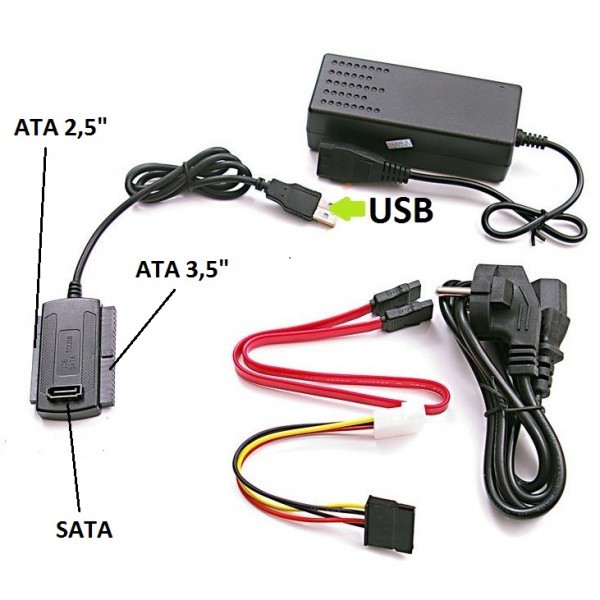
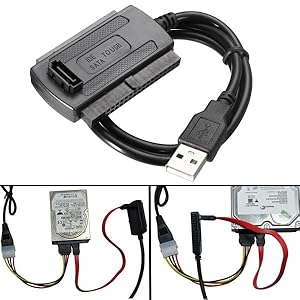
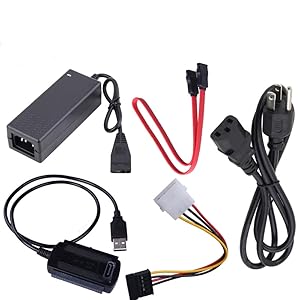
The SANOXY A12940 SATA/PATA/IDE to USB 2.0 Adapter Cable Set is a comprehensive, plug-and-play solution designed for professionals needing to connect 2.5", 3.5", and 5.25" SATA or IDE drives to any USB port. Supporting up to 480 Mbps transfer speeds, it includes all necessary cables and power adapters to convert internal drives into external storage or recovery devices, making it an indispensable tool for data recovery, backups, and drive repurposing.
| ASIN | B001OORMVQ |
| Best Sellers Rank | #5,033 in Computer Cable Adapters #9,471 in Audio & Video Connectors & Adapters |
| Brand | SANOXY |
| Brand Name | SANOXY |
| Cable Type | USB |
| Color | BLACK |
| Compatible Devices | DVD Player, Laptop, PC |
| Connectivity Technology | USB |
| Connector Gender | Male-to-Female |
| Connector Type | Optical, Usb 2.0 |
| Customer Package Type | sealed anti-static bag |
| Customer Reviews | 4.4 out of 5 stars 3,422 Reviews |
| Data Transfer Rate | 480 Megabits Per Second |
| Global Trade Identification Number | 00877083099562 |
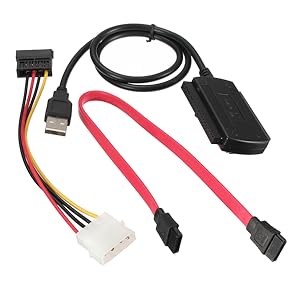
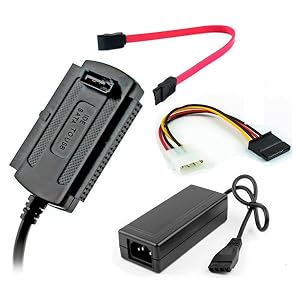
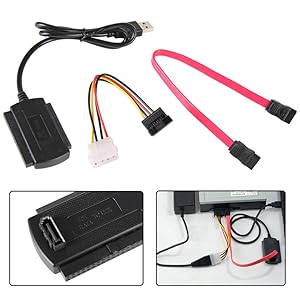
| Included Components | USB to IDE / SATA cable adapter, SATA Data cable, AC adapter, AC to IDE power converter, IDE to SATA power cable. |
| Indoor Outdoor Usage | Indoor, Outdoor |
| Item Shape | Round |
| Item Type Name | SANOXY SATA/PATA/IDE Drive to USB 2.0 Adapter Converter Cable (SANOXY_USB-IDE-SATA-2) |
| Item Weight | 0.01 Ounces |
| Manufacturer | SANOXY |
| Maximum Voltage | 5 Volts (DC) |
| Model | SANOXY_USB-IDE-SATA-2 |
| Model Name | SANOXY_USB-IDE-SATA-2 |
| Number of Items | 1 |
| Number of Pins | 4 |
| Other Special Features of the Product | Data Transfer, High Speed |
| Recommended Uses For Product | Connecting and using external storage devices (e.g. 2.5''/3.5'' IDE hard disks, SATA hard disks, CD-ROMs, DVD-ROMs, and CD-RW/DVD-RW ROMs) through a USB port Recommended Uses For Product Connecting and using external storage devices (e.g. 2.5''/3.5'' IDE hard disks, SATA hard disks, CD-ROMs, DVD-ROMs, and CD-RW/DVD-RW ROMs) through a USB port See more |
| Special Feature | Data Transfer, High Speed |
| Specification Met | Sata Ide |
| UPC | 877083099562 |
| Unit Count | 1.0 Count |
S**L
Easy, functional and inexpensive -- excellent!
This thing works out of the box, as expected, without mucking around. Plug it in, the drive works. No software, no mess, no extra parts, no complication, does just what you should expect it to do, and I paid about $7 for it shipped 2-day with Prime. For the price, it's an excellent and highly functional product. Some things to keep in mind: This probably won't work through a hub for a laptop drive. I couldn't even get it to work through a powered hub. It worked just fine on the front and back panel USB ports. This is because the ones from the motherboard source more power. The hub didn't source enough to run the hard disk. If you're using a drive that has a separate power connector, this shouldn't be an issue. This is not a problem with the device, it's just how these things work. Some USB hubs, especially the more expensive ones, source more power too. Unless you know a little bit about hard drives, you may not be able to take an existing disk, plug it in and use it as if it was an external drive. Sometimes it will work, sometimes it won't. If you know what you're doing or you use some fancy drive recovery software, there shouldn't be a problem. This isn't an issue with the device, it's just how these things work. My Ububtu machine auto-mounted the first NTFS 2.5" PATA drive I tried. This is a solution for things like drive recovery, not for general use. USB 2.0 has a data transfer speed of 60 MBps. PATA (133) transfers at 133 MBps. SATA (3) transfers at 600 MBps. This adapter will get data off your drive, at best, at one half the speed of PATA and one tenth the speed of SATA, assuming your drive can keep up. Then again, this is the same story with any external USB drive. For reference, the high-end FireWire runs at 393 MBps and USB 3.0, which isn't advertised as supported by this device, runs at 400 MBps. Once again, this is not an issue with the device, it's just how these things work. I didn't test throughput, I don't own a machine with USB 3.0, I didn't try any optimization, and I didn't verify these throughput numbers (from Wikipedia).
M**T
It did its job very well
We bought this to get vital data from a drive out of a Mac Powerbook which really died a hot death (user error). No power, no sign of life, nothing. This kit contains everything needed. The adapter and SATA cables are long, very good. Only problem was with the Molex plug & socket adapter cables. Hard/tricky to connect. (I have hated them since I saw them on the first drives long, long ago. Cheap, cheap, cheap but a secure connection.) The first test was with the SATA connection to a new WD 1TB drive (WD10JPVT). Zero problems: partition, format, write/read many GB of data. Speed close to 400Mb. Then on to the recovery from the 2.5" ATA/100 drive. The filesystem was corrupt but fixable. A quick look followed by an immediate dump of the vital data worked. Then the drive went into its death spin taking itself and the adapter out. I am now sure this drive also destroyed the drive interface on the computer too. I suspect over current is the cause. May post mortem it later. I'll update this. This device saved us a $700 data recovery fee. Well worth many times the price. I believe it would not have failed but for this drive. No - I will not claim warrantee or defective return.
M**1
Works well
Used the cables to read a few drives (SATA & IDE) that were removed from units that simply did not work. A 160 GIG WD internal IDE, a Segate 160 GIG SATA internal, a Toshiba SATA 120 GIG. Connected after a few seconds the drive showed up on the desktop (one at a time), and managed to retrieve data that I thought was lost, photos, music video clips, documents. No data recovery software was required as the drives were in good shape. I did use the cables on a 500 GIG WD Caviar Blue internal SATA drive the was in my 21" iMac and it does not work. It justified all of the trouble shooting that was done with Apple, the drive had failed. New drive ordered on Amazon to replace it. No instructions came with it, so unless you are familiar or used these types of cables before it can be a little confusing at first, but once you try it a few times it gets easy to use. Cables can only be plugged in one way so damaging the drives or the computer are almost impossible. The cost of these cables can save you a lot of money and time by simply trouble shooting your drives on your own. If you managed to get the drives out of the device that they were in, means that you are well on your way. The connection cable is USB so that could not be any easier. If the connections are made and the drive is not recognized or you don't hear it spool up after a short time then the drive may not be working. Don't throw the drive away as a pro may have alternatives. You also don't want to lose any data that may be on the drive. For around $8, you cant go wrong, and they can be used over and over again. Some similar "kits" sell for three and five times as much as these do and I can't see why. I would recommend these cables.
G**O
Looks like a cheap piece of crap, BUT it is surprisingly EXCELLENTt!
I already have three nice big USB drive docks. I saw this one, said "Hey, that's too cheap to be good!" ...so I decided to try it. It took FOREVER for it to get here. It has to be shipped by slow boat from China! (It is, actually...) When it arrived it lay in a drawer for 2 months. Then I tried it. Boy was I surprised! It is a far better drive dock than my big expensive ones! It has been able to read every SATA drive, and has been able to read every IDE drive larger than 30 gigs - something my big expensive docks CANNOT DO! They read SATA, no problem. Plug in any IDE and they are worthless! With this simple little dock I was able to recover movies on an old IDE drive that I have been unable to access for years. What a wonderful surprise! The thing is SOOOOO SIMPLE! I'm a computer guru. Made my living as a highly compensated technical consultant for decades. I'm NOT easily impressed by hardware. But I'm impressed by this little item! It comes with the dock, which is basically a fancy cable with a USB connector on one end and the drive connector dongle on the other end. The drive dongle has 3 molded in connectors. One is for IDE drives, another for 2.5" laptop drives, and the third is a socket for a SATA data cable. The package also includes a power supply with AC cord and a connector for standard 3.5" drives. There is an included power adapter cable to connect to SATA drives. Also included in the package is the SATA data cable. Rather complete package! There is no driver disk. It is plug 'n play UNLESS you use it on Windows 95, which does require a driver. I guess if you're still running Win95 you can download the driver from their website. Don't know - I don't use Win95. The instructions, which are minimal, do say it can run on Win95. The instructions are minimal because only an idiot would even NEED instructions. It is that easy to use. Plug it in, BOOM it works! That simple! If you need separate power for the drive, that's included in the kit. There is pretty much no way possible you can hook anything up wrong. I think it really IS idiot proof. Well... After using it for an hour, I came back to Amazon and ordered two more of these adapter kits. And I may buy more of them. Yep, I like it that much. It answers a need admirably - even better than docks costing almost ten times as much. That's got to get your attention! Would I buy it again? I ALREADY DID! Would I reccomend it? As a computer professional I have to say that I would reccomend it over docks costing far more because cheap as it is, it OUTPERFORMS the more expensive docks! Interestingly, I was able to use it on a laptop computer that ALREADY had a USB hard drive dock actively in use. This caused NO HARDWARE CONFLICTS! Man, that's wonderful! I've been hampered for YEARS because I could only have a single drive in a single dock on my computer (don't use a desktop - don't need one with the computer's expansion interface dock). That meant anything I wanted to copy to another drive had to first be copied to my inboard hard drive and then copied to another drive after swapping drives in the dock. Anything more than a few gigs and I had to break the copy into many swaps. WHAT A PAIN! I'm sure many of you have had the same frustration! With TWO docks connected simultaneously I was able to copy 520 gigs in 3 hours. Swapping drives and copying small bites of that 520 gigs at a time it would have taken me 4 or 5 --DAYS-- to do the same thing! MAN WHAT A TIMESAVER!!! Pros: Fast data transfers LOW price Versatility Plug 'n play No software or drivers required Ability to have two docks at the same time without fancy hardware Everything needed IS INCLUDED! Cons: I can't find any... Sorry! This is probably one of the only times in my life I've been UNABLE to fault a product in ANY way. I definitely reccomend this to one and all!
T**O
Low durability but it does it's job for a low price.
With this product, I killed two birds with one stone. I needed a SATA cable to connect my DVD drive to the motherboard and I wanted someway to connect my salvaged IDE drives. I read a lot of complaints about drives shorting out seconds after plugging it in, so I tested the provided power supply out on a low capacity drive first without connecting it to a computer to make sure that everything was in working order. I let the drive spin up and stay powered for several minutes while I checked temperatures every 30 seconds or so. Nothing shorted out and temperature was warm not hot. I pulled the plug and connected the IDE adapter before plugging the power back in. Next, I connected the USB end to a USB extension cable connected to my computer. The computer initially recognized the device then it gave me a balloon tip alerting me to an error. I don't remember the error but I was prepared for it. I hadn't set any jumper settings to specify master or slave. I unplugged the USB first then I unplugged the power. I applied the jumper settings for master then plugged in power followed by the USB. Windows now happily installed the driver for mass storage devices. I went into Device Manager and saw windows detected the drive name and model but Windows Explorer did not show any new drive letters. I check the disk in Disk Management and it tells me the disk is Unreadable. My heart sunk. I wasn't sure what the problem was but I figure all these complaints regarding the flimsy power supply might be a clue. So I pulled out an old salvaged power supply which had the molex connection that I needed and gave it a quick 'hack' using a paper clip so it would power up without a motherboard. I powered up the IDE and then plugged in the USB but Disk Management is still telling me that it is Unreadable so the power supply was ruled out. The last thing to do was to ditch the USB extension. Windows detected the drive and installed the drivers before without any problems.. so why should it make any difference? I don't know but Disk Management was finally able to detect the drive capacity. So now I have an alternative means of powering the IDE drive via a trusted power supply. I ditched the flimsy power supply even though it didn't appear to be an issue. Better safe than sorry. I can't keep an eye on it all the time. The adapter is not durable so you should take care not to crush or drop it. The adapter casing is made of cheap plastic and has a hollow sound when dropped. For the price, I'm quite happy with the product. Update: You know how the molex connector has a distinct shape so it won't go in if you plug it in wrong way? Well, because the male molex connector is made of rubber, you can plug it the wrong way with a bit of force. So pay attention to the shape of the molex connections and match it up or you may fry your hard drive. As an extra precaution, double check the wiring for the 'molex to SATA power adapter'. Make sure the wire colors are where they should be. As some have stated, the molex pins for the 'molex to SATA power adapter' are a bit loose. Another complaint I keep seeing is about the molex connector only having three pins; 12V, 5V and GROUND. It seems to work fine. The missing ground wire might be for grounding the hard drive motor while the ground that does exist may be for the hard drive's circuitry. Just an educated guess. Whatever the case, I am using a salvaged power supply unit for powering my IDE drive. One last thing; if you want to use a USB extension cable, you will need to amplify the signal for it work properly. My recommendation is to ditch the USB extension.
J**R
Very Handy Kit
I purchased this kit when a friend needed to recover a hard drive that had a corrupted boot sector. His desktop machine would not boot and he had years of photos that he could not risk losing. I searched around on Amazon for a product that I might be able to use to read his 3.5 inch IDE drive from my laptop. This was the product I ordered. This product comes with all the connectors one would need to connect the most common drives as well as a power supply. These items are all well packed and are packaged in a plastic bag that I have continued to keep the pieces in even after I have used the kit. It isn't the most ideal way of housing the kit; for instance it doesn't close, but it certainly keeps all the pieces together for the next time I need to use the kit. From a construction standpoint the connectors are not super heavy duty; they are of a more moderate construction. They don't appear intended to be used dozens of times day in and out as they might if you ran a computer repair business. They certainly are capable of being used frequently and I had no issues using any of the connectors. I had no issues with the power supply. I did try it on a couple of different drives that I had lying around and it worked perfectly each time. The power supply seemed lighter than other comparably sized power supplies that I have used in the past. For the price it was more than I expected. I would have been happy if it worked for just the one drive. It did that and much more. I would recommend this kit. I certainly saved my friend's pictures.
B**I
Great for the price
This product does exactly what it is supposed to. However, the very essence of it rings low-quality, from the plastic, to the power supply. Allow me to explain. The power supply squeals when standing by/not powering a device. The AC power plug that came with the power supply DID NOT FIT the female connector on the unit! I had to get another one, and it is lucky I have plenty. I threw the original out. The drive reader itself works for all connections, and works at a decent speed. The underlying technology of the reader works well and is well made. However, it feels like the plastic it is encased in will fall apart. My last complaint, is that the Molex connector on the power supply is so cheap, it doesn't even feature a 12V ground pin. Just the 5V ground pin exists. If you have a device that doesn't tie the two grounds together, it will not power on correctly unless it is a mobile drive or 5V device only. For example, I found this is true for an 8-inch fan of mine. Molex connectors should power ALL Molex devices. I give this product no points for structural quality. All in all, it works, and if you are lucky enough to get a power cord that works, or have another, it will work for you, and is very inexpensive.
D**T
Wondefrul product!
I bought this to transfer some files from a hard rive of my old computer that went up in flames on me. I've had it sitting for nearly two years, and i only recently found out about this sort of thing. (I did not have a computer able to hook up IDE drives to. and was unwilling to shell out 150 bucks to have best buy put it all on disks for me) It got here really quick, and for its price it does its job. I was a bit annoyed at first when I connected it, only to have my computer after a second or two say it couldn't recognize it. I rebooted the computer, only to have it not boot past the main screen, so I unplugged the external hard rive and rebooted again. This time it all booted up fine, I plugged it back in before logging in to my account on the computer. This time the computer recognized it, and is transferring data as I type. Its amazingly fast too, 19 gigs in only 20 minuets. The led light is flashing red as the data transfers so all is working well. All in all for its price it is great, I don't intend to use it long term but i imagine it will hold up nicely.
Trustpilot
2 months ago
1 week ago