

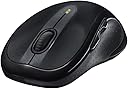

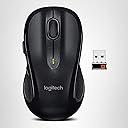
Logitech M510 Wireless Mouse, Black
Product ID: 336036
Details
- BrandLogitech
- ColorDark Gray
- Connectivity TechnologyUSB
- Movement Detection TechnologyLaser
- Special FeatureBattery Life
📡10m wireless range
🔋18-month battery life
🎛️5 programmable buttons
Desertcart purchases this item on your behalf and handles shipping, customs, and support to Kyrgyzstan.
🖱️ Elevate your desk game with precision, comfort, and wireless freedom!
The Logitech M510 Wireless Mouse combines a comfortable, contoured design with advanced laser tracking and a robust 18-month battery life. Featuring a compact Unifying USB receiver with a 10-meter wireless range, five programmable buttons including side scrolling, and power-saving technology, it’s engineered for professionals seeking reliable, customizable, and ergonomic control. Compatible across major OS platforms and backed by a 3-year warranty, it’s a premium upgrade for any workspace.
| ASIN | B003NR57BY |
| Additional Features | Battery Life Indicator, Power Saving Mode, Programmable Buttons, Wireless |
| Antenna Location | Home, Office |
| Battery Average Life | 18 months |
| Best Sellers Rank | #541 in Computer Mice |
| Brand | Logitech |
| Button Quantity | 5 |
| Color | Dark Gray |
| Compatible Devices | Lunix, Mac, Windows |
| Connectivity Technology | USB |
| Customer Reviews | 4.6 out of 5 stars 39,882 Reviews |
| Enclosure Material | Rubber |
| Finish | Rubber |
| Global Trade Identification Number | 00097855066596, 10097855066593 |
| Hand Orientation | Ambidextrous |
| Hardware Platform | Personal Computer,Macbook |
| Included Components | 2 AA batteries, Logitech Unifying receiver |
| Item Dimensions L x W | 4.4"L x 2.5"W |
| Item Type Name | Logitech M510 Wireless Computer Mouse Comfortable Shape with USB Unifying Receiver with Back/Forward Buttons and Side-to-Side Scrolling, Dark Gray (910-001822) |
| Item Weight | 4.55 ounces |
| Manufacturer | Logitech |
| Mfr Part Number | 910-001822 |
| Model Name | M510 |
| Model Number | 910-001822 |
| Movement Detection | Laser |
| Movement Detection Technology | Laser |
| Number of Batteries | 1 AA batteries required. (included) |
| Number of Buttons | 5 |
| Operating System | Windows 10 |
| Pattern | Mouse |
| Power Source | Battery Powered |
| Range | 10 meters |
| Special Feature | Battery Life Indicator, Power Saving Mode, Programmable Buttons, Wireless |
| Style Name | Modern |
| UPC | 097855066596 667649008233 754292174733 |
| Unit Count | 1 Count |
| Warranty Description | 3-year limited hardware warranty |
T**D
Solid mouse, great quality.
I've tried to save a little money in the past by purchasing cheaper mouses that had good reviews but they die or become too frustrating to use after a few months due to shoddy craftsmanship and poor engineering. This mouse is a huge breath of fresh air. Some reviews have mentioned concerns about the weight of this mouse. Personally, I think it's great. You can use one battery or two so there is some control over weight which is nice. I love the feel of this thing. It's not so light that it feels like you can crumple it in your hand. It feels solid and is really a quality piece of equipment. Normally I cringe at power saving features since they can shut the mouse down after a period of time and require you to click it to activate it again sending you to pages/files on your computer that the cursor happened to be sitting on that you don't want to go to etc. In short, they're usually more of a hassle than their worth. Not the case with this mouse. It does shut itself down after some time but all you do is move it and it's going again. It doesn't have a noticeable delay, it just works exactly the way you want it to. That and it has a ridiculously long battery expectancy of 2 years. This was something that concerned me because I wondered if it would decrease the sensitivity and accuracy but it's all fantastic. No reason to be concerned at all. Finally, the back and forward buttons are crisp and work great. The mouse contours very well to my hand and feels comfortable. The up and down scrolling is smooth and accurate and the side to side scroll feature is just as good. A simple software download from their site allows you to customize functions to your liking. I registered the mouse and got an extra 6 months of warranty totaling 2 1/2 years. If you decide you don't like it, they have a 100% money back 30 day trial. Two good indications you're dealing with a good company and a quality product. It's really nice to be able to say there's nothing I don't like and I highly recommend this product to everyone.
B**Y
Perfect mouse for my desktop use
I am old school and only use a desktop computer - no laptop. I had a wireless mouse - brand GIGATECH -that was over 6 years old and worked flawlessly till it recently died. I have large hands and it was the perfect fit. The first replacement I bought was a Microsoft and it was terrible. It was tiny and thus cumbersome for my large hands and the cursor would continuously jump around. So I did my research and purchased this Logitech M510. I love it. I am left handed but use my right hand for use with the mouse. This one fits my hand perfectly and I find it very solidly built. The left/right click and cursor wheel all work flawlessly while I also find the buttons on the side perfectly placed. Many have said the mouse felt heavy and I found this to be true as well. But then as I read the directions it said to make the mouse lighter you could remove one of the batteries and use the mouse with only one. I did this and the heaviness was gone. I find this to be a very high end mouse for the price. I have not had to download the software to work on the settings. It works seamlessly for me as is. The cursor moves fast with precision and accuracy. The left click button is also precise. I find I use the cursor wheel more than I did with my old mouse for it is also very seamless and moves the page up and down at the perfect pace. I love that the usb is so tiny. I plugged it into a port on the front of my desktop for all mice with these small usbs say often if placed in back of a desktop the mouse is then too far away to work as it should. For me this mouse works perfectly and it has certainly been a great replacement for my tried and true older mouse. Highly recommend.
P**A
I closed out the window and tested the mouse and it was working just fine except that it wouldn't scroll
If I could give this mouse 4-1/2 stars I would. But only because of the few snags I ran into when I first installed it. I already had a Logitech wireless keyboard with a unifying receiver, so I didn't plug in the one that came with the mouse. For a couple of minutes nothing happened on my desktop and the mouse was not working. Logitech really shouldn't tell you it's plug and go when it's not! I went to the kitchen for something and when I came back there was a window up with instructions for getting the mouse to work with the keyboard unifying receiver. I followed them and at the end of the process a window popped up telling me that the procedure had not worked for my keyboard [they gave me the correct model # for the keyboard] and my mouse [for which they gave me the WRONG model number]. I closed out the window and tested the mouse and it was working just fine except that it wouldn't scroll. No matter how often I turned the wheel forward or backward there was no scrolling going on at all. I then went into SetPoint settings and found that for middle button the task selected was --are you ready? Middle Button. That made little sense so I changed the task to Universal Scroll and now the scroll wheel is working fine. Oh, and somewhere along the line SetPoint has figured out that I have a model M510 mouse and corrected that error on the top of the SetPoint Settings window. How in the world that happened I have no idea and I'm not sure I want to know. LOL Since everything seems to be working fine, I'm quite happy with this mouse. I have not downloaded the software for the side to side scrolling yet so I can't speak to that. As I've never had the opportunity to use side to side scrolling I don't know what I'm missing and at this point I don't much care, so I probably won't be downloading the software any time soon. Update 3/28/16: I bought this mouse on amazon.com 12/18/14 for $27.22. Once I figured out how to get it working, it worked fine until a week ago. I'd attempt to move my cursor from one point to another and it wouldn't move. I had to move the mouse around in quick circles to get it to work again. It worked fine for a few minutes then it hung up again. Thinking it was the batteries, I tested them and they were almost completely full. I put the batteries back in and continued to use the mouse for a few days. But the glitching happened so often, it was driving me crazy, so I uninstalled the Logitech M510 and put in a wired Dell mouse that came with my computer. I'm very disappointed in this development as I've loved this mouse. It's ergonomic features work wonderfully well to not aggravate my carpal tunnel syndrome. Sadly, this mouse has now been retired. I'll keep it in the drawer where I keep old computer hardware that may or may not work after 6 months or so of lying idle. Don't smirk! We all have a collection of old computer hardware that we can't bear to throw out for one reason or another. Given how much I loved this mouse coupled with it's relatively short lifespan, I have to now give it two starts.
W**B
Excellent mouse, but new version with new control panel does not allow application specific button/wheel assignment
The Logitech M510 replaced a Microsoft Intellimouse Explorer 2.0 with a left button gone intermittent. I was looking for something with similar heft, basic wireless functionality, and reliability. The M510 is a pleasure to use, but be aware that you cannot make application-specific assignments to the buttons and wheel. (In the screenshot of the Options software for the M510, note that the "Application Specific" option normally found top right is missing.) GOOD CHOICE AS SIBLING MOUSE TO OTHER LOGITECH DEVICES: A good experience with the M325 travel mouse combined with Logitech's solid Unifying Receiver technology led me to the M510. The unifying receiver works alongside Bluetooth but without the driver and performance problems faced with Bluetooth 2.0, 3.0, and 4.0 on laptops and desktops ranging in age from 2007 to 2015. Logitech allows up to six devices per receiver. For a laptop that spends some of its time on the main desk, some at a standing desk, and some at coffee shops and client sites, the ability to fire up either mouse and have it work is one task when changing work locations. SIZE, SHAPE, MASS: Ergonomically, the M510 is a standard size mouse, slightly narrower and shorter than the old Intellimouse. One worry that failed to materialize was the loss of right-handed asymmetry, which I don't miss at all. I rarely use auxiliary mouse buttons, and the two slim left-side buttons--the only concession to right-handedness of most consumers--I customized via Logitech Options software (oddly, a separate component from the Setpoint software required to customize the M325) to Volume Up/Down, useful as replacements for the difficult-to-find volume meta-key controls my particular laptop (HP 640). My regular use of an M325 and a mousepad with an elevated wrist cushion has over the years nudged me toward using my upper fingers and fingertips instead of a grip closer to and more in contact with the palm. Only those with small hands or children could use the M325 with a palm grip. The M510 is definitely longer, wider, and heftier, but still smallish for larger hands. With two batteries, the mouse has a nice heft, which can be a nice change from using a lighter travel mouse. The device will operate on one battery if less mass is desired. TRACKING ON SURFACES:The mouse works well on all mousepads and on finished wood. On glass, the performance is touchier and the mouse does not glide as smoothly. Not tested as "couch mouse' on fabric or skin (eew, anyway). I could have continued using just the M325 for all my computer time, but as a telecommuter who spends 50-80 hours per week with database tables and spreadsheets, I like to mix up my work environments by switching among desks, chairs (or no chair, at a standing desk). I do this to ensure I'm not settling into one potentially harmful constant usage pattern. I extend this variety to my choice of keyboard and pointing device. At the risk of sounding like a Logitech shill, I enjoy switching among big mouse (M510), little mouse (M325), and the built-in laptop Synaptics trackpad (and until my most recent laptop update, a pointing stick). WEB SITE: The noteworthy Logitech registration process allows you to enter the serial number, purchase date, vendor, and even allows an upload of the receipt. The warranty expiration date comes up for all devices registered. This feature is appreciated in a world where most of us have dozens of electronic devices with various warranty lengths purchased at different times. I may not always have occasion to test Logitech's customer service, but if I do, I know I can go back to the support site and find my warranty expiration and even have the proof of purchase receipt already in their system (says the world's not-quite-most-interesting reviewer). The receipt upload combined with the live warranty expiration date is one of the better ideas I've seen on any electronic device manufacturer's support site. SOFTWARE SUPPORT (beyond built-in drivers) A minor quibble is that different software packages are required for different mouse products (specifically, SetPoint for the M325 and the overly-generically named "Options" for the M510). Both installed without a hitch in Windows 7 Pro. The M510 works well with the stock Windows driver; install the Logitech software only if you need to change settings not available in the stock control panel. The "Logitech Unifying Sofware" must be installed to register another Logitech device on the same receiver, a quick and simple process. PROs: The click on both left and right is consistent and easy to long-press or double-click. Directional buttons are reasonably convenient, if a little awkward at first. They take a fairly deep stroke, and feel a bit spongy. Two batteries but can operate on one, if a lower mass is preferred. Built-in internal slot to carry Unifying Receiver. Will work with other Logitech devices via Unifying Receiver. No Bluetooth compatibility woes. CONs: Marginally small for those who prefer to whole-hand the mouse. Auxiliary directional buttons might be too awkward, and take a deep press to actuate (listed here again, as for this feature one person's pro might be another's con) Unifying receiver required, which means one USB port is taken. Mouse did work well with the receiver on a hub (Asus PB238Q monitor USB port). No Application Specific settings available in new "Options" software. This mouse (M510) uses "Options" software. M325 uses "SetPoint", which offers more control and is integrated with the WIndows Control Panel. It's a mystery as to why Logitech would choose to dumb down what has been a mouse control panel standard for 20 years, unless they want to force customers to choose a more expensive product. That knocked a star off what would otherwise be a near perfect product. Overall, the M510 is a high quality, reliable device for standard office work and some graphics work (not tested for gaming).
M**Y
Best mouse I have ever used
I have had this mouse for years...not sure how long, at least 4-5 years, best I can remember. I was recently thinking how much I love this thing, and figured I should write a short recommendation. So, first of all, I have used this mouse for gaming, and it's great, but it does have only two side buttons to go with the wheel and normal left/ right mouse buttons. So if you want a mouse with umpteen programmable options, look at another mouse. But it is super accurate (far more accurate than any non wireless mouses I have used), and I have had not a single problem with it. It is the size of a normal business type mouse (minor edit, I'd say it is *slightly* larger than some business sized mouses...but it is a plus to me, since it is far more comfortable for me to use than most mouses...in any case, people with very small hands may find it a little large), which is a plus to me. I don't believe I have yet replaced the batteries even. I used this on my desktop for years with absolutely no issues, and I just started using it on my new laptop with absolutely no issues. I wish every piece of computer tech I have used over the last 30 odd years was as satisfactory and reliable as this mouse. Prior to this, I used a Logitech more gaming oriented mouse at home (sorry I don't have the model number at hand), and I loved that mouse, and it was slightly more programmable, but honestly not much more capable than this one...and it was not wireless. If this one bit the dust I would instantly buy another. The most most accurate and reliable mouse I have ever used. And cheap, too. Strongest recommendation.
J**H
Love it so far!
I've only had it for a couple days now, so I can't speak about this product extensively. But it's been great for the first couple uses. I'll go over a few notes about my use so far: 1. It feels perfect in my hand. I was very worried about the size and feel going into it. With something like a mouse, it all comes down to personal preference. I went to Best Buy so I could find one that fit my hand well, but they didn't have any displays out to try. So I took a shot in the dark and bought this one off Amazon. I have small hands, but I'm a fully grown man, so I probably have pretty average hands for all users. It's big enough to use as a full size mouse but small enough to not be too large. The ergonomic place for your thumb is very comfortable. As an added note, I love the blue color. I decided to go with it instead of the plain black and I spent a little more but it looks great. 2. Another thing I was worried about was losing the dongle. In a perfect world I would leave it attached to my laptop. But I bought the mouse to use at work and I use a different computer every day, so I knew I would drop it eventually without realizing it. However, I found out there is a place to store it in the battery compartment. GREAT feature that isn't even mentioned in the description. 3. The buttons are solid yet easy to press. There is little resistance without having much opportunity to accidentally click or double click. I have not tried the two buttons next to the thumb space yet and probably won't put them to much use. They are out of the way enough that they don't cause a problem, yet are within easy reach for those who plan on using them. 4. The set-up (or lack of it) is idiot-proof, as my father would say. You plug the dongle into a USB port and it's ready to go. There's no software to install unless you want to use the extra two buttons, and you can flawlessly switch between computers. Overall, I am incredibly happy with this purchase. I was trying to choose between this and the next step up, the slightly more expensive Logitech Marathon M705. If you are trying to make the same decision, don't think twice. Save a few bucks and get this one, which is also larger. (Note: I haven't ever used the M705 so I can't speak for that one. I'm just going off how much I like this one.) Very happy with my purchase! Edit: 6 months late, I still love this mouse. I use it 40 hours a week at work and have yet to change the batteries. It's also surprisingly sturdy. I have dropped it on stone tile at work multiple times, and it still looks and works like new. But even if it did break, I'd immediately buy another. It's still extremely comfortable, and a handful of co-workers who have used my computer have told me they really liked using the mouse. Highly Highly recommended.
H**E
love Logitech M510
myself and a bunch of friends bought the logitech M510 and M505 mice on the recommendation of a friend. we are all very happy with both. the M510 is a little bigger (the M505 is perfect for a laptop and for people without huge hands). the M510 adds a few more features that are nice but probably not needed by everyone. it adds three programmable buttons. one is a scroll wheel push. the other two are on the side out of the way. otherwise the two mice work the same. they both have a horizontal scrolling feature that is enabled by downloaded free software. you tilt the scroll wheel for that. they both are a pleasure to use. very low friction on most surfaces and they seem to work just about anywhere that's not a mirror finish. they both have lasers instead of LED lighting. the laser is invisible and allows much higher resolution and works on many more surfaces than LED. i find the horizontal scroll feature very handy. especially if you choose to make the other two side buttons (on the M510) "magnify and de-magnify" . that is a God send to people like me that don't have perfect vision. you can blow up the page so you can read it then go back and forth using the horizontal scroll feature. the center button (push the scroll wheel M510) i have elected to be a "back" button .. that's really handy. on the internet you can easily go back to the previous page as is often needed. i think the M510 is the perfect mouse for main computers but works nicely for laptops as well. it works smoothly, great range, no wires and comfortable to use. the batteries last so long you will forget about them. the included USB receiver is vary small and out of the way. a couple of complaints: first its really hard to compare all the logitech products to see what one suits your need the best. it takes a long time just to see what each does. second the M505 comes in some beautiful colors. the M510 looks really nice but only comes in black (i think). other than that these are very high quality devices i can highly recommend. unlike the many other wireless mice i have been using these do everything right. nice ... very nice
D**A
Quality As Usual
I've used Logitech products for many, many years on multiple Windows computers with various applications including graphic design, video production, spreadsheets and word processing. As expected, this new Logitech M510 mouse is very responsive and precise. It is a full size mouse that fits my female hand wonderfully. I really like the rubber grips on the sides as they make the mouse easy to hold onto and move comfortably, especially when working on my computer for long periods of time. I bought this one to replace my older Logitech mouse that I'm sure I've had and used extensively for 10+ years. That mouse was still accurate and precise, but the left button began having sporadic problems responding as a double-click when I single-clicked and vice versa. Installation of this new M510 mouse was a breeze. I simply unplugged the old mouse receiver dongle and inserted the new tiny USB receiver (while my pc was still running). My pc recognized the change, updated itself, I hit the power button on the bottom of the mouse, the mouse instantly responded and I was able to return to working on my pc with no problem at all. I also love having the mini USB receiver rather than the old dongle or large receiver. It's a must-have for laptops as well as for eliminating another wire draping off the back of my desktop. I would highly recommend (and have) Logitech devices for use on any Windows-based computer.
S**R
Thumbs up
Great mouse
K**N
Gute Mouse
Gute Mouse für den täglichen Gebrauch (ich mache allerdings kein gaming, dazu kann ich nichts sagen). Sie liegt gut in der Hand und kann auch mit der linken Hand benutzt werden. Ich bin zwar Rechtshänderin, habe aber schon immer die Mouse mit links betätigt, ich kann sie aber auch mit rechts benutzen. Läuft auch gut über das Mousepad. Für mich perfekt.
O**Y
It's the mouse I was looking for. In other words, it's perfect.
This mouse is perfect. The feel is ideal for my hand. It's very comfortable. It feels like it was sculpted for repeated use. It slides well on any surface. The laser is invisible to the naked eye, so you won't go blind it you turn it upside down. Setting up the mouse is easy. I have a Windows 10 64 bit Home Edition laptop. I just plugged it in the side USB port and the mouse worked. All features were functional. No issues. No pain. No fuss. Just works. I love the two buttons on the left side of the mouse. They make going forward and back on web pages and folders quick and easy. In fact, when I'm on other computers that use different mice, I find myself just naturally trying to use my thumb to go back or forward, and am disappointed that they don't have those two handy buttons. The battery life is a million years, I think, considering I have never had to replace them. The mouse turns off on its own, and it also has a manual switch on the bottom to ensure it stays off when you have it in your laptop bag -- big convenience The scroll wheel is as you would want and expect. Scroll up or down and it does it. When you click the scroll wheel, the quick scroll features turns on, so all you have to do is move the mouse up, down, left, or right, and the page will move quickly so that you don't have to scroll the wheel on long pages. Moving the scroll wheel left or right makes the page move left or right. Everything just works right. I use this mouse for travelling, and would not go without it. I refuse to use those small laptop mice that end up giving you carpel tunnel syndrome. This mouse is functional, has a very good form, has no issues setting up, the USB dongle is very small, and has a long battery life. It's great. No regrets. I have used this mouse for several months. I have the option of using my laptop's tracking pad, a touch screen, or the mouse. I find I use the mouse the most, then the touch screen, and rarely the tracking pad.
B**S
TOP
Für mich die beste Maus die es gibt. Liegt super in der Hand usw.
H**S
la qualité Logitech
Le fabricant Suisse est pas le leader pour rien, j'ai recommandé la même car pour moi c'est le top.....y a pas de débat à avoir !
Trustpilot
2 days ago
3 weeks ago