Buy anything from 5,000+ international stores. One checkout price. No surprise fees. Join 2M+ shoppers on Desertcart.
Desertcart purchases this item on your behalf and handles shipping, customs, and support to Kyrgyzstan.
🔥 Elevate your build with power, style, and wireless freedom!
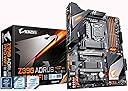
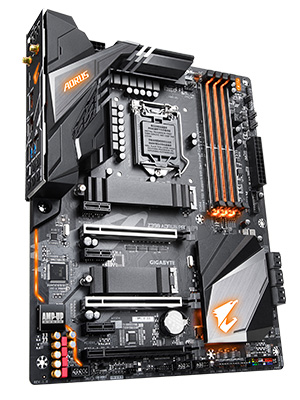
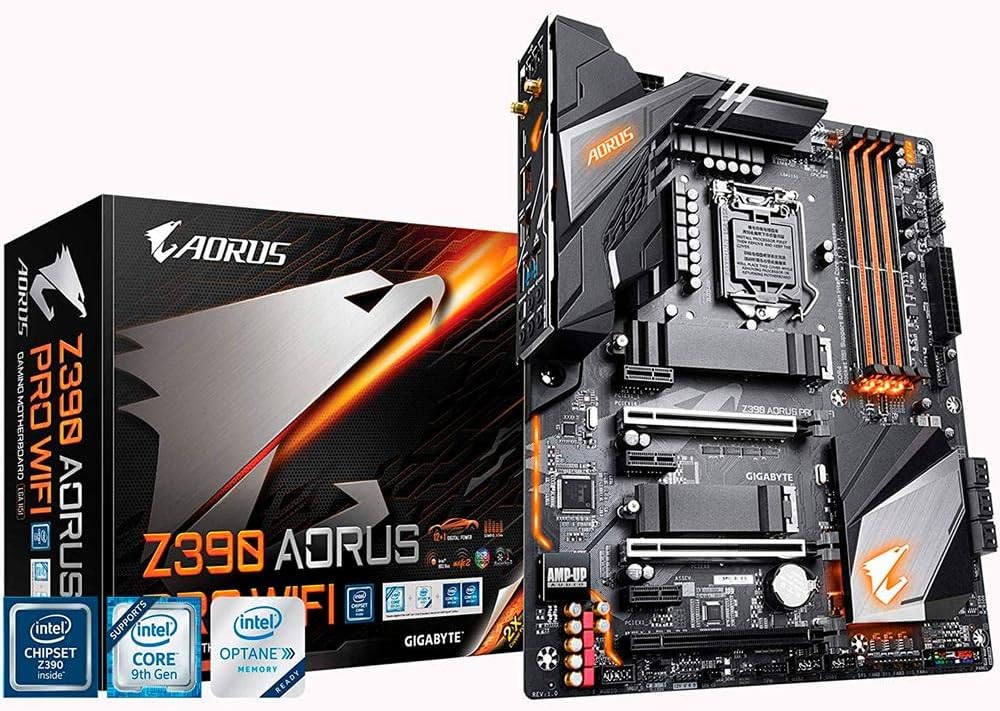
The GIGABYTE Z390 AORUS PRO Wi-Fi motherboard supports 8th and 9th Gen Intel Core processors with a robust 12+1 phase digital VRM and advanced thermal design. It features dual M.2 slots with thermal guards, onboard Intel 802.11AC Wi-Fi, Bluetooth 5, and immersive RGB Fusion lighting. Designed for experienced PC builders seeking high performance, stable power delivery, and customizable aesthetics in an ATX form factor.


| ASIN | B07HRZKPXM |
| Best Sellers Rank | #177 in Computer Motherboards |
| Brand | GIGABYTE |
| Built-In Media | motherboard, users manual |
| CPU Model | Core i9 |
| CPU Socket | LGA 1151 |
| Chipset Type | Intel Z390 |
| Compatible Devices | Gaming Console |
| Compatible Processors | 8th Generation Intel Core |
| Customer Reviews | 4.5 out of 5 stars 2,191 Reviews |
| Global Trade Identification Number | 00889523014882 |
| Graphics Card Interface | PCI Express |
| Item Dimensions L x W x H | 10.62"L x 3.14"W x 13.18"H |
| Item Type Name | GIGABYTE Z390 AORUS PRO WIFI (Intel LGA1151/Z390/ATX/2xM.2 Thermal Guard/Onboard AC WiFi/RGB Fusion/Motherboard) |
| Item Weight | 1400 Grams |
| Main Power Connector Type | 24-Pin |
| Manufacturer | Gigabyte |
| Memory Clock Speed | 4400 MHz |
| Memory Slots Available | 4.0 |
| Memory Storage Capacity | 1000 TB |
| Mfr Part Number | Z390 AORUS PRO WIFI |
| Model Name | Z390 AORUS PRO |
| Model Number | Z390 AORUS PRO WIFI |
| Number of Ethernet Ports | 1 |
| Number of Ports | 1 |
| Platform | Windows 10, Windows 7, Windows 8 Pro, Windows 8.1 |
| Processor Socket | LGA 1151 |
| RAM Memory Technology | DDR4 |
| Ram Memory Maximum Size | 2048 GB |
| S/PDIF Connector Type | Optical |
| System Bus Standard Supported | SATA 3 |
| Total Number of HDMI Ports | 1 |
| Total PCIe Ports | 4 |
| Total SATA Ports | 1 |
| Total Usb Ports | 1 |
| UPC | 889523014882 |
| USB 2.0 | 1 |
| Warranty Description | 3 |
K**S
Awesome Motherbaord
After researching the top 3 brands of motherboards (Asus, MSI, Gigabyte), I decided to go with the Gigabyte Z390 Aorus Pro WiFi board for my Intel i7-8700K. I was looking for certain features including a board with WiFi and the latest M.2 NVMe Technology, and not too much bling with lights So far, I am very pleased and happy with this board because I wanted to use Samsung's 970 EVO 500 Gb M.2 NVMe SSD. And so far, the stick is working smoothly with Windows 10 installed. The board instantly recognized the stick without doing any setting in the BIOS. Just make sure you only have this SSD installed when first installing Windows 10 if you want the OS on this SSD (or else you may have issues) I currently have 4 sticks of 3200 RAM CORSAIR Vengeance RGB 8GB DDR4 3200MHz C16 installed on the board along with a GPU EVGA 1070Ti FTW2 - the board booted up the first time it was turned on going straight to the BIOS screen and instantly recognized my Corsair fans, AIO Cooler, M.2 Samsung Drive and EVGA GPU card without any tweaking in the BIOS. A lot of people say the BIOS interface is not the best; but, being a first time PC building, the BIOS has an EASY Mode for a newbie like to me navigate through. However, the board defaults at the 2133 Mhz for any RAM over 2133; you'll have to go back into the BIOS...easy mode...enable XMP...then reboot to get it to change automatically You also can get a 3 year warranty with Gigabyte if you register your motherboard
E**!
Not the most user-friendly, but best performance for the price hands down
It was just under $200 when I purchased it. It's a great motherboard, but it is NOT for beginners. I have been using this motherboard since October 2020 and it has been smooth sailing. A few notes I had to learn the hard way since it isn't well documented... - The board IS Windows 11 compatible. You have to go into the BIOS settings, activate TPM, and then Windows 11 can be installed without issue - It is ARGB compatible, but the instructions are... confusing to say the least, in the instruction manual. - Gigabyte is not known for having robust or stable firmware, but it can still be a worthwhile experience if you know how to manage it As I mentioned, this is not a board for beginners. There are certain caveats to consider when purchasing a performance-oriented, but budget-friendly board, that can be easily overlooked if you don't know what you are doing. Even so, for the features and performance alone, it is definitely a 5-board for PC builders with a bit of experience.
T**Y
Nice Mobo
Built another system for myself-my ASUS mobo arrived DOA, and after months of fighting I gave up on them. Found this board-was a little apprehensive, as this was the first time I used something other than ASUS in over a decade. I'm pleasantly surprised. This board has delivered well in every area. Designed well, plenty of extra connectors, all the USB support I like, even wifi support built in as an added plus. The bios isn't as intuitive as the ASUS boards, but I had no trouble with it as I'm used to tweaking settings-a novice user might have some difficulty. The only thing that I would consider to be a negative is the placement and direction of the SATA connectors, but many board makers seem to favor this approach. The connectors are bundled together and face towards the drive stacks. The bigger problem is if you have a large video card (I had an ASUS DUAL-RTX2080-A8G I had to cram in there). Mine completely obstructed the SATA ports which made plugging in anything to the SATA ports impossible. I had to take out the video card just to plug something into the SATA ports. This was a minor issue though, and compared to the rest of the perks of the board, really inconsequential. Just install your SATA cables first. ;)
K**C
Great board, super thermals, designed to handle the 9 Series from the ground up with power phases.
I've got nothing bad to say about this one. I'm not a Gigabyte fan in general, but they got this one right. I put a lot of effort into building it as a gamer for a specific client, and it did everything well when I tested it and shipped it out. Just recently had contact with the buyer, he absolutely loves it still, won't even consider "upgrading" to the Intel 10 series because he doesn't want to switch boards. This has all the bells and whistles (ARGB headers being his favorite), but it's still as rock solid performance-wise as they come. The lighting is cool, even I admit it. The software to control it is even better in my experience than most, and I was able to tweak the settings I'd normally not want to saddle a buyer with right out of the box. Great board, fair price.
L**5
The best priced option for your hard earned money
Background: I have worked in IT for 24 years; my first several years were in the 90s in a small shop that built PCs. I upgrade about every five years at this point, and for the first time in awhile, competition in the market has produced worthwhile advancements, so I went shopping to upgrade my Core i7-4790K system, choosing the Intel i9-9900K because I found a good deal on pricing. I have used most major brands of mainboards available (Gigabyte, MSI, ASUS, Asrock); I looked at all major brands for a solid Z390 board of quality construction, especially in voltage regulation, but with a measure of features I like. Amazon has this board currently for the most competitive price of any vendor, and after shopping around, I found the Z390 Aorus Pro WiFi also had all of the features I wanted, and many competitors in the same range did not, or charged more. PROS: -A thick, solid PCB that will not warp or flex too easily -Quality voltage regulation featured by the Aorus Elite, Pro, Pro WiFi, and Ultra boards (all have the same setup). Note that ASUS, for example, doesn't have nearly as good of voltage regulation until you hit their top-end boards, and charges considerably more for their ROG STRIX Z390-E. MSI has similar quality, but their MPG Z390 Gaming Pro Carbon AC (say that three times fast) board is also a step up in price. -Realtek ALCS1220 audio onboard codec, separated from the electrical components on the PCB to eliminate crosstalk, using quality capacitors. It sounds quite good on a Logitech 5.1 speaker system, I had no crackles, pops, or other defects. -Two M.2 NVME slots for SSDs, both with included heatsinks (Note:, Using these will take away some SATA ports; read the specs and know this beforehand, this is how the Z390 chipset works for every vendor, there are only so many PCIe lanes) -Onboard Intel AC wifi, which I have tested with a Ubiquiti AC access point (it works very well, though I normally go wired) and an Intel gigabit NIC -Two metal-reinforced PCIe slots (perfect for my SLI setup) and metal-reinforced DIMM sockets, to prevent slot breakage and board warping -Two temperature sensors headers onboard, which will (with the included sensor leads) let you monitor temperature of areas in your system if desired -A plethora of all of the necessary ports, USB2, USB3.1, and USB3.1C to meet your needs -Gigabyte DualBIOS to protect from an accidental BIOS corruption -A built-in backplate; you'll never lose it, small thing, but a welcome one CONS: -BIOS. This honestly isn't the worst thing in the world, but Gigabyte's BIOS is not intuitive compared to ASUS (the leader of the pack) and has lots of items buried in sub-menus, and not always defined clearly. Once you have the board set how you like it, it's not going to be an issue, but if you're a tweaker, you're going to need to do a lot of research to define some options, or even find out where they are. Thus my deduction of one star. Also, make sure you're up to the latest revision (F9 at this time) -I'd have loved to see three additional things on this board; a debug LED, a Displayport connector in addition to the HDMI, and power/reset CMOS buttons on the backplate. Admittedly, this would raise the price, and nobody has the debug/LED, or power/CMOS buttons at this price (a few have the Displayport). Not knocking anything off for this, just me wishing. I have been running this board for a month; nearly three of those weeks I have run Folding@Home on my i9-9900K when not gaming, which uses 100% of my two Geforce GTX 1070 cards and 100% of all eight CPU cores at 4.8GHz max turbo speed. My system has been rock solid stable (using a Seasonic Platinum I 1000w PSU) with no crashes or issues. All of my games have either run a minimum of 10fps faster (many more than that), or allowed me to set higher detail settings than my 4790K system (with same graphics cards) at 1900x1200 resolution. I would recommend this board without hesitation as the best model you'll find under $200, and above that price, you're mostly buying fluff, or features designed for liquid cooling folks. Solid purchase. UPDATE 7/11/2019 - I replaced my storage, going from two Samsung 850 Pro 512GB SSDs (2.5") and one WD Black 1TB to keeping one of the SSDs for storage and adding two HP EX920 1TB M.2 NVMe x4 SSDs. They work beautifully and they're wicked fast. The first SSD does not take any SATA ports away (as long as you use NVMe), the second takes two ports away (4 and 5). With these two drives, I still have enough room for the SATA SSD, a DVD burner, and the SATA dock built into my case, with one port left to spare.
J**A
Starting At 5 Stars
I will start this review at 5 stars simply for the fact that I plugged everything in and booted up. It booted up no problem and windows adjusted to the new motherboard (been waiting for that for like 15-20 years and was promised before now and it never worked). Then I reset it and set my XMP profile to on and it has run my RAM at speeds without any issue at all. I am actually kind of amazed. So I've never had an easier install. First boot up the CPU was at 28c with a Deepmax 400 HSF. Last I saw it was 30-32c, which is still acceptable, and it's brand new so needs time to adjust to the paste. So far I am loving it. Need to ensure all my drivers are up to date and that I have all that Gigabyte has to offer software wise so I can see if any of it is useful, which they install CPUZ, Cfos, and Smart fan, which are all items I always have or don't mind having when a motherboard reminds me they exist (cfos). Layout is nice, and the added heatsinks for your m.2 drives is bad a$$. I was sad I had to rip off my 970 + 960 sticker so I could make sure the heat film touches the chips and not the sticker, but I placed them on the outside of the heatsink so it works out. I was able to screw in all screws without too much hassle. My last mobo in the same case was more difficult due to the placement of stuff. This one, not so much. Overall I am amazed and absolutely love this mobo, but time will tell if this changes. As I own this thing I will come back if any stars need to be removed If you have specific questions add a comment and I can try to answer.
A**R
Does NOT support 9th gen out of the box
This board CAN be great and do really whatever you need for any of the new stuff you can put into it. It has plenty of connections, the RGB is good without being over the top and it is fairly easy to figure out where everything needs to go. Problems: One small issue is that the board does not come with a pre-installed motherboard speaker. This usually isnt a big deal and is very cheap to get one for it if you do need it (This is not the speaker you'd use for gaming or anything like that but rather to diagnose the motherboard itself). Still just seems odd that a board almost $200 can't include a 20 cent speaker. The BIG problem however is that while the board supports 9th gen processors, it does not come with the latest BIOS update, or at least mine did not. This means that while you can put a 9th gen intel CPU into it, and have the BIOS recognize it AND have it pass all POST testings, it will never boot. The only way to fix this is to first put an 8th gen CPU in, and update the BIOS manually (Which is kind of a pain but not super difficult to do). However when you already put a CPU in, you will have to take it out and hopefully know somebody else that has a compatible CPU just to be able to update it a usable state. If you take it to a computer repair store, the going price for this procedure is about $200. I was lucky to know a person that builds computers as a hobby that did it for me for $45, but I should not have to pay money to get support for something the box ALREADY SAYS IT SUPPORTS. This is really unacceptable on Gigabyte's part and I would not buy a board from them again. After finally getting that done, everything works great and I do not have any issues with this board, but I just can't believe Gigabyte would advertise it supports 9th gen, when it doesn't do it out of the box. A lot of people building a new computer may not just have an extra CPU laying around to update it to bring support.
M**I
Great Value, Excellent Board.
I got this for $189, which I think was a great deal. The board is fast, has lots of good bells and whistles, and even a little bling with LED lights that can be controlled via software through Windows. The built-in WiFi is a huge plus, and it has a jillion USB ports. One thing that's often overlooked is the layout of the board. I have a big Noctua CPU air cooler, and the RAM doesn't get in the way on this board. The 16x PCI slot is also far enough away from the CPU that the graphics card doesn't cram up against the CPU cooler either, which is an improvement over other mobos I've had in the past. I don't do any crazy overclocking or extreme builds or whatever, so I can't comment on that. But for some gaming and a little A/V work, I can't complain at all about the board. Put a fast processor and enough RAM into it and I think you'll be happy.
A**A
Sobresaliente.
Excelente tarjeta madre, con una buena fuente te mantiene los 5ghz sin ningún problema, es bastante cómodo que traiga Bluetooth 5 integrado para poder jugar con mandos a distancia, el wifi es de lo mejor, a su vez la conexión alambrica es magnífica, las luces RGB aunque tenues agregan un toque gaming bastante chulo, excelente en compatibilidad ya que cuenta con un montonal de puertos de expansión, el audio como lo describe gigabyte es de alta gama, quizá incluso un poco más de lo que debería para el mercado al que se enfoca, honestamente no es de lo más barata pero vale la pena ahorrar para invertir en esta chulada. 👌
S**H
انصح اي مهتم بشراء هذه السلعة
التوصيل سريع التغليف ممتاز مطابقة للمنشور عنها تماما
M**I
Works flawlessly
Great motherboard for a 8th gen or 9th Intel processor. Assembling it is flawless. The only downside is the cosmetic side of things. RGB fusion is not as straight forward as ASUS.
T**N
Love it
Everything is perfect about this product, i9 processor and you’re good to go
A**N
To download lan driver off a different computer onto a USB drive so that you can get to internet.
I mean, this motherboard is AMAZING. Has all the pmw fan settings in the bio, strong board, and it looks amazing. Although I just started gaming, I literally pieced everything together. And I went used for a gpu cpu and ram just to get it going faster. This thing is a beast. Paired with a 980 ti (for now) (cheap deal) it’s simply playing everything on max at 1080p. Overclocking is easy done through the bios, but remember you have to download all the drivers from gigabytes website. I’ll buy again for sure. Wireless internet and wireless Bluetooth. I can connect my Ethernet cord to my computer lan and then use that computer as a hotspot/router for all my other devices. Up to 8. It’s not the best speed but my router bit the dust and I was stuck almost not playing my computer and having internet on my phone at the same time( no service on the farm) also the audio that comes out of this board is AMAZING. I had to re tune my audio video home theatre receiver cause it has SOOOO MUCH more low end bass. Fantastic quality.
Trustpilot
3 days ago
2 weeks ago