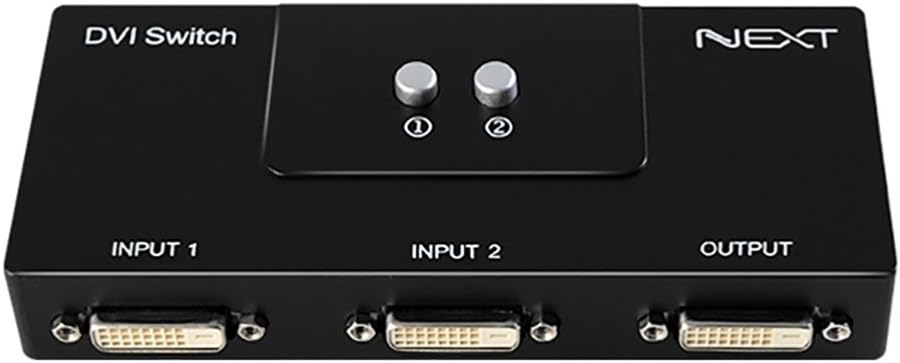

DVI 2 Port Manual Switch Box Monitor Single Mode 1920x1080 2:1
Product ID: 78908674
Details
- BrandNext By Athena
- Cable typeDVI
- Colourblack / black
- Compatible devicesCamera Monitor
- Connector typeDVI
⚡1.65 Gbit/s
📺2 Ports
🔄Manual Switch
Buy anything from 5,000+ international stores. One checkout price. No surprise fees. Join 2M+ shoppers on Desertcart.
Desertcart purchases this item on your behalf and handles shipping, customs, and support to Kyrgyzstan.
🔌 Connect, Switch, Impress!
The DVI 2 Port Manual Switch Box allows seamless sharing of two devices to one monitor or vice versa, delivering stunning 1920x1080 Full HD resolution without the need for a power supply. Compact and versatile, it supports multiple resolutions and is perfect for any professional setup.
| ASIN | B07489JJHF |
| Best Sellers Rank | 28,777 in Computers & Accessories ( See Top 100 in Computers & Accessories ) 88 in DVI to HDMI Adapters |
| Brand Name | Next By Athena |
| Cable Type | DVI |
| Color | black / black |
| Compatible Devices | Camera, Monitor |
| Connector Type Used on Cable | DVI |
| Customer Reviews | 4.3 4.3 out of 5 stars (583) |
| Item Dimensions D x W x H | 25D x 157W x 25H centimetres |
| Item Weight | 191 g |
| Manufacturer | ez-net |
| Manufacturer Part Number | 202S |
| Model Number | 202S |
| Number of Ports | 2 |
A**R
Nice piece of kit
I use 2 computers, one more powerful than the other and each with its own monitor. But I wished to connect both to the larger monitor of the 2. My computers have Display Port connectivity, but the Monitors DDI. The NEXTU switch enabled me to connect each computer to inputs 1 & 2 using Display Port to DDI cables and the shared monitor to the output using a DDI to DDI cable. The switch works perfectly and gives me exactly what I wanted. I'm well pleased.
R**L
Does exactly what it needs to do with no fuss
Wanted to leave a review as I'm really impressed with this little box. It does exactly what I need it to do and I've had no issues in my first month of use. I have 1 monitor I use for both work (2nd monitor to a laptop) and my PC (primary monitor). This box saves me unplugging/replugging the monitor in every time I want to switch input and doesn't need its own power. I've also not noticed any quality difference over using the cables directly and have no problems with the buttons.
D**L
It works.
I needed this so i could use swap between my second monitor showing my computer and showing my nintendo switch and it works very well, make sure you get some decent dvi-d cables with long screws.
D**R
Works well for switching between two dvi inputs to one screen
Excellent product for switching between two dvi inputs. I needed to go from a pc and laptop to single screen and this did the job superbly. Mechanical robust buttons for each input and no power needed.
C**N
HDMI to DVI isn’t working
Please could someone explain why it’s not working. My dvi to dvi works fine , but when I press 2 which is connected to my ps5 (hdmi-dvi), nothing happens. I tried swapping it to 1 as well but still doesn’t work.
J**N
Just perfect
Dammit i should have bought that years ago, it is PERFECT. I have one computer connected to a TV screen and a screen on a desk, at such an angle that I cannot see both at the same time. I use to have to deal with either mirroring the screen (which crop the ratio and have an un-ideal resolution for one of the screen) or extend, but then having to move everytime a window open on the wrong screen. With this, on the press of a button, my PC becomes a media center with no loss of quality. Audio is being transmitted as well to the TV. It's entirely mechanical as well so doesn't require an extra power outlet. Money very well spent. + Doesn't require power plug + Instanteneous + Carries audio as well + Satisfying click when selecting one or the other - Really not a problem for me, but I guess some people would like a remote control ? (Which of course means you then need a power plug, definitely more happy like that)
M**.
Worked with MAC - Just what I wanted
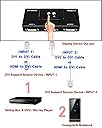
I have a PC with two monitors. I also have a work MAC book I figured it would be nice to use one of my Pc monitors with my MAC when using at home.. This was fine but a bit of a pain unplugging the PC cable from the nonitor an plugging the MAC in.. So bough this box. 1) Plugged the PC cable of chosen monitor into the output of this box instead of the monitor 2) Plugged a DVI to DVI cable from the monitor to input 1 (like this https://www.amazon.co.uk/gp/product/B0131RQTA8/ref=ppx_yo_dt_b_asin_title_o00_s00?ie=UTF8&psc=1) AmazonBasics DVI to DVI Cable 3) Plugged a DVI to to HDMI cable into INPUT 2 The HDMI goes into the MAC when I want to use it. Otherwise it just sits there ready. Something like this: https://www.amazon.co.uk/AmazonBasics-Adapter-Cable-Latest-Standard-Black/dp/B014I8UL8U/ref=sr_1_3?crid=RKS6GSH1O6IA&keywords=dvi+to+hdmi&qid=1564218410&s=electronics&sprefix=dvi+to+hd%2Celectronics%2C137&sr=1-3 Now I just press button 1 and have both monitors on my PC ..Orr button 2 and have one momitor om PC and the other is used by the MAC Simple as that Some peoople said they had issues with MAc but works fine for me.
D**Y
No nonsense product - works well - easy to use.
Does the job well - no flicker or interference - clean switching between 2 PCs - using it lot while in lockdown with my work laptop and home PC!!.
M**O
semplice da usare
R**R
Works great
J**C
I have my personal laptop that I use nightly and my work laptop that I use for working from home. At the end of the day I kept swapping cables to my secondary monitor that was connected via USB-C to DVI between the work laptop and the personal laptop. It was a pain to have to snake that cable around cameras and other cables each night when I wanted to work on my laptop. I was also worried about the wear and tear of constantly removing the cable from the usbc port and back in etc. This eliminates all that, first I had to buy another usbc to DVI cable, plug one into Input1 and the other into Input2 and the Output using a DVI to DVI cable to the monitor. Now I just press a button for 1 or a button for 2 and it automatically switches over. Wish I bought this a year ago.
J**S
El envío como siempre de 10, y el selector de puertos funcionando a la perfección.
C**B
Die Kabel lassen sich einfach aufschrauben, die Umschaltung erfolgt mühelos über die Drucktasten. Kein Schnickschnack - solide Mechanik. Mehr braucht man dafür nicht.
Trustpilot
1 week ago
3 weeks ago