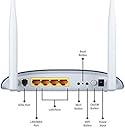
🚀 Power your productivity with lightning-fast, reliable Wi-Fi!
The TP-LINK TD-W8960N is a compact, energy-efficient ADSL2+ modem router delivering N300 wireless speeds via 802.11bgn technology. Designed for seamless home or office networking, it combines easy setup with trusted TP-Link reliability to keep you connected effortlessly.


| ASIN | B0031SUB4S |
| Antenna Location | Home |
| Antenna Type | Fixed |
| Box Contents | TP-LINK TD-W8960N Wireless N300 ADSL2+ Modem Router |
| Brand | TP-Link |
| Brand Name | TP-Link |
| Compatible Devices | Laptop, Personal Computer, Smart Television, Smartphone, Tablet |
| Connectivity Technology | RJ11 |
| Control Method | App |
| Controller Type | Switch |
| Customer Reviews | 4.0 out of 5 stars 2,727 Reviews |
| Data Transfer Rate | 300 Megabytes Per Second |
| Frequency | 2.4 GHz |
| Frequency Band Class | Dual-Band |
| Global Trade Identification Number | 06935364060343, 06935364091835 |
| Item Part Number | TD-W8960N, TDW8960N |
| Item Weight Unit of Measure | 0.19 Kilograms |
| LAN Port Bandwidth | 10/100 megabits_per_second |
| Manufacturer | TP-Link |
| Manufacturer Part Number | TD-W8960N |
| Model Name | Computers & Accessories/Categories/Networking Devices (1375427031);Computers & Accessories/Categories/Networking Devices/Modems (1375431031);Computers & Accessories/Categories/Networking Devices/Routers (1375439031) Model Name Computers & Accessories/Categories/Networking Devices (1375427031);Computers & Accessories/Categories/Networking Devices/Modems (1375431031);Computers & Accessories/Categories/Networking Devices/Routers (1375439031) See more |
| Model Number | TD-W8960N |
| Number of Ports | 5 |
| Operating System | Windows |
| Other Special Features of the Product | QoS, Remote Access |
| Special Feature | QoS , Remote Access |
| UPC | 720656518284 803982808189 777785895830 845973060343 |
| Voltage | 240 Volts |
| Warranty Description | 3 years Manufacturers Warranty |
| Wireless Communication Standard | 802.11bgn |
| Wireless Compability | 802.11bgn |
S**M
Good BSNL home modem - value for money
TP-LINK TD-W8960N Wireless N300 ADSL2+ Modem Router Good item (TP-LINK TD-W8960N) - value for money Cons: 1. Modem initially kept on disconnecting every 10 minutes. After complaining to BSNL this was fixed by them by identifying a faulty wiring at some point between my house and the junction box. This modem wont work if telephone line has heavy noise. Lots of bad reviews on this modem for bsnl may be because of this. 2. TpLink is only a medium quality company. My previous tplink modem stopped working after 4 years. Cannot be compared to an old seimens wifi modem that's still in working condition after 10 years. Pros: 1. Latest version as per tplink website (v8) 2. Setup is easy as BSNL config can be selected from a list. 3. Decent features like guest network etc available. IPTV, QoS, parental control etc (I've not used these.) 4. Wifi Range is sufficient for my medium size 2 story house. 3 mobiles, 2 laptops, 1 desktop, smart tv and a fire tv stick work seamlessly. 5. Box has all required stuff like adsl splitter, rj 11, lan cable etc 6. works well in router only mode for bsnl FTTH.
G**A
Liked the router cum modem
Bought this recently as a replacement for my D-Link modem after reading the reviews put in my everyone. Thank you all for your assistance. What I liked about this - 1. The WIFI range is better then my earlier one. The signal strength & speed which sites are opening are all the proof 2. Easy set-up (which most of the brand are today) 3. The versatile connectivity - interchangeable wan/lan port & ADSL option. My earlier one wasn't so. For me this was one of the deciding factor as I have the option to switch over operators 4. From aesthetic point of view, its really nice. The color blue & the pattern too is different then the usual stuff you get everyone. Its livens up one corner of the house. I wish manufacturer would come out with some different kinds as well :-) If you like it from technical point do go for it, its definitely worth it.
A**R
The Best in its price range
First of all the modem's design is very appealing...the cool design over the top gives a good look of the PCB and the heat vents are in abundance...never got heating issues(been using it for last 4 months). I had a major complaint with my old bsnl provided router(the crappy teracom) that it used to drop the connection even when the weather became a little bit windy and it just won't connect during a storm and this was really very frustrating (if you know how it feels when you are in the middle of a war attack in COC and the connection drops)...BUT this TP-LINK router equipped with the broadcom chipset proved a great help in holding the connection well...even in heavy rains and storms it holds the connection very well (NOTICE:I have a BSNL connection)...so this proves its stability. And Hats off to its firmware and UI of configuration page...provides easy configuration of the connection. The wifi range is what you can expect from a 1K-2K price range router but is more than enough if you live in a flat and a few wifi extenders can be used if you live in a big house ( But of course if you live in a big house you have a good amount of money in your pocket and can afford a high end wifi router) So overall it is a very satisfying router in the price tag of 1700 INR and I assure you...you can give this puppy a shot.
U**Y
its average in use n good in technologies system.
its good but flipkart, IRCTC, matrimonial sites n many more blocked. recommended for those, who have 8-16 ages kid in the house. wifi coverage is nice for 2 stored house as like me. youtube is very fast yet. BSNL work well.
D**A
Recommended for regular use
I got hardware Version 7 also knows as V7 or Ver. 7, and the latest one is V8 or Version 8 but it hardly matters as they both are good. Ordered via Appario Retail Private Ltd.. It is all in one solution to broadband and wireless/wired routing. As I knew my ID and pass for my ISP, it took me just 45 seconds to setup(basic setup). It comes with a Telephone and Broadband line splitter which splits RJ 11 cable that goes to phone using RJ 11 cable and one that goes into this Modem/Router which is again RJ 11 cable (RJ 11 is normal telephone cable), box also contains two RJ 11 cables(probably one for modem and other for Phone) otherwise you can directly put RJ 11 cable into Modem if you don't have telephone on same line which also reduces the need to use splitter, box also contains one Ethernet cable which is for PC and it also contains of course One TP-Link Modem/Router and its adapter and some informative documents. It has a Dark Blue glossy look which makes it even more beautiful. Best for Regular home or office use. best Modem/Router under Rs. 2k. recommended......
S**R
IT DOESN'T HAVE DETACHABLE ANTTENA IN v6.0 PLZ REDACT THE PRODUCT PAGE
Well Tp link as such for features in routers known to be best though do have a peek on Indian making router company DIGISOL. Pros: NO HEATING This thing doesn't know what "heat up" is thanks to beautiful design of air vent it got. if someone says that this ain't good for long duration working or become unstable due to heat then just ignore them because I am using it throughout a day except 5-6 hr the time i sleep.This is the best feature of this router unlike my previous one i can put iron on my shirt if it stays on for like 3-4hrs. :D RANGE IS AVERAGE/OK Don't expect exceptional range/ coverage as it shows in the advertise pic like one corner of the room of some floor n u get access to like 2-3 floors. ITS ONLY GOOD UPTO 1500Sqr.ft area. Top notch 2000sqr.ft. As it depends upon the house n it's obstacles.U wont get roughly more than 2 bars on your cellphone if 2 thick walls comes between u two n that's not bad. And may corners of the area disappoint u with single dot.well I am not meant to scare you but don't expect so much in case of signal range.I have tested it's max range like 2nd floor if kept it in the ground floor raised up to the height to 6-7 ft. I DON'T FIND ANY DIFFERENCE IN DATA TRANSMISSION WITH VARIATION IN SIGNAL STRENGTH. as I run the test I am not find any major difference to conclude any thing negative about it. IT ENHANCES THE UPLOAD SPEED sometimes more than download speed as I am bsnl Broadband user I haven't noticed that before when I was using previous bsnl modem. Cons IT DOESN'T COME WITH DETACHABLE ANTENNA with recent VERSIONS 6.0. It was with old version and I guess now in market rollout even newer version,so do check version before buying.most probably u'll get the same version as mine v6.0.
B**Y
Not a good device, lots of problems
I bought it based on so many positive reviews, and have issues since the installation of this device. I have replaced my old router as it was getting shutdown due to over heating. That was single antenna free Beetel model provided by Airtel and worked without any issue since last 5 years. Now, with this, the expectation was to increase the wi-fi coverage, but things did not work well. Installation was easy, just 5 minute setup. But wi-fi coverage was not even close to my earlier model. I used to get 90-100% coverage in my other room, and it has dropped to 35-40% now. I have searched online and change a lot of advance settings, but was only able to bring it to 60-70%, not more than that. Then there was another issue of internet speed getting dropped from time to time. I have 8Mbps connection, but my laptop / mobile was dropping at 3-4Mbps on wi-fi. I logged multiple complaint to Airtel, but they were not able to fix the issue, as there was no issue at their side. They even changed the cable but with no impact. I changed my modem to the old one, and issue got resolved. that is how I came to know that its the modem's fault, and not line issue. Still, I continued using it for last 5 months. Now, it has developed another problem. All lights are on, showing Wi-Fi and internet connection is on. My mobile or laptop will connect to Wi-Fi, but shows no internet connection. I have to power restart my modem to fix this issue. I am not able to ping my router or open the router page as well. This happens once or twice in a day. I am not sure if this is some kind of defense mechanism of the device or a bug. But now I think it s time to switch to a new one. The biggest problem is choosing a new one which do not have such issues. But I recommend all of you to not buy this model, as it is pain.
A**N
good product
It's a good product and all but the after-sales services are a bit let down. cuz after 2 years of use it died of lighting and tp link didn't fix it instead replace with a refurbished product it didn't last a month. brought a new one(it's tp-link since it's convenient and its app is easy to use). the reason I mentioned after-sales service is that it isn't worth your time just buy a new one. D-link after-sale services are also the same as tp-link so there isn't a difference in brands in how they solve the problem
M**_
===> The *BEST* Entry Level WiFi RouterModem
You will spend ages looking at all the various component bits (I did) and features you need for your home network (maybe also small business). You will probably buy a few bits only later to realise they are wrong. This is the one you want to buy. It's got all the features and it's the cheapest. AND it seems to work for me. 1. It's 2011 so you need 300MBPS wireless N - this unit has it. this is the fastest furthest reaching signal. 2. You might have a fast ADSL2 broadband connections - this baby can handle that. 3. Has the holes you need for a wired network the old technology is wireless B and G. That's slower and does not go as far. If any of your PCs still have these components then your connection will not be improved in terms of speed or distance probably. That is why some reviewers do not notice an improvement. So if you buy this then also buy wireless N adapters for your PCs. If you have a mostly wired network like me) then you might wonder why I say you should buy this as it only does a WIRED network at 10/100 speed ie NOT gigabit. Well when you have to reboot your modem all your open files will be lost...that is the problem with relying on a bit such as this as the central 'hub' of your network So you want to buy this unit AND a gigabit switch. Link all your wired connections into the switch and the switch into this modem router. The speed of your broadband connection is less than the 10/100 speed so that is why you only need 10/100 speed to go from this unit to your switch. If you really want only one network hub device (all-in-one) AND you have wired gigabit connections then you DO NOT want this device. Go for the next one up with faster gigabit lan ports. This unit easily connects my blackberries and my sons WII and the kid's XP and my windows 7 computers. They all work. -ve points other than above none. The configuration software is easy enough. The only thing i couldn't configure was the MRU the maximum recieve packet size...not a key feature!! don't worry. The config software seemed tolose my previous config if ever i tried to redo any of it so i had to re-enter all the info...a bit annoying. Have updated to the latest firmware but not yet tested if that makes any difference. UPDATE: July 2011 All is mostly good. Works for weeks without needing restarting. On the downside I did have to re-enter all the settings (ie effectively re-install it) as the wifi connection to my son's zen touch 2 would just not work. Rebuilding/re-starting did work. This time i remembered to save the configuration settings afterwards to make it easier next time i might have to do this. I do have some issues with "internet pausing" thos this could be my pc or the ISP or this unit....I don't know and will probably never find out! Never last for more than a minute or so though. A negative point i have just discovered. I had this great super secure home network for my kids. Controlling their internet access via microsoft family safety (which is free and nice). However as soon as you let them access the net from their Wii or their ipad or their zen touch or whatever you lose all that control and they have free access to everything!!! THE ONLY SOLUTION to that will rely on a router (ie the unit in this review) having control features. Now this unit does have features you COULD use but it would be impractical to do so in reality. All you can sensibly do is stop internet access for a certain device at a certain time and that involves using MAC addresses and I have to say is not straightforward and I'm technical. However I would not place this as a bad point against this product as Iwould imagine all the competitors are the same!
K**T
Buena Calidad.
Este Modem es muy eficiente y fácil de instalar. Mejora por mucho a los modem de Telmex, haciendo la señal un poco más potente y más rápida la conexión del mismo dispositivo. En mi caso solo sustituí el modem de Telmex y coloque este modem y en automático tuve la señal en mis de más dispositivos. La configuración del modem se lleva acabo siempre y cuando se quiera cambiar la contraseña del modem por una contraseña personalizada. La calidad del modem es buena, trae consigo un CD de instalación, un cable UTP y un instructivo. La velocidad de internet se vio un poco más fluida, pero es algo marginal. Se pueden conectar 5 dispositivos a la vez y no presenta problemas de alentamiento. Lo recomiendo 100%.
L**E
Eccellente rapporto Qualita'/Prezzo, eccellente servizio.
Il router, per quanto non di marca blasonata, o particolarmente costoso, e' decisamente semplice da configurare (in pratica, solo la parte riguardante le impostazioni per il model ADSL, che variano per utente/provider), ed eccezionalmente agile in condizioni di traffico misto e sostenutissimo, quando connessi via cavo: Bittorrent con impostazioni ultra-aggressive per le connessioni, browsing di facebook, quotidiani, streaming da video, tutto contemporaneamente senza alcun visibile rallentamento fino alla saturazione della banda DSL disponibile, grazie alla qualita' del sistema di QoS (automaticamente abilitato) presente nel router stesso. Anche nella parte WiFi e' un ottimo performer, quando si tratta di coprire spazii tipici di una casa Italiana (non tantissimi metri quadri, ma strutturalmente complesse per il segnale WiFi con mura in cemento armato), nel senso che a breve distanza (20 metri) c'e' poco che riesca a fermare il segnale WiFi, mentre le performance decrescono rapidamente all'allontanarsi. Splendido servizio da eWide: consegna nel mattino della giornata prevista, imbalaggio eccellente con aggiunta di imbottitura e protezioni aggiuntive. Fortemente raccomandati sia il prodotto che il venditore.
Z**G
perfekt für Österreich
Ich habe das Gerät als Ersatz für das A1 TG585 gekauft. Hauptgründe waren 300Mb WLan un der wesentlich geringere Leistungsverbrauch. Positiv ergeben hat sich auch noch ein größere Reichweite. Die Installation über den Browser ist eine Sache für 10 Minuten ( inclusive auspacken). Österreich im 1. Menü einstellen, dann komm gleich A1 und alle Parameter stimmen. Jetzt, was am längsten dauert, Benutzername und Kennwort eingeben und schon ist man Online. Für WLan noch die SSID etc. ( vom alten Modem vorher gespeichert ) und alles erledigt. Ich habe die Installations CD nicht ein mal ausgepackt . Leichter geht es nicht. Läuft seit einer Woche ohne Verbindungsunterbrechung und Absturz.
Y**O
Trés bon modem, rapport qualité prix imbatable
J'ai choisi ce modem pour le fait qu'il intègre un chipset ADSL Broadcom, considéré comme un des plus performants, meilleur que la plupart des box de FAI sur des lignes très longues. La configuration est relativement classique et peut se faire via un utilitaire dédié ou via une interface web. L'interface web propose de très nombreuses options avancées: En particulier, ce modem est parmi les rares à permettre d'ajuster le SNR, ce qui permet d'augmenter légèrement son débit ADSL, ou de le réduire en cas de soucis. La connexion ADSL est effectivement très stable, le wifi offre des débits très bons, même à travers des murs épais . A ce jour aucun plantage ou déconnexion intempestive à signaler. Le modem et son alimentation chauffent trés peu et semblent trés solides En bref un très bon produit, à ce prix la il n'y a pas mieux Le seuls défauts à signaler sont: L'interface web et quasiment toute la documentation sont en anglais. Cela ne posera toutefois pas de souci insurmontable à un utilisateur confirmé. Le câble d’alimentation est vraiment très court (1,20m). A noter également que le produit reçu contenait un filtre ADSL en RJ11 et un second filtre aux normes italiennes au lieu d'une prise en T française.
Trustpilot
1 month ago
3 weeks ago