Buy anything from 5,000+ international stores. One checkout price. No surprise fees. Join 2M+ shoppers on Desertcart.
Desertcart purchases this item on your behalf and handles shipping, customs, and support to Kyrgyzstan.
📡 Stay ahead of the signal curve with the ultimate digital scanner experience!
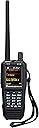
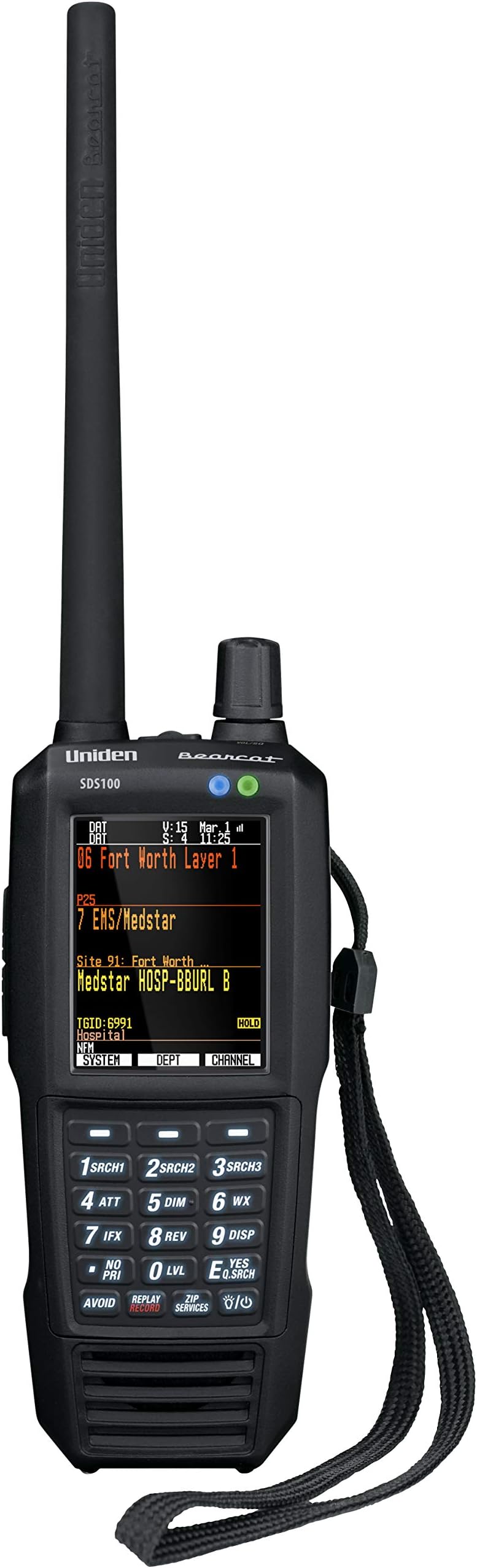
The Uniden SDS100 is a premium true I/Q digital handheld scanner featuring advanced software defined radio technology for superior reception in challenging environments. It offers a fully customizable display, rugged JIS4 water resistance, and an extended battery life with USB charging. Designed for professional and enthusiast users, it requires Windows for software updates and supports a wide range of analog and digital radio systems, making it the go-to choice for serious monitoring in any condition.


| ASIN | B07DK26FDN |
| Best Sellers Rank | #11 in Radio Scanners |
| Brand | Uniden |
| Built-In Media | Digital Handheld Scanner |
| Color Depth | 24 |
| Connection Type | USB |
| Connectivity Technology | USB |
| Customer Reviews | 4.4 out of 5 stars 1,284 Reviews |
| Global Trade Identification Number | 00050633650806 |
| Item Dimensions D x W x H | 1.5"D x 5.5"W x 7.5"H |
| Item Type Name | True I/Q Digital Handheld Scanner |
| Item Weight | 1.5 Pounds |
| Manufacturer | Uniden |
| Media Type | MicroSD Card |
| Minimum System Requirements | Windows 7 |
| Model Name | Uniden |
| Product Dimensions | 1.5"D x 5.5"W x 7.5"H |
| Resolution | 24 Bits |
| Scanner Type | Digital Handheld Scanner |
| Standard Sheet Capacity | 1 |
| UPC | 050633650806 650415522736 |
| Unit Count | 1.0 Count |
| Warranty Description | 1 Year Liminted |
M**T
AWESOME SCANNER!!! (Got a Mac?)
This is an AWESOME scanner and a worthy upgrade. Is it perfect? Nope. Uniden should have included some features that would have added significant value to the user. A few of those things are 1) Bluetooth 2) Ability to lockout keypad (seriously?) and 3) Ability to use AA batteries as a backup if needed. Are those all of them? Nope. But they are a few of them that irk me at the moment. The scanner overall is wonderful and amazing. The speaker is loud and clear, the reception is really great, and I pick up neighboring counties that I have never been able to pick up previously, and that’s just using the stock antenna that came with it. The programming of this scanner is extremely easy. I had considered purchasing from another retailer as they had me scared to death about the complexities of setting up the programming. It’s no sweat. Everything is pretty much already set up in the scanner. Just set up your favorites list, then enter your zip code location (in that order as one reviewer pointed out) and your set! There are a lot of customizable settings, pretty much everything by system, and it’s fun to play around with all the different settings and screen colors. The reason I ended up purchasing on Amazon was for the extended warranty. I have enough experience to know, that you never know with Uniden what you will get long-term, and it was an inexpensive peace of mind to add that warranty through Amazon. I trust that if they ever need to make good on it, they will. I did not really need to utilize the Sentinnel software... well because everything is pretty much already databased in the scanner, and it’s easy to get it set up the way you want it. My concern with Sentinnel is that we have all Mac’s, which it won’t run on. I downloaded the parallel stuff and spent hours getting it all set up, but just couldn’t get it to work. I ended up finding a super easy solution that worked easily and perfectly on my Mac, which I’ll paste below if it would be helpful to someone else. It’s important to note once again, that I really didn’t need to do anything with the Sentinnel software, but I guess it’s nice to know I have a backup of all my settings now. The instructions below may look intimidating at first, but trust me it’s really quite easy and pain-free. Here it is: 1. Go to WineBottler |*Run Windows-based Programs on a Mac and download WineBottler. I used the 1.6.1 Stable on Mavericks. It will pop up an ADFly Page. Just give it 5 seconds then click the “SKIP AD” button in the top right. (If you get any more ad pop ups just give it a few seconds and it will start downloading.) Once finished: Move “Wine.app” and “Winebotter.app” to you applications folder. 2. Download the latest Sentinel Version. BCD536HP < UnidenMan4 < TWiki and unzip it to your desktop. (or where you fell comfortable) 3. Launch “Winebottler” from you applications folder. Follow prompts for install. This will install any needed files to run the apps later. a. Click “Advanced” in the top bar. b. Select “new prefix” default c. Program to install: “select File…” and select the “Setup_BCDx36HP.msi” in the Sentinel folder on your desktop. d. check “This is an installer, execute it. e. in the “Winetricks” section, click in the search field and search for “dotnet20”. Check the MS .NET 2.0. (this will install the .net for the Sentinel to install) f. Click “Install” button. Save to your desk top as Sentinel. This is now creating a windows app that will run on your mac using “wine”. It will install the Dot Net files and you will have to agree to terms and tell it where to install. Defaults will be fine. That will finish and then Sentinel will star the install. Again, agree and save to defaults. This part does take some time so bear with it. (HINT: sometimes the installers will pop up in the background. You may have to click the doc to bring it forward to agree to the DOT NET terms etc…) Once the files are installed, the last step is to “Select Startfile” leave it on Program Files/Uniden/BCDX…… and when you click the “Sentinel” app it will launch the app. Hit OK and your done. Now double click the newly created app and your ready to run Sentinel on your mac.
E**A
It's the best scanner available today
I'm a Ham radio operator and over the years I have had dozens of scanners. I also own the SDS200 (base/mobile version of this radio) Most scanners don't die but the changing radion standards make them obsolete. This is the premium scanner that will handle the most radio systems that operate today. Analog, digital, trunked, it does them all. However you have to pay extra for and unlock key for NXDN ($50), DMR ($50) and ProVoice ($50) and if you do want these go directly to the Uniden site otherwise everyone else will charge $75. If you are just doing public service monitoring you won't need these options but I do a bit of commercial and business monitoring as well and many of them are NXDN or DMR. I don't think anyone except San Antonio Police use Provoice anymore. Actual performance is great across all bands and intermod is well filtered. There are some idiosycrancies to it but go to radioreference.com forums to figure that out as I could go on for days. But overall it is the best most versatile and feature rich handheld scanner you can buy today. I live in an area with some radio systems that are problematic for many scanners (simulcast issues) and this one handles them all like a champ. A couple things to know. There is no keyboard lock function which I REALLY dislike but I figured out a hack how to lock the keyboard via the free programming software but it's a total hassle and not practical. So it can be done and perhaps that will be a part of a future firmware upgrade. Also the unit gets pretty warm when operating, that's normal. The battery is pretty big and sticks out from the back of the unit which is a little dopey looking but overall not an issue with usability. It's just wen they first released them the original battery was way to weak so they now ship with the extended battery (about 8 hours) and it works fine. Actually the previous model would fall over all the time when you set it on a table and this bigger battery prevents that, so that's a plus. I bought a second battery and I've actually never used in about six months. It's a shame they didn't put bluetooth in it, but they did make it so you can charge the batteries while listening which you couldn't do on the previous model so that's a big plus. The build is very sturdy and I'm sure I will replace this radio when technology changes not because the radio itself stopped working perfectly (like my last six scanners). It's is waterproof and much sturdier than the previous model. Sound quality is great and loud enough in very noisy environments.
M**K
Key lock function is there..
For those that mention keypad lock... It is the function key and the power button... That turns it on and off... Same as the BCD436HP handheld scanner... I hope this helps some folks,, I have seen it mentioned as not being there.. The little pad lock decal is not there, but the actual function is... Great scanner, awesome features and performance, and some should read the manual... The key lock function is in the manual..
M**E
Expensive performant scanner with some problems
This scanner is overall really good. I will say that I do think it’s overpriced, but only for some quirks. First upon unboxing it lacks “sturdiness” or “ruggedness” that some professional radios or even HAM radios have. It doesn’t feel like a Baofeng but it’s very light mostly due to that it’s an SDR based platform, so it’s lighter and the plastic seems thinner. I think if I dropped it from fairly high I’d probably damage it in some way. The huge battery protruding out the back looks a bit silly but not overtly. That said it doesn’t feel flimsy or cheap or like a toy and it does look like a professional product. It seems like attention was made to waterproof the unit. O rings are visible and flaps for the USB port are in place. I’d not take it out in the rain, but if it gets some water on it looks like it’ll probably be fine. I do wish for the price it was a higher IP rating! It takes a long time to charge, it uses a USB mini which I haven’t seen in years. USB c would be nice and a better more modern battery for quick charging would be amazing. That said the battery lasts decently long. I scan all day and usually leave it plugged in all night. The back of the scanner does get a little warm sometimes when using it for long periods of time or when plugged in. I was worried about programming some people say its easy as entering in the zip code others say it takes a programming degree. I found it to be somewhere inbetween. What you need to do is to use Sentinel software, create favorites list, enable them, set them to respect location, and set your location on the scanner. A lot of people get tripped up on the service types as well. If you learn these things you’ll have no problems. I spent one day, pretty much the whole 8 hours learning how to do this. I’m on ARMER which is very complex so it may be easier for you if you just have a few sites you want to monitor and depending on the complexity of the trunking system in your area. I definitely think it’s not as scary as people say. Sentinel is great software. The menu on the system is very very good and easy to navigate. The display also looks very good. My last gripe is the belt clip is just terrible. A belt clip needs to be ROCK SOLID so you don’t risk the unit coming off and losing it. They might as well not have included one. You tilt it the wrong way and it just completely detaches. All in all it does an amazing job at scanning. I do think it’s fairly overpriced for some of the antiquated things (battery, charging), lack of higher IP rating, terrible belt clip, and lack of ruggedness which is why I docked a star. I do hope in the future they release an updated model with USB-C, IP68, and a better belt clip and battery. What it is meant to do is scan, and it does that phenomenally. I can pick up everything I hoped to pick up with very good audio and I’m very happy I purchased it and can now be informed without relying on online scanning sources.
C**G
Worth the cost very happy!
If your shopping for a scanner that will that can keep up with the latest encryption bands as well as tune into just about anything out there without any limitations (exception to cellular) this scanner is certainly a choice you will not regret! It's easy to program and set up, from the time it arrived at my door I was listening to the latest public saftey frequency bands in my area with in 15 minutes. Going online and downloading the programing software from the manufactures website keeps the firmware of the scanner current along with all the scanner frequencies in your area. There is a noticeable improvement in signal sensitivity that I noticed compared to a older scanner I had from 3 years ago. This scanner is nice and clear and is able to pick up the latest digital bands as well as the old analog frequency's used by less traditional forms of communication. Battery life is not the best, might get about 5 hours out of the batter that's fully charged but it does allow for usb charging while listening to the scanner at the same time. There is an option in the setting that is disabled by default, so you do have to enable this feature if you wanna listen and charge at the same time. Good scanner! Well worth the money.
Z**.
Antenna is Weak and signal is sporadic on certain frequencies
The scanner is excellent, picks up what it’s supposed to I’d recommend buying this scanner if you need a wired scanner the battery is good but not great on a full charge you’ll get about 4 hours tops and I’ve found that it doesn’t charge with the micro usb port you must use the mini usb wish it had usb type c but maybe the next gen scanner will. I have this programmed to receive fire, ems, sheriff, city police, and county police. I am a building inspector and I do a lot of driving in my jurisdiction and it’s nice to know where the wrecks are so I can avoid those areas also I go on call frequently and it’s good to know when something happens so I can prepare myself to get ready to head out. But even in my mobile county vehicle if I need more than 4 hours I have to plug it in and it’s good because you can charge and receive at the same time it’s in the settings in case you didn’t know already. Now let’s discuss the negatives or the cons and this might just be my reason to return it. I have the SDS200 which is an excellent base station scanner however when I programmed the 200 I used the same program on the 100 and the antenna is much stronger on the 200 picking up multiple transmissions that the 100 doesn’t even see and it does this while at home or on the road and honestly for the price I’d settle for the 200 any day it’s just overall a better scanner. I will say this though I live way outside the city limits so picking up city signals is almost impossible but I have the unication g5 for those transmissions and this goes to show no scanner is a do all meet all expectations no matter the price. Recap Pros Loud Speaker Programmable for multiple locations Good for mobile Can be plugged in and still function Large display Can be setup without the need of a pc however for the best customization you want to use the software Cons Short battery life Weak antenna Signal is sporadic it comes and goes on the channel in the photos Please be advised the photos are comparing the SDS100 and SDS200 Update changed to 1 Star would give negative 5 if I could. When you purchase a $650 product you expect it to be the best you can buy then when it’s delivered and you get it setup it works well a couple days you throw away the shipping packing. Then after a week or two of using it the product starts to fail and then no longer functions at all thankfully you’re still within the return window so you decide to return it and then you ship it back get a notification that a partial refund has been refunded when you question why you get a response the “original packaging” has been removed therefore we are charging you $104 as a restocking fee. This is highway robbery I will never buy a Uniden product again. Terrible customer experience terrible customer service and horrible products stay away from these guys I learnt the hard way so you don’t have too. Will be getting Amazon involved on this one as I need backup because $104 for a cardboard box is ridiculous
J**T
Scanner
Great product and been looking for a while
J**S
Would recommend if you want or need one.
I already owned an SDS200. The 100 is just the little brother to that one. They both work nearly the same. The SDS100 is a little bit more tricky to operate but still not hard to operate if you know how to use an SDS200. You will need to do a little research on how digital and state wide interop systems work before attempting to program or you will mess up. Programming is a breeze with the Sentinel app that Uniden provides free of charge. The Database isn't 100% so I would suggest searching the FCC website to fill any holes. Good quality unit and I like it.
Trustpilot
2 weeks ago
2 months ago