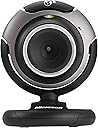
🎬 Elevate your video calls with precision focus and seamless Windows Live vibes!
The Microsoft LifeCam VX-3000 is a budget-friendly webcam optimized for Windows Live, featuring adjustable manual focus, automatic face tracking, and a built-in microphone. It delivers crisp video quality with excellent low-light performance, making it ideal for professional video conferencing and casual streaming. Lightweight and easy to set up, it offers a reliable, no-fuss solution for clear, engaging online communication.
| ASIN | B000EVM5DK |
| Best Sellers Rank | #2,234 in Webcams |
| Customer Reviews | 4.0 4.0 out of 5 stars (904) |
| Date First Available | May 15, 2006 |
| Is Discontinued By Manufacturer | No |
| Item Weight | 3.36 ounces |
| Item model number | 68A-00001 |
| Manufacturer | Microsoft |
| Product Dimensions | 8.1 x 7.2 x 2.9 inches |
A**G
one of the best for the price
After some search and comparision with couple logitech webcam model I liked vx-3000 the best in it's price range--with or without the coupon. This camera give me exactly what I need for personal online video conference -- low noise, crisp, clear video stream through adjustable focus, and good low-light capability -- without me paying extra for "high quanlity" still image capability which no matter how good, just can't compare with a good digital camera. I personally don't like Logitech webcam despite they are one of the most popular webcam manufacture (one low-end Creative model I tried in the past isn't good either). Several logitech I tried which were in vx-3000's price range come with HUGE amount of noise -- small spots that show up white where there is actually no light --- especially in low-light condition. vx-3000 got one of the best sigal to noise ratio, say you turn off the light to the entire room during night, a webcam with bad noise ratio will have image with tons of white spots flickering (though there aren't any light) while vx-3000 will show the correct pure black. Also I can't understand why some Logitech hi-end webcam came with FIXED focus, which mean you have to sit at a defined distance from camera to get the best picture. For vx-3000 you can manually adjust the focus by turning the knob surrounding the len. There are talks of softwere problem with vx-3000, i did experience that exactly just once while playing with webcam configure softwere when I'm using webcam with another program, but the problem went away after I reboot and nevered occured again (make sure you get the latest driver from internet). On the other hand, Logitech camera often come with this useless bundle software that eats up system resource. The face tracking option with vx-3000 works fine but I didn't play much with it since it's only digital zoom and only have a limited range and is considered not really useful. Overall, it's a excellent buy for the price and has great quanlity in area needed for video conference.
M**9
Camera ok, Mic not so good
I bought this webcam and had it sent to my mom and dad so I could talk to them over skype. the setup of the webcam was easy. the camera itself worked good, good picture. there is a known problem with the mic in this webcam though, which I didn't find out till after the fact. the problem is a buzzing sound on the receiving end of whoever you are talking too, I thought maybe the webcam was to close to my dads speakers and or monitor, but after some reseach online I found this to be a known problem, well, a long story short my dad didn't want to deal with returning the webcam, so I ordered a separate mic with a stereo connection, switching the mic over to this separate mic was like night and day, I could actully talk to my dad without have to put up with a buzzing noise
E**C
Excellent Item
I ordered this to keep in touch with my neices and nephew... and their parents ;-) It installed so quickly and easily that I was amazed. The audio/camera software wizard was pretty nice. If you don't have a head set microphone already, make sure you test out the audio settings with another computer to make sure the mic level you setup is fine. I have a really nice headset so it's very easy to set the mic level so the other end can hear me just fine. Using the built in mic, you'll want to make sure you don't have anything making noise near it. Things like a fan can make your video chat session annoying to the other person. I was very impressed with the face following software. It's not instanteous but it's not meant to be. It checks every so often and adjusts as needed to frame your face pretty well. Yes, I have read that it is set up to work with Live Messenger and it does that beautifully. It claims to work with others as well but I haven't tried them (don't need to since my chats will be with other Live Messenger users). I tested it with Live Messenger 9.0 (which is in limited beta) and it worked just fine. This is a good camera for use in IM sessions. It's not the best for taking photos or videos but for simple blog shots (it really easily publishes to your Live Spaces blog) it works great. Great Camera for the price.
A**R
Works great for Skype video chatting
I got this camera so that my kids can video chat with my parents who live in another state. It was simple to install on Windows XP and I haven't had any problems. It works well with Skype. The video quality is decent. The microphone is much clearer and louder than the one built into my laptop. I'm sure there are better cameras out there, but I didn't want to spend too much money. Plus, video quality is usually limited by your internet connection, not the camera. The only gripe, which some others have had, is that the button on top of the camera is easy to bump and it tries to load Microsoft Live Messenger. I changed it to open Skype using another reviewer's suggestion: Jrverse says: You can have the large button activate a different app (like Skype) when it's clicked. This works for me and others on the web (Advanced users only!!!): 1. Open regedit. 2. Navigate to the following key: [HKEY_LOCAL_MACHINE\SYSTEM\ControlSet001\Control\Class\{6BDD1FC6-810F-11D0-BEC7-08002BE2092F}\????\Settings] Where ???? is a number like 0000, 0001, 0002, 0003, 0004. You may have a few of these. 3. Under each of the "\????\Settings" folders, look for the entry called "QuickStartPath", and change it from the current value (usually "C:\Program Files\Microsoft LifeCam\icepick.exe") to the path of the program you want to launch when the big button is clicked (like "C:\Program Files\Skype\Phone\skype.exe") This works perfectly for me.
E**N
Why you selling kit that is redundant and does not work in the modern age????? Were all Windows 10 so when selling kit for a past operating system make this clear to your audience waste of time and money Ill be seeking a refund!!
R**I
Does what is says on the box.
Trustpilot
2 months ago
1 month ago