Buy anything from 5,000+ international stores. One checkout price. No surprise fees. Join 2M+ shoppers on Desertcart.
Desertcart purchases this item on your behalf and handles shipping, customs, and support to Kyrgyzstan.
๐ Elevate your home WiFi gameโbecause buffering is so last decade.
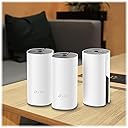
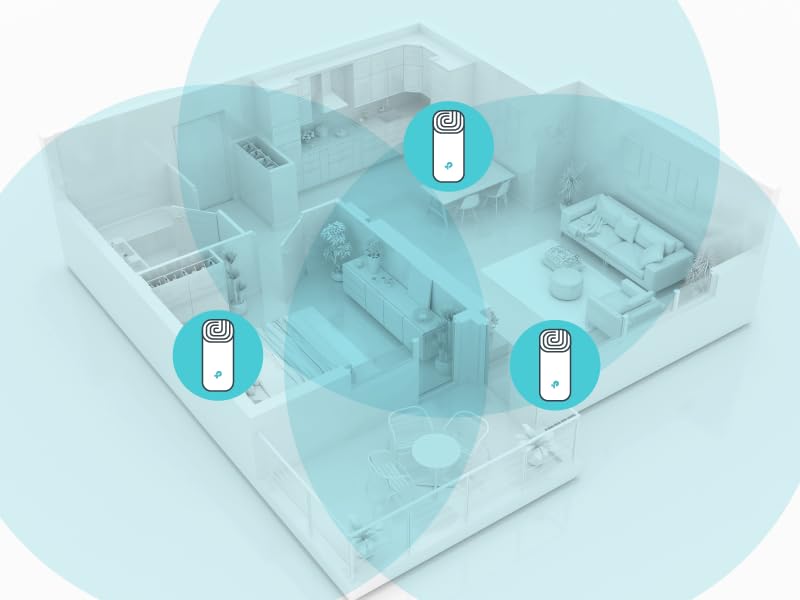
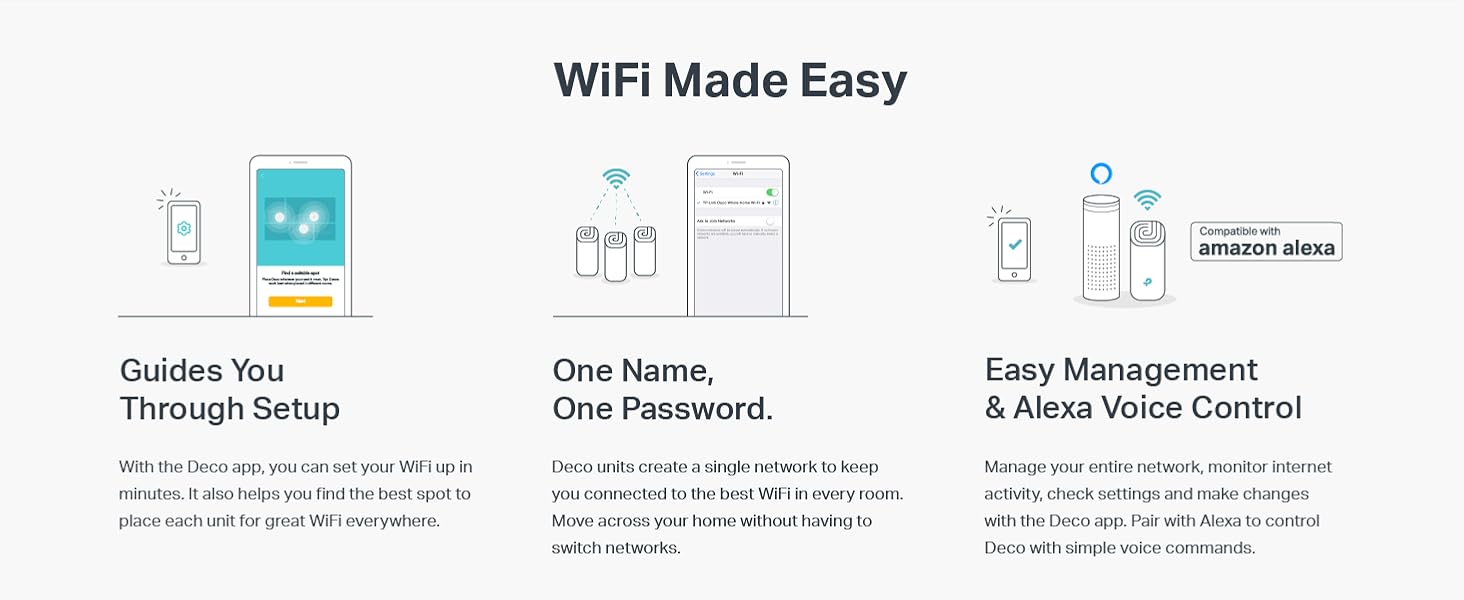
The TP-Link Deco M4 3-Pack Mesh WiFi System delivers expansive 5,500 sq.ft. coverage with AC1200 dual-band speeds, supporting up to 100 devices seamlessly on a single network. Featuring advanced mesh technology, it ensures uninterrupted roaming throughout your home, robust parental controls, Alexa compatibility, and an easy app-based setup backed by 24/7 award-winning support.


| ASIN | B07NF6V8SC |
| Antenna Location | Home |
| Antenna Type | Internal |
| Best Sellers Rank | #124,192 in Electronics ( See Top 100 in Electronics ) #387 in Whole Home & Mesh Wi-Fi Systems |
| Brand | TP-Link |
| Built-In Media | Network Cable, Power Supply, QIG |
| Color | 3 Pack |
| Compatible Devices | Personal Computer |
| Connectivity Protocol | wi-fi |
| Connectivity Range | 5500 Square Feet |
| Connectivity Technology | Wi-Fi |
| Control Method | Voice |
| Controller Type | amazon_alexa, vera |
| Coverage | 5,500 square feet |
| Customer Reviews | 4.5 out of 5 stars 2,264 Reviews |
| Data Transfer Rate | 1200 Megabits Per Second |
| Frequency | 5 GHz |
| Frequency Band Class | Dual-Band |
| Global Trade Identification Number | 00840030700125 |
| Is Modem Compatible | No |
| Item Dimensions L x W x H | 3.57"L x 3.57"W x 7.48"H |
| Item Type Name | wifi router |
| Item Weight | 3 Grams |
| LAN Port Bandwidth | 1000 Mbps |
| Manufacturer | TP-Link |
| Maximum Upstream Data Transfer Rate | 867 Megabits Per Second |
| Mfr Part Number | Deco M4 (3-Pack) |
| Model Name | Deco M4 (3-Pack) |
| Model Number | Deco M4 (3-Pack) |
| Number of Antennas | 3 |
| Number of Ports | 2 |
| Operating System | Android |
| Other Special Features of the Product | Fast Charging |
| Security Protocol | WPA2-PSK, WPS |
| Smart Home Compatibility | Smart Home Compatible |
| Special Feature | Fast Charging |
| UPC | 840030700125 |
| Unit Count | 1.0 Count |
| Warranty Description | 2 Years |
| Wi-Fi Generation | Wi-Fi 5 |
| Wireless Communication Standard | 802.11a, 802.11ac, 802.11b, 802.11g, 802.11n |
| Wireless Compability | 802.11a, 802.11ac, 802.11b, 802.11g, 802.11n |
V**N
Solid economical buy for home Wifi mesh system needs with good signal bandwidth
This review is about TP-Link Deco Whole Home Mesh WIFI System โ Seamless Roaming, Adaptive Routing, Up to 5, 500 Sq. ft. Coverage, Works with Alexa(Deco M4 3 Pack). Need: Setup mesh router system for WIFI on my two-storey 3000 sq.ft home. Price: I started with Google Wifi system (3-pack) but ended up preferring the TP-link system primarily because of the price-point (approx, $300 vs $150). Setup: Connect to ISP-provided router (disable WiFi if it has one). The provided setup installations via downloaded TP-Link mobile-app are thoroughly straight forward. One thing to note is that the positioning of the each mesh-router would depend on the layout of the house (location of walls/other signal-blocking obstacles, Wifi-needing devices etc.). Some competitors have option that indicates the strength of the mesh setup as to whether if a router needs to be re-positioned). I myself did the manual way of identifying the places where router needs to be placed, did the setup via the app and then moved throughout the house doing internet-speed tests. Once you do some trial and error, and feel comfortable, it should hold good then onwards (provided your ISP-provided-bandwidth is good enough). The speeds provided (upload/download Mbps) by each router is at par with my ISP-plan speeds. Notable Aspects: I created dual networks (2.4Ghz, 5Ghz). You may configure WiFi-devices to connect to both/one. Yo may very well assign static IPs which is probably required for camera-security-system setups (involving cameras, receiver, switches etc.). I operate the system in 'Router' mode where it is responsible for IP-assignment. Also, you may assign priority to some devices like mobile-phones, laptop etc (so, they aren't bandwidth-throttled by other competing devices. There are 2 ethernet ports on the back (one obviously to connect to ISP-provided router) and the other may be used in cases where direct LAN access is needed for any devices (I use one to connect to my mobile-carrier-signal-booster). You may stick some devices to a particular router (eg: Ring doorbell) or by default, beam-forming with have devices connect to router generating max-signal-strength. In cases where you may want to reboot the system, it is possible to do so via the mobile-app. The mobile-app is mostly functional with some occasional lag (like when renaming some connected devices, it sometimes takes 2 tries to achieve it, also when refreshing the connected devices list it takes 5-10 seconds for the devices list to refresh etc.). Attaching few snaps. Overall, hardly any complaints after 6 months of usage. I'll update this review if I notice anything substantial.
J**N
May save your marriage.
Prior to TP-Link Deco, I lived a life full of angry women (wife and four daughters) who constantly chastised, berated and blamed me for wifi outages, poor connection speed and inability to stream their favorite shows. I felt emasculated, inadequate and an overall failure as I was told that wifi and all electronics was my job. Step one was to change from ATT uVerse as they had poor 25 mbps download speed in my neighborhood. Done. I moved to Spectrum with 400 mbps download thinking my woes would be cured. Nope. I had poor home coverage as our house is larger than average. Even after adding a Nighthawk router to replace the inadequate, buggy router from Spectrum, I still fell short and was barely getting any signal on my third-floor office. After calling in a Spectrum technician, we discussed a Mesh network and he said it was mandatory. I researched systems and bought the TP Link system. Setup was simple and despite having to hookup what seemed like 100 devices (laptops, wifi-tv's, Blink security, ipads, Kindle's, phones, desktops, Energy consumption meter, etc.) it was 100% worth the trouble. My speed in the house is consistently fast and is also reliable. My wife now speaks to me again and brags of my wifi and technical prowess. I sometimes catch her giving me that approving look that all men yearn for. I believe it has improved her libido as well. My daughters no longer hold their heads in shame when their wifi-entitled friends come over. TP Link is to thank as my home is now a blissful wifi-paradise.
F**Y
STOP THINKING...JUST GET IT!
By far the best ISP WiFi router alternative for the money. Before this I tried so many options to boost the junky ISP Wifi router signal. We have a house with 2 floors and the ISP router was constantly cutting out and dropping signals. The only strong area was just in front of the router. Now we have a strong signal through tour the whole house, in the backyard and even in the garage. You can even buy more nodes if necessary, but most wonโt need it, three should cover most average size houses nicely. And the best part is that there havenโt been any complaints about slow WiFi since I installed the system, (dads you know what Iโm talking about). Also, setup was really simple. I heard that some other systems might have been challenging, which is one reason I chose the TP Link. Directions are pretty clear and there are lots of YouTube videos to walk you through the setup (but you really wonโt need it), setup is a snap. They also look nice, no need to hide them like most other routers. Seriously, stop debating and just get it. I was not paid to do this review. I bought the system out of necessity and after several months of service with no hiccups in service, Iโm 100% satisfied with my purchase would absolutely recommend the product to anyone who is frustrated with their lousy coverage from their ISP WiFi router. Just buy it. You wonโt regret it.
B**.
Great coverage, but a few devices had issues connecting
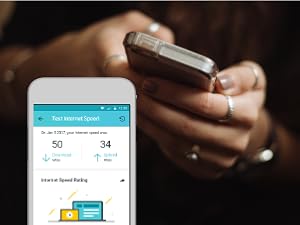
In general it is really nice to have complete high-speed wifi coverage across my house, and I get good wifi signal now in corners of the house that had difficulty with streaming 4k video previously. Now my speed test application shows great upload and download speeds throughout the entire house and outside into the yard. The setup of the devices themselves was extremely easy - no real issues at all. Very "plug and play". I'm marking it 4 stars primarily because I had quite a bit of trouble getting certain wifi-connected devices in my house to connect to the new router, primarily because the original firmware and/or mobile application didn't offer the ability to turn off the 5ghz channel. I had trouble getting my weather station, Philips Hue hub, and Amazon Cloud Camera to connect to the Deco, and I'm still unable to connect the Cloud Cam while I have the Fast Roaming turned on, so I have to live without that functionality. It seems like part of your QA process would be to make sure "Internet of Things" (IoT) devices can connect easily, since that's a key part of usability. It took me literally days to get everything connected, and I'm relatively advanced in terms of my knowledge of networking. I had to spend time doing lots of research on various forums and trial and error to get different devices connected. And of course as soon as I had everything working, literally the next day an update came out that added the option to turn off the 5Ghz band. This is necessary because certain devices that only require the 2.4Ghz band have trouble connecting to the Deco because the Deco only has one SSID (wifi name) for both bands, so if you can't turn off 5Ghz, it seemed like devices would always get confused or if the device connected to wifi by using an app on my phone, there was no way to force my phone to only connect to the 2.4Ghz channel on the router. For example with my weather station, I had to literally set it into pairing mode and then run down my driveway, far enough to be outside the range of the 5Ghz signal for my iPhone Xs to switch to the 2.4Ghz band (2.4Ghz has better range and penetration so it goes further, but the iPhone will always default to 5Ghz if it can, because it's much faster) and once I did that, the app that came with my weather station could sync the weather station to the 2.4Ghz band of the router. If the option to turn off 5Ghz was there originally, this wouldn't have been a problem. So overall a really solid router, and it appears they are working to improve the firmware and app. But it felt like it maybe wasn't quite fully baked yet and they hadn't done enough testing with different devices to either support easy connection for these devices, or at least provide technical support on their website to guide users on how to connect different IoT devices. I think if I had to do it again I probably would have bought the same router (especially since it was on sale) but TP-link needs to up their game with regards to QA and Tech Support.
S**I
Big Google Fan here, but...
I debated between this and Google's WIFI, and overall it came down to cost. The TP-Link is almost $90 Cheaper (At my time of Purchase) then Google's WIFI. Layout: - I have a 2500 Square Foot Home - 3 Floors - Verizon FIOS at one end of the house and bad internet at the back end. - How I set it up, you need to connect one to your main router (Pictured, Note: Once all is connected, you will want to disable your Routers internal WIFI, there is a such thing as too much WIFI) - Then I hooked one up down in the basement and connected it directly to the PS4 (The PS4 non-pro model only supports a 2.4GHz signal, so hooking this up directly to it with a WAN make it like it's god a 5GHz LAN Connection) - The last one I hooked up in the Master Bedroom. - Overall I made a Triangle of WIFI. Setup: - Setup overall was simple, plugged the main unit into my Router Directly. - Downloaded the TP-Link app, and took under a minute for it to detect. - You need to sign up for TP-Link account - It created a secondary Network, so most routers do 192.168.1.1. This will make another which you can change. This is important to know because if you are using any devices with a Static address (Like a Network / Wireless Printer or even a Home Desktop, you IP Scheme is going to change) - Also and VERY important, if you leave it create the 2nd VLAN, for Alot of at home devices it won't matter, but if you Work from Home and you need to connect thru VPN, your VPN will no longer work. Why you ask, this network you've create is now a "Double-NAT". VPN will not work through this type of setup, so you need to create "Flat Network" if you use and need VPN for work. Performance: - We have 4 Kids, and like 25 overall devices and I notice blazing speeds no matter the scenario of who was using what. - the pS4 is the biggest factor, so if there is say a 15GB Game Download or Update, it would have normally have told us it could take several hours to download (Again, PS4 only supports 2.4GHz unless you bought the PSPro). Now with it getting 5GHz and a Direct LAN / Cable connection, my test went from 5-6 hours to 12 - 15 minutes for this large file. Bad: The biggest pain for me in this was well, ALEXA! This has NOTHING to do with the performance of the TP-Link at all. We have 6 Alexa Speakers and a few smart Plugs. There is no way in the Alexa app to mass change the WIFI Network or Password, you need to basically go around to each device and almost set them up like they are new. The Speakers set back up pretty easily, but the plugs, the app treated them as new Plugs, not existing and I needed to re-do all our Alexa Routines. Overall: I would highly recommend this Mesh WIFI for a home, but like me, if you have some smart home devices (Alexa, Security Cameras, Nest Thermostat), just be prepared to redo all those devices as if they just came out of the box.
M**L
Getting better. Much better.
--Updated on 8/12/2020 The system has been working great, it get the job done. Again, it gets the job done. The system doesn't come with a lot of functions, and the parent control doesn't work all the time, but it's great for the money. Highly recommended. --Updated on 11/4/2019: Parent control is unreliable. Not recommended. --Updated on 9/6/2019: Customer service emailed back. Claimed there are "devices limitations", each profile should have less than 16 devices. We only have 3 devices. Still waiting for the solutions. --Updated on 8/29/2019: We finally registered the product. Opened a ticket. The product stopped working. When we tried to "Pause" the internet on the mobile app, it doesn't work. When it shows "paused", actually not paused. When It shows "unpaused", it actually paused. We try to register this product so we can get the warranty. TP-Link won't let us register the product. Showing: "Product Not Found. Please Contact Support at (866) 225-8139" Called the number, they claimed they "manually" added the serial number to their system. And asked me to wait for their email, before get any warranty service. Not email show up yet. Will keep updating. ---Original Review Why you should NOT buy this: 1. Parent Control not working. It tracks all the traffics and sum them up all together to calculate "Screen Time". Example: you open one website for 1 minutes, the website makes connections to 4 other URLs, it counts 4 minutes. If you do one hour screen time, this device counts it more than 3 times. Very misleading. Besides the basic "time out" function, the other Parent Control functions not working, or I don't know how to use them. 2. Streaming got issues. We have two TVs connections, the streaming lags poorly if we use two TVs at the same time. We don't know which TV connects to which node, but keep buffering/lagging. We don't know what's the issue. 3. Management interfaces. User is not allowed to assign devices to Mesh nodes. Actually user doesn't know which nodes it connects and won't able to pick. Maybe the Mesh is "auto pick the best signal", we still want to see which devices connecting to which Mesh nodes at any given time. Unfortunately, this Mesh doesn't show it. It does NOT come with a website to manage, only the phone app. 4. Bottom line: --If all you want is to boost the speed, this is good value product. --If you want to see the activities, or any management features, don't buy this product. For the price, it's a good buy. I will keep it. However, I will NOT recommend this to my friends.
J**E
Excellent coverage, easy set-up (maybe Amazon can get the right reviews on the right item)?
Wow! Went from traditional cable company wired house to a wireless system, cut the cord too. I went from two wireless modems, one as an extender, to this TP-Link Deco M4. Two of the three units are on the first floor, one unit upstairs. Wireless signal in the basement works off of the units on the first floor. Previously I would get drops and slowdowns on my ROKU sticks with the traditional wireless modems. Now with this M4 system I get excellent wireless on every device in the house, and there are plenty! Set up was simple, just required a bit of patience while the units connected to themselves. Follow the instructions when it says to connect the units while having them close to each other (same room), then relocate them as needed. I have one unit in the far corner on the first floor, this is hard wired to a cable modem in the basement. A VOIP device is also hard wired to this unit and a telephone lead is wire. into the house phone wiring. A second M4 unit is on the other side of the house connected wireless to the first unit. This is wired to a 5 port switch and feeds a laptop, printer, back up hard drive, and a wire to a smart TV in another room. The third M4 unit supplies signal to the top floor of the house: ROKU, cell phone (wireless plan: Republic), Alexa dot, and a tablet or two. The TP-Link M4 is affordable and works great for a home wireless system. (two old routers slowly croaking made a change necessary) also: each of the three unit can act as the main router, too easy.
C**E
Does what it says! Much cheaper option. --UPDATED
UPDATE 12/23/18 - One last update, After almost 2 months, I was able to receive a replacement unit free of charge (although I had to pay almost $25 to ship the old units back to TP-Link). Its great that they finally honored their warranty however because I rely on wifi I ended up having to buy a new system because I couldn't wait 2 months for them to replace these units. I do appreciate the replacement, but the hassle was not worth it. ________________________________________________________________ UPDATE 11/8/2019 - I can no longer recommend this product. I've had a terrible experience with it in the short 2 months and have went another route at this point for a home mesh system. Some of my issues: 1. Every time my internet has an outage, which is not that often but we've had some power issues lately, I have to factory reset all of the decos and completely reconfigure the network. It has happened 5 times in 2 months! I thought maybe this was a fluke the 1st and second time, but as I continued to do it, it became a massive headache. I work from home, so having a short outage isn't a huge deal but then you tack on time to reconfigure your entire network and you are looking at at least an hour of downtime (usually more for me because I have to fine tune everything). 2. The reconfiguration process was unreliable. Sometimes I'd have no issues getting the main deco to setup, sometimes it wouldn't work. Sometimes, when setting reservations, I would see the devices, other times I wouldn't. The thing is just extremely flaky! and yes, I'm running the most current firmware. 3. The last outage I had last week took out the deco system entirely and I can no longer get it back online. No idea why because you can't review logs on these devices. You literally have no access into its inner workings. In some ways, I was drawn to this with the cloud mesh system, I liked the ease of use and the simplicity. But as an IT person, when things don't work the first thing you do is check the logs! I am now the proud owner of 3 tall paper weights that cost me $150 and countless hours of downtime (imagine my children's horror!) 4. I'm currently dealing with support via email and to say the process has been long would be an understatement. They haven't been bad, but it takes on average 48hrs to respond and when they do, they are literally re-asking me the same questions but just worded differently. Its frustrating! I think this model needs a lot of work before they bring it to the market, I think the M5s or the M9? has much better reviews although they cost more. But remember, you get what you pay for! This one is cheaper which is why i was drawn to it but I am now out close to $500 because I went and purchased an entirely different mesh system that so far is working flawlessly. This M4 version I think is supposed to be TP-Links very scaled back version, it doesn't have all the bells and whistle the other ones do and I liked that because I don't need all that other stuff (network security, etc, I've got other options I use here). I'm hoping my devices were just a lemon set, based off other positive reviews but I don't trust this model any more. ___________________________________________ Does exactly what it says and a low price, perfect for home use for someone who doesn't need or want all the features that other more pricey devices are capable of. I ran into a few issues with setup and the first few days of use but was able to work through it. Most of the GUI on the app is pretty self explanatory but the one thing I would suggest paying close attention to (if you need it) is the IP Reservation screen. There is no "Save" button. When you select something, it shows up at the top and there is a "Done" option but its not obvious that you need to click that. Because of that oversight, I ran into some major IP conflicts and had to factory reset my TP-Link devices and reset everything because there is no way to manually connect to these devices. After I got everything setup again, I realized i didn't hit "Done" when setting some reservations. No issues since! Also, no built in malware protection, I'm assuming because of the price. For the target market, this should be included. I setup a pie-hole in my house to use since its a very cheap (or free) solution to help assist with that.
Trustpilot
1 month ago
1 month ago