Buy anything from 5,000+ international stores. One checkout price. No surprise fees. Join 2M+ shoppers on Desertcart.
Desertcart purchases this item on your behalf and handles shipping, customs, and support to Kyrgyzstan.
⚡ Scan smarter, not harder — your desk’s new MVP!
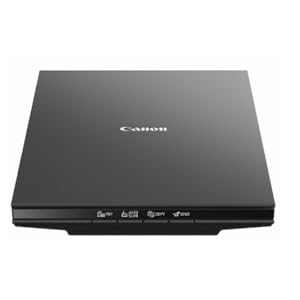
The Canon CanoScan LiDE 300 is a sleek, USB-powered flatbed scanner delivering ultra-high 2400 x 2400 dpi resolution with rapid 10-second scan speeds. Featuring Auto Scan Mode for effortless document detection and four intuitive EZ buttons, it streamlines digitizing photos, receipts, and documents. With built-in PDF creation and direct cloud upload capabilities, it’s designed for busy professionals seeking premium quality and seamless workflow integration in a compact footprint.

| ASIN | B07G5XZVLQ |
| Best Sellers Rank | #2,061 in Office Products ( See Top 100 in Office Products ) #1 in Flatbed Scanners |
| Brand | Canon |
| Built-In Media | CanoScan LiDE 400 Color Image Scanner, Setup CD, USB 2.0 Cable (USB A to Mini B) |
| Color Depth | 48 bits Bits |
| Connection Type | USB |
| Connectivity Technology | USB |
| Customer Reviews | 4.2 out of 5 stars 7,032 Reviews |
| Global Trade Identification Number | 00013803306507 |
| Greyscale Depth | 16-bit Internal / 8-bit External |
| Item Dimensions D x W x H | 14.5"D x 9.9"W x 1.7"H |
| Item Type Name | CanoScan LiDE 300 Slim Everyday Scanner |
| Item Weight | 3.6 Pounds |
| Light Source Type | LED |
| Manufacturer | Canon USA Inc. |
| Media Type | Photo ; Receipt ; Business Card ; Paper |
| Minimum System Requirements | Windows 7 |
| Model Name | CanoScan |
| Product Dimensions | 14.5"D x 9.9"W x 1.7"H |
| Resolution | Optical: 2400 x 2400 dpi |
| Scanner Type | Document, Photo |
| Standard Sheet Capacity | 1 |
| UPC | 013803306507 |
| Unit Count | 1.0 Count |
| Warranty Description | 1-Year Limited Warranty |
| Wattage | 4.5 watts |
A**S
Little scanner, big results!
As an artist, I have been meaning to find myself a nice flatbed scanner for art purposes, scanning sketches or what have you, but found myself procrastinating until I could devote time to really look at reviews and figure out a high quality, high end scanner. I found myself in a position recently that I needed to manually sign some documents and get them to where they needed to be by the next day, but my car was in the shop. I thought maybe one of those portable wand style scanners might be good, and I could use it also to scan receipts, but they are so expensive, and I needed some thing that would be delivered the next morning. What came up was the Cannon LIDE 300, which would be delivered between four and eight in the morning, and this was perfect—I could sign the documents, scan them and upload. And I would also have a nice inexpensive scanner for things. I was looking for something that would be an overnight delivery, and dare I say, on the “cheaper” side and this fit the bill. This printer far exceeded my expectations. I realized with the first scan that this little machine was way more useful, and of a higher quality than its price would suggest. Inexpensive, yes, but by no means a cheap piece of equipment. I am on an older OS Mac, so I was worried I would not find some thing that would be compatible with my system, but in reading the reviews, it looked like the scanner would work—and there were some very helpful reviews on how to use the scanner without having to download any software for Mac. It was pretty much ready to go straight out of the box, plug into your computer, go to system preferences under “printers and scanners”, hit the plus sign and you can add this scanner. Use the “printers and scanners” window to access the scanner—just hit the “open scanner” button and it will give you the scanner “user” window. It starts immediately with an overview scan and from there you can change the resolution, the size, rotation angle, even the format —say PDF or JPG. You can even do image correction with brightness and contrast. It’s pretty intuitive —all you really need to do is play around with that scanner window for a few minutes and do some test scans and you’ll see exactly where you’re at. For each new page/item that you scan you need to close the scanner window, go back to the “printers and scanners” window and hit the “open scanner” button again… There may be a way for it to auto detect when you put a new page in the scanner, but I have not figured that out… Maybe I should take a look at the manual, which is still in its plastic bag… L O L. There is a “combine into single document” option, but I chose to just do separate PDFs, and then combined them in Acrobat. And it worked out great. The quality was fantastic! And the color 300 dpi test scans I did on some color items were phenomenal, and when you enlarge them up and look at the detail, I was just blown away… Much higher quality than I expected, and I’m starting to think maybe I don’t need a higher end scanner. As I said, I bought it as an emergency measure, but now I find myself with quite a useful, high-end (in my eyes), and inexpensive little scanner. I will probably be saying quite often “how did I ever live without this”… And again I’ll mention the price is right on point, pretty inexpensive for the quality that I’m seeing, and I deal with resolution/dpi levels In my job as an artist… If you need additional information, go in under the (Amazon) reviews for this scanner and type in Mac in the search window—that was very helpful for me in making my decision to buy this scanner… The information I ultimately used for how to access the scanner without software was from one of those reviews. The scanner worked with the cable that came with it, and in less than 10 minutes I was scanning… No download of software needed for now, but I might check that out in the future. I thought this review might be helpful for others who are on an older system Mac… Sometimes it’s really hard to find useful information on products, regarding compatibility with the older systems…For reference I am on Mac, Mojave 10.14.6. Because yes, sometimes the newer OS does not always equal the best. I will say, with the positive experience of this little inexpensive model scanner, I will upgrade to another Cannon scanner, when and if needed. That’s how strongly I feel about this scanner. PS the scanner does have copy, scan/auto send as part of its functions (buttons), but I’m guessing you probably would need to download some software for those functions. As noted, this was a quick solution for some “emergency” scans, and this device was perfect! I am looking forward to seeing what else this scanner can do.
L**S
Great scanner!
Easy to set up and works great! I use this scanner with a HP notebook computer running Windows 11. The only drawback I have found is that it did not function when I plugged the USB cable into a USB hub. This computer only has two USB connectors, one of which is taken by the connector for a wireless mouse. When I switched the scanner's USB cable to the connector on the computer, it worked fine. This is the best moderately priced flat bed scanner that I've owned.
S**Z
Simple and fast photo scanning.
Install the software first then just plug and play. This was the third scanner I tried and third times the charm. Fast, simple to use, and very good quality for scanning photos. Just put the picture on the tray, push autoscan, and ten seconds later it shows up on your computer cropped and saved. For scanning old photo albums, this is the way to go. Powered over the USB cable so no need for an AC adapter. Thank you Canon
P**N
great scanner especially for the price with great photo reproduction. 4800dpi requires setup
I love this scanner, but I'll start off talking about a certain aspect because I did see a lot of reviews saying you can't scan at 4800DPI or you are limited to a tiny image. After some trial and error, I found out you can do 4800 DPI. The limitation of the ScanGear software (included with the scanner) is apparently memory. But oh well. The image cannot exceed 50,000x50,000 pixels or 4GB. so that means the biggest image I was able to scan at 4800 DPI is 6.7 inches x 9.20 inches which is just below 4GB in size for a JPEG. I shouldn't have any limitations because my PC has 128 GB of RAM and 80 TB of storage but oh well. Note that this 6.7 inches x 9.2 inches is the output resolution. The input can be whatever can fit on the glass (example, 8.5 inches x 11 inches). In order to get to 4800 DPI, if you want to use the included Canon software, you have to use ScanGear. It doesn't appear to be available in Canon's other scanning modes. If you use a paid commercial scanning software like Vuescan, maybe this 4800 DPI memory limitation doesn't exist because the hardware can do 4800 DPI. Here's the key point, you have to go to the settings for ScanGear and select the checkbox for "Enable large image scans". I don't know why this is even an option. Whoever wrote the software should just allow for large image scans because it's only going to confuse people. If you don't set this checkbox, the biggest image you can scan is something like 14000x10000 pixels which means at 4800DPI, the biggest image is something like 2 inches x 2.5 inches. Once the setting is saved, go to ScanGear to scan the image. TYPE 4800 into the resolution box (don't use the dropdown arrow). Set max scan to 6.7"x9.2". That will produce a 4GB data file. If you're expecting to scan a 4800DPI 6.7"x9.2" TIFF image, you would probably need terabytes of RAM because it doesn't scan to your storage. It scans into your memory and then saves that image to disk. Considering a lot of users have only 8GB or 16GB of RAM, scanning a 4800DPI TIFF image isn't really feasible. Then you will be able to scan at 4800DPI. Remember, this 6.7"x9.2" is the output resolution. The input can be the full size of the scanner glass. For example, you put on a 8.5 inch x 11 inch paper. and then the output is 6.7"x9.2". And the last aspect of 4800 DPI scanning is how long it takes. This is not the seconds of scanning you get with 300 DPI or 600 DPI. No, this is many minutes. You really have to realize whether 4800 DPI is worth it to you. If you're scanning a printed photo, 4800 DPI won't really make it better. you're at the limit of the print. 4800 DPI aside, how is this scanner? It's super thin as a scanner. You can put books or whatever on the glass (platen). I thought about the Epson photo scanner where you can feed pictures. But then I realized it was $600 and that you can't scan books and non-fed sheets and it was limited to 600 DPI. This Canon is super fast at more normal resolutions (300, 600, 1200, etc.). It comes with a stand so you can have the scanner vertically positioned while scanning! Not sure how useful that is but it is neat to see it scanning something while vertical. The color reproduction and the scanner features are top-notch. I totally recommend this if you're scanning at 2400 DPI and below. I bought it mostly for photo scanning. For photos I plan to share through social media or email, I'll probably scan at 300 DPI or 600 DPI (that I then compress down) because email's limit is 25MB which is something like 7000x7000. I know the JPEGs I output out of photoshop from my digital camera are 45 megapixels (8192x5464 resolution) and 31.5MB in size so already too big for email or social media. If your main thing is scanning everything at 4800DPI, then I would suggest getting something else. For photos I'm going to print, I'll probably scan at 1200 or 2400 DPI. But if you'll only occasionally use 4800 DPI, then this can totally do it and do it well (as long as you're below 50000x50000 resolution). I just scanned a 32162x44160 which ended up being a 410 MB JPEG. It took about 20 minutes (ballpark estimate). Note that if 4800 DPI was seamless and was selectable from a dropdown menu, I would've given this scanner 5 stars. But for making it a hassle, I knocked off a star.
G**N
Great Canon Lide 400 Scanner BUT note the SERIOUS CAUTION in my Review
Works Great! I've scanned scores of photos using 600 dpi and am very pleased with the simplicity and results. Scanned a few documents with similar opinion. EXTREME CAUTION: Access the Canon Website for Driver download and Product registration by typing ij.start.canon in the address bar and not into a browser search. I typed it into a Google Chrome search instead and came upon a Canon site for Driver download that unknowingly took me to ij.start.cannon (note the mispelling). This is a very legitimate looking Canon site. When I entered the scanner model I received an error code and a phone number to resolve the issue. The phone number took me to a third party called MS Assistance LLC, who told me that they represented Canon and that the error code meant that I could not download the driver because I had foreign ip addresses connected to my network. I believed them and paid them $100 to connect to my computer and fix the problem. They then downloaded the driver to my computer for me. Then they told me that I needed a product called Network Privacy Shield to protect me from foreign invaders in the future. I believed them and paid another $199.99 for the software that they downloaded for me while still tied to my computer. Days later, my sister told me that Canon would never operate this way and that I needed to call Canon. I called Canon and was told that they had no knowledge of this company MS Assistance or of the error message that I received. While on the phone, they directed me to type ij.start.canon into the address bar and that took me to the correct Canon webpage that had my driver to install AND product registration that I hadn't even thought about before. Regarding the supposed Network issue, Canon told me to talk to my Internet provider. Charter-Spectrum told me that I should NEVER allow anyone to connect to my computer over the phone and that who knows what files they could have stolen when connected. They said that I needed to take my laptop back to Apple to see if any malware or damage was done. I have found that the software Network Privacy Shield is a Google Add-In available on the Google Store and it is made by driversandshield.com. I called driversandshield.com and asked a question about the legitimacy of their product Network Privacy Shield protecting against foreign IP addresses connecting to my computer network and then called MS Assistance at their phone number and asked the same question and the person said that 'I just talked to you and answered that question'. MS Assistance IS also driversandshield.com; the maker of Network Privacy Shield. They are one in the same. MS Assistance LLC operates out of an apartment in an apartment building in Austin TX and driversandshield.com supposedly operates out of an apartment in an apartment building in St Cloud MN. Do you think this is a SCAM?
J**E
Works Well with Linux Mint with the Correct Software
I needed a flatbed type portable scanner I could use with my laptop when away from home. This one seems to meet that need for me (I haven't traveled with it yet). Since I use Linux Mint, the Canon software wouldn't work (shame on you, Canon, for not making Linux compatible drivers!), so I can't comment on how well the scanner works with Canon's software. I already use Hamrick's VueScan software on my other two scanners, a Canon 9000F flatbed scanner, and a Fujitsu ix500 duplexing, ADF scanner (both of which are NOT what I would consider portable!) and it works well with this scanner once I updated it. I haven't tried to use any of the scanners buttons since Vuescan easily and conveniently does it all from within the software. When I first tried to use the scanner with Vuescan, I went nuts trying to get the software settings to work the way I needed. It then dawned on me that I hadn't updated VueScan in quite a while since "nothing was broke so don't fix it." After I updated Vuescan (although the .deb version would probably work, the tarball—.tgz—version, when extracted, had a simple to use installer that automagically updated the current installation without changing the settings), everything started working perfectly. Another reviewer reported getting good results with the free to use xsane. The first time I used it, I noticed that it was hard to slide paper over the platen. I lightly moistened a microfiber cloth with water and gently wiped down the platen. After that, paper easily slides across the platten. The stand for the scanner is a joke. Trying to position a document or whatever on the scanner while it is in the stand will be awkward at best. One will have to be really hard up for space to find it useful. I put mine in the drawer of items that will never see daylight again. Also, my Canon 9000F uses the upper right corner has "home" for locating documents on the platen. The LiDE 400 uses the lower left corner as "home". This will take a bit of getting used to. Now for the pros and cons. Pros: 1. Inexpensive 2. Compact for a flatbed scanner that can handle up to letter size documents. 3. Lightweight 4. Runs off USB power so no power cords needed. (Canon says USB 3.0 is necessary for this scanner but I was able to run it just fine off a USB 2.0 port on my laptop; your "mileage" may vary.) 5. When using VueScan and the settings have been sorted out, it's easy to use. 6. Good quality scans. 7. 48" long USB cable Cons: 1. Anything being scanned must fit flat on the platen to be fully in focus, unlike my Canon 9000F which can focus on parts that may be as much as 1/2" from its platen (for my intended use, that will not be a problem). 2. It's noisier than my other scanners (not a big deal for me). 3. The lid is flimsy. This will be a problem when transporting the scanner since the lid won't be able to protect the glass platen unless precautions are taken to protect them (I've ordered a larger laptop bag so I can safely carry the scanner in the same bag with my laptop). 4. The lock slide on the bottom is stiff to move. It has to be locked when transporting the scanner and unlocked when using it. Being on the bottom of the scanner, it will be easy to forget to reset it every time the scanner is transported and set up for use. 5. 48" long USB cable (whether that is a pro or con will vary from person to person). For me, the cons were not enough for me to remove any stars from the rating. It should perfectly meet my needs. I do a lot of scanning (including some hard to scan items) so I wouldn't want to use this as my go-to flatbed scanner at home, especially since my old 9000F is still going strong but, for occasional use, the LiDE 400 should last me a long time. BTW, the description is wrong; it's 1.75" x 9.875" x 14.5".
R**E
Simple and fast scanner
I wanted something small, simple, and easy to use. My previous printer/scanner was wireless and I had a lot of issues keeping it connected to my wifi, so I specifically wanted a wired scanner this time. This scans documents quickly and the interface app is super simple to use. The scan quality also seems very nice. The only weird things with this scanner are: 1) It says it uses a USB-C connection, but that's only on the scanner side. It uses the old-style USB-A on the computer side, which defeated the purpose of why I got this model. My computers (and most other recent models) don't even have USB-A ports and so I don't know why peripherals are still being made with the old USB-A connector. I had to use a USB-C to USB-A adapter to connect it to my computer. 2) The vertical stand is way off to the one side, so the unit tips and touches the table on the other end. Why not make it so the stand is in the center? Very weird design. I don't plan to use it upright but I thought that would be nice for storage.
V**Z
It works easier because it opens on the short side and is great for artists
I thought I just posted this. Well, maybe it was another scanner. The Canon CanoScan scanner is good for scanning paper up to legal paper. I am an artist, so I use it to scan my art. I needed a scanner that opened up on the short end so I could more easily scan my large art in sections. This scanner says it can even piece the individual sections like Photoshop does. If this is the case, I am thrilled that I don't have to open Photoshop to piece together sectional scans. This little scanner is more special than I thought, with many more useful features to make scanning easier. I only tested mine, but I am very pleased with the couple of scans I did just to see if it works well. I think this scanner is a winner. It also comes with a manual to explain all its features. It works with Apple or PC, even though it is designed more for a PC than Apple computer. I am an Apple computer user. It is still my choice because it will be much easier to scan sectional sectoins of my large art, especially if it can also piece the sections together for me. Time will tell.
R**X
Facile à utiliser, qualité très recommandable.
Après plus d'un mois d'utilisation, ce scanner répond très bien à mes besoins relativement limités.
ع**ر
منتج ممتاز
ممتاز وسهل الاستخدام
I**B
Flatbed scanner
Scanning paperwork, extremely happy with it portability
R**A
Buen producto, fácil de usar
Llegó en buen estado. Simple de instalar siguiendo las instrucciones del manual. Escaneé un manual de 40 páginas sin problemas. Ese va a ser mi uso primario, digitalizar textos, recibos y manuales
V**U
Eazy to use
Very simple to use. Quite sturdy too. I recommend this for all scanning needs at home
Trustpilot
2 weeks ago
1 month ago