Buy anything from 5,000+ international stores. One checkout price. No surprise fees. Join 2M+ shoppers on Desertcart.
Desertcart purchases this item on your behalf and handles shipping, customs, and support to Kyrgyzstan.
🚀 Elevate your 3D printing game with BIGTREETECH Pi — power, precision, and connectivity in one sleek board!
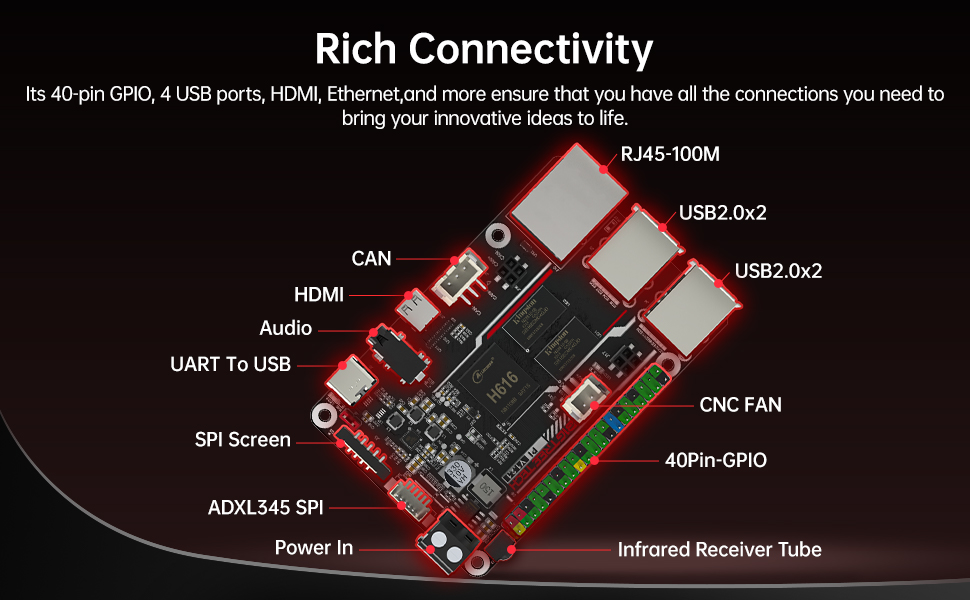
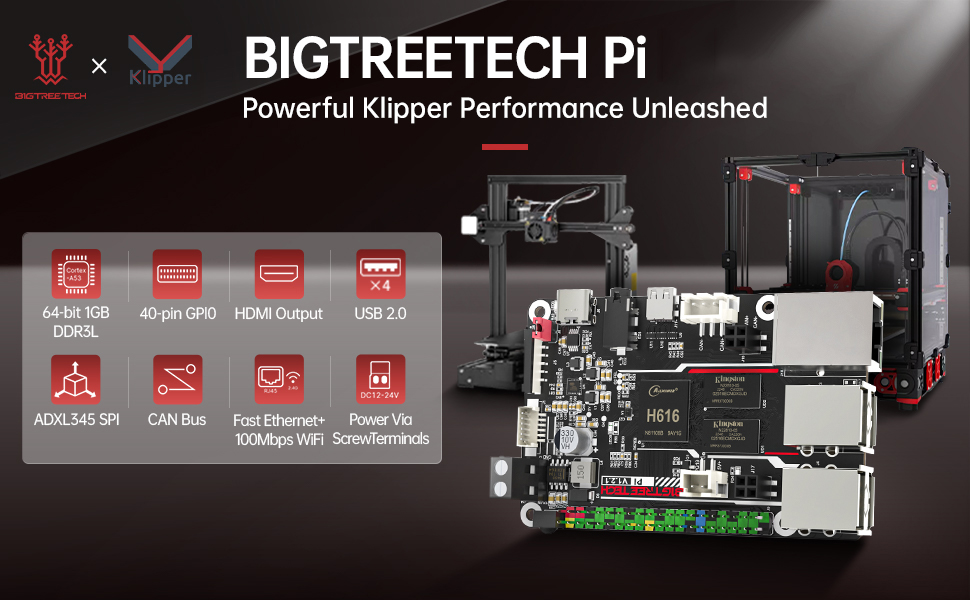
The BIGTREETECH Pi Control Board is a compact, Raspberry Pi-sized 64-bit quad-core SBC designed specifically for 3D printers. Featuring a 1.5GHz Allwinner H616 CPU, 1GB DDR3L RAM, and Mali G32 MP2 GPU, it supports 4K UHD HDMI output and runs Klipper firmware seamlessly. With extensive connectivity options including 40-pin GPIO, USB ports, WiFi, Ethernet, CAN Bus, and flexible power inputs (USB-C 5V or 12-24V DC), it integrates effortlessly with popular SKR control boards, making it the ultimate upgrade for professional-grade 3D printing setups.


| ASIN | B0C46B6X64 |
| Box Contents | BTT PI |
| Brand | BIGTREETECH Direct |
| Brand Name | BIGTREETECH Direct |
| CPU speed | 1.5 GHz |
| Compatible Devices | SKR MINI E3 V3.0, SKR Pico, SKR V1.4 turbo, SKR 3, Kraken, Octopus pro, Octopus V1.1 series |
| Connectivity technology | Ethernet, GPIO , HDMI , USB, Wi-Fi |
| Customer Reviews | 4.3 out of 5 stars 58 Reviews |
| Included components | BTT PI |
| Item Dimensions L x W x H | 8.4L x 6.4W x 0.1H centimetres |
| Manufacturer | BIGTREETECH Direct |
| Manufacturer Part Number | BIGTREETECH |
| Model Name | BIGTREETECH Pi |
| Model Number | PI V1.2 |
| Model name | BIGTREETECH Pi |
| Network Connectivity Technology | Ethernet, GPIO, HDMI, USB, Wi-Fi |
| Operating System | Linux |
| Processor Brand | Allwinner |
| Processor Count | 4 |
| Processor Speed | 1.5 GHz |
| RAM Memory Installed | 1 GB |
| RAM Memory Technology | DDR3L |
| RAM memory installed size | 1 GB |
| Smart Home Compatibility | Not Smart Home Compatible |
| Total USB Ports | 4 |
| Unit Count | 1.0 count |
| Wireless Compability | Bluetooth |
G**E
Works well with an SV06 running on Octoprint
I purchased this to run Octoprint for my SV06. Follow the instructions on GitHub and it works like a charm with an SV06. This was my first foray into Linux, but was very easy with BigTreeTech's installation instructions. They only issue I had was finding the correct port for running a camera, but once I googled how to find your port with terminal, all was golden. This is running with a 32GB sd card and HDMI to mini-hdmi cable plugged into my printer and is a great alternative to Raspberry PIs. I've also had no issues loading Kiauh on it in preparation for Klipper, using the Mac iOS terminal application to connect to it once you've loaded the correct Debian image per BTT instructions. The install is flawless. I'm glad I purchased!
M**N
Outdated but rock solid!!
In 2025, the BTT Pi 1.2 is outdated and underperforms compared to other options on the market like the Pi 4 - which sells for a whopping $35.99. Heck, you can find the same chip (H616) in a $19 Orange Pi Zero. BUT i still love it. Why? It has several creature comforts that make life for Printer Builders so much easier- doubly so if you are bought fully into the Bigtreetech Ecosystem. These are: 1. Onboard 24V in. It removes the need for a secondary 5V PSU, reduces wiring complication, harness size, cable routing issues, and failure points as a result. 2. Plenty of USB ports 3. Sufficient compute power to run a camera alongside Klipper 4. Easy integration with the TFT35 ŚPI - a cheap, excellent BTT touch screen. Now onto the cons- 1. As always, BigTreeTech’s documentation is garbage and setup requires searching through lots of forum posts. 2. This PI requires active cooling if your electronics enclosure is not well insulated against high chamber temps- especially when printing engineered materials. Thankfully, there are lots of mounts for 3010 and 4010 fans that you can print. 3. It’s a PI made for 3D printers, so it doesn’t do other raspberry pi things particularly easily. Keep this in mind. All in all, once configured, the BTT pi 1.2 is a rock solid option for anyone planning to run a basic Klipper instance. If you are trying to run Kalico and use a lot of advanced computational functions, get the Pi 2.
R**D
Best Alternative to a Raspberry Pi... For 3D Printing.
If you want a RPi for running 3D printers using Klipper, but don't want to wait for them to come back in stock, or to shell out $70-$130 USD, this is the best alternative in my opinion. With that said, you have to use BTT's OS on this, so using it for other stuff is a little limited (though still technically possible).
A**.
Inexpensive Klipper Board
Can't beat the price. It's not exactly a RasPI clone, but can do most of the same things. From the BTT Github, install the full image if you want to use Klipper. I tried to use the minimal image first and some of the dependencies were giving me all sorts of cascading issues (and I'm an IT guy who knows his way around Linux distros).
J**R
Pi V1.2.1 - Not Reliable
Review of the Pi V1.2.1 Using this Pi to run Klipper on a home made core xy printer. The Pi works ok, until it doesn't. Flashed BTT firmware to a 32Gb SD card. The Pi will talk to the printer and will start a print. Sometimes the Pi goes 10 minutes before it randomly locks up and other times it will last more than an hour before locking up and ruining my print. By the time I was fed up with this thing and ready to return it I was one day out of the 30 day return policy. So, looks like this prize is mine to keep. Next purchase will be the real deal, Raspberry Pi 3.
Trustpilot
1 day ago
5 days ago