We remain fully operational. Our teams are working around the clock to ensure your deliveries continue safely.

DOWNLOAD THE APP


Customer Services
Copyright © 2025 Desertcart Holdings Limited
DOWNLOAD THE APP



Buy anything from 5,000+ international stores. One checkout price. No surprise fees. Join 2M+ shoppers on Desertcart.
Desertcart purchases this item on your behalf and handles shipping, customs, and support to Kyrgyzstan.
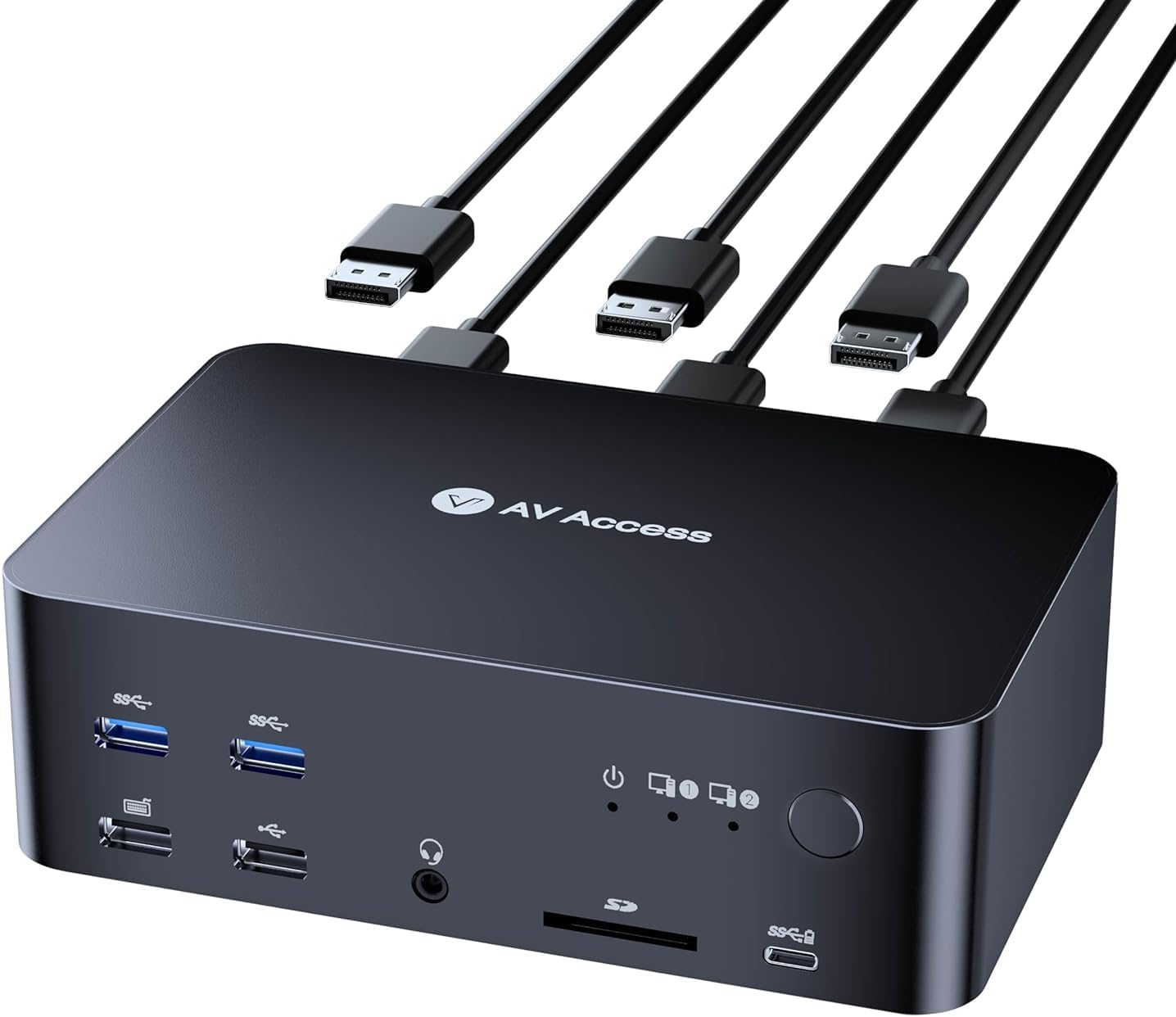
🚀 Elevate your dual-PC setup with 8K triple-monitor mastery — because your desk deserves the future now!
The AV Access iDock D23 is a premium DisplayPort 2.0 KVM switch and docking station that supports dual computers and up to three monitors with resolutions up to 8K@60Hz. Featuring ultra-fast 2-3 second switching, USB 3.0 ports, 1G Ethernet, and a sleek CNC-machined aluminum design, it’s engineered for professionals demanding high performance, seamless multitasking, and a clutter-free workspace.





| ASIN | B0CRDQW4GT |
| Amazon Bestseller | #12,876 in Computers ( See Top 100 in Computers ) #74 in KVM Switches |
| Brand | v AV Access |
| Built-In Media | 1 x KVM Dock, 2 x USB Type-A to Type-B cable, 6 x DP 1.4 cables, 1 x Power adapter |
| Color | gray |
| Compatible Devices | Dell Latitude 7370 |
| Country of Origin | China |
| Customer Reviews | 3.9 3.9 out of 5 stars (90) |
| Hardware Interface | 3.5mm Audio, Ethernet, SDXC, USB 1.1, USB 2.0 Type A, USB 3.0 Type A, USB Type C |
| Input Voltage | 12 Volts (DC) |
| Manufacturer | AV Access |
| Number of Ports | 7 |
| Total Usb Ports | 6 |
| Unit Count | 1.0 Count |
| Warranty Description | 2 years |
| Wattage | 36 |
A**ー
iDock C20を購入しました。同梱ケーブルで接続ができず(接続と非接続を不安定に繰り返す状態)であり、カスタマーサービスに連絡したところ、Kevin-sanという方からUSB3.2 GEN2ケーブルを使用してくださいとの指摘があり、自前のケーブルで問題解決しました。対応は丁寧&動作感にも満足しており星5にします。
L**O
I’ve been using this KVM for a a couple of weeks now multiplexing between 2 monitors and my Windows PC and my Macbook Pro, and overall I’m pretty happy with it. Here’s a quick breakdown of my experience so far: Form Factor: - The design is sleek and modern, which I appreciate. It actually looks nice on my desk, unlike a lot of competitor brands out there. At about twice the height of my previous AVAccess KVM (visible on the bottom left in the picture), it’s a little too tall to fit under my desk stand though — I wish it were just a bit shorter. - One minor annoyance is with the supplied cables — unplugging the middle or bottom cables is tricky. You have to press a release lock on top of the cable head, but it’s hard to do that without first unplugging the top cables. Features & Performance: - Switching inputs is fast — faster than my old AVAccess KVM, which is great. There's no flickering so far, which was an issue with some other KVMs I’ve tried - I’m a fan of all the extra ports: headphone jack, SD card slot, USB ports on the back for a webcam or monitor hub. My old KVM didn’t have a rear USB port, so I had to awkwardly route my webcam wire around the unit. This is a small but really nice improvement for wire management. - One feature I miss: a power button. It’d be nice to have the option to turn it off without unplugging it. - I haven't had it for very long yet, so time will tell how reliable it is. If it breaks down before the warranty is over, I will definitely update my review with my experience. Compatibility: - It’s DisplayPort (DP) only if you’re using a laptop, which is a bit of a pain for MacBook users like me. I had to buy some Thunderbolt-to-DP cables. I get why DP was chosen, but it would’ve been nice if 2-3 adapters were included in the box. - My Apple keyboard works fine in every USB slot except the dedicated USB 1.1 keyboard slot. It worked fine in the USB 1.1 port on my older AVAccess KVM. Sometimes I have to play USB port roulette a few times to get it to connect properly. - Occasionally, it seems to interfere with my WiFi. Even though I’m not using the Ethernet port, I’ve had to restart my computer or switch inputs back and forth to get my connection back. - One more downgrade from the previous model: no dedicated mic input port this time. Not a dealbreaker, but something I noticed. Overall, this is a really solid KVM switch with a lot of thoughtful improvements over my previous model.
R**G
I needed a KVM switch to drive x3 monitors from both a work laptop and a Mac Studio. The product info says that the D23 only works with desktops and DP connections, so I was a little reticent to purchase, but took the chance. On arrival it didn't work - only two monitors and many peripherals not connecting. I emailed the AV Access team who came back to me within 24 hours with solutions. (For those with similar setups: 1/ connecting the D23's USB-B inputs to the computers (cable supplied) in addition to the DP inputs solved the peripherals issue, and 2/ to resolve the issue with the monitor connected through HDMI, I replaced my passive DP>HMDI cable, with a £25 Startech active DP>HDMI adaptor). Now everything works - and it's amazing! Being able to switch at a click of a button all three monitors (+audio adaptor/mic +webcam +Stream deck +prompter) is game-changing. The device itself has a high build quality, and looks nice on my desk. I may still invest in the clicker button. The service from AV Access was quick and friendly (thanks Johnny and James). I got the feeling that they genuinely cared to solve my issue, and was left in no doubt that if not resolved there would be no problem returning the item.
L**M
I bought this for a desktop-only setup so I could switch between my gaming PC and work PC without having to constantly swap cables around, and it has made the whole setup feel much more seamless. That is the main thing I wanted from it, and it has delivered really well. What I like most is that it does not feel like I am having to compromise just because I am using two computers on the same desk. I can move between my gaming PC and work PC very smoothly while keeping the same monitors, USB devices and wired connection, which makes the whole setup feel far more practical day to day. It takes away a lot of the little annoyances that come with running two separate systems side by side. It also feels like it is built for people who actually care about display quality and refresh rates, rather than just basic office use. A lot of KVM switches sound impressive in the listing, but in real use they can be fiddly or unreliable once you start dealing with multiple monitors and a higher-end PC setup. This one has felt much better suited to that kind of use. I also appreciated that it comes with the DisplayPort cables included, because that saves extra hassle and cost straight away. Setup took a bit of time, but that is more down to the nature of multi-monitor KVMs in general than this unit specifically. Once everything was connected properly, it worked the way I had hoped. Overall, this has been a really worthwhile purchase for my setup. The biggest benefit is how seamlessly it lets me use both my gaming PC and work PC without turning my desk into a mess of cables and workarounds. If you already know you need a KVM for a more demanding desktop setup, this feels like a genuinely useful bit of kit rather than just another accessory.
R**R
I purchased the AV Access iDock D23 8K KVM Switch Docking Station, which offers impressive specs at a competitive price. While the initial unit had issues, the customer service was outstanding. They quickly sent replacements and even included an extra item as an apology. This KVM switch provides features like DisplayPort 2.0, 1G Ethernet, and support for high refresh rates, making it versatile for both gaming and home office setups. It's a great value compared to other KVMs on the market. The 5-star rating is primarily for the exceptional customer service. If the replacement resolves the initial issues, this product could easily earn 5 stars on its own merits. Overall, I'm satisfied with my purchase and impressed by AV Access's 3 Year Free replacement policy and their commitment to customer satisfaction.
G**S
I was given a laptop from my work, and I am working mostly from home. I have a very specific setup (monitor/keyb/mouse/chair/desk/sound) which I wanted to keep using with my work laptop, so I decided to buy the iDock. Most important factor was the ability to display 3440x1440@165Hz via the DP port, and it was the best choice at that range. Good quality, as it is described, no problems in general, works fine. However it misses few features that would be nice to see in future models. -No power switch. Apart from the power consumption, which is low, but still, why being on 24/7? Also, both my keyb/mouse are LED illuminated, therefore they are on 24/7. Fortunately they are in my office, but if someone have their PC/Laptop in their bedroom, that could be a problem. -LAN is always connected, even without a cable attached. This wouldn't be an issue in most cases, however my laptop is heavily locked by my employer, and when I connect it to the iDock, reverts the connection there instead of WiFi, and I cannot switch back (company policy). I had to ask my support to disable the USB-to-LAN adapter in Windows to properly work, as there is no way to disabled on the iDock -When I have both computers connected and on, while one has two monitors connected but the laptop just the main, and I switch it, all windows from my main screen, on my personal PC, move to the secondary monitor. This means that the signal sent to a connected PC when you switch to another, is that this monitor is disconnected, which again, is not a good practice. It shouldn't change anything, just "hide" the signal. Overall it is a very good solution, even though it is missing the above features. I am not sure if any other has them in this price range.
Trustpilot
1 month ago
3 weeks ago