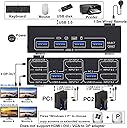
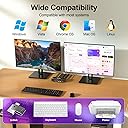
🚀 Elevate your dual-computer setup with 4K clarity and seamless control — because multitasking deserves the best!
The KCEVE KVM Switch enables professional users to control two computers with dual 4K@144Hz DisplayPort monitors and share four USB 3.0 devices via a single keyboard and mouse setup. Featuring plug-and-play operation, wired remote switching, and broad OS compatibility, it streamlines workspace efficiency while delivering ultra-high-definition visuals and fast peripheral connectivity.


| ASIN | B0F4CV33G5 |
| Actuator Type | Push Button |
| Best Sellers Rank | #145 in KVM Switches |
| Brand | KCEVE |
| Circuit Type | 2-way |
| Compatible Devices | PC, laptop, TV Box, PS5, most DP input devices, Windows 11/10/8/7/XP/Vista, Mac OS, Linux, Chrome OS |
| Connectivity Protocol | DisplayPort |
| Connector Type | Plug In |
| Contact Material | Metal |
| Contact Type | Normally Open |
| Control Method | Remote, Touch |
| Control Type | Manual |
| Controller Type | Push Button |
| Current Rating | 1 Amps |
| Date First Available | April 10, 2025 |
| International Protection Rating | IP64 |
| Item Weight | 7 ounces |
| Item dimensions L x W x H | 4 x 2.4 x 1.2 inches |
| Item model number | KC-202DP |
| Manufacturer | KCEVE |
| Number of Items | 1 |
| Number of Positions | 1 |
| Operating Voltage | 5 Volts |
| Operation Mode | ON-OFF |
| Product Dimensions | 4 x 2.4 x 1.2 inches |
| Terminal | Through Hole |
| UPC | 686585114709 |
| Unit Count | 1.0 Count |
| Upper Temperature Rating | 100 Degrees Celsius |
| Wattage | 5 watts |
A**N
Faulty electrical?
It was fine for a week, then my 2nd monitor started turning on and off whenever I moved my mouse. Sometimes my peripherals would temporarily lose power. I disconnected the 5v power and somehow the KVM is staying on and my issues are gone. Is there an electrical issue? EDIT: the issue was nvidia GeForce app, uninstalled and the problem vanished immediately
M**T
Two screens - easy setup - great product
This is a great product. It worked perfect for me to switch between my two computers while still being able to utilize the same two screens, keyboard, and wireless mouse. Easy and fast ti set up, it’s a great product. This is a must!
T**S
Perfect
Works perfectly. Switching between the monitors takes 3-4 seconds, but I can live with it.
A**R
Does not work on Macs
Does not work as advertised. Tried on my m4 macbook pro, does not work at all due to (what I'm guessing) no EDID emulation. This claims to be compatible with new macs, but it is not. Stay away if using Mac.
I**S
Works nice on linux laptop and windows desktop
Using this on a Vector laptop with linux and MSI gaming computer, both running to a 4k TV and keyboard and mouse. I tested a couple similar KVM at the same time. This model wound up appearing exactly the same as another brand on here. I mention this due to price. Shop around if you're considering this one as there may be a cheaper listing of the same one with a different name on it. It works as expected. No issues. It claims 4k@60hz and that's what I tend to run, even if a device can support more. I've been using some USB hubs and at times, even some external storage. Just be sure to safely eject the storage if you do this! The KVM will not handle that action for you. If you use any external storage and do not "Safe Eject" or "Eject" (Windows/Mac) or "sync/umount" (linux and alike), you may lose data when switching! It's been working great with a tb4 dongle in a hub that works for both a keyboard and mouse. All around, everything's working fine.
J**S
Works as expected
Works as expected
M**E
Essential KVM Switch For Sharing Monitor And Peripherals with a 2nd PC
Ordered to evaluate and use for typical IT stuff. At first glance out the box the kit includes 2xUSB3.0 cables, 1x KVM Switch Extension, 1x HDMI 2.0 cable, and 1x USB-C to A power adapter cable (power block NOT included), and 1x KVM switch/hub. Functionally it supports up to 4K@60hz HDMI 2.0 standard. It features EDID emulation for seamlessly switching 1 monitor between 2 computers without resetting or disrupting any graphics settings and up to four USB3.0 devices or peripherals such as keyboard, mouse, printer, etc. Overall an essential device at fair MSRP for those running multiple computers for one reason or another.
M**O
A good KVM with a good list of features.
A good KVM with a lot of features, works great and super easy to install. Just connect both computers and one set of peripherals. I also appreciate having the wired remote, which gives the ability to hide away the KVM and all the wires, and not have them in the way. Works great, super simple to use. Overall I would recommend it.
M**A
Handles my 2k144hz ultra wide very well, having a setup where I switch between my PC and MacBook Pro easily without issues!
C**L
Arrived nicely packaged, with all cables included. It's small and lightweight. I ended up using nano tape to hold it where I wanted it. I ordered this to be able to occasionally connect my laptop to my desktop set up. Some jobs just need the bigger screen. It was very easy to set up and saves me from having to reconnect multiple cables. I can use the mouse and keyboard with my laptop as well. It was plug and play for me, connected the cables and it worked - my kind of device! I have used it several times a month for the past few months with no issues.
V**N
If you're constantly swapping between a work laptop and a personal PC but only want one monitor, keyboard, and mouse setup, this is exactly the kind of switch you need to stop the desk chaos. It handles the core job—letting two computers share one display - but it also works as a USB hub, so both machines can instantly access up to four other devices like your printer, webcam, or a fast external drive, thanks to the USB 3.0 ports. Now, about the performance: it does indeed support 4K resolution at 60Hz, which is great, and it complies with the HDMI 2.0 standard. But I need to be completely honest here—a KVM switch is only as good as the cables you use. If you're running 4K, do not use old or cheap HDMI cables. If you want stable, flicker-free switching, you absolutely must use high-quality, certified HDMI 2.0 or 2.1 cables for every connection. If you get weird black screens when switching, the cables are usually the culprit, not the box itself. The best feature, the one that prevents daily frustration, is the EDID emulation. This means when you switch from your work machine to your gaming rig, the machine you just left still thinks the monitor is connected. Why is this a lifesaver? Because your desktop icons won't scatter, and your application windows won't resize and jump all over the place. It keeps your workspace exactly where you left it. For switching, it’s simple: you can either press the button on the small metal unit, or you can use the included wired remote, which is super helpful if you plan on hiding the switch under your desk. The unit itself is a solid, small metal box, which is much better than cheap plastic, offering better durability and heat management. It’s truly plug-and-play and works across everything - Windows, Mac, PS5, you name it. It's a reliable workhorse for a tidy dual-PC setup.
R**F
____________________________________________________________________________________________ ITEM REVIEWED : KCEVE KVM Switch 1 Monitor 2 Computers 4K@60Hz, .................................HDMI KVM Switch for 2 Computer Share 1 Monitor and 4 USB 3.0 Devices, .................................with Wired Remote ____________________________________________________________________________________________ Nice solid little one HDMI monitor KVM with four switched USB3 ports. This thing is housed in a metal case. You switch between which computer is connected to your monitor and USB ports using the button on the top or a small wired remote which comes with it. Nothing else is included. You need to provide all the other cables yourself. Really there's not much to be said. This KVM works exactly as it should. NICE! The one feature it has that you might not really think about that it does EDID emulation. EDID is "Extended Display Identification Data". This is how your monitor communicates it's options/features available to your computer. This also is how your computer then "remembers" how it set/configured your monitor. Simply what this KVM does is "emulate" the EDID of your monitor settings for the computer that is currently not selected (connected to your monitor). This way the computer that is currently not selected should not mess up it's monitor settings because the HDMI port is not connected to your monitor at that time. Simply the KVM remembers your monitor's EDID and keeps your unconnected PC seeing this EDID so it "thinks" your monitor is still connected. This is a FANTASTIC FEATURE that works and you really don't think about it. Other KVMs have this too, but many don't as well. A KVM will work without EDID emulation but then sometimes when you switch between PCs your PC and monitor do the EDID recheck like you've just connected a different monitor on reconnect and so Windows screen settings (size/orientation/monitor 1 or 2 etc) may get changed when this happens... so you have to go and put them back how you want them again. OK this doesn't happen a lot, but usually at the worst times for me. This won't happen with this KVM. ____________________________________________________________________________________________ * NOTE * - This product was provided to me FREE of charge as part of the Amazon Vine Review program without any conditions ... other than that I must submit a review within 30 days of receipt. I will be continuing to use this product and if anything changes after posting this review, I will come back and update this review by adding to it. This review and rating is based on my personal opinion of this product without any input from Amazon, the manufacturer or the seller. I have tried to present as fair and independent review as possible. ... I hope that the time I took to write this review is of some small help to you. ____________________________________________________________________________________________
Z**S
As a tech with over 30 years of hands-on experience, I'm constantly working on multiple client machines, often juggling between laptops, desktops, and test rigs. The KCEVE HDMI KVM switch has been a fantastic addition to my workspace, offering exactly the kind of performance and reliability I need. Right out of the box, the setup was effortless—true plug-and-play with no drivers needed. It comes with all the essential cables: HDMI, USB-C for power, and USB 3.0 connections for both systems. You’ll need to provide your own USB power adapter, but aside from that, everything was included and clearly labeled. Both of my systems were recognized immediately, and switching between them—whether via the top-mounted button or the included wired remote—is instant and seamless. The LED indicators are bright and clear, making it easy to see which machine is currently active. One of the standout features is the four USB 3.0 ports, which are a major upgrade over the USB 2.0 models I’ve used in the past. I’ve connected everything from keyboards and mice to printers and external drives, and all peripherals have worked flawlessly across systems. File transfers through the USB 3.0 ports are blazing fast—no lag or dropout whatsoever. Video performance is rock-solid. I'm running a 4K@60Hz monitor, and the image is crisp, stable, and free from flickers or signal loss. I did take the manufacturer’s advice and used an 8K-rated HDMI cable, and I’ve had zero issues with screen performance. EDID support also ensures my display settings stay consistent when switching between systems—something that used to be a headache with older KVMs. Physically, the unit is compact and metal-housed, which gives it a premium, durable feel. It also stays cool during use and helps clean up my desk by consolidating multiple machines into one tidy setup. It’s made a huge difference not just in productivity but in reducing the cable clutter that used to come with running multiple computers at once. If I had one minor note, it’s that the manual could do a better job explaining when additional power is needed. My desktop required USB-C power, while my laptop didn’t—but that’s easy enough to figure out with a bit of testing. Overall, this KVM switch has dramatically streamlined my workflow. Whether you’re a fellow IT professional, a content creator, or just someone managing multiple systems, this device checks all the boxes. Fast switching, clean video, full USB 3.0 support, and excellent build quality—it’s a true game-changer for any multitasking setup.
Trustpilot
2 weeks ago
2 months ago