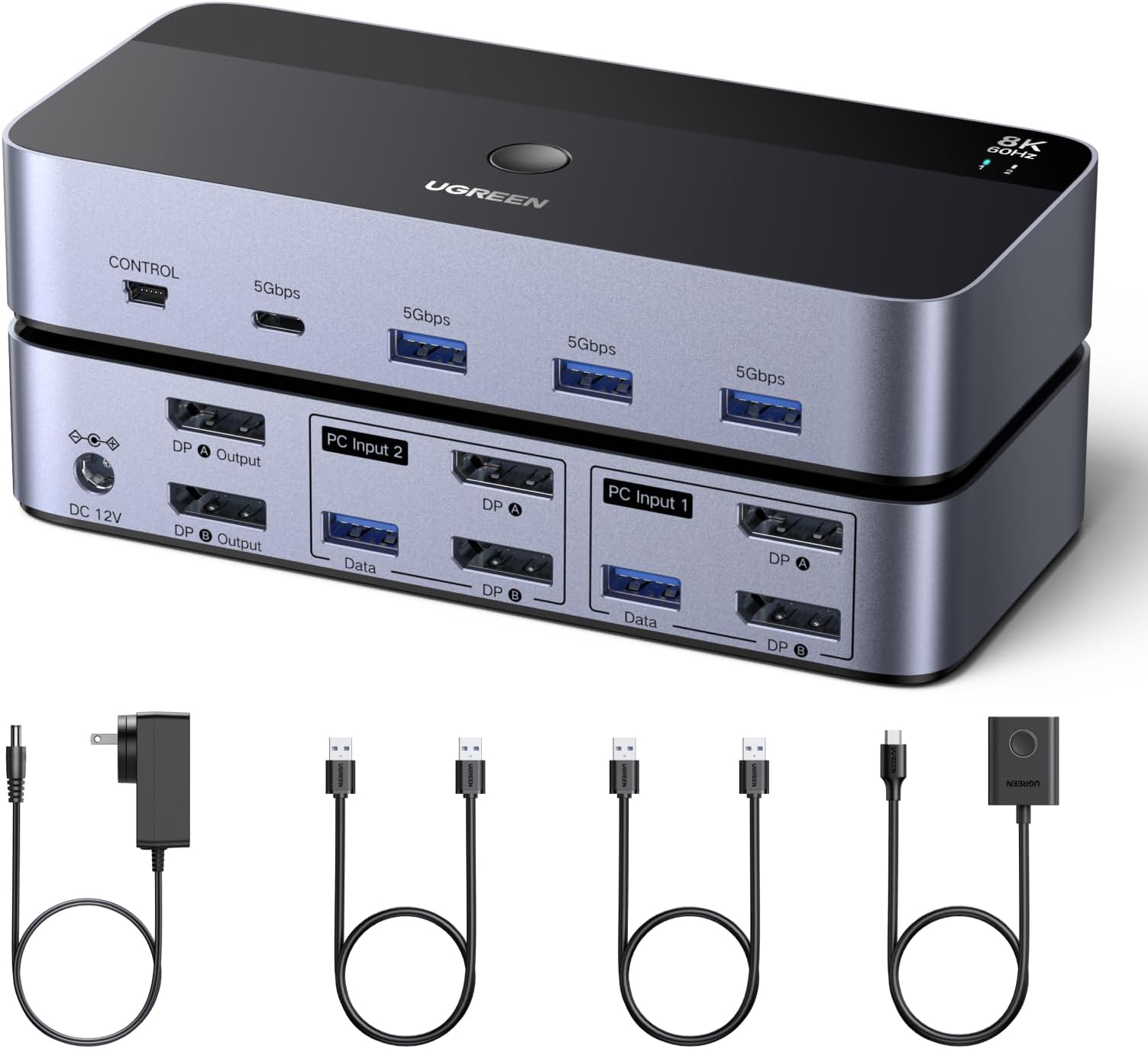
🚀 Elevate Your Workspace: Dual 8K Power Meets Effortless Control
The UGREEN 8K@60Hz DisplayPort KVM Switch enables professionals to control two computers and dual monitors with a single keyboard and mouse. Featuring ultra HD 8K resolution support, four high-speed USB 3.0 ports, and a convenient desktop controller, it offers seamless switching without software installation. Crafted from durable aluminum and compatible across Windows, MacOS, and Linux, this switch is designed to streamline complex multi-device setups for maximum productivity.


| ASIN | B0DXF5Z23S |
| Best Sellers Rank | #14 in KVM Switches |
| Brand Name | UGREEN |
| Color Name | Multi |
| Customer Reviews | 4.1 4.1 out of 5 stars (380) |
| Date First Available | June 10, 2025 |
| Item Weight | 1.87 pounds |
| Item model number | 55851 |
| Product Dimensions | 6.18 x 2.83 x 1.18 inches |
M**E
2 laptops with dual external monitors
Good product so far (have been using it for 3 days). Works as expected, including on Linux. - Provides power supply with multiple outlets format (US, EU, GB), USB3 connection cable for peripheral devices - Does not provide DP cables My setup: - 2 laptops (one Linux, other Windows), each connected to its own Thunderbolt docking station - Each docking station has 2 DisplayPort outputs connected to the KVM switch as input sources - KVM DisplayPort outputs are connected to two 27" monitors at 2560x1440 This setup allows me to switch between the two laptops, each with dual external monitors, with a single button press. Best desktop experience ever :)
G**X
Excellent quality
Perfect for me. This has been an absolute lifesaver for me. I finally found a kvm that supports dual 4k 240hz displays with no issues. All features work (Dolby vision, VRR, Gsync, etc). The USB ports are limited and I wish it had more, however the features work fine, as the ports seamlessly swap between my two computers (keyboard, mouse, hd, controller). Would recommend this for someone who needs a kvm for driving multiple displays for gaming or work at very high resolution and refresh rate.
V**4
KVM Space saver.
I was debating on getting a second monitor for my second computer but due to the limited space I occupy this KVM switch saved me the trouble of having of a such a spacious set up. I bought this unit of having the flexibility of having two computers with one monitor (or two, should the need arise). The functionality is pretty straight forward, but this unit is DESIGNED FOR ONE COMPUTER USE AT A TIME by either using the button switch on the unit itself or by a tethered Remote Control. There's barley any heat level on the unit and the quality is pretty solid. Absent of an 8K or 4K monitor, the KVM switch works perfect for my 2K monitor with full refresh rates at any resolution I set. Recommend using a DisplayPort cable at 6ft or less (depending on your set-up) for a solid full performance. This unit is perfect for people with high productivity work and lite post production.
D**5
Does not support EDID emulation - terrible
I needed a KVM for my two computers: Apple macBook Pro, and a Dell laptop. However, I quickly realized that this KVM does NOT have EDID emulation. What does that mean? When you flip between computers, the computer you are NOT using sees the monitors and USB devices disappear. This means when you switch back to that computer, it's like you just plugged in new monitors and USB devices. This causes Windows and macOS to take several seconds to detect the new monitors/USB devices. This can also throw a huge wrench in window placement on both OSes, as app windows will likely be all messed up each time you switch. Bottom line, spend the money for a KVM with EDID emulation, which solves the problem by "faking" out both computers that the montiors are always attached.
A**R
Minor issues but works as needed
This has been working great for me so far. I use it to switch between my work computer and my home computer set up. I keep my laptop docking station plugged into and my desktop computer. It allows me to use the same mouse, keyboard, webcam, and of course monitors with both systems with ease, even my gaming laptops with macro keys. I tried two others first. One was a lot cheaper but was dead on arrival. I don’t know if it was Amazon quality control or what cause it was definitely a previously returned item. I wasn’t taking my chances and ordered a more expensive one. That one wouldn’t work with my gaming keyboard due to the software built into the switch. I had to return that one as well. This one from UGREEN has worked great so far though. Some of the issues: - It has limited ports. I had to purchase an additional powered USB hub just to use all my peripherals. - it doesn’t always recognize my monitors in the correct format when waking up my laptop. It’s an easy fix by just unplugging my docking station from the laptop and plugging it back in, it’s just annoying.
W**U
Worth the Price! Excellent KVM Switch!
At first, I doubt this package will arrive at my door. This is the first time I bought item on Amazon because the item are not available in Indonesia and there is no similar item with the same functionality. Even if the item exist in my country, it would be really expensive like 2 times the price. The dock works well on my work setup. I'm using my PC and my Macbook Air M2. I already know that my Macbook only able to extend only up to 1 monitor, but it won't be a trouble for my because I already have a dock with DisplayLink from W*vL*nk brand. The switch works well and switching from my macbook air and my PC really easy and seamless. The remote switch also really long, so I can put it on the far way from the dock itself on my work desk. Overall, really worth it to buy this!
I**R
Amazing KVM, supports high resolution and refresh rate
This is honestly a hidden gem for KVM's. I have gone through several KVM's, even spent a good amount of money on Level1Tech's KVM switch (which is known to be one of the best KVM's) However this one does everything better at fraction of the cost. Though it does not state to have EDID support, when switching between computers, I noticed that the windows that I had up remain in the same spot as they did, this might be due to the monitor's I have, I have not tested on any other hardware. This thing can handle a variety of resolutions and refresh rates. I have this connected to a 5120x1440p monitor and a 3440x1440p both at 144hz runs them no problem The HDCP 2.3 seems to work well, if you don't know what this is, when you have a monitor connected to a kvm switch, the hdcp protocol thinks its a recording device which will cause you screen to go black intermittently when watching something like netflix, amazon prime video, hbo max etc. Even the $400 Level1Tech KVM switch, goes black now and then because of the hdcp protocol. If you are a remote worker looking to switch between your work pc and gaming pc with no issue, this is the one. I hope Ugreen comes out with a triple monitor version.
A**X
Suffisamment de port pour les périphériques J’utilise le Kvm entre un Mac Mini et un pc Windows
D**R
He probado varios KVM y, como persona con movilidad reducida que utiliza un QuadStick para manejar el ordenador, mi prioridad era la accesibilidad. No puedo usar teclado ni ratón de forma directa, así que necesitaba un sistema que me permitiera cambiar de equipo sin depender de combinaciones de teclas. Después de probar opciones que no reconocían mis comandos, opté por este modelo de UGreen, una marca en la que confío porque todos sus dispositivos me han dado buenos resultados. La experiencia ha sido excelente. Puntos positivos: Fiabilidad y calidad UGreen. Siempre funcionan a la primera. Botón físico con cable largo. Puedo colocarlo cerca y usarlo sin depender de atajos de teclado. Diseño limpio y flexible. Incluye cables USB-A a USB-A, pero se pueden sustituir fácilmente por USB-A a USB-C más finos. Gestión de energía inteligente. Cuando el PC está apagado, el KVM corta la corriente y todos los periféricos (teclado, ratón, micrófono…) quedan desactivados, evitando desgastes innecesarios. Compatibilidad sin problemas. Funciona tanto en Windows como en Mac. Antes como el ordenador se quedaba encendido. Aunque lo apagara siempre se ha quedado una luz y en el QuadStick a partir de ahora ya pueden descansar Y no estropearse! Aspectos a mejorar: El botón tiene una resistencia algo dura. Para personas con fuerza reducida, como es mi caso, cuesta un poco. Para el resto de usuarios puede ser perfecto. Accesibilidad: Este KVM resulta muy útil para personas que, como yo, no pueden usar atajos de teclado. El botón externo facilita muchísimo la vida y da independencia. Es un detalle importante que fabricantes como UGreen tengan este tipo de soluciones. En resumen, un producto fiable, bien diseñado y muy práctico tanto para usuarios convencionales como para quienes necesitamos opciones accesibles.
A**A
Preso con il Black Friday. Fa il suo dovere. Lo uso con due schermi collegati in daisy chain.
A**N
Funkar perfekt
A**S
Dość przeciętna jakość produktu. Spełnia częściowo swoją rolę, ale nie jest idealnie. Dopiero w instrukcji wyczytamy, że przy połączeniu jednego monitora na wejściu mogą pojawić się problemy - i tak też jest w moim przypadku. Podłączenie laptopa, który ma tylko jedno wyjście jest problematyczne. Brak możliwości wyłączenia urządzenia (brak np przycisku), konieczne jest odłączanie przewodu. Wszystkie porty zewnątrzne to USBC, przez co mam problem z podłączeniem niektórych urządzeń współpracujących z USB2 (*oczywiście istnieje wsteczna kompatybilność, ale tutaj nie działa poprawnie z jakiegoś powodu. Gdybym nie potrzebował czegoś na szybko, pewnie bym odesłał. Moim zdaniem zbyt drogo jak na oferowane możliwości.
Trustpilot
1 month ago
2 months ago