We remain fully operational. Our teams are working around the clock to ensure your deliveries continue safely.

DOWNLOAD THE APP


Customer Services
Copyright © 2025 Desertcart Holdings Limited
DOWNLOAD THE APP
Buy anything from 5,000+ international stores. One checkout price. No surprise fees. Join 2M+ shoppers on Desertcart.
Desertcart purchases this item on your behalf and handles shipping, customs, and support to Kyrgyzstan.
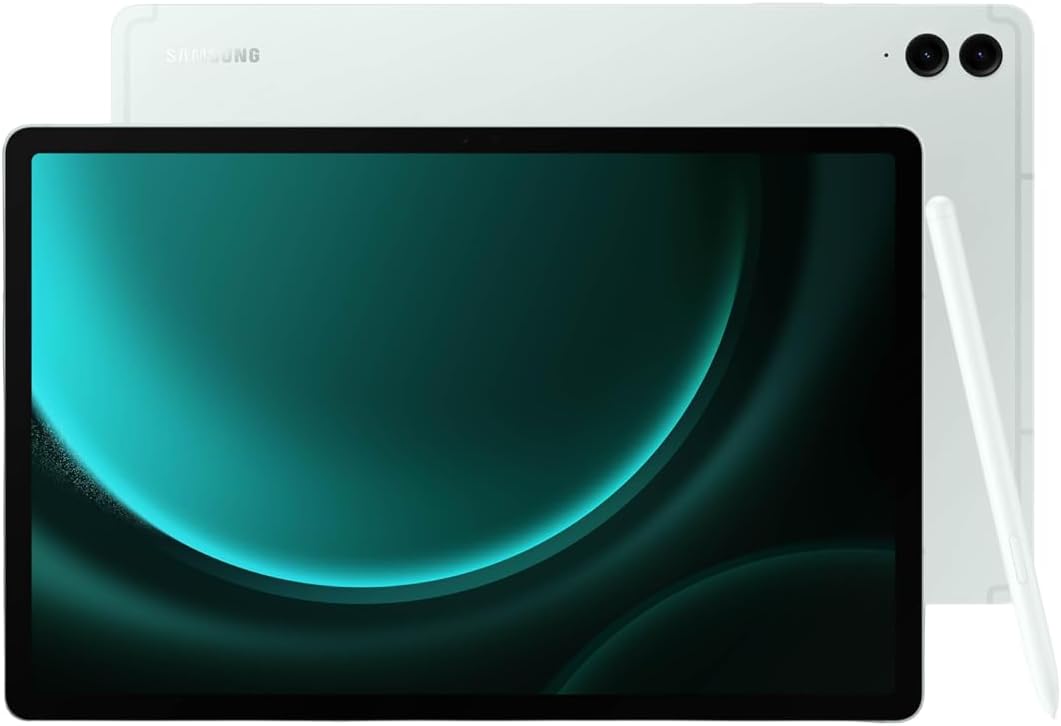
🚀 Elevate your productivity and play with the Galaxy Tab S9 FE+ — where power meets style.
The Samsung Galaxy Tab S9 FE+ is a sleek, durable 12.4-inch Android tablet featuring a vibrant AMOLED display, a powerful 3 GHz Exynos processor, and an ultra-responsive S Pen. Designed for professionals and creatives alike, it offers up to 20 hours of battery life, IP68 water and dust resistance, dual speakers for immersive sound, and 256GB of internal storage expandable by up to 1TB. Perfect for multitasking, entertainment, and on-the-go productivity in a lightweight, stylish mint finish.


| ASIN | B0CCBWD42N |
| Age Range Description | Adult |
| Aspect Ratio | 16:10 |
| Battery Average Life | 20 Hours |
| Battery Cell Type | Lithium Polymer |
| Battery Power | 9 |
| Brand | Samsung |
| Built-In Media | Data Cable, Ejection Pin, Galaxy Tab S9 FE, S Pen |
| CPU Model Number | X610 |
| CPU Model Speed Maximum | 2 GHz |
| Camera Description | Front |
| Cellular Technology | 4G |
| Color | Mint |
| Compatible Devices | Devices with Wi-Fi connectivity |
| Connectivity Technology | Wi-Fi |
| Customer Reviews | 4.5 4.5 out of 5 stars (66) |
| Display Resolution Maximum | 2560 x 1600 pixels |
| Display Type | LCD |
| Flash Memory Supported Size Maximum | 256 GB |
| GPS Geotagging Functionality | Assisted GPS (A-GPS) |
| Generation | 10th Generation |
| Graphics Coprocessor | ARM Mali |
| Graphics Description | Dedicated |
| Hardware Interface | USB |
| Human-Interface Input | Touchscreen with Stylus Support |
| Item Dimensions L x W x Thickness | 28.5L x 18.5W x 0.7Th centimeters |
| Item Weight | 0.94 Kilograms |
| Lithium-Battery Energy Content | 9 Watt Hours |
| Manufacturer | Samsung |
| Memory Slots Available | 1 |
| Memory Storage Capacity | 256 GB |
| Model Name | Tab S9 FE+ |
| Model Number | SM-X610NLGEXAR |
| Model Year | 2023 |
| Native Resolution | 2560 x 1600 pixels |
| Number of Rear Facing Cameras | 1 |
| Operating System | Android |
| Other Special Features of the Product | Lightweight |
| Photo Sensor Resolution | 8 MP |
| Processor Brand | Samsung |
| Processor Description | Samsung Exynos 1380 |
| Processor Speed | 3 GHz |
| RAM Memory Installed | 12 GB |
| Rear Facing Camera Photo Sensor Resolution | 8 MP |
| Screen Size | 12.4 |
| Speaker Description | dual speakers |
| Specific Uses For Product | [INFERRED] Education, creativity, entertainment, potential outdoor or semi-rugged use |
| Supported Audio Format | MP3, AAC, FLAC, OPUS |
| Total Usb Ports | 1 |
| UPC | 887276784342 |
| Unit Count | 1 Count |
| Video Capture Resolution | 1920 x 1080 pixels or 1280 x 720 pixels or 1440 x 1080 pixels |
| Video Processor | ARM |
| Warranty Type | Manufacturer's |
| Wireless Compability | 802.11ac |
| Wireless Provider | Telcel |
| Wireless Technology | Wi-Fi |
A**N
I was so excited to try this tablet for my art, as Android has a ton of things that make for an efficient workflow including air gestures (with the S-Pen Pro, not included), air actions, DEX mode, syncing with my Windows computer, and so much more. The mint color is gorgeous, and I loved everything about the tablet... except that it couldn't do the ONE thing I bought it to do. It worked fine at first, but then I noticed there was an extreme delay in gestures when switching from pen to gesture, and sometimes just wouldn't work at all. This happened in my Clip Studio app as well as others. I spent hours with support for the tablet and with CSP before being forced to factory reset, which somehow solved it... Until I installed the updates. Turns out, the issue is with OneUI, and hasn't been resolved for years according to the complaints on Reddit dating back to 2022. This delay completely interrupts my workflow, as I can not seamlessly switch from drawing with the pen, to zooming or rotating with my hand. I had returned the first tablet I got, under the direction of the support desk, only to get a second one, spend hours re-installing my brushes on CSP, only to find the same problem. It's definitely an issue with OneUI. For everyone else who doesn't care, or who doesn't intend to use it for art, it's 100% fantastic. Bright screen, powerful budget tablet that can do so much more than you think it can. For artists? I am so sad to claim defeat to the iPad which can do the one thing this one can not: Work. The straw that broke the camel's back for me is more of an issue with Clip Studio Paint's Android version which does not allow you to access your files in ANY other way except through the cloud, making it absolutely impossible to batch move your files from your tablet's CSP to your desktop, external HD, or other devices. You literally have to manually open each file from the cloud, onto desktop, then save it where you want. Or you have to access the files ONE at a time through the cloud, click an arrow, open the file location, cut the file and paste it where you want. And of course the file location doesn't have ALL your images in one place. it places it within 3 tiers of foldiers for each. individual. file. So after going through 2 tablets, hours of support, blood sweat and tears, I finally have to call it quits on the Samsung Tablet yet again and switch to the 2x more expensive iPad. I'm so devastated.
A**Y
I was scared this tablet was going to be a scam or wouldn’t work well at all. The tablet proved me wrong, works great. The battery life is ok but I wouldn’t say it’s a breath taker. The charging speed is moderate and I love the color of the tablet.
M**E
For a long time, I was strongly considering purchasing a new laptop computer. I looked at and pondered over the many choices before finally deciding on choosing a new tablet. I'm so glad I made that decision! The thing I love most about this tablet is its size! It's about the same size as a small laptop, but with all the advantages of the Android platform. I love Android! This tablet is fast, and there is a ton of storage space. The only negative I have found is the same as on my previous Samsung tablet: Some keys on the keyboard are "wonky" (for lack of a better word). By this I mean, that when typing on the touchscreen, there are times when the key pressed results in a different letter, or even a number. The "T," for example, will often result in the number "5," right above it. I'm sure this is my fault somehow, but it's irritating, nonetheless. Other than that small, occasional issue, I find this tablet to be a cut above my previous Samsung tablet, which had served me well, also. But, it was time for an upgrade!
T**X
I bought this to replace a Kindle Scribe which I was attempting to use for work and for home needs. The Scribe simply did not have the robust abilities I required. The Samsung Galaxy Tab does exactly what I wanted - I am using it as a laptop replacement for work as I can connect to MS Planner and work on my tasks. It is lightweight and can also be used at home for reading kindle books, project planning, and more. It was easy to setup and totally worth the price. I highly recommend this product regardless of the technology skill level of the user. It can be used for simple or advanced functionality.
D**O
Great product! I use for school and for drawing since I have a Samsung phone it was really easy to set up and I haven't had any issues so far. I recommend this
Trustpilot
1 month ago
3 weeks ago