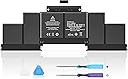
![A1398 Battery Replacement A1494 A1618 Battery for MacBook Pro 15 inch (Late 2013, Mid 2014, Mid 2015 Version) [11.36V/99.5Wh]](https://m.media-amazon.com/images/I/61eeeYAsnCL._AC_SL3840_.jpg)

Buy anything from 5,000+ international stores. One checkout price. No surprise fees. Join 2M+ shoppers on Desertcart.
Desertcart purchases this item on your behalf and handles shipping, customs, and support to Kyrgyzstan.
๐ Power your MacBook Pro like a boss โ never miss a beat!
The YUERYE A1398 Battery Replacement offers a robust 8755mAh/99.5Wh capacity at 11.36V, designed specifically for MacBook Pro 15" Retina models from Late 2013 to Mid 2015. Featuring premium-grade cells with advanced safety features including overcharge and temperature control, this battery ensures reliable, long-lasting performance. It comes with two free screwdrivers for easy installation, making it the smart, cost-effective upgrade for professionals who demand uninterrupted productivity.


| ASIN | B0DP3XZMNX |
| Antenna Location | Laptop |
| Battery Capacity | 8755 Milliamp Hours |
| Battery Cell Composition | Lithium |
| Battery Cell Type | Lithium |
| Battery Weight | 350 Grams |
| Best Sellers Rank | #13,825 in Electronics ( See Top 100 in Electronics ) #73 in Laptop Batteries |
| Brand | YUERYE |
| Compatible Phone Models | Compatible with Macbook Pro 15 inch Laptop : A1398 Battery (Late 2013,Mid 2014,Mid 2015) |
| Customer Reviews | 4.5 out of 5 stars 213 Reviews |
| Manufacturer | Bituli(Dongguan) New Energy Co, Ltd.DongGuan Simer Electronics Co., LTD. |
| Model Name | A1618 |
| Model Number | A1618 |
| Number of Batteries | 1 Lithium Ion batteries required. |
| Recommended Uses For Product | Laptop |
| Reusability | Rechargeable |
| UPC | 721718042167 |
| Voltage | 11.36 Volts |
| Warranty Description | 1 year |
L**S
Long lasting battery!
I love this battery. My MacBook Pro 15" had gotten to the point where it would barely hold a charge and this replacement brought it back to life. The install went smoother than I expected. Everything lined up well and once it was in my laptop started right up without any issues. And the battery life is honestly really good now. I can actually use my MacBook for several hours again without needing to keep it plugged in all the time. Overall really happy with it. Works great. Laptop feels useful again. Definetly worth it if your old battery is dying.
S**8
Lives up to expectations under real world diagnostics (In this review)
Lives up to expectations. After numerous discharges and recharges while running diagnostics matches original almost exactly. Should you buy it? Se the diagnostics below and decide. These are real world disanostics. See below for results and comparison to original battery. Typical 3 cell Li-Ion Battery v. OEM HP Battery v. This Battery. Claimed Specs on Replacement Battery (What the seller advertises) This batter is marketed as a compatible replacement for multiple HP Pavilion series including; 920070-855 920046-421 14m-cd0003dx 15-cc023cl Pavilion 15-cc1xx Pavilion x360 15-cc123cl These models typically use 3-cell Li-ion batteries in the 40โ41.9 Wh range, which matches my original HP 17-ar050- battery specification (~41 Wh). Diagnostic Data Design Capacity: 42134 mWh Full Charge Capacity: 42134 mWh Considered a perfect match to the OEM HP Battery. Full Run Time (based on logs): 4h 40m Adjusted Run Time: 5h Full charge time: 1h 41m Moderate use charge time: 1h 36m Charge while computer off: 1h 31m Charge rate: +55% per hour Discharge rate: โ21% per hour under moderate use Exact comparison to HP OEM. Original Battery (HP spec): ~41 Wh battery 3-cell lithium-ion Expected real-world runtime when new: 4โ7 hours depending on load and screen brightness Replacement Battery: Design capacity: 42.1 Wh - Matches original HP capacity almost exactly Full charge capacity: 42.1 Wh - Means 0% wear โ the battery is essentially new and reading exactly at spec Is the Battery worth buying? Performance Interpretation (Is the battery good?) Full Charge Capacity = Design Capacity This is the best-case scenario โ your battery is healthy and performing at original specification. 4h 40m โ 5h Adjusted Runtime This is normal and expected for a Pavilion 17" with my specs. Running background Windows tasks 5 hours from a brand-new 41 Wh battery is realistic. Charging time 1h 41m This is also normal. HPโs 3-cell batteries typically charge from 0โ100% in 90โ120 minutes. Discharge: 21% per hour This means: 100 รท 21 โ 4.75 hours total runtime = Perfect diagnostic match to original OEM battery specs. Charge rate: 55% per hour This equals: 100 รท 55 โ 1.81 hours aligns with your reported 1h 41m charge time. Everything is consistent with an HP OEM Battery. Should you buy it? Well that is up to you after looking at the diagnostics. A real OEM is $80 v. this $15 battery. Size is a perfect fit replacement. Compatibility to listed computer is exact. Value? (You tell me).
T**1
A exact replacement lasts 8 hours on a full charge! A excellent aftermarket battery!
Bolted right in no issues! A perfect replacement for oem HP battery. The battery lasted my father off the power cable for nearly 8hrs with basic web use First time I have seen a aftermarket battery perform significantly better than an original battery and it was 1/3 the price of OEM! I plan to buy other parts from them! A rare excellent product
S**R
How to take care of your battery / Happy so far
I'm happy with this battery (for now, at least). This was a good deal, and for now I'm highly pleased with the up to 4 hour battery life on a charge. But what about longevity? And will the battery life on a charge decline? I'll treat this battery well (see below), and I'll update this if I'm surprised one way or the other. BEFORE installing the battery, I checked the power management settings of my operating system (Linux Mint 22.2, as of Nov. 2025), to see if they needed to be changed. I need to allow charging the battery to 100%. Then I rebooted and entered the Dell's UEFI/BIOS to change battery charging to Standard, so that I could charge the battery to 100%. It had been set to Custom, with a maximum of 95%. Next, I carefully installed the battery. It included 2 screwdrivers, only one of which I used. It also included 2 "guitar picks" to help pry open the laptop. Be VERY CAREFUL when doing that on your laptop. From what I've seen on YouTube videos, some laptop owners are careless, especially if they use a screwdriver. They poke around inside their laptop and break something that the repair shop person has to troubleshoot and then re-solder. $$$ By the way, this battery FAILS to include the little cable that connects the battery to my laptop. So I had to remove it from the deceased battery and install it on this one. I don't know if that little cable is standard on all brands of laptops? I think the last time I replaced a battery, it came with that cable. It's no big deal, though. Less waste. Next, after putting the laptop back together, I charged this battery for a couple hours with the laptop still turned off. Since I have a Dell charger brick, 1.5 hours was more than enough to charge it to 100%. If you use a cheaper brand charger, you may need to charge for 4 hours or so. Then, I booted into my operating system. The goal here is to calibrate your OS's knowledge of the battery. For its battery charge estimates to be accurate, your OS needs to know what level is 100%, what is 50%, what is 5%, etc. You calibrate things by charging the battery to 100%, then using your laptop on battery power until the battery is down to 3-5%. You do that 3 times in a row. (If your battery isn't charging to 100%, or isn't going down to 5% or less, then you probably skipped my initial step 4 paragraphs ago.) Once calibration was done, I then rebooted to change the BIOS again. This time, I set battery charging back to Custom: 50% to 70%. That's extremely conservative. You may want 50% to 80% or 85%. I'm lowering the individual charge to extend the full lifetime of the battery, at the expense of individual charges. . Now I'm done, and I just use the laptop with the power brick plugged in. Notes on power: At 100%, the WDX0R battery lasts about 4 hours 2 minutes on my Dell Inspiron 15" 5565. That's with Chrome with about 15 - 30 tabs open, plus 3 LibreOffice spreadsheets, and screen brightness about 75%. At 70%, it can only power my laptop for about 2 hours, 7 minutes. That's OK, though. If I ever need my battery to last 3 or 4 hours, I can change the settings to allow it to charge more than 70%. I'll get the best of both worlds that way. And if I haven't updated this review in several years, you can know that my experiment is still going well. I shouldn't need to replace this battery for several years. My laptop is kept out of sunlight or high temps; the only challenge it faces is being plugged in 24x7. You can tell from it being a Dell Inspiron 15 5565 laptop in 2025 that I keep my things in good working order.
M**B
Easy to replace, works great.
Pull Original adhesive like command strips to remove old battery. This worked great on my 10 year old MacBook. Easy to do. My MacBook would not power on at all, I thought it was a hard drive problem, turns out just needed a battery, you need a good battery even when using power supply.
J**E
Fits but fan keeps turning on. Battery lasts 6 hours at most of continuous usage. :(
UPDATE: It seemed everything was working ok but my computer fan keeps turning on. Upon googling, it says it's because the sensor cannot read the new battery's temp, causing the system to default to faximum cooling. "If the replacement battery is not from Apple, it may not communicate properly with the logic board, causing it to fail to report temperature data correctly." At any rate, the battery holds at most, 8 hours of continuous usage of the computer so it's really not a good battery. It was little difficult to take the old battery as it had stickies in the back and you had to carefully remove it, once it was removed, this battery fit perfectly and works great for my MacBook Pro 15" (late 2014 model). It has been only one day since the battery replacement so I'll have to see how long it can hold.
J**R
What I needed at good price point
So far so good. Replaced old battery now have longer runtime before plugging in. Easy replacement
D**E
Successful battery replacement 2014 MacBook pro
I've been using this battery now in my 2014 MacBook pro for the past several months and it seems like it lasts quite a long time considering it's an older machine. The battery replacement works very well.
Trustpilot
2 months ago
1 week ago