We remain fully operational. Our teams are working around the clock to ensure your deliveries continue safely.

DOWNLOAD THE APP


Copyright © 2025 Desertcart Holdings Limited
DOWNLOAD THE APP




Buy anything from 5,000+ international stores. One checkout price. No surprise fees. Join 2M+ shoppers on Desertcart.
Desertcart purchases this item on your behalf and handles shipping, customs, and support to Kyrgyzstan.
⚡ Power your productivity with the ultimate 16-in-1 Thunderbolt dock!
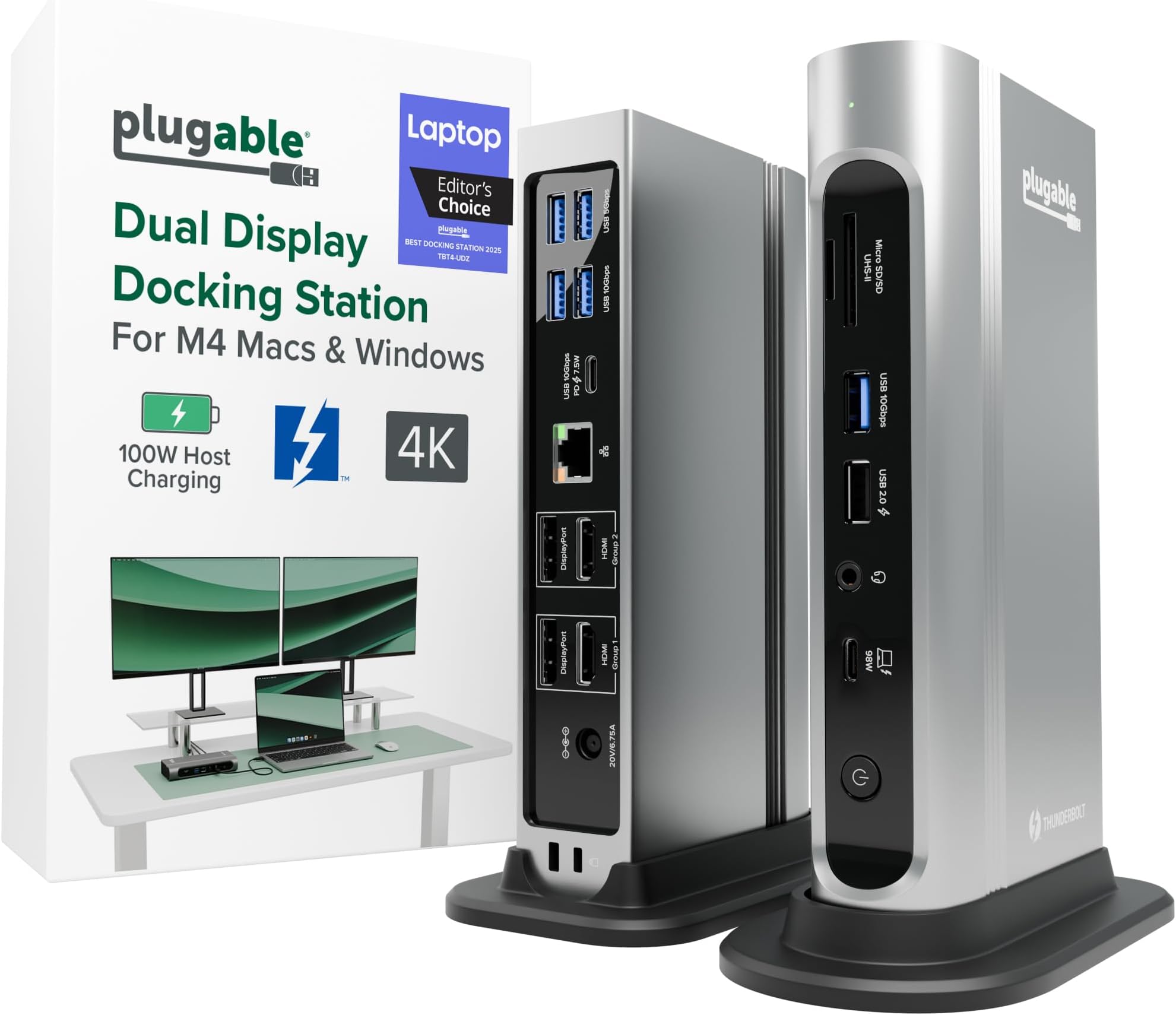
The Plugable 16-in-1 Thunderbolt 4 Dock is a premium docking station designed for M4/M5 MacBook Air/Pro and Windows laptops, delivering dual 4K 60Hz display support, 100W charging, and a comprehensive 16-port hub including 7 USB ports, 2.5Gbps Ethernet, and SD card readers. Awarded Laptop Mag’s 2025 Dock of the Year, it offers plug-and-play compatibility with Thunderbolt 4/5 and USB4 devices, transforming your laptop into a powerful, clutter-free dual-monitor workstation.
























| ASIN | B0BQJWKBMF |
| Amazon Bestseller | #208,245 in Computers ( See Top 100 in Computers ) #870 in Laptop Docking Stations |
| Brand | Plugable |
| Color | Silver |
| Compatible Devices | Thunderbolt 4 Mac with Windows 11 Thunderbolt 4 host and macOS 11+ M5 / M4 MacBook Pro and MacBook Air, M1 Pro/Max, M2 Pro/Max, M3 Pro/Max, or Base M3 (Dual Display Require Clamshell Mode), HP Omnibook / EliteBook / DragonFly / ProBook / Spectre x360 Series, Dell Pro Max / Plus / XPS / Latitude / Inspiron, Lenovo ThinkPad / IdeaPad / Yoga k (Intel Process) Asser), Microsoft Surface Pro 11 & 10 for… |
| Customer Reviews | 4.1 4.1 out of 5 stars (461) |
| Hardware Interface | Thunderbolt |
| Item Dimensions L x W x H | 14.7L x 7.9W x 29.5H cm |
| Item Type Name | Laptop Docking Station |
| Item Weight | 646 Grams |
| Manufacturer | Plugable |
| Mfr Part Number | TBT4-UDZ |
| Model Number | TBT4-UDZ |
| Number of Ports | 16 |
| Smart Home Compatibility | Not Smart Home Compatible |
| Total Number of HDMI Ports | 2 |
| Total Usb Ports | 7 |
| UPC | 819927012733 |
| Unit Count | 1.0 Count |
| Wattage | 100 |
C**S
I bought this to dock a new gaming notebook to the two monitors, keyboard, mouse, speakers, mic, webcam, and other assorted odds and ends at my working desk. All of that is shared with a work notebook which has its own company-supplied "meh" quality off-brand Thunderbolt 3 dock, with both docks switching through a modern KVM so that I can jump back and forth as desired. As the new computer has a Thunderbolt 4 port, I wanted to go with a TB4 dock to allow for the possibility of higher resolution & higher refresh monitors and maybe even more of them at some point. This Plugable dock looked to be the best balance between price and features -- for the features, there just aren't that many docks at this price. A lot of the docks around this range don't even have DisplayPort, just capability for USB monitors. A lot of the ones at this price also tend to supply less power, which aren't enough for this computer. This one also seemed to make the top X on quite a few of the "best Thunderbolt 4 docks" lists. So nothing much to report in the functionality -- plug stuff in, stuff works. I had no issue with the computer locking onto the dock or the dock addressing any of the peripherals. Everything happens pretty much instantaneously. You get a nice green solid light to show successful TB connection with the computer, or white if no connection. The dock supplies 98W of power, which is enough to actively charge my power-hungry Lenovo Legion 5 Pro notebook which needs something close to that to charge while using. It's almost the 100W max for this computer for USB charging. Anyway, that certainly works. I had one hiccup -- toward the end of the first full day of use, it just stopped working at all, unable to ever establish a connection to any computer plugged into it. Swapped cable, same deal. I contacted tech support (after hours) via email and immediately got a human response acknowledging the problem, letting me know the real techs were going to be back in office first thing in the morning and would get with me, and as promised, they did, the very next day. Josh from Plugable, probably one of the most polite and pleasant people I've ever dealt with from a tech support team, was quick to ask for a bit more info, followed by acknowledgement that it appears that the dock is bad, and an offer to send out another immediately in exchange for promise of return from me using the shipping label that was to be included. Each interaction was very quick -- no long waits between emails. The package did arrive in just a couple of days and the replacement so far is working great. He mentioned really being eager to get that other one back with all of the original stuff (i.e., "please use only the new stuff [power supply, cable, etc] because we don't know which part of the old unit is the point of failure") so that they can diagnose the cause of the problem, presumably to know whether there are manufacturing or design issues to address. It's what I like to hear. Anyway, highly recommend this product. If you need it, the tech support is unbeatable. Hopefully you won't need it, and you'll have a really solid and frankly very attractive dock that looks good sitting on my desktop where my old mid-tower system used to be, along with easy access to USB ports and SD-card slots and a headphone jack.
P**2
Excellent rock solid performance from day one. We are using this with an Alienware x14 laptop with NVidia 3060 video card. Three external monitors plus the laptop screen working at the same time. Tons of USB devices attached via USB hubs connected to this dock. No problems at all. You MUST connect your laptop charger to your laptop if you want this or any other dock to work flawlessly (100w supply from a thunderbolt dock can't run a laptop that needs 130w power). Without your laptop charger attached, you will have random screen disconnects and general instability (not the docks fault). We were able to get 120hz refresh rate working with an LG C2 OLED tv.
A**R
Pese a que las especificaciones mencionan que no es compatible con Linux (me di cuenta después de hacer la compra...), me funcionó perfecto sin tener que instalar o configurar absolutamente nada (en Ubuntu 24.04). Lo uso con 3 pantallas FHD externas más la pantalla FHD interna de mi notebook, las 4 pantallas mostrando contenido distinto. No he probado el puerto de red, pero el sistema sí detecta la interfaz, así que debería funcionar sin problema también.
N**L
Great item with a good number of functional ports. All appears to work well and powers my Dell with 2 monitors.
M**E
I’m using this Plugable TBT4-UDZ with a Mac Mini M4 (2025 base model), and it works perfectly for dual extended monitors, no drivers needed. My main display is a 34” HP ultrawide connected through DisplayPort, and the secondary 19” Samsung runs over HDMI. Both show up as separate displays, full resolution, super stable. One important tip: ➡️ Use the USB-C cable that comes in the box to connect the dock to your Mac! I originally tried a different cable I had on hand, and the monitors would not work correctly. Once I switched to the included Thunderbolt/USBC cable, everything lit up instantly. The dock gives me plenty of USB-A ports for my keyboard, mouse, webcam, and mic, plus fast Ethernet. Love the flexibility: I can disconnect one USB-C cable from my Mac Mini and plug it into my laptop (or a Windows PC) and immediately have both displays and peripherals ready to go. Exactly what I needed; plug-and-play dual monitors on modern Macs without messy adapters or driver installs. Worth the price. Highly recommended!
Trustpilot
1 day ago
2 weeks ago