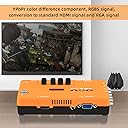
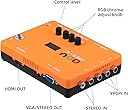
Let me start off by describing my setup. I have a Denon receiver that feeds an HDMI input into my LG 4K TV (set to game mode). The output resolution on the GBS-C is 1280x960, for a widescreen effect, since 1080p displays in 4:3. You’re probably reading this review because you’re looking for an upscaler. A month ago I was too, and if you don’t know much about tech you’ll be completely lost, when all you want is better video quality for your retro console games. Or in some cases you just need a video signal your TV can understand, like the PSOne’s 240p resolution that isn’t compatible over HDMI. I looked around a bit before buying, and did the research, and if you don’t want to spend a boatload of money on the RetroTink 5x then your options are really limited, due to the chip shortage. Everybody is out of stock of just about everything. If you’re handy with DIY, and a soldering iron, then GBS Control becomes a solid option at a relatively lower price point. But what if you don’t DIY or have the tools to do it? That’s where the McBazel ODV GBS-C comes in. It’s a commercial product that takes the DIY out of the GBS Control, so you can just connect it to your TV’s HDMI input, then connect your gaming console either via component or SCART inputs, and it converts it to a resolution that your TV can understand. It even runs on the same open source firmware that the DIY option uses, so you can update it as new improvements get rolled out by the community. I have my PS2 connected via HD Retrovision component cables, and my PSOne connected via a SCART cable. A couple of caveats on RGB SCART, make sure the one you use has capacitors built into it, or it will only be compatible with the PS2/PS3. Also, when connected via SCART, make sure the switch next to the SCART input on the GBS-C is set to RGBS (middle position). At first mine was set to the first switch position (YPBPR VGA RGBS), and the PSOne had lots of sync issues, screen tearing and dropouts. I almost returned this unit, until I figured this out through trial and error. Now it works great. I have the GBS-C set to output scan lines on the PSOne, because personally I think it looks better. It actually makes it look higher resolution than it does without them. The PS2 uses motion adaptive deinterlacing, and there’s no screen flicker or movement at all like there is with upscalers that use bob deinterlacing. So how’s the lag? Well, there is none. None that’s perceptible anyway. My LED TV adds more lag to the signal than the GBS-C. At first I thought the GBS-C was fairly laggy, but after doing further research it was all the image processing going on in my TV. Once I optimized my TV the lag completely disappeared. Games that require precise timing like Guitar Hero, Tekken 5, and Hot Shots Golf 3 work without any lag issues. I’ve only found one con so far in my use case, and that is that the GBS-C defaults to using the RCA audio inputs if a cable is plugged in, even if the console is turned off. So if I want to play the PSOne over SCART, I have to unplug the audio cables from the PS2’s component input to get any sound. Overall that’s a minor inconvenience, but I’m looking into using the digital audio output from the PS2, and feeding the audio into my receiver that way to see if it solves the problem. I want to just be able to turn on either console without fiddling with wires. Another con, for other people (not me), would be that it doesn’t support S-Video. That means a lot of Nintendo consoles won’t work without conversion first. McBazel shows a S-Video converter that pairs with the GBS-C, but I haven’t found it retail in the US yet. If you need Nintendo S-Video support, then the RetroScaler2x is probably a better option. I included a bunch of photos so people can make up their own minds about the video quality, since the only other review with pictures said it was horrible. It doesn’t seem so bad to me. It’s upscaling 480i and 240p video signals several times, and does a pretty good job to my eyes. The images should be self-explanatory, but if they’re not then the PSOne images all show scan lines, and the PS2 ones don’t. Overall I’ve been very pleased with this upscaler, and GBS-C is probably the best option for PS1/PS2 if you’re on a sensible budget. If you’re a retro console enthusiast, and money isn’t the sticking point, then you probably already know which option is the absolute “best” one, and of course it’s not this one. For everybody else, this option can get you 90% of the way there.