Desertcart purchases this item on your behalf and handles shipping, customs, and support to Kyrgyzstan.
๐ Elevate your digital domain with UGREEN NAS DXP2800 โ where speed meets smart storage.
The UGREEN NAS DXP2800 is a high-performance 2-bay network-attached storage device designed for advanced home users, remote workers, and creators. Featuring an Intel N100 quad-core CPU, 8GB DDR5 RAM, and 2.5GbE networking, it supports up to 80TB of storage with dual M.2 NVMe SSD slots for blazing-fast access. Its AI-powered photo management and home surveillance capabilities make it a versatile centralized hub for multi-device backup, 4K media streaming, and secure data management. Diskless design allows customization with compatible HDDs and SSDs, backed by UGREENโs 2-year warranty and dedicated support.


| ASIN | B0D22JRHZB |
| EUในใใขใใผใใฎๅ ฅๆๅฏ่ฝๆ้ | 2 ๅนด |
| HDDๅฎน้ | 128 TB |
| ใใใใๅบฆ | 5ใคๆใฎใใก4.6 616 ใฌใใฅใผ |
| ใซใฉใผ | ใฐใฌใผ |
| ใใธใฟใซในใใฌใผใธใฎๅฎน้ใฎๆธฌๅฎๅไฝ | 144 TB |
| ใใธใฟใซในใใฌใผใธๅฎน้ | 144 TB |
| ใใผใฟ่ปข้้ๅบฆ | 1250 ใกใฌใใคใๆฏ็ง |
| ใใผใใฆใงใขใคใณใฟใผใใงใคใน | SATA 6.0 Gb/s, USB, ใคใผใตใใใ |
| ใใผใใฆใงใขใใฉใใใใฉใผใ | x86_64 |
| ใใผใใใฃในใฏ ็จฎ้ก | ใกใซใใซใซใใผใใใคในใฏ |
| ใใผใใใฃในใฏใฎใใฉใผใ ใใกใฏใฟใผ | 3.5 ใคใณใ |
| ใใผใใใฃในใฏใคใณใฟใผใใงใคใน | Serial ATA |
| ใใผใใใฃในใฏใใฉใผใ ใใกใฏใฟ | 3.5 ใคใณใ |
| ใใผใใใฃในใฏๅ่ปขๆฐ(rpm) | 7200 RPM |
| ใใฉใผใ ใใกใฏใฟใผ | 2.5ใคใณใใ3.5ใคใณใใ |
| ใใฉใณใ | UGREEN |
| ใใฉใณใๅ | UGREEN |
| ใกใผใซใผๅ | UGREEN |
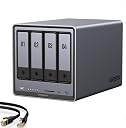
| ใกใผใซใผๅ็ช | DXP4800 Plus, 4-Bay |
| ใขใใซๅ | DXP4800 Plus,4-Bay (Diskless) |
| ไบๆใใใคใน | ในใใผใใใฉใณ, ใฟใใฌใใ, ใในใฏใใใ, ใใผใใใฝใณใณ |
| ไปๅฑๅ็ทๆฐ | 1 |
| ๅใไปใใฎใฟใคใ | ๅ ่ตใใผใใใฉใคใ |
| ๅๆขฑๅๅ | USBใฑใผใใซ, ใฏใคใใฏในใฟใผใใฌใคใ, ในใฏใชใฅใผใใฉใคใใผใญใใ, ้ปๆบใขใใใฟใผ |
| ๅๅใฎ็จ้ | ใใผใฝใใซ, ใใธใในใใชใใฃในใ, ใใซใใกใใฃใขใใใผใ ใ |
| ๅๅใฎ่ฟฝๅ ่ชฌๆ1 | Intel 5ใณใข 8505 CPUใ8GB DDR5 RAMใ1x 10GbEใ1x 2.5GbEใคใผใตใใใใ128G SSDใ4K HDMIใSD 3.0ใ |
| ๅๅใฎ้้ | 3.79 ใญใญใฐใฉใ |
| ๅๅๅค่ฃ ็ด ๆ | ้ๅฑ |
| ๅ็ช | DXP4800 Plus,4-Bay(Diskless) |
| ๆฅ็ถๆ่ก | HDMI, SATA, USB, ใคใผใตใใใ |
| ๆธใ่พผใฟ้ๅบฆ | 1250 megabytes_per_second |
| ็นๅพด | Intel 5ใณใข 8505 CPUใ8GB DDR5 RAMใ1x 10GbEใ1x 2.5GbEใคใผใตใใใใ128G SSDใ4K HDMIใSD 3.0ใ |
| ่ชญใฟ่พผใฟ้ๅบฆ | 1250 ใกใฌใใคใๆฏ็ง |
| ้ไฟกใปๆฅ็ถใคใณใฟใผใใงใผใน | HDMI, SATA, USB, ใคใผใตใใใ |
K**O
ๅฐๅ ฅ็ฐกๅใๅฎๅฟใๆฅฝใใใ
ๅใใฆใฎใใกใคใซใตใผใใผใงใใใใๅฐๅ ฅใฏ้ๅธธใซ็ฐกๅใงใใใ win / Mac / iPhoneใใใใขใใชใง่ปฝๅฟซใซๅใใฆใใพใใใwin ใจใฏLANใง็ด็ตใใฆ่ปฝๅฟซใซใใใฏใขใใใงใใฆใใพใใ๏ผHDDโHDDใง100-160MB/s็จๅบฆ FastCopyใไฝฟ็จใใฆ2.5TBใฎใใใฏใขใใใซ4ๆ้็จๅบฆ๏ผ ใใใใงๅ็ป็ทจ้ใฎในใใฌใผใธ็ฐๅขใฎไธๅฎใๆๆญใงใใพใใใ ไฝใฃใฆใใ2.5HDDใ็ฉใใงใฟใพใใใใๅฐใใใธไฝ็ฝฎใๅคใใใใไปๅฑใฎใใธใงๅบๅฎ๏ผ็ญใใใฉในใใฉใคใใผใๅๆขฑใใใฆใใพใ๏ผใใใฐ็กไบไฝฟใใพใใใ ใใกใใฏๅฎถๆ็จใฎๅ ฑๆใใฉใซใใจใใฆไฝฟ็จใใฆใใใใจๆใใพใใ ็ฌ่ชใฎOSใ็ฉใใงใใใPC็ฐๅขใใใใฉใฆใถ็ต็ฑใง่ฆใใจไปฎๆณPCใฎๆงใชใฆใฃใณใใฆใ้ใใพใใ ๅ็ใๅ็ปใฎใใใฏใขใใใ้ฒ่ฆงใใๆฉ่ฝใๆฎ้ใซใขใใชใฎๆงใชๅฝขๆ ใงใ้ๅๆใชใๆไฝใ ่ฉฆใใซใiPhoneใฎๅ็ใๅ็ปใใใใฏใขใใใใฆใฟใพใใใใ่ชๅฎ ใซ่ฆใๆ้ใ ใใใใใฏใฐใฉใฆใณใใงๅไฝใใ็ถใใใจใใใ35,000ใใกใคใซ 1.3TBใง3ๆฅใใใใพใใใ iCloudใใใใฆใณใญใผใใใฆใฏ่ปข้ใโฆใฟใใใชใใจใ ใฃใใฎใงใใใชใใใใฉใใใงใใใใใใใฏใขใใใๅฎไบใใฆใฟใใฐใ็ดๆญฃใขใใชใใใใฎ่ปฝๅฟซใใงๅใใฆใใพใใ๏ผ้ฒ่ฆงใใซใใใฎใใใใฉใใใใฎใงใใใใใใใใกใคใณใซใฏใใพใใใ๏ผ ๆดใซใใพใใใใงใใ3.5HDDใชใฉใ็ฉใใงใฟใพใใใใใใกใใฏใใฃใใใจในใใผใฟในใซใๅฑ้บใใจ่กจ็คบใใใใฎใงใใใใๅฎๅฟใงใใพใใใ ้ใๅฅๅ จใชHDDใๆฒขๅฑฑ็ฉใใงใใฏใฉใฆใใตใผใในใใใฎ่ฑๅดใ้ฒใใฆใใใใใจๆใใพใใ ใฏใคใใฏใชใใกใฌใณใน็ใชใใฎใ ใใงใ่ฉณใใ่ชฌๆๆธใจใใฃใใใฎใฏใใใพใใใงใใใ ๆฅๆฌใตใคใใฏใพใ ใฏใฉใฆใใใกใณใใฃใณใฐ่ฒใฎๅผทใใๅฐๅ ฅใใผใธใฎใฟใงใใใฎใงใLANใฎ็ด็ตใชใฉใฏChatGPTใซๆใใฆใใใฃใฆใตใฏใฃใจ่งฃๆฑบใใพใใใ ChatGPTๆฐใใใใใ่ฏใใใทใณๆใฃใฆใพใใ๏ผใใ ใใใงใใ ใใฎใใกใใคใฏใฉใตใผใใผใชใฉไปฒ้ๅ ใฎใฒใผใ ใตใผใใผใ็ซใฆใฆใฟใใใงใใ
J**N
A Powerful NAS at a very Good Price that Provides Lots of Storage Options
I purchased the UGREEN DXP4800 Plus 4-Bay Desktop NAS because my previous NAS (Drobo 5n2) failed and the manufacturer is no longer in business. What attracted me to the 4800 Plus was the upgradability, especially the RAM. The second factor I considered was price. I have been using the DXP4800 Plus for several months and I have to say I am very, very pleased with it I have a 2.5GPs network and this comes with not only 2.5GPs but also a 10 GPs connection, so belive me when I say file transfers are rapid. In addition, the 4800 Plus has not 1, but 2 slots for M2 drives for file caching purposes (sorry, you can't use the M2 drives as additional storage). The combination of the 4 bays plus the 2 M2 drives (and the 32 GB of RAM I upgraded to over the 8GB it comes with) is really unbeatable for a NAS in this price range. I found setup to be fairly easy, albeit the creation of the share took the better part of a day to configure. The instructions were very clear and the menus were very intuitive. Once I got the share created, I had to migrate multipl TB of data and the machine performed flawlessly. I mainly use this for storing of all of my media for Plex, family photos, movies, etc. and it handles everything I throw with it. The software included to manage the NAS is pretty easy to use, and it has a good variety of apps to enhance your experience. If you've used a NAS before, then you'd see that UGREEN's software functions just like other NAS software, so the learning curve is short. I would remove a 1/2 star for the unintuitive way to have the NAS mapped as a network drive. It took me a few days to figure how to get this accomplished. This is one area Synolgy has UGREEN beat. But once I figured it out (and how to lock the IP address to the 4800 Plus through my internet provider's router), it is now pretty much set and forget. The other big con of this NAS is that for drive sizes of 20TB and above, the number of supported drives is very limited. The final thing I would say is that I like the DXP 4800 Plus so much, I was seriously considering purchasing a second one. I came up with a cheaper, non network option, but I still would buy this again.
A**N
Unmatched quality
Built like a tank. Incredible quality inside and out. This is as premium as it gets for the prosumer. It's unbelievable what ugreen offers at the same price point as the competition. Fast, reliable, and built to last. Beautiful unit. The OS is intuitive, polished, and has everything you need to get up and running in a home environment. These units from ugreen are the new standard now. There plastic box competition is going to have to up their game, or fall by the wayside. If you're looking for an Nas, look no further. Ugreen holds the crown.
S**E
So far, so great.
Very easy to setup. If you use quiet NAS disks, you can definitely hear it when under load, but it's not loud at all, and super easy to drown out with TV or music. Really impressed with the low sound levels. The fan is nearly silent. Setup was very easy. I played with some different configs at first to see how long it took to build a RAID 5, then re-do it as a RAID 0. I'm quite happy with the "stress testing" of the drives. Installing and setting up apps ranges from easy to "huh?". But there is plenty of on-line support, and once you get it configured the way you like, it becomes a part of your home network. Have not tested it as a video server yet, need to get a long HDMI from the NAS to the TV, or move the NAS. I don't want to put it right on the floor because it will just get coated with dust bunnies (very dusty in SoCal), so I have it on a side-table shelf, about 15" off the ground, and have a USB cable plugged in full-time so I can sync to my external disk whenever I need to. I've played with both leaving it on 24x7 and turning it off at night. I think I'm going to just set up a power schedule where it's on all weekend, but not nights on week-days. From the logs, it's totally idle during those times. Works amazingly well as a backup device, super easy to set up backup/sync jobs. Also makes a great music server. Overall, it's been solid, reliable, quiet and fast.
T**Y
I Enjoy to use it!
Definitely a solid NAS. I bought it 6 months ago and used a lot to write a detailed review. Pros: +Good quality hardware. +NVME & HDD storage pool options. +Ultra High speed access/transfers with 10Gbit Ethernet on NVME Storage pools. I think this is the key reason I have chosen this NAS. I can easily reach over 1GBytes/sec. speeds over the 10 GBit network (even can go faster with 2 ethernet link aggregation). I almost stopped using my external NVME drives after having this NAS. (This is really Great!!) Before this NAS I was planning to have Synology DS923+ and 10 Gbps network upgrade. But NVME storage pool is not available unless you don't purchase Synology nvme drives which is even more expensive than MacBook SSD upgrades!!! Besides you cannot find any Synology NVME over 2TB!!! Go to hell Synology!!!! +Silent cooling. +Very fast in general and Very fast startup/shutdown. (Thanks to having a separate NVME drive for operating system) Previously with my old QNAP NAS, it takes ages to boot up so I was never shutting it down and the times I don't it was consuming power for nothing. Now I don't hesitate to Shut down, it boots up less then a minute!! +Compatible with all HDDs I have. +Freedom for using and OS you want. Actually I am using with stock Operation System (UGOS Pro). But I have plans to try TruNAS someday. Cons: -Original Operation System is good, fast and stable, But still needs improvements. For example; manually adjusting the fan speeds, Or conditional adjustments like QNAP has "if X drives goes over 40C increase the fan speed". There few more things that I don't see in the their software, so still there is room for improvement. But still at least faster than QNAP's slow QTS system. -NVME cooling is not efficient. Actually fan doesn't have any effect on SSD cooling. Initially I was using 4TB WD SN850X. Several times I heard the FAN speed up when I was writing on SSD. I checked the system if there is another reason, CPU was cool everything was cool but NVME was over 50 C. And due to fan has no effect on SSD compartment it doesn't cool the SSD down and it blows high for nothing during this write process. So you have to find a cool working SSD with this NAS. But it is kind of hard since it is a NAS and the SSD you choose should have DRAM and TLC Nands. Mostly you can find this combination in higher and drives which are generally get hot. Seagate firecuda 530 and Samsung 990 Pro or any other cooler working SSDs are better options for this NAS. - Similer issue with above SSD compartment is very slim and you cannot use SSDs with original heatsinks. I already had a 8TB WD SN850X (with original heatsink) and I couldn't use it as well. I didn't want to remove the heating cuz I know it will be hell hot. In general finding the perfect SSD for this NAS is really tricky. But there are some 3D print options on the web to make this compartment larger to use heatsink or even to attach another fan for SSD compartment, but in my opinion FAN is unnecessary, if you can install a proper heatsink, I believe all SSD will be fine.
V**E
Amazing piece of tech. Wish I got into this stuff years ago.
Background was I found myself with $1000 in Amazon gift cards and I've been thinking about getting into this stuff on and off for a while now - it's one of the things I told myself I'd look into when I went for 2Gb Fiber internet at the beginning of this year. Little did I know what I was getting myself into. Gear: - UGreen DXP4800 Plus - Upgraded with 32GB 4800MHz DDR5 RAM - 3x 18TB Seagate Exos X18 HDDs, will add a 4th down the line - Added a 2TB 990 Pro NVMe - Opted to get a 10Gb PCIE expansion card for my personal PC Storage Config: - Volume 1: 36TB RAID5 (54GB total from the current 3 x 18TB, but 18TB of that reserved for parity) - Volume 2: 2TB NVMe Didn't do that much upfront research on OS options and decided to stick with whatever UGOS was going to end up being, which is .... okay? Easy to use for the most part but some baffling decisions. For example, it took me a good 15 minutes to figure out how to delete folders in the UGOS UI and now I just do that through Windows. On using an NVMe - looked into it and decided how could I *not* do it. For example, I edit videos fairly often. So one thing I can do is copy raw footage from the HDDs into the NAS nvme and make it so that Adobe Premiere Pro on my pc does everything on that nvme over a 10Gb cable without ever having to move stuff to/from my pc. 8pm rolls around, i export a draft copy of the video to the nvme that takes 10 minutes or so to encode while i cook, then I hop on my phone/pad while i'm eating and view the exported draft video still on that nas nvme. Workflow can't be that smooth with just HDDs. Another thing, if you can tell from my PC, I also game here and there and like to record footage. I don't have good warm and fuzzies recording 4k/60 footage over a 10Gb onto HDDs, so instead Nvidia Overlay points to a "Passthrough" folder on the NAS nvme where throughput is seamless. Then wrote a cron script that executes a mv command to migrate footage on the nvme into the HDD every night at 4:30AM. Other things I got done over the first weekend: - Pihole up and running for network wide DNS-level adblocking. This alone is lifechanging and worth the price of admission if you ask me. I actually had a friend come over at one point over the weekend and he freaked out about his phone browsing feeling so nice at my place. - Set up a homegrown VPN so I can benefit from pihole outside my home. Fun fact: most name-brand subscription VPNs charge extra for enhanced adblocking. With your own home server and a little coding DIY, you can set up your own service for free (outside the hardware costs, obviously) - Took about 18hrs to migrate ~7TB of data I've been slowly accruing since like 2014, and that's WITH numerous cleanups and whatnot over the years. Feels really good to not have to delete stuff anymore just to make room...... for now - Got Plex and Jellyfin up and running - Got an "arr" docker container stack going to automate media acquisition. - Least exciting thing, obviously I got remote phone and automatic pc/data backups going on a reasonable schedule Things I'm looking to work on throughout this next week or two: - Finish up that VPN/reverse proxy project, likely using Tailscale, featuring Pi-hole as the adblock service - Start messing around on a VM or two, plus there are definitely games I've been wanting to host persistently in the background with friends. - Been meaning to host a personal website - Look into Home Assistant - Get a retro game arcade cabinet going that pulls from the NAS I can't remember the last time I was thrilled about getting into a new thing that slots into the rare "lifechanging new hobby" category. Snowboarding maybe? This homelab stuff with the UGreen DXP4800 Plus at the center of it all has been a blast.
Trustpilot
2 months ago
4 days ago